Install the Cloider CLI and log in
The cloider CLI is a single binary that manages Cloider from a terminal: apps, clusters, databases, buckets, registry projects, domains, DNS, support, usage and billing. This page installs it and logs it in. The full reference is in the CLI section.
At a glance
| Platforms | macOS, Linux and Windows, each on amd64 and arm64 |
| Install | curl -fsSL https://cloider.com/install.sh | sh, on Windows irm https://cloider.com/install.ps1 | iex in PowerShell |
| Log in | cloider login, which creates an API token through the browser |
| Check | cloider whoami |
| Updates | Automatic, checked once a day. See Updating |
Install on macOS or Linux
Run the install script:
curl -fsSL https://cloider.com/install.sh | sh
Downloading cloider 1.4.0 for linux/amd64
Installed cloider 1.4.0 to /usr/local/bin/cloider
Get started with: cloider login
The script downloads the latest release for your system, checks it against the release's SHA-256 checksums, and installs the cloider binary:
- into
/usr/local/binif you can write there, - otherwise into
~/.local/bin. If that directory isn't on yourPATH, the script prints theexport PATH=...line to add to your shell profile.
You can change what it does with environment variables:
| Variable | Effect | Example |
|---|---|---|
CLOIDER_INSTALL_DIR | Install into this directory | curl -fsSL https://cloider.com/install.sh | CLOIDER_INSTALL_DIR=$HOME/bin sh |
CLOIDER_VERSION | Install this version instead of the latest | curl -fsSL https://cloider.com/install.sh | CLOIDER_VERSION=1.3.0 sh |
The script needs curl or wget, and sha256sum or shasum.
Install on Windows
Run the install script in PowerShell:
irm https://cloider.com/install.ps1 | iex
Downloading cloider 1.4.0 for windows/amd64
Installed cloider 1.4.0 to C:\Users\jane\AppData\Local\cloider\cloider.exe
Added C:\Users\jane\AppData\Local\cloider to your Path
Get started with: cloider login
The script downloads the latest release for your architecture, checks it against the release's SHA-256 checksums, installs cloider.exe into %LOCALAPPDATA%\cloider and adds that folder to your user Path. It takes the same CLOIDER_INSTALL_DIR and CLOIDER_VERSION variables, set with $env:CLOIDER_VERSION = "1.3.0" before you run it.
More detail, including a manual install, is in CLI install.
Check the installation
cloider version
cloider 1.4.0
Log in
The CLI calls the Cloider API with an API token. cloider login creates one for you and saves it, so you don't have to copy anything by hand.
cloider login
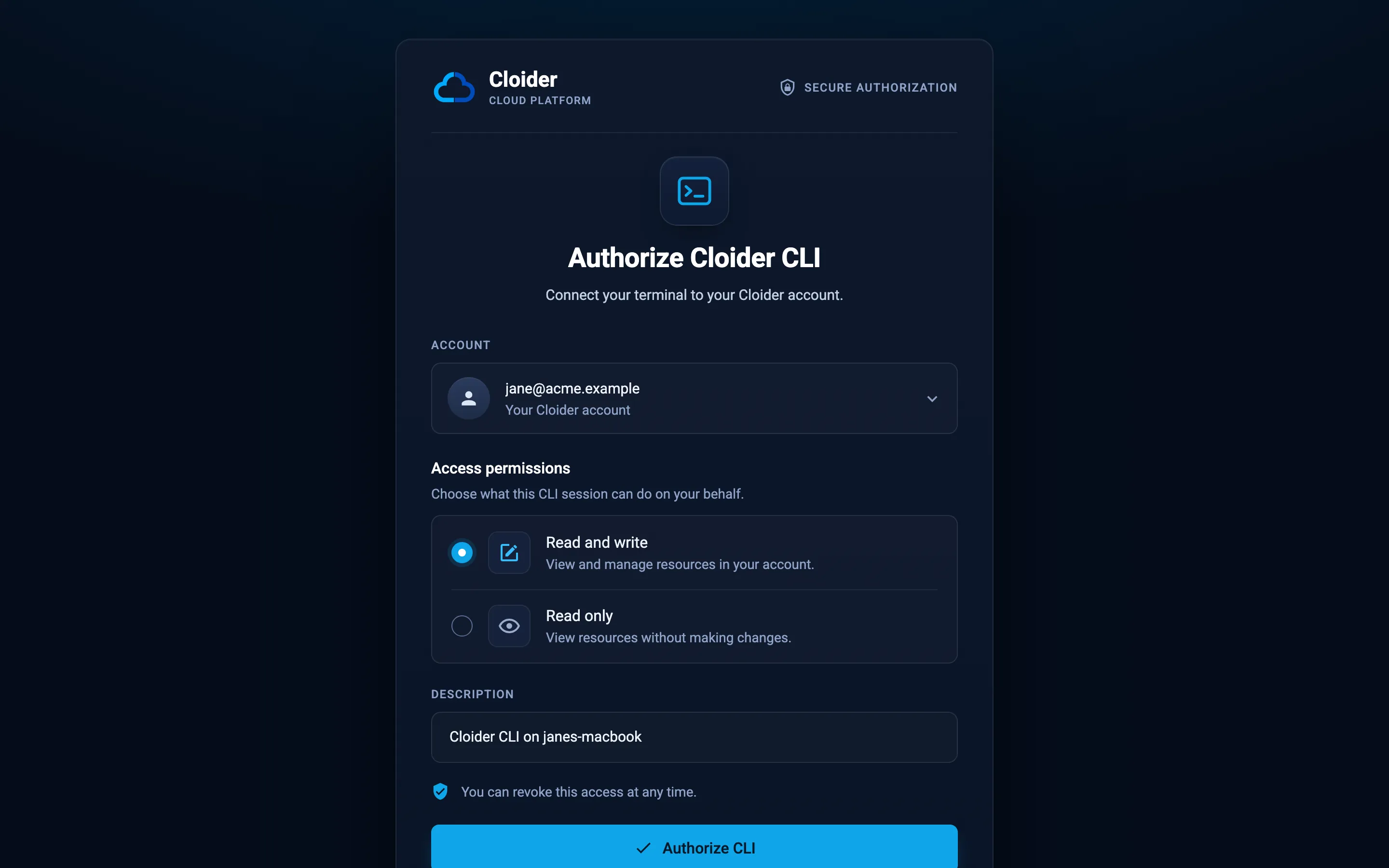
- The CLI opens your browser on the Authorize Cloider CLI page. If you aren't signed in to Cloider, sign in with Google or GitHub first.
- Under Account, pick the account the CLI should work in. If you belong to several accounts, each shows your role in it.
- Under Access permissions, choose Read and write to manage resources, or Read only to only look. Read and write is unavailable for an account where your role is Restricted.
- Keep or change the Description, which is how the token is listed in Access Control. It defaults to
Cloider CLI on <your computer's name>. - Click Authorize CLI. The page says You're all set, and the terminal confirms:
✓ Logged in as jane@example.com in account jane@example.com (Read & Write)
The token is saved in plain text in ~/.cloider/token (other profiles: ~/.cloider/tokens/<profile>). Keep it private.
Log in on a machine without a browser
On a server or over SSH, use --no-browser. The CLI prints a link; open it on any computer, authorize, and paste the token the page shows (Copy your token) back into the terminal:
cloider login --no-browser
Log in with an existing API token
If you already have a token from Access Control, API Tokens (for example in CI), pass it on stdin:
cloider login --with-token < token.txt
In CI you don't need to log in at all: set CLOIDER_TOKEN (or CLOIDER_TOKEN_FILE) and every command uses it.
export CLOIDER_TOKEN=cldr_xxxxxxxxxxxxxxxxxxxxxxxx
cloider cluster list
The CLI takes the token from the first of these that is set: the --token-file flag, CLOIDER_TOKEN, CLOIDER_TOKEN_FILE, then the saved login. See CLI authentication.
Check who you are logged in as
cloider whoami
User:        jane@example.com
Account:     jane@example.com
Role:        Owner
Access:      Read & Write
Token:       Cloider CLI on janes-macbook
Profile:     default
API:         https://cloider.com/api
Token from:  /Users/jane/.cloider/token
Account is the account the token works in, and Access is Read for a read only token or a Restricted member.
Work with several accounts
A token belongs to one account. To use the CLI with several accounts, log in once per account under a profile name and switch between them:
cloider login --profile acme
cloider profile use acme
cloider --profile personal cluster list
See Auth and profiles commands.
Log out
cloider logout
cloider logout revokes the token on Cloider and forgets it locally. Tokens can also be deleted in the dashboard under Access Control, API Tokens.
Troubleshooting
| Message | Fix |
|---|---|
cloider: command not found | The install directory isn't on your PATH. Add the line the install script printed, for example export PATH="$HOME/.local/bin:$PATH", to your shell profile. |
Invalid or revoked API token! (exit code 3) | The token was deleted or its member was removed. Run cloider login again. |
This API token is read only! (exit code 5) | You logged in with Read only. Run cloider login again and choose Read and write. |
CLOIDER_TOKEN or CLOIDER_TOKEN_FILE is set, and takes precedence over this login. | Unset the variable, or use it on purpose. |
| This link is incomplete in the browser | Run cloider login again; the link must come from the CLI. |
Next steps
- CLI overview and the command reference.
- Shell completion for bash, zsh, fish and PowerShell.
- Deploy your first app with
cloider deploy. - Set up the MCP server so an AI agent can use the CLI.
Frequently asked questions
How do I install the Cloider CLI?
On macOS or Linux, run curl -fsSL https://cloider.com/install.sh | sh. On Windows, run irm https://cloider.com/install.ps1 | iex in PowerShell.
How does cloider login work?
It opens the Authorize Cloider CLI page in your browser, where you pick the account and Read and write or Read only. Clicking Authorize CLI creates an API token for that account and hands it to the CLI, which saves it in ~/.cloider/token.
How do I use the CLI in CI?
Create an API token in Access Control, API Tokens, store it as a secret in your CI system and expose it as the CLOIDER_TOKEN environment variable. No login step is needed.
Where does the CLI store my token?
In plain text in ~/.cloider/token for the default profile and ~/.cloider/tokens/<profile> for other profiles. CLOIDER_CONFIG_DIR moves the whole directory.
Does the CLI update itself?
Yes. It checks for a new version once a day and installs it before running your command. cloider update disable turns that off, and CLOIDER_AUTO_UPDATE=0 overrides it for one environment.