Choose a tool, dashboard, CLI, Terraform, API or MCP
You can manage Cloider from five tools: the dashboard in your browser, the cloider CLI, the Terraform provider, the REST API and the MCP server for AI agents. They all act on the same account and the same resources, so you can mix them freely: create a cluster in the dashboard, script it with the CLI and keep its database in Terraform.
At a glance
| Dashboard | CLI | Terraform | REST API | MCP | |
|---|---|---|---|---|---|
| Best for | Exploring, one-off tasks, billing, team management | Terminals, scripts, CI pipelines, deploying apps | Infrastructure as code, repeatable environments | Custom integrations in any language | Asking an AI agent to do the work |
| Signs in with | Google or GitHub | An API token (cloider login creates one) | An API token | An API token as a bearer token | The CLI's API token |
| Install | Nothing, open cloider.com/dashboard | curl -fsSL https://cloider.com/install.sh | sh | source = "cloider/cloider" in required_providers | Nothing, any HTTP client | The CLI, then add cloider mcp to your agent |
| Apps | Yes | Yes | No | Yes | Yes |
| Clusters, databases, buckets, registry, domains, DNS, targets | Yes | Yes | Yes | Yes | Yes |
| Support requests | Yes | Yes | No | Yes | Yes |
| Usage and billing | Yes | Yes (read) | No | Yes (read) | Yes (read) |
| Members and API tokens | Yes | List only | No | List only | List only |
| Run commands in apps, clusters, databases | Yes (browser terminal) | Yes (shell, exec) | No | exec endpoints | exec tools |
| Docs | Dashboard tour | CLI | Terraform | REST API | MCP |
Inviting members, changing roles and creating or deleting API tokens only work in a signed in dashboard session. The API refuses them for an API token with This endpoint can't be used with an API token!, so a leaked token can never give out more access. The CLI, the API and the MCP server can list members and tokens.
The same task in every tool
Here is one small task, creating a Kubernetes cluster called staging and checking that it is ready, done in each tool. The tabs on every page of these docs follow the same order, and your choice is remembered.
- Dashboard
- CLI
- Terraform
- API
- MCP
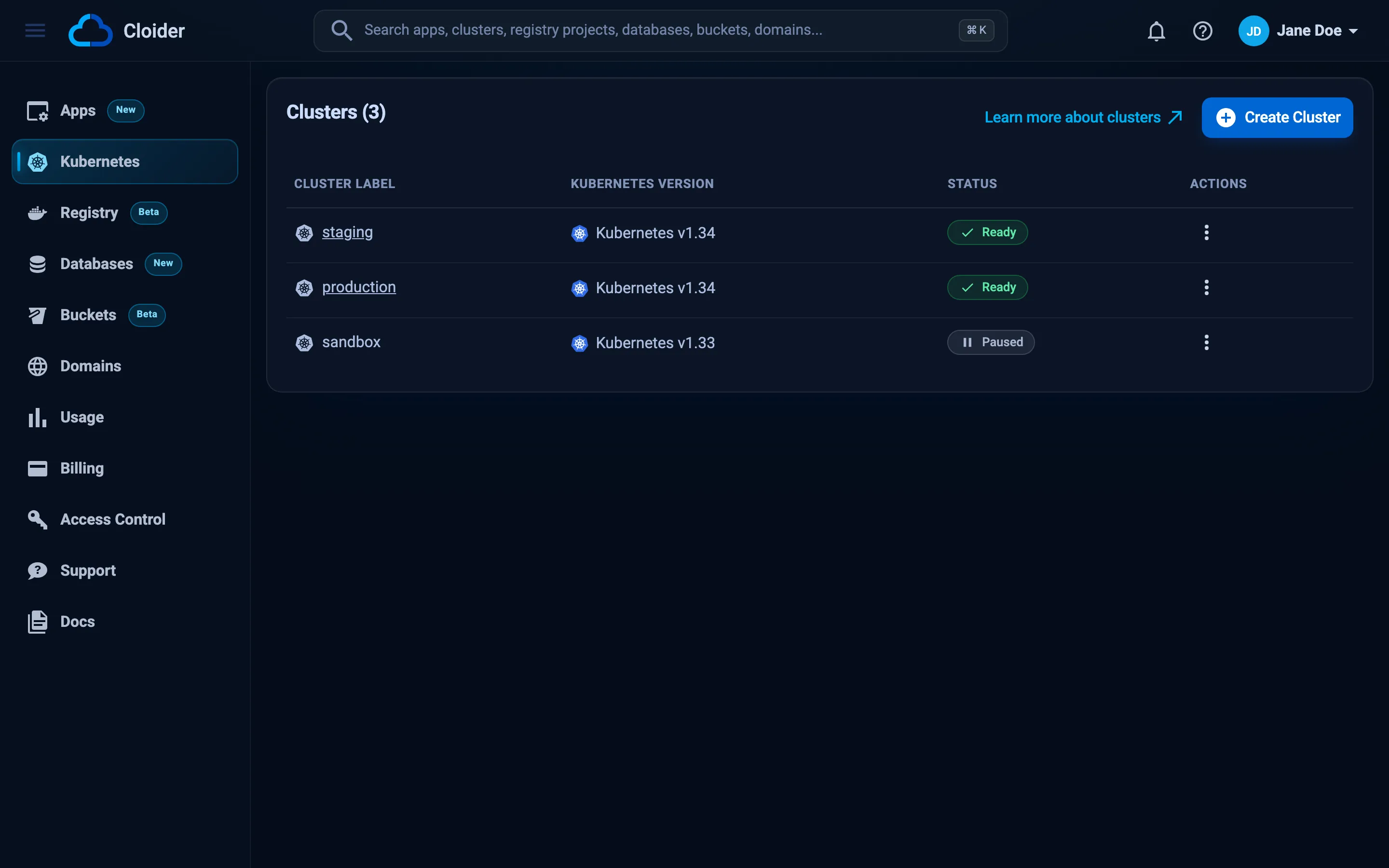
- Open Kubernetes in the sidebar and click Create Cluster.
- Type
stagingin Cluster Name and click Create cluster. - Watch the status in the list change from Creating to Starting to Ready.
cloider cluster create staging --wait
cloider cluster list
✓ Creating cluster staging (Kubernetes 1.34)
✓ Cluster staging is ready. Get its kubeconfig with `cloider cluster kubeconfig staging --merge`.
NAME      VERSION  STATUS  CREATED
staging   1.34     Ready   2026-10-20 09:12
Add -o json to any command for machine readable output.
terraform {
  required_providers {
    cloider = {
      source = "cloider/cloider"
    }
  }
}

provider "cloider" {}

resource "cloider_cluster" "staging" {
  name = "staging"
}

output "staging_status" {
  value = cloider_cluster.staging.status
}
export CLOIDER_TOKEN=cldr_xxxxxxxxxxxxxxxxxxxxxxxx
terraform init
terraform apply
terraform apply returns once the cluster is Ready.
curl -X POST https://cloider.com/api/clusters \
  -H "Authorization: Bearer $CLOIDER_TOKEN" \
  -H "Content-Type: application/json" \
  -d '{"cluster_name": "staging", "cluster_version": "1.34"}'
{"hashed_id": "q7m2x"}
curl -H "Authorization: Bearer $CLOIDER_TOKEN" https://cloider.com/api/clusters/q7m2x/status
Ready
Ask your agent:
Create a Kubernetes cluster called staging and wait until it is ready.
It calls the create_cluster tool:
{"name": "staging", "wait": true}
The dashboard
The dashboard is the web interface at cloider.com/dashboard. You sign in with Google or GitHub, and nothing needs to be installed.
Use it when you are exploring Cloider, doing something once, looking at charts (usage, insights), reading invoices, managing members and API tokens, or using the browser terminal.
It can't be scripted. For repeatable work, use one of the other tools.
Start with the Dashboard tour.
The CLI
The cloider CLI is a single binary for macOS, Linux and Windows that does from a terminal what the dashboard does. It authenticates with an API token, which cloider login creates for you through the browser.
curl -fsSL https://cloider.com/install.sh | sh
cloider login
cloider deploy
Use it when you deploy apps from your computer (cloider deploy), work in a terminal, write shell scripts, or run Cloider commands in CI. It has -o json, -o yaml and -q output for scripts, --wait to block until a change is done, and documented exit codes.
It can't invite members or create API tokens (it can list them), because the API keeps those to the dashboard.
Read Install the CLI, then the CLI overview.
Terraform
The cloider/cloider provider for Terraform and OpenTofu manages Cloider resources as code: Kubernetes clusters, databases, buckets and their access keys, registry projects and their tokens, domains, DNS records and targets.
Use it when you want your infrastructure reviewed in pull requests, reproduced across environments (staging and production) and wired to other providers, such as the kubernetes and helm providers pointed at a Cloider cluster.
It can't manage apps, support requests, members or API tokens. Deploy apps with the CLI or the dashboard.
A Read token is enough for terraform plan, while terraform apply needs a Read & Write token. Read Terraform get started.
The REST API
Everything the dashboard and the CLI do goes through the same REST API at https://cloider.com/api. You call it with an API token in the Authorization: Bearer header. Requests and responses are JSON, and errors come back as:
{"errors": {"cluster_name": ["Cluster name can not be upper case"]}, "data": null}
Use it when you build your own integration in a language without a Cloider SDK, or need something the CLI doesn't expose.
Mind the rate limit: 10 requests a second and 100 a minute per client. The CLI retries for you; your own code should back off on HTTP 429. Read the REST API overview and Rate limits.
MCP and AI agents
The MCP server lets an AI agent (Claude Code, Claude Desktop, Cursor, VS Code, Windsurf and others) manage Cloider by calling tools. It is part of the CLI: cloider mcp serves one tool per CLI command, using the token the CLI is logged in with.
cloider login
claude mcp add cloider -- cloider mcp
Use it when you want to describe what you need in plain language ("deploy this folder", "why is my build failing?", "what did I spend this month?") and let the agent run the commands.
Keep it safe: cloider mcp --read-only only offers tools that change nothing, and every tool says whether it reads, writes or deletes, so your client can ask before a delete. Read the MCP overview and Safety and permissions.
API tokens for the CLI, Terraform, API and MCP
Every tool except the dashboard authenticates with an API token, a secret starting with cldr_. A token belongs to one account and has one of two access levels:
| Access | Can do |
|---|---|
| Read | Only reads (GET requests). Writes fail with This API token is read only! |
| Read & Write | Everything the member who created it can do, except managing members and tokens and connecting a Git provider, which need the dashboard |
cloider login creates a token for you. For CI, Terraform and the API, create one in the dashboard under Access Control, API Tokens. Read API tokens.
Next steps
- Install the CLI.
- Deploy your first app.
- Manage Cloider with an AI agent.
- Infrastructure as code with Terraform.
Frequently asked questions
Should I use the Cloider CLI or Terraform?
Use Terraform for infrastructure you want to keep as code and recreate the same way, such as clusters, databases, buckets and DNS. Use the CLI for deploying apps, one-off tasks, shell scripts and CI steps. Many teams use both.
Can Terraform deploy Cloider apps?
No. The Terraform provider manages clusters, databases, buckets, bucket keys, registry projects and tokens, domains, DNS records and targets. Deploy apps with cloider deploy or the dashboard.
Can I invite team members with the CLI or the API?
No. Members and API tokens are managed in the dashboard only, so that a leaked token cannot be used to give out more access. The CLI and API can list them.
Do the CLI, Terraform and the API see the same resources?
Yes. All tools act on the same account through the same API, so a cluster created in the dashboard shows up in cloider cluster list and can be imported into Terraform.
Which tool should a beginner start with?
Start with the dashboard to see what Cloider offers, then install the CLI when you want to deploy from your computer or automate something.