Log in to the Cloider CLI with a browser or API token
The cloider CLI talks to the Cloider API with an API token, a secret that starts with cldr_ and belongs to one Cloider account. cloider login gets a token for you through the browser and saves it. In CI and scripts you skip the login and hand the CLI a token through CLOIDER_TOKEN, CLOIDER_TOKEN_FILE or --token-file. This page explains every way to log in, which token wins when several are set, where tokens are stored, and how to work with several accounts.
At a glance
| You want to | Use |
|---|---|
| Log in on your own computer | cloider login (opens the browser) |
| Log in over SSH or on a server without a browser | cloider login --no-browser |
| Log in with a token you already have | cloider login --with-token < token.txt |
| Use a token kept in a file of your own | cloider login --token-file ~/secrets/cloider or --token-file on any command |
| Authenticate in CI | CLOIDER_TOKEN or CLOIDER_TOKEN_FILE, no login needed |
| Work in several accounts | One profile per account: cloider login --profile acme |
| See who the CLI acts as | cloider whoami |
| Log out and revoke the token | cloider logout (--all for every profile) |
What is an API token?
An API token is a long random secret that lets a program act in your Cloider account without your password. Each token:
- belongs to one account. If you are a member of several accounts, you need one token per account.
- is either Read & Write or Read only. A read only token can list and show resources but gets
This API token is read only!when it tries to change anything. A token created by a member with the Restricted role is always read only. - acts with the role of the member who created it. See Accounts and roles.
- is listed in the dashboard under Access Control, API Tokens, where it can be revoked at any time. An account can have at most 50 tokens.
A token can't add members, change roles or create other tokens. Those actions need a browser session in the dashboard, so a leaked token can't hand out more access. See API tokens.
Log in through the browser
cloider login is the normal way to log in on your own computer. It opens the dashboard, where you pick the account and the access level, and the dashboard creates a token for the CLI.
cloider login
Opening the browser to log in. If it doesn't open, visit:
  https://cloider.com/cli/login?host=janes-macbook&port=53817&state=4qX0...
⠋ Waiting for the browser…
In the browser:
- If you aren't signed in to Cloider, the page says Sign in to continue. Click Continue with Google or Continue with GitHub. You come back to the same page afterwards.
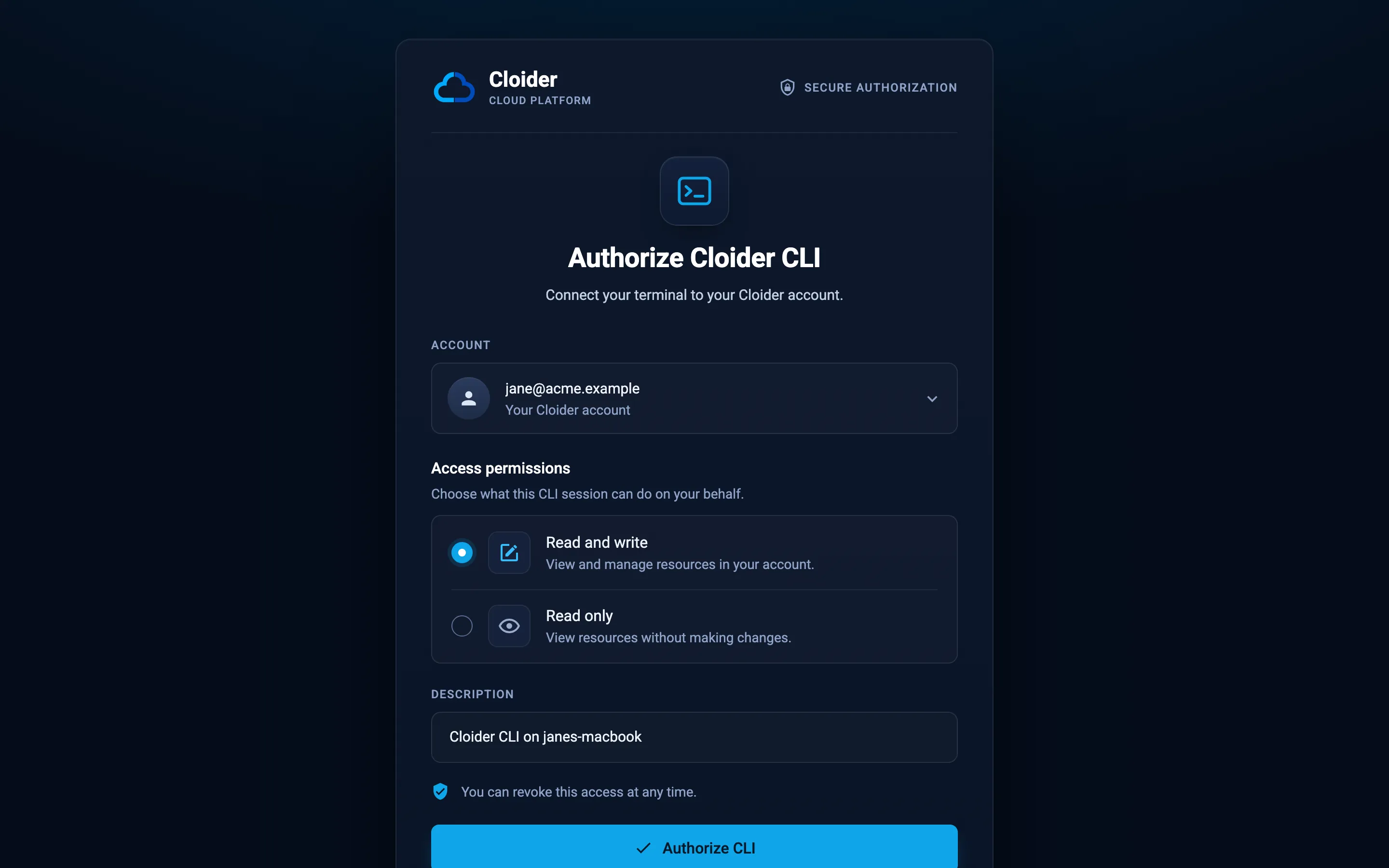
- The page Authorize Cloider CLI opens. Under Account, pick the account the CLI should work in. Your own account is listed as Your Cloider account; accounts shared with you show Shared with you and your role in them.
- Under Access permissions, choose Read and write to view and manage resources, or Read only to view resources without making changes. Read and write is unavailable for an account where your role is Restricted.
- Keep or edit the Description. It defaults to
Cloider CLI on <your computer's name>(up to 100 characters) and is how the token is listed under Access Control, API Tokens. - Click Authorize CLI. The page changes to You're all set, and you can close the tab.
The terminal confirms the login with the user, the account and the access level:
✓ Logged in as jane@example.com in account billing@acme.example (Read & Write)
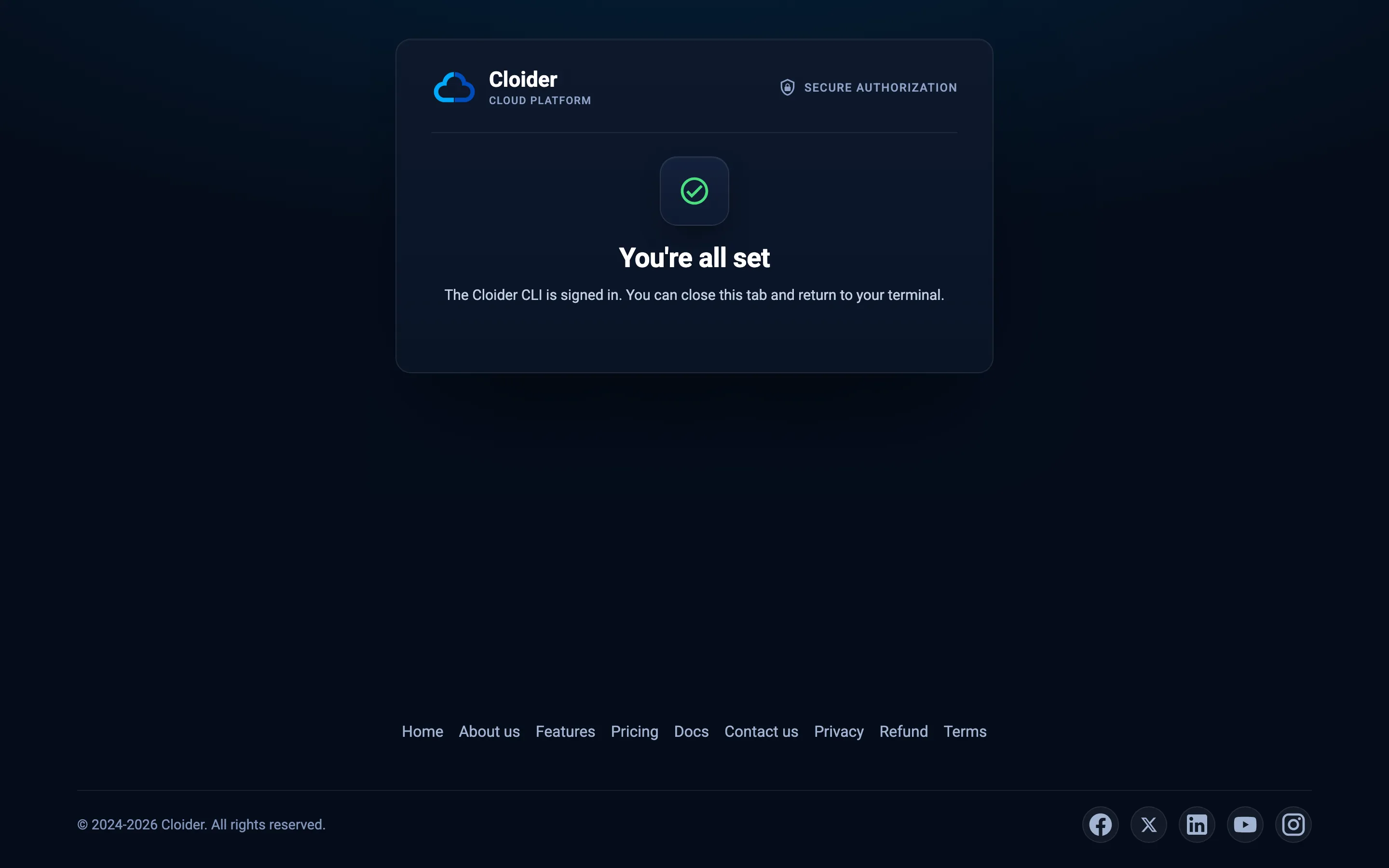
If you click Cancel instead, the page shows Authorization cancelled and the command fails with login was cancelled in the browser. If nothing happens in the browser for 5 minutes, the command gives up with no answer from the browser after 5m0s.
How does the browser login work?
The browser login never shows the token on screen and never sends it anywhere but your own machine:
- The CLI starts a small web server on
127.0.0.1on a random port, and makes up a random one-timestatevalue. - It opens
https://cloider.com/cli/loginwith the port, the state and your computer's short host name. - When you click Authorize CLI, the dashboard creates the API token in the account you picked and redirects your browser to
http://127.0.0.1:<port>/callbackwith the token and the state. - The CLI accepts the token only if the state matches the one it made up, then sends the browser back to the You're all set page so the token doesn't stay in the address bar.
- The CLI checks the token by calling
GET /api/whoami, saves it, and stops the local server.
Ask for a read only token
--read-only preselects Read only on the page:
cloider login --read-only
Use it on shared machines, for monitoring scripts, or when you give an AI agent access through cloider mcp and want it to look but not touch.
Log in without a browser on the machine (--no-browser)
On a server, in a container or over SSH, the machine running the CLI often has no browser. --no-browser prints a link you can open on any other device, and you paste the token back:
cloider login --no-browser
Open this link in a browser, authorize the CLI, and paste the token it shows:
  https://cloider.com/cli/login?host=build-01

Token:
- Open the link on your laptop or phone and sign in if asked.
- Pick the account and access level and click Authorize CLI.
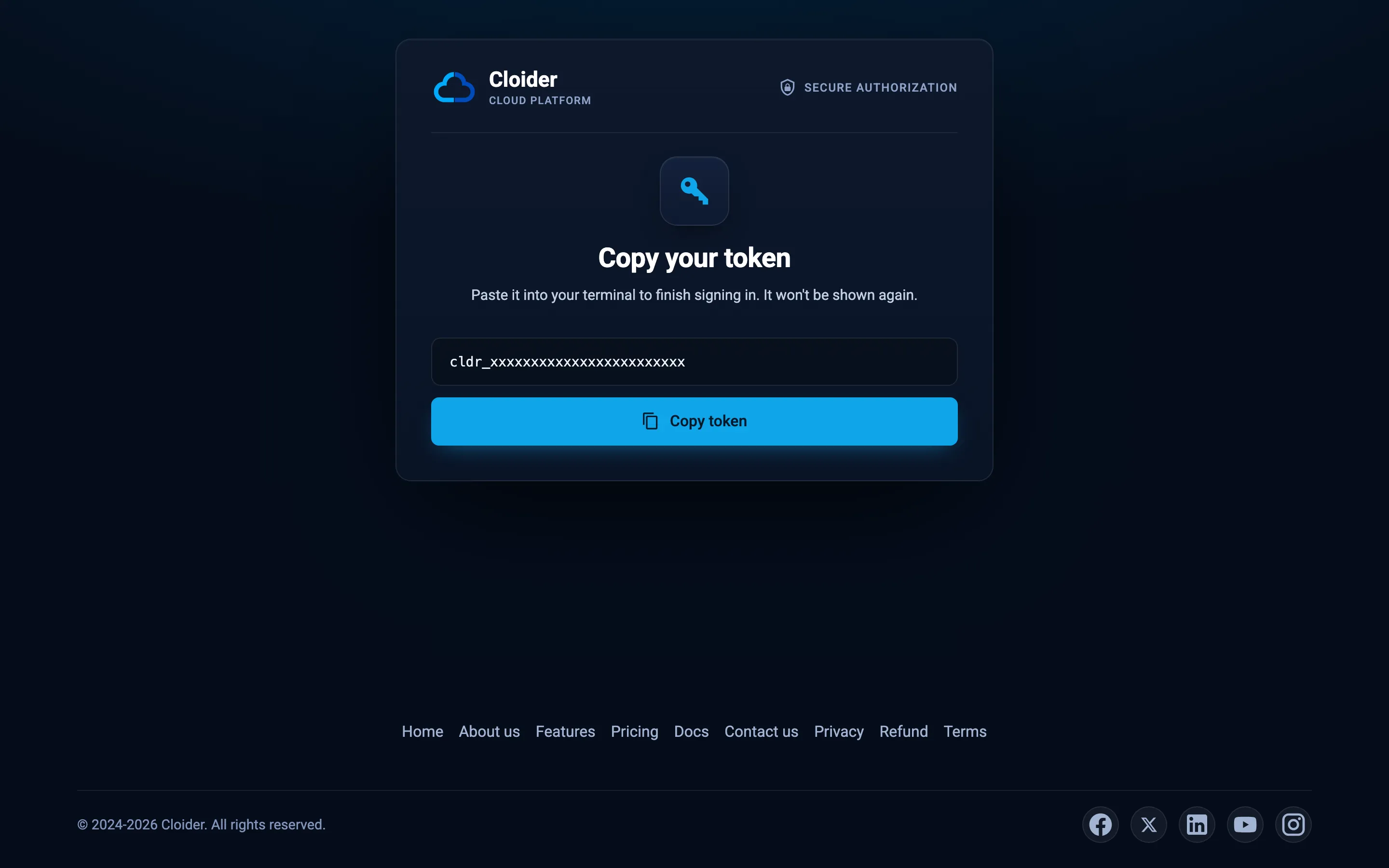
- The page shows Copy your token with the token and a Copy token button. It is shown only once.
- Paste it at the
Token:prompt. The input is hidden, like a password.
--no-browser needs an interactive terminal for the prompt. In a script use --with-token or CLOIDER_TOKEN instead.
Log in with an existing token (--with-token)
If you already have a token, for example one created under Access Control, API Tokens, --with-token reads it from standard input:
cloider login --with-token < token.txt
# From a password manager
op read "op://Private/Cloider/token" | cloider login --with-token

# From an environment variable, without it landing in your shell history
printenv CLOIDER_NEW_TOKEN | cloider login --with-token
When you run cloider login --with-token in a terminal without piping anything in, it asks Paste your API token: and hides what you type.
The CLI checks the token with the API before saving it. A token that is wrong or revoked fails with that token is not valid, or was revoked and exit code 3. The token is then copied into the profile's token file in ~/.cloider. --with-token and --no-browser can't be combined.
Use a token from a file (--token-file)
--token-file is a global flag that works in two ways:
On any command, it uses the token in that file for this one command, without saving anything:
cloider --token-file ~/secrets/cloider-acme cluster list
With cloider login, it points the profile at that file, where it is. The CLI doesn't copy the token: every later command reads the file again, so you can rotate the token by replacing the file.
cloider login --token-file ~/secrets/cloider-acme
✓ Logged in as jane@example.com in account billing@acme.example (Read & Write)
The file must contain only the token (surrounding whitespace and a trailing newline are fine). A path starting with ~/ is expanded to your home directory. On macOS and Linux, if anyone but you can read the file, the CLI warns like ssh does:
! /home/jane/secrets/cloider-acme is readable by others (mode 644), run: chmod 600 /home/jane/secrets/cloider-acme
A token file you pointed a profile at is yours: cloider logout revokes the token but leaves the file in place.
Use a token from the environment (CLOIDER_TOKEN, CLOIDER_TOKEN_FILE)
You don't have to log in at all. When one of these environment variables is set, every command uses it:
| Variable | Contains | Typical use |
|---|---|---|
CLOIDER_TOKEN | The token itself | CI secrets exposed as variables, one-off scripts |
CLOIDER_TOKEN_FILE | The path of a file that contains the token | Docker and Kubernetes secrets mounted as files, CI systems with file variables |
export CLOIDER_TOKEN=cldr_xxxxxxxxxxxxxxxxxxxxxxxx
cloider whoami
export CLOIDER_TOKEN_FILE=/run/secrets/cloider
cloider app list
An environment token takes precedence over the token you logged in with. cloider login warns about this when it finishes:
! CLOIDER_TOKEN or CLOIDER_TOKEN_FILE is set, and takes precedence over this login.
Which token does the CLI use?
When several token sources are set, the CLI uses the first one in this order and ignores the rest:
| Order | Source | Shown by cloider whoami as |
|---|---|---|
| 1 | --token-file <path> flag | --token-file <path> |
| 2 | CLOIDER_TOKEN environment variable | CLOIDER_TOKEN |
| 3 | CLOIDER_TOKEN_FILE environment variable | CLOIDER_TOKEN_FILE <path> |
| 4 | The current profile's token file, written by cloider login | profile <name> (<path>) |
The profile is chosen separately, in this order: the --profile flag, the CLOIDER_PROFILE environment variable, the profile picked with cloider profile use, and finally the profile named default. A token from 1, 2 or 3 still uses the chosen profile's API URL.
If none of the four gives a token, commands that need one fail with exit code 3:
Error: not logged in, run `cloider login` or set CLOIDER_TOKEN
A file named with --token-file or CLOIDER_TOKEN_FILE must exist; a missing or empty file is an error (can't read the token from ...). The profile's own token file missing just means you aren't logged in.
Where are tokens stored?
cloider login writes the token in plain text into the CLI's configuration directory, ~/.cloider (or the directory in CLOIDER_CONFIG_DIR):
| Profile | Token file |
|---|---|
default | ~/.cloider/token |
Any other profile, for example acme | ~/.cloider/tokens/acme |
A profile set up with --token-file | The file you named, recorded in ~/.cloider/config.json |
The CLI creates these files with mode 0600 (only you can read them) and the directories with mode 0700, and it writes them atomically so a crash never leaves half a token behind. Because they are plain text files, you can also put a token there by hand:
mkdir -p ~/.cloider && chmod 700 ~/.cloider
printf '%s\n' "cldr_xxxxxxxxxxxxxxxxxxxxxxxx" > ~/.cloider/token
chmod 600 ~/.cloider/token
On Windows the directory is %USERPROFILE%\.cloider. The full layout is in Configuration.
Anyone who has the token can act in your account with its access level. Don't commit it to git, don't paste it into issues, and revoke it under Access Control, API Tokens if it leaks.
What happens when you log in again?
Logging in again for the same profile replaces its token. If the profile had a token the CLI wrote itself and the new one is different, the CLI first revokes the old one on Cloider, so unused tokens don't pile up against the account's limit of 50:
Revoked the token this profile used before.
✓ Logged in as jane@example.com in account billing@acme.example (Read & Write)
The first profile you log in with becomes the current profile.
Check who you are logged in as (whoami)
cloider whoami calls the API and shows who the CLI acts as, in which account, and where its token came from:
cloider whoami
User:        jane@example.com
Account:     billing@acme.example
Role:        Admin
Access:      Read & Write
Token:       Cloider CLI on janes-macbook
Profile:     default
API:         https://cloider.com/api
Token from:  profile default (/Users/jane/.cloider/token)
| Field | Meaning |
|---|---|
| User | The person who created the token |
| Account | The account the token works in, named by its owner's email |
| Role | Your role in that account: Owner, Admin or Restricted |
| Access | Read & Write, or Read for a read only token or a Restricted member |
| Token | The token's description |
| Profile, API, Token from | Which profile, API URL and token source this command used |
In scripts, use JSON:
cloider whoami -o json | jq -r '.account.email'
billing@acme.example
Work with several accounts using profiles
A profile is a named pair of an API URL and a token. Because a token belongs to one account, you create one profile per account you work in. The profile called default exists without being created.
Log in once per account, giving each login a profile name (letters, digits, ., _ or -, up to 64 characters):
cloider login                    # the default profile, for example your own account
cloider login --profile acme     # pick the Acme Inc account in the browser
✓ Logged in as jane@example.com in account billing@acme.example (Read & Write)
Saved as profile "acme". Switch to it with `cloider profile use acme`.
Then choose the profile per command, per shell, or for good:
# One command
cloider --profile acme cluster list

# Every command in this shell
export CLOIDER_PROFILE=acme

# From now on
cloider profile use acme
List your profiles. The current one is marked with *:
cloider profile list
NAME      CURRENT   ACCOUNT                API                       TOKEN
acme      *         billing@acme.example   https://cloider.com/api   /Users/jane/.cloider/tokens/acme
default             jane@example.com       https://cloider.com/api   /Users/jane/.cloider/token
A profile whose token file is missing shows (not logged in) in the TOKEN column. Every profile command (list, use, add, remove) is described in Auth and profiles commands.
Point a profile at a token file of your own
cloider profile add creates or changes a profile without logging in through the browser, for example one whose token lives in a secrets file:
cloider profile add ci --token-file /run/secrets/cloider
cloider --profile ci whoami
Log out
cloider logout revokes the current profile's token on Cloider and deletes the token file the CLI wrote:
cloider logout
✓ Logged out of profile default
To log out of every profile at once:
cloider logout --all
✓ Logged out of profile acme
✓ Logged out of profile default
What logout does depends on where the token came from:
| Token source | What cloider logout does |
|---|---|
A token file the CLI wrote (~/.cloider/token, ~/.cloider/tokens/<profile>) | Revokes the token and deletes the file |
A token file you pointed a profile at with --token-file | Revokes the token, leaves the file: Left <path> in place, remove it yourself if it should go. |
--token-file, CLOIDER_TOKEN or CLOIDER_TOKEN_FILE on this command | Revokes that token instead of the profile's, and leaves it in place: Revoked the token from CLOIDER_TOKEN |
cloider logout without any saved token prints Not logged in. and succeeds. cloider profile remove <name> is different: it forgets a profile and deletes the CLI's token file, but doesn't revoke the token on Cloider.
Use the CLI in CI/CD
In CI you never run cloider login. Create a token in the dashboard, store it as a secret in your CI system, and expose it as CLOIDER_TOKEN.
- In the dashboard, open Access Control, API Tokens and create a token with a description like
GitHub Actions deploy. Choose read only access if the pipeline only reads. See API tokens. - Store the token as a secret in your CI system.
- Expose it as
CLOIDER_TOKENin the job that runscloider.
- GitHub Actions
- GitLab CI
- Mounted secret file
name: Deploy
on:
  push:
    branches: [main]

jobs:
  deploy:
    runs-on: ubuntu-latest
    env:
      CLOIDER_TOKEN: ${{ secrets.CLOIDER_TOKEN }}
    steps:
      - uses: actions/checkout@v4
      - name: Install the Cloider CLI
        run: |
          curl -fsSL https://cloider.com/install.sh | CLOIDER_INSTALL_DIR="$HOME/.local/bin" sh
          echo "$HOME/.local/bin" >> "$GITHUB_PATH"
      - run: cloider whoami
      - run: cloider deploy --app blog
Add CLOIDER_TOKEN under Settings, CI/CD, Variables in your GitLab project, with Masked turned on.
deploy:
  image: debian:bookworm-slim
  stage: deploy
  rules:
    - if: $CI_COMMIT_BRANCH == "main"
  before_script:
    - apt-get update && apt-get install -y --no-install-recommends curl ca-certificates
    - curl -fsSL https://cloider.com/install.sh | CLOIDER_INSTALL_DIR=/usr/local/bin sh
  script:
    - cloider whoami
    - cloider deploy --app blog
If your CI or orchestrator mounts secrets as files (Docker secrets, Kubernetes secrets, GitLab file variables), use CLOIDER_TOKEN_FILE:
export CLOIDER_TOKEN_FILE=/run/secrets/cloider
cloider app list
Commands never prompt when there is no terminal, so pass --yes to commands that would ask for confirmation, such as deletes. More CI patterns, exit codes and JSON output are in Output and scripting.
Troubleshooting
| Message | Exit code | Cause and fix |
|---|---|---|
not logged in, run `cloider login` or set CLOIDER_TOKEN | 3 | No token was found. Log in, or set CLOIDER_TOKEN. Check the profile with cloider profile list. |
Invalid or revoked API token! followed by Run `cloider login` to log in again. | 3 | The token was revoked in the dashboard, or the member who created it was removed. Log in again. |
This API token is read only! followed by This token can only read. Run `cloider login` and pick Read & Write to make changes. | 5 | The token is read only, or your role in the account is Restricted. Log in again with Read and write, or ask an owner or admin to change your role. |
This endpoint can't be used with an API token! | 5 | The action is only allowed in the dashboard, for example managing members and tokens. |
not running in a terminal: use `cloider login --with-token`, or set CLOIDER_TOKEN | 2 | cloider login without flags needs a terminal to open the browser and wait. In scripts, use --with-token or CLOIDER_TOKEN. |
that token is not valid, or was revoked | 3 | The token you passed to cloider login doesn't work. Check for copy and paste mistakes. |
login was cancelled in the browser | 1 | You clicked Cancel on the authorize page. Run cloider login again. |
no answer from the browser after 5m0s | 1 | The browser didn't complete the login within 5 minutes. If the browser can't reach 127.0.0.1 on the machine running the CLI (for example over SSH), use --no-browser. |
CLOIDER_TOKEN or CLOIDER_TOKEN_FILE is set, and takes precedence over this login. | 0 | A warning, not an error. Unset the variable to use the login. |
| This link is incomplete in the browser | The link was cut off or not opened from the CLI. Run cloider login again. | |
invalid profile name "..." | 2 | Profile names may contain only letters, digits, ., _ and -. |
Next steps
- Configuration: every global flag, environment variable and file.
- Output and scripting: JSON output, exit codes and CI.
- Auth and profiles commands: the full reference for
login,logoutandprofile. - API tokens: create and revoke tokens in the dashboard.
Frequently asked questions
How do I log in to the Cloider CLI?
Run cloider login. It opens the Authorize Cloider CLI page in your browser, where you pick the account and Read and write or Read only and click Authorize CLI. The dashboard creates an API token and hands it to the CLI, which saves it in ~/.cloider/token.
How do I log in on a server without a browser?
Run cloider login --no-browser. Open the printed link on another device, authorize the CLI, copy the token the page shows and paste it at the Token: prompt.
How do I authenticate the CLI in CI?
Create an API token under Access Control, API Tokens, store it as a CI secret and expose it as the CLOIDER_TOKEN environment variable. No cloider login is needed. CLOIDER_TOKEN_FILE works the same way with a token stored in a file.
Which token wins when several are set?
The --token-file flag, then CLOIDER_TOKEN, then CLOIDER_TOKEN_FILE, then the current profile's token file written by cloider login. The first one that is set is used.
Can I use the CLI with several Cloider accounts?
Yes. A token belongs to one account, so log in once per account with cloider login --profile <name>, then switch with cloider profile use <name>, the --profile flag or the CLOIDER_PROFILE environment variable.
Where does the CLI store my token?
In plain text with mode 0600 in ~/.cloider/token for the default profile and ~/.cloider/tokens/<profile> for other profiles. CLOIDER_CONFIG_DIR moves the whole directory.
Does cloider logout revoke the token?
Yes. It revokes the token on Cloider and deletes the token file the CLI wrote. A token file you supplied yourself is revoked but left in place.
Can the CLI create API tokens or invite members?
No. Members and API tokens are managed in the dashboard only, so a leaked token can't grant more access. cloider token list and cloider member list show them.