Create and manage Cloider API tokens
An API token lets a script, a CI pipeline, the cloider CLI, the Terraform provider, the MCP server or your own code call the Cloider API without a browser. A token looks like cldr_ followed by 40 random characters, works in one account, and acts as the member who generated it, with Read or Read & Write access.
At a glance
| Format | cldr_ + 40 characters, for example cldr_xxxxxxxxxxxxxxxxxxxxxxxx |
| Scope | One account, as the member who generated it, never more than that member's current role |
| Access levels | Read (only read requests) or Read & Write |
| Shown | Once, when generated. It can't be displayed again |
| Expiry | None. A token works until it is deleted, or its creator is removed or deactivated |
| Limit | 50 tokens per account; description up to 100 characters |
| Managed in | The dashboard only: Access Control, API Tokens |
| Used as | Authorization: Bearer cldr_..., CLOIDER_TOKEN, CLOIDER_TOKEN_FILE, or cloider login |
Read or Read & Write?
| Access | Can | Can't | Use it for |
|---|---|---|---|
| Read | Every read (GET) request: list and show resources, usage, logs, kubeconfigs, database passwords | Create, change or delete anything, open terminals, run exec. Writes fail with This API token is read only! | Monitoring, dashboards, terraform plan, AI agents that only look |
| Read & Write | Everything its creator's role allows | Manage members and tokens, connect Git providers (dashboard only) | Deploys, CI, terraform apply, the CLI on your computer |
A token never has more access than its creator: a Read & Write token generated by an Admin acts as an Admin, and its access drops at once if the Admin is made Restricted. Restricted members can only generate Read tokens. The Billing endpoint only answers a Read & Write token generated by the Owner. See the permission matrix.
Generate a token
- Dashboard
- CLI
- Terraform
- API
- MCP
- Open Access Control in the sidebar and choose the API Tokens tab.
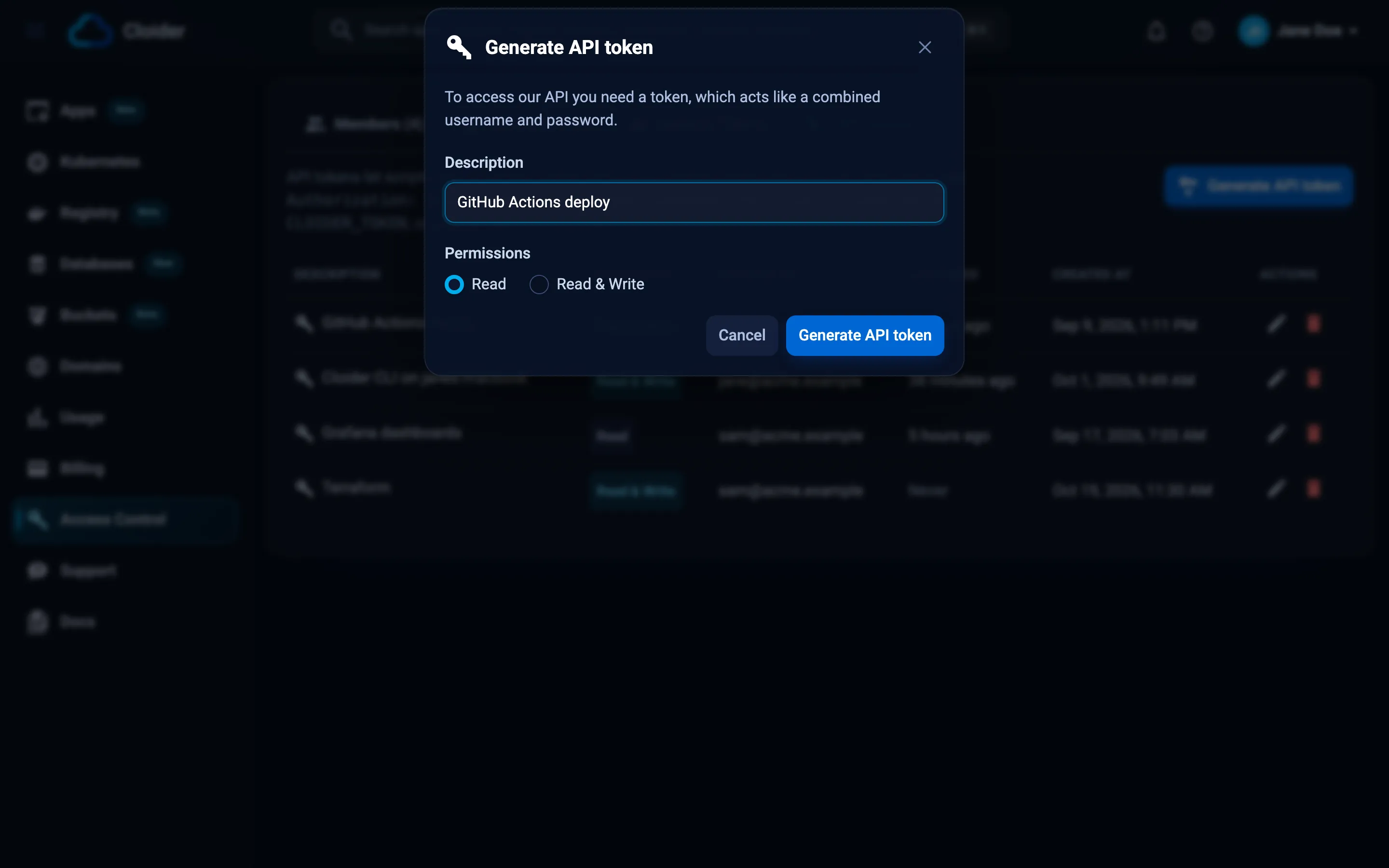
- Click Generate API token.
- Type a Description that says where the token will be used, for example
GitHub Actions deployorterraform. You'll see it in the token list later. - Under Permissions, choose Read (the default) or Read & Write.
- Click Generate API token.
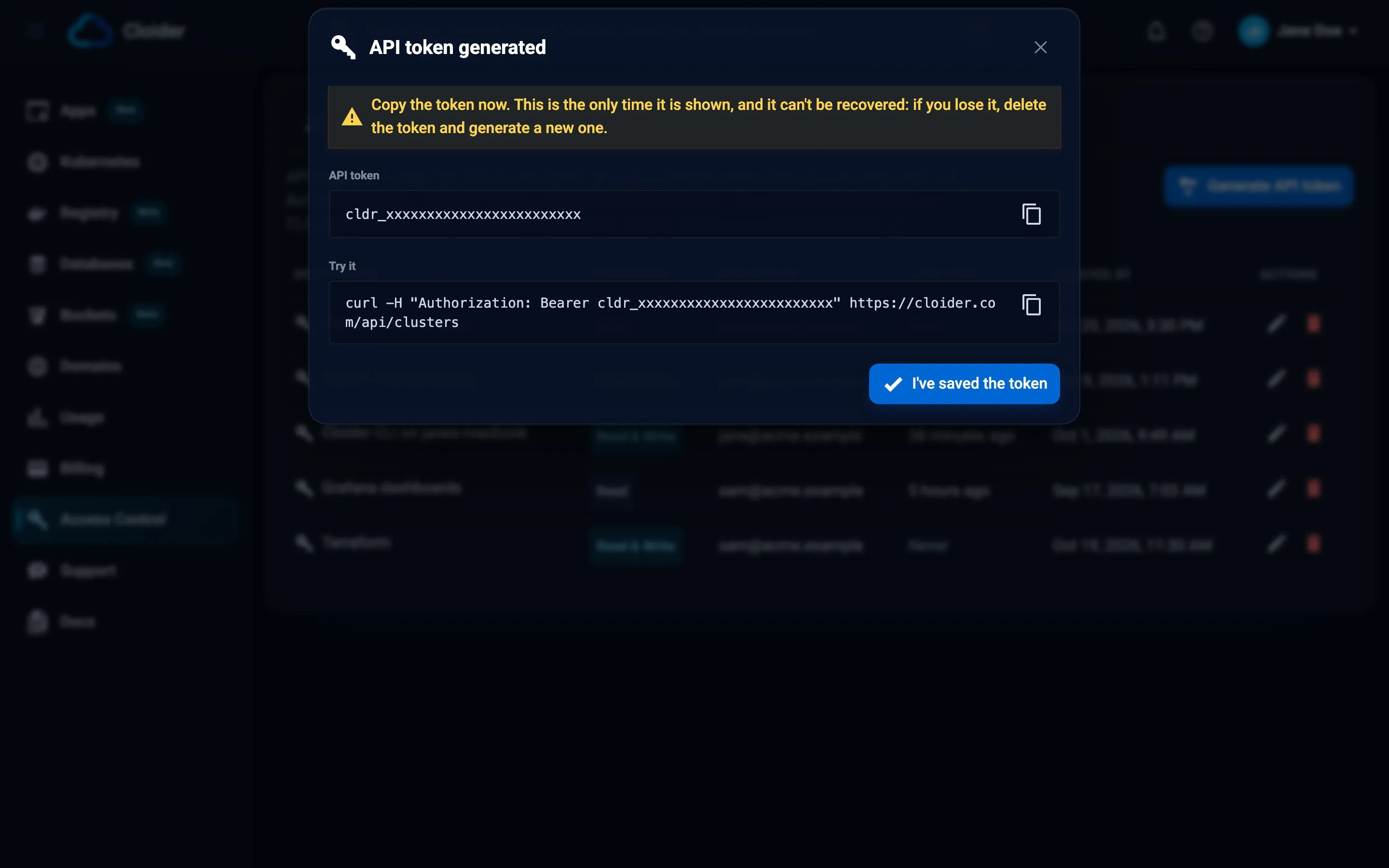
- The API token generated dialog shows the token and a Try it
curlcommand. Copy the token now: This is the only time it is shown, and it can't be recovered. - Click I've saved the token.
cloider login generates a token for the CLI through the browser and saves it, so you don't need to copy one:
cloider login                 # Read and write or Read only, chosen in the browser
cloider login --read-only     # preselects Read only
For a token generated in the dashboard, pass it on stdin:
cloider login --with-token < token.txt
The CLI can't generate other tokens. See Install the CLI.
Terraform can't generate API tokens. Generate one in the dashboard, then give it to the provider, preferably through the environment:
export CLOIDER_TOKEN=cldr_xxxxxxxxxxxxxxxxxxxxxxxx
terraform plan
POST /api/api-tokens only accepts a signed in dashboard session, so a token can't be used to make more tokens. With a token it answers 403 with This endpoint can't be used with an API token!. Generate tokens in the dashboard.
The MCP server can't generate API tokens. It uses the token cloider login saved. Use the Dashboard or CLI tab.
Use a token
Send the token as a bearer token in the Authorization header of every API request:
curl -H "Authorization: Bearer $CLOIDER_TOKEN" https://cloider.com/api/clusters
The CLI and the Terraform provider read it from the environment:
export CLOIDER_TOKEN=cldr_xxxxxxxxxxxxxxxxxxxxxxxx
cloider cluster list
For a token kept in a file, such as a mounted secret, use CLOIDER_TOKEN_FILE=/run/secrets/cloider-token or the CLI's --token-file flag.
In GitHub Actions
Store the token as a repository secret named CLOIDER_TOKEN, then expose it to the steps that need it:
name: Deploy
on:
  push:
    branches: [main]

jobs:
  deploy:
    runs-on: ubuntu-latest
    env:
      CLOIDER_TOKEN: ${{ secrets.CLOIDER_TOKEN }}
    steps:
      - uses: actions/checkout@v4
      - run: curl -fsSL https://cloider.com/install.sh | sh
      # the script installs to ~/.local/bin when /usr/local/bin is not writable
      - run: echo "$HOME/.local/bin" >> "$GITHUB_PATH"
      - run: cloider deploy --app blog
More in CI/CD with GitHub Actions and CI/CD with GitLab.
Check what a token can do
GET /api/whoami tells you who a token acts as, in which account, with which role, and whether it is read only:
curl -H "Authorization: Bearer $CLOIDER_TOKEN" https://cloider.com/api/whoami
{
  "user": {"first_name": "Jane", "last_name": "Doe", "email": "jane@acme.com", "picture": "https://...", "plan": "Paid", "trial_end_date": null, "suspended": false},
  "account": {"first_name": "Acme", "last_name": "Inc", "email": "ops@acme.com", "picture": "https://...", "plan": "Paid", "trial_end_date": null, "suspended": false},
  "role": "Admin",
  "token": {"hashed_id": "t4k9p", "description": "GitHub Actions deploy", "read_only": false, "creator": {"first_name": "Jane", "last_name": "Doe", "email": "jane@acme.com", "picture": "https://..."}, "last_used_at": "2026-10-20T08:01:00Z", "created_at": "2026-09-02T10:20:00Z"}
}
cloider whoami prints the same as a table.
List tokens
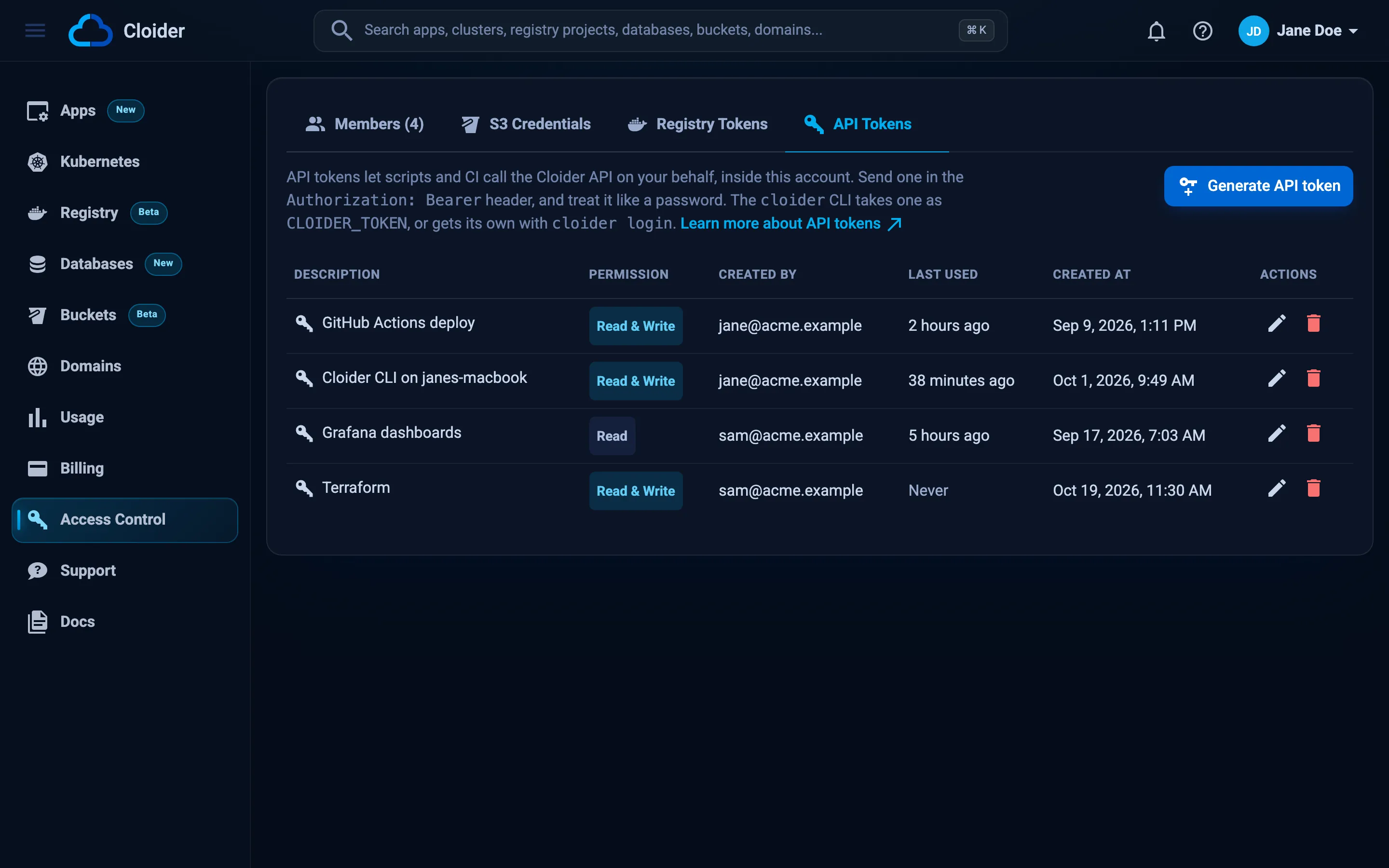
The API Tokens tab lists each token's Description, Permission (Read or Read & Write), Created by (for Owners and Admins), Last used and Created at. Owners and Admins see every token in the account; other members see only their own.
cloider token list
DESCRIPTION                     ACCESS        CREATED BY      LAST USED  CREATED           THIS CLI
Cloider CLI on janes-macbook    Read & Write  jane@acme.com   just now   2026-09-02 10:20  *
GitHub Actions deploy           Read & Write  jane@acme.com   3h ago     2026-09-04 09:12
grafana                         Read          sam@acme.com    never      2026-10-01 14:30
The * marks the token the CLI is using. Last used is updated at most once a minute.
Edit a token
You can change a token's description and its permission without generating a new one:
- In API Tokens, click the pencil icon (Edit) on the token's row.
- Change the Description or the Permissions.
- Click Save changes.
Owners and Admins can edit any token in the account. A token can't be given Read & Write if its creator is Restricted.
Delete (revoke) a token
Deleting a token revokes it: anything still using it loses access right away.
- Dashboard
- CLI
- Terraform
- API
- MCP
- In API Tokens, click the delete icon on the token's row.
- Confirm. The dialog warns that Anything still using it loses access right away.
cloider logout revokes the token the CLI is using and removes it from your computer. Other tokens are deleted in the dashboard.
cloider logout
✓ Logged out of profile default
cloider logout --all logs out of every profile.
Terraform can't delete API tokens. Use the Dashboard tab.
A token can revoke itself, and only itself:
curl -X DELETE -H "Authorization: Bearer $CLOIDER_TOKEN" https://cloider.com/api/api-tokens/current
The answer is 204 No Content. This works even for a Read token. Deleting any other token needs the dashboard.
The MCP server can't delete API tokens. Use the Dashboard tab.
Tokens are also deleted automatically when their creator is removed from the account, and stop working while their creator is deactivated.
If a token leaks
- Delete it in Access Control, API Tokens straight away. It stops working on the next request.
- Generate a new token with a new description and update the places that used the old one.
- Check Usage and your resources for changes you didn't make.
The cldr_ prefix makes leaked tokens easy to find with secret scanning tools.
Troubleshooting
| Message | HTTP status | Cause and fix |
|---|---|---|
Invalid or revoked API token! | 401 | The token was deleted, mistyped, or its creator was removed or deactivated. Check CLOIDER_TOKEN and generate a new token if needed. |
This API token is read only! | 403 | A Read token tried to change something. Use a Read & Write token. |
Terminals need a Read & Write API token! | 403 | Terminals can't be opened with a Read token. |
This endpoint can't be used with an API token! | 403 | Members, tokens, account switching and Git connections are dashboard only. |
An account can have up to 50 API tokens, delete one you no longer use! | 400 | Delete unused tokens first. |
Description is required! or Description can be up to 100 characters | 400 | Give the token a short description. |
Read & Write needs write access to this account, Restricted members can only have Read tokens | 400 | Your role is Restricted. Choose Read. |
More in Troubleshooting and API authentication.
Next steps
Frequently asked questions
How do I create a Cloider API token?
Open Access Control in the dashboard, choose the API Tokens tab, click Generate API token, type a description, choose Read or Read & Write and click Generate API token. Copy the token from the dialog: it is shown only once.
Do Cloider API tokens expire?
No. A token works until it is deleted, or until its creator is removed from the account or deactivated.
I lost my API token. Can I see it again?
No. A token is shown only once, when it is generated, and can't be displayed again. Delete the lost token and generate a new one.
Can an API token create another API token?
No. Tokens are generated, edited and deleted in the dashboard only. The only change a token can make is to revoke itself with DELETE /api/api-tokens/current.
How many API tokens can an account have?
Up to 50. Delete tokens you no longer use to make room.
Which token does Terraform need?
terraform plan works with a Read token. terraform apply needs a Read & Write token.
Can a token work in several accounts?
No. A token belongs to the account it was generated in. Use one token per account, for example with CLI profiles or one Terraform provider block per account.