MCP safety and permissions for AI agents on Cloider
An AI agent connected to the Cloider MCP server can do anything the CLI can do with the same login: create and delete clusters, change who may connect to a database, deploy over a running app. This page explains the four layers that decide what an agent is actually allowed to do, from the strongest to the most convenient, lists which tools are destructive or expose secrets, and gives recommended setups, including for production accounts.
At a glance
| Layer | Where it is set | What it does | Can the agent get around it? |
|---|---|---|---|
| 1. Account and role | Which account the login is in, and your role there | Limits the agent to one account and to what your role allows | No |
| 2. API token access | cloider login --read-only, or a Read token from the dashboard | A Read token makes the API refuse every change | No, enforced by the API |
| 3. Server flags | cloider mcp --read-only, --toolsets | Removes tools from what the agent sees | No, the tools don't exist for it |
| 4. Client approvals | Your MCP client's settings | The client asks you before running tools, guided by the tools' annotations | Only through what you approve |
Use the strongest layer that still lets the agent do its job.
Layer 1: the account and your role
Every tool acts as one API token, and a token belongs to exactly one account. An agent can never see or change resources in another account, and never has more access than the member who created its token:
- An Owner or Admin token can change every resource. Only the Owner's Read & Write token can read bills.
- A Restricted member's token can only read, whatever access was asked for.
- No token can invite members, change roles or create and revoke API tokens. The API refuses those from any token (
This endpoint can't be used with an API token!), so an agent can never give itself or anyone else more access.
For the strongest separation, keep production in its own Cloider account and give agents working on development a login to the development account only. See Switch accounts.
Layer 2: read only API tokens
A token is either Read or Read & Write. With a Read token, the API refuses every change with This API token is read only!, so nothing an agent does, and nothing a prompt injection tells it to do, can create, change or delete a resource.
Log the CLI in with a read only token, in its own profile so your normal login stays untouched:
cloider login --profile agent --read-only
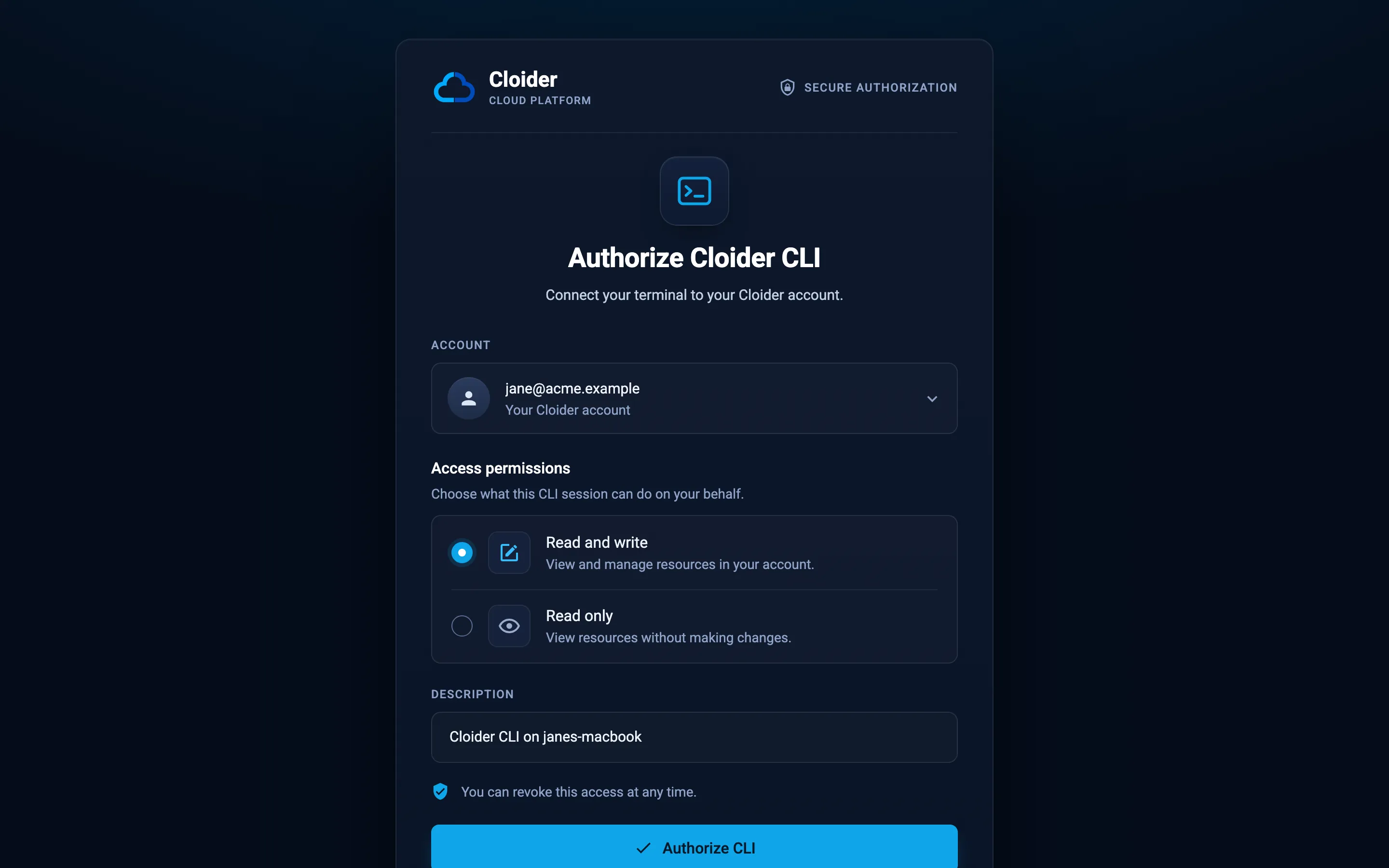
--read-only preselects Read only on the login page. Keep it selected and click Authorize CLI:
Then start the MCP server with that profile:
claude mcp add cloider-readonly -- cloider --profile agent mcp --read-only
What a Read token can still do:
- List and show every resource, usage, logs, builds and insights.
- Read secrets: database passwords (
get_database_password), kubeconfigs (get_cluster_kubeconfig) and secret app variables (get_app_variable). See Tools that return secrets.
What it can't do: create, change or delete anything, run the exec tools, read bills.
Layer 3: server flags
--read-only
cloider mcp --read-only only offers the 51 tools that change nothing: every list_* and get_* tool, whoami, check_domain_availability, and the two download tools. The agent doesn't see the other 68 tools at all, so it can't call them and doesn't waste attention on them.
--read-only hides tools, but the token could still change things if another client or command used it. Combine it with a Read token (layer 2) when you need a guarantee.
--toolsets
--toolsets offers only some of the eight toolsets: account, clusters, databases, buckets, registry, apps, domains, support.
# An agent that deploys apps and their DNS, and can't touch clusters, buckets or the registry
cloider mcp --toolsets account,apps,domains

# Read only access to databases and usage
cloider mcp --toolsets account,databases --read-only
Toolsets narrow what an agent can affect and shorten the tool list the model reads, which helps clients that cap the number of tools.
Layer 4: client approvals and tool annotations
Every tool declares what it does through the standard MCP tool annotations. Clients use them to decide which calls to run straight away and which to show you first.
| Annotation | Set on | Typical client behavior |
|---|---|---|
readOnlyHint: true | The 54 read only tools | May run without asking, or offer "always allow" |
destructiveHint: true | The 28 destructive tools: deletes, whole replacements, uploads that overwrite, and the exec tools | Asks every time, often with a warning |
idempotentHint: true | Read only tools, and 24 changes that do nothing more when repeated, such as pause_cluster or set_bucket_versioning | Safe to retry after a timeout |
openWorldHint: false | Every tool | The tools only reach your Cloider account, not the open internet |
Inside the tools, nothing asks for confirmation: the server runs every command with --yes. Your client's approval prompt is the confirmation step, so read it before you approve, in particular the tool name and its arguments.
Destructive tools
These 28 tools carry destructiveHint:
| Toolset | Destructive tools |
|---|---|
| clusters | delete_cluster, cluster_exec |
| databases | delete_database, database_exec |
| buckets | delete_bucket, set_bucket_policy, delete_bucket_policy, set_bucket_lifecycle, set_bucket_cors, upload_bucket_objects, delete_bucket_objects, delete_bucket_object_versions, delete_bucket_key |
| registry | delete_registry_project, delete_registry_image, untag_registry_image, delete_registry_repository, delete_registry_token, set_registry_retention_rules, run_registry_retention, delete_registry_immutability_rule |
| apps | delete_app, unset_app_variables, app_exec, disconnect_git_installation |
| domains | delete_domain, delete_dns_record, delete_domain_target |
Some are destructive because they replace something whole: set_bucket_policy, set_bucket_lifecycle, set_bucket_cors and set_registry_retention_rules replace every existing rule, and upload_bucket_objects overwrites a file with the same key.
Changes worth reviewing that aren't marked destructive
These tools don't delete anything, so they don't carry destructiveHint, but they can still hurt. Don't put them on an "always allow" list for a production account:
| Tool | Why to review it |
|---|---|
set_bucket_visibility with public: true | Anyone can read every file in the bucket |
update_database_trusted_sources with * | Anyone on the internet may try to connect |
deploy_app, retry_app_build | Replace the running version of an app |
set_app_variables, update_app_settings | Restart or rebuild the app |
resize_database, set_database_ssl | Restart the database. A resize also changes what it costs |
pause_cluster, pause_database, pause_app | Stop serving until resumed |
create_* tools | Create billed resources |
create_bucket_key, create_registry_token | Create credentials, whose secret goes into the conversation |
The exec tools
cluster_exec, database_exec and app_exec run any command the agent writes, so they are marked destructive and need a Read & Write token:
cluster_execruns in the cluster's terminal withkubectlandhelmconnected as the cluster's admin.kubectl deleteworks there.database_execruns a query with the database's own client, logged in as the database user, next to the database: trusted sources don't apply.DROP TABLEworks there.app_execruns inside the app's running container, with its environment variables.
They are also the most useful tools for debugging. Approve them one call at a time and read the command before you do.
Example: Claude Code permissions
Claude Code names MCP tools mcp__<server>__<tool>. In .claude/settings.json (or your user settings), allow the reads you trust and deny what the agent must never run:
{
  "permissions": {
    "allow": [
      "mcp__cloider__whoami",
      "mcp__cloider__list_apps",
      "mcp__cloider__get_app",
      "mcp__cloider__get_app_logs",
      "mcp__cloider__list_app_builds",
      "mcp__cloider__get_app_build_logs"
    ],
    "deny": [
      "mcp__cloider__delete_cluster",
      "mcp__cloider__delete_database",
      "mcp__cloider__delete_bucket",
      "mcp__cloider__delete_registry_project",
      "mcp__cloider__database_exec"
    ]
  }
}
Everything else still asks. Other clients have similar settings: Cline's autoApprove list, and per tool "allow" choices in VS Code, Cursor and Claude Desktop. Never auto-approve the destructive tools above.
Tools that return secrets
Tool answers go into the conversation, which your AI provider processes like the rest of the chat. These tools put secrets into it:
| Tool | Secret |
|---|---|
get_database_password | The database user's password |
get_cluster_kubeconfig (without file) | A kubeconfig with cluster admin credentials |
get_app_variable | Any variable's value, secrets included |
create_bucket_key | The new key's secret access key |
create_registry_token | The new token's secret |
Ways to keep secrets out of the conversation:
get_cluster_kubeconfigwithfile(ormerge) writes the kubeconfig to a file with0600permissions and answers without it.get_databasegives every connection detail except the password, which is a separate tool on purpose. Denyget_database_passwordin your client if the agent doesn't need it.list_app_variablesnever lists secret values.
Local files
The server runs on your computer, so some tools read or write files there, with your user's permissions: deploy_app (uploads dir), upload_bucket_objects (paths), download_bucket_objects (dest), get_cluster_kubeconfig and get_database_ca_cert (file, merge), create_support_ticket and reply_support_ticket (attachments), and download_support_attachment (file). Review paths in approval prompts like any other argument, and run the server as a user that only has access to what the agent needs.
Recommended setups
| Situation | Token | Server | Client |
|---|---|---|---|
| Exploring, answering questions, cost reviews | Read (cloider login --profile agent --read-only) | cloider --profile agent mcp --read-only | Allow reads freely |
| Development account, day to day | Read & Write | cloider mcp, optionally --toolsets for the task | Allow reads, approve each change, always ask for destructive tools |
| Production account, investigating incidents | Read | --read-only --toolsets account,apps,databases or what the incident needs | Allow reads |
| Production account, making changes | Read & Write, in a separate profile | cloider --profile prod mcp --toolsets <only what is needed> | Approve every call, deny deletes and exec in settings, remove the server when done |
| Unattended agents and CI | Read by default, a dedicated Read & Write token only if it must change things | --token-file with a token stored as a secret, --read-only where possible | No interactive approvals exist, so rely on layers 1 to 3 |
A few more habits that help:
- Give each agent its own token, created in Access Control, API Tokens, so you can see it in the token list and revoke it on its own. See API tokens.
- Start with
whoami. Ask the agent to confirm the account and access before it changes anything. - Ask for a plan first. "List what you would do, then wait for my OK" costs nothing and catches mistakes before any tool runs.
- Protect important data independently of agents: database backups, bucket versioning and data protection, immutable registry tags.
- Watch for prompt injection. Logs, files, issues and web pages the agent reads can contain instructions. A read only token makes them harmless.
Next steps
- Set up the MCP server with the variants above
- Tools reference: every tool's effect and annotations
- Account and roles and API tokens
- Security
Frequently asked questions
How do I give an AI agent read only access to Cloider?
Log a CLI profile in with a read only token (cloider login --profile agent --read-only) and start the MCP server with cloider --profile agent mcp --read-only. The flag hides every tool that changes something, and the read only token makes the API refuse every change.
Does cloider mcp ask before deleting something?
The server itself doesn't ask: it runs commands with --yes. Your MCP client asks, because every delete tool carries the destructiveHint annotation. Don't auto-approve destructive tools.
Can an AI agent read my database password through MCP?
Yes, with get_database_password, even with a read only token, because reading a password is a read. Deny that tool in your client if the agent doesn't need it. get_database returns every other connection detail without the password.
Can an agent connected to Cloider create API tokens or add members?
No. Members, roles and API tokens are managed in the dashboard only, and the API refuses those changes from every API token.
Why are the exec tools marked destructive?
cluster_exec, database_exec and app_exec run any command the agent writes, such as kubectl delete or DROP TABLE, so they carry destructiveHint and need a Read & Write token. database_exec runs next to the database, so trusted sources don't apply.
What is the safest way to use an AI agent on a production Cloider account?
Use a read only token and cloider mcp --read-only for investigation. For changes, use a separate profile with a Read & Write token, limit the server with --toolsets, approve every tool call, and deny deletes and exec in your client settings.