Delete old images with registry retention policies
A retention policy deletes old images from a project automatically, so CI builds and stale versions don't fill your storage. You write rules that say which images to keep; when the policy runs, every other image in the repositories the rules cover is deleted. Run it by hand, on a schedule, or as a dry run that only reports what it would delete.
At a glance
| Where | A project's Policy tab, Tag Retention section. Also the CLI, API and MCP |
| Rules per project | Up to 15 |
| What a rule keeps | The N most recently pushed or pulled images, images pushed or pulled in the last N days, or every image |
| Which images a rule looks at | Repositories and tags chosen with patterns (**, api, team/*, v*), matching or excluding |
| Schedule | Never (by hand only), hourly, daily or weekly, in UTC |
| Dry run | Reports what would be deleted, deletes nothing |
| Protected | Tags an immutability rule covers are never deleted |
| Not available | In the apps project, which Cloider prunes itself |
How retention works
When the policy runs, Cloider looks at each repository in the project:
- A repository that no rule covers is left alone.
- In a repository that some rule covers, each rule picks the images whose tags match its tag patterns, and keeps some of them according to its Keep setting.
- Every image that no rule keeps is deleted. Each rule is worked out on its own, and an image that any rule keeps stays.
- An image whose tag is protected by an immutability rule is always kept (reported as Kept, immutable).
Untagged images are only seen by rules that have Untagged images too turned on. Untagged images in a covered repository that no rule keeps are deleted.
A rule says what to keep, not what to delete. A single rule such as "in repositories **, keep the 5 most recently pushed images with tags sha-*" deletes every image in every repository that doesn't have a sha-* tag among the 5 newest, including release images tagged 1.0. Add a second rule that keeps the rest (for example tags excluding sha-*, keep Every image), and always start with a Dry run.
What a rule can keep
| Keep (dashboard) | keep value | count means | Range |
|---|---|---|---|
| The most recently pushed | latest_pushed | Number of images | 1 to 10000 |
| The most recently pulled | latest_pulled | Number of images | 1 to 10000 |
| Pushed within the last | pushed_within_days | Days | 1 to 3650 |
| Pulled within the last | pulled_within_days | Days | 1 to 3650 |
| Every image | always | Not used |
Patterns
Each rule has a repositories selector and a tags selector. A selector is either matching (the patterns pick what the rule covers) or excluding (the rule covers everything the patterns don't match), with up to 20 patterns.
| Pattern | Matches |
|---|---|
** | Everything (the default) |
api | Exactly api |
team/* | team/api, team/web, but not team/a/b (* stays within one path segment) |
team/** | Everything under team/, at any depth (** crosses segments) |
v* | v1, v1.2.0, v2-rc1 |
1.? | 1.0 to 1.9 |
sha-* | sha-4f2a9c1 |
[0-9]* | Tags that start with a digit, such as 1.4.0 |
Repository patterns use lowercase letters, digits, ., _, -, / and the wildcards *, **, ? (and [...] character classes). Tag patterns use letters, digits, ., _, - and *, ? (and [...]). In the dashboard, separate several patterns with commas.
Add retention rules
- Dashboard
- CLI
- Terraform
- API
- MCP
- Open the project and go to the Policy tab.
- In Tag Retention, click Add rule.
- For the repositories: choose matching or excluding and enter patterns, for example
**for all repositories. - Keep: choose what to keep, for example The most recently pushed and
10images. - Tags: choose matching or excluding and enter patterns, for example
**. - Tick Untagged images too if untagged images should count as matching the tags, so the rule can keep them. Unkept untagged images are deleted.
- Click Add rule.
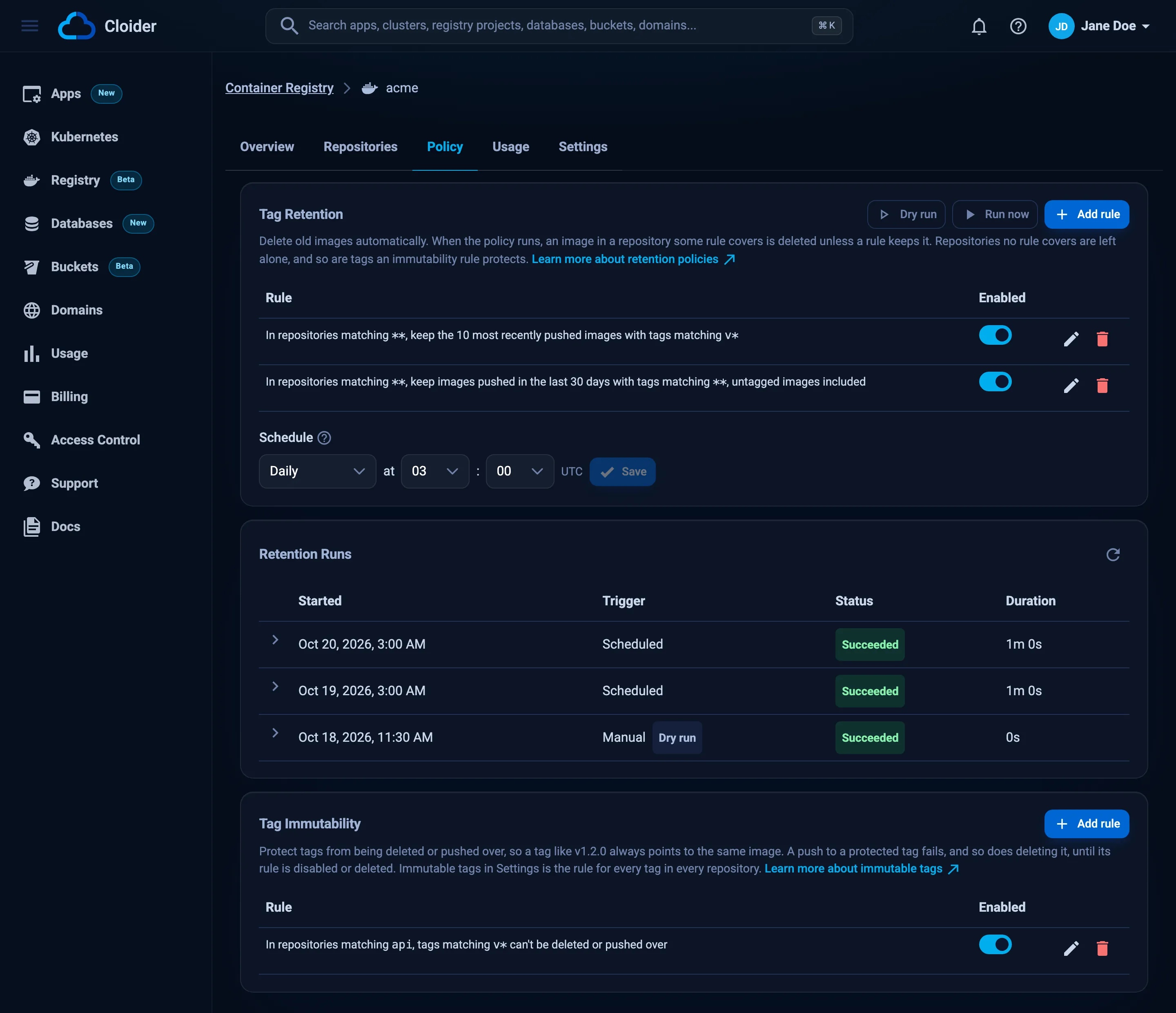
The rule appears in the list as a sentence, for example In repositories matching **, keep the 10 most recently pushed images with tags matching **, untagged images included. Each rule has an Enabled switch, and edit and delete buttons.
Write the rules as a JSON array (or {"rules": [...]}) and set them. set replaces every rule of the project:
[
  {
    "repositories": {"match": "matching", "patterns": ["**"]},
    "tags": {"match": "matching", "patterns": ["**"]},
    "untagged": true,
    "keep": "latest_pushed",
    "count": 10
  }
]
cloider registry retention set acme -f rules.json
✓ acme now has 1 retention rule(s)
A selector you leave out matches everything, so this one-liner is the same rule:
echo '[{"keep": "latest_pushed", "count": 10, "untagged": true}]' | cloider registry retention set acme -f -
Show the rules and the schedule:
cloider registry retention get acme
#  REPOSITORIES  TAGS          KEEPS             ENABLED
1  **            **, untagged  latest 10 pushed  yes

Runs: only when run by hand
To remove every rule, set an empty list: echo '[]' | cloider registry retention set acme -f -.
The Terraform provider doesn't manage retention policies. Use the dashboard, the CLI, the API or MCP, for example in the same pipeline that runs terraform apply.
PUT .../retention/rules replaces every rule:
curl -X PUT https://cloider.com/api/registry/projects/r4t6yu/retention/rules \
  -H "Authorization: Bearer $CLOIDER_TOKEN" \
  -H "Content-Type: application/json" \
  -d '{
    "rules": [
      {
        "repositories": {"match": "matching", "patterns": ["**"]},
        "tags": {"match": "matching", "patterns": ["**"]},
        "untagged": true,
        "keep": "latest_pushed",
        "count": 10,
        "disabled": false
      }
    ]
  }'
{
  "rules": [
    {
      "repositories": {"match": "matching", "patterns": ["**"]},
      "tags": {"match": "matching", "patterns": ["**"]},
      "untagged": true,
      "keep": "latest_pushed",
      "count": 10,
      "disabled": false
    }
  ],
  "schedule": {"every": "none", "minute": 0, "hour": 0, "weekday": 0, "cron": ""}
}
Through the API every selector needs match and at least one pattern. Read the policy with GET .../retention.
Ask your agent:
In the acme registry project, keep only the 10 most recently pushed images in every repository, untagged ones included. Do a dry run first and show me what would be deleted.
It calls the set_registry_retention_rules tool, then run_registry_retention with dry_run:
{
  "project": "acme",
  "rules": [
    {"repositories": {"match": "matching", "patterns": ["**"]},
     "tags": {"match": "matching", "patterns": ["**"]},
     "untagged": true, "keep": "latest_pushed", "count": 10}
  ]
}
set_registry_retention_rules is marked as a tool that can delete, so most clients ask you before it runs.
Example rule sets
Keep the last 10 images of every repository
[{"keep": "latest_pushed", "count": 10, "untagged": true}]
CI builds: keep 20 commit builds, every release
Commit builds are tagged sha-*; everything else (versions, latest) is kept.
[
  {"tags": {"match": "matching", "patterns": ["sha-*"]},
   "keep": "latest_pushed", "count": 20, "untagged": true},
  {"tags": {"match": "excluding", "patterns": ["sha-*"]},
   "keep": "always"}
]
Delete images nobody pulled in 90 days, except releases
[
  {"tags": {"match": "matching", "patterns": ["**"]},
   "keep": "pulled_within_days", "count": 90},
  {"tags": {"match": "matching", "patterns": ["v*", "[0-9]*"]},
   "keep": "always"}
]
Clean only one group of repositories
Repositories outside team-a/** aren't covered by any rule, so they are left alone.
[
  {"repositories": {"match": "matching", "patterns": ["team-a/**"]},
   "keep": "pushed_within_days", "count": 30, "untagged": true}
]
Keep the last 5 images per environment tag family
[
  {"tags": {"match": "matching", "patterns": ["staging-*"]}, "keep": "latest_pushed", "count": 5},
  {"tags": {"match": "matching", "patterns": ["production-*"]}, "keep": "latest_pushed", "count": 10},
  {"tags": {"match": "excluding", "patterns": ["staging-*", "production-*"]}, "keep": "always"}
]
Enable, disable, edit and delete rules
- Enabled switch: a disabled rule stays in the list but doesn't apply. In JSON,
"disabled": true. A policy with no enabled rule can't run. - Edit (pencil) opens Edit Tag Retention Rule; click Save rule.
- Delete (trash) asks Delete this retention rule? Images only it kept are deleted the next time the policy runs.
With the CLI and API, edit the JSON and set it again: the list you send replaces the rules.
Schedule the policy
A schedule runs the policy on its own. Times are in UTC; the dashboard also shows your local time. The most frequent schedule is hourly.
- Dashboard
- CLI
- Terraform
- API
- MCP
- In the Policy tab, under the rules, find Schedule.
- Choose Never, Hourly (at minute), Daily (at hour : minute) or Weekly (on a weekday, at hour : minute).
- Click Save.
A schedule set by support shows as Custom with its cron expression.
cloider registry retention schedule acme --every daily --hour 3
cloider registry retention schedule acme --every weekly --weekday 0 --hour 4 --minute 30
cloider registry retention schedule acme --every hourly --minute 15
cloider registry retention schedule acme --every none
✓ Retention of acme runs daily at 03:00 UTC
| Flag | Values |
|---|---|
--every | none, hourly, daily, weekly (required) |
--minute | 0 to 59 |
--hour | 0 to 23, for daily and weekly |
--weekday | 0 (Sunday) to 6 (Saturday), for weekly |
The Terraform provider doesn't manage retention schedules. Use the dashboard, the CLI, the API or MCP.
curl -X PUT https://cloider.com/api/registry/projects/r4t6yu/retention/schedule \
  -H "Authorization: Bearer $CLOIDER_TOKEN" \
  -H "Content-Type: application/json" \
  -d '{"every": "weekly", "weekday": 0, "hour": 4, "minute": 30}'
The response is the whole policy, with "schedule": {"every": "weekly", "minute": 30, "hour": 4, "weekday": 0, "cron": "0 30 4 * * 0"}. every is none, hourly, daily or weekly.
Ask your agent:
Run the acme registry retention policy every day at 03:00 UTC.
It calls the set_registry_retention_schedule tool:
{"project": "acme", "every": "daily", "hour": 3, "minute": 0}
Run the policy now, or as a dry run
A dry run goes through the same steps as a real run and reports what it would delete, without deleting anything. Do one after every change to the rules.
- Dashboard
- CLI
- Terraform
- API
- MCP
- In the Policy tab, in Tag Retention, click Dry run (shows what a run would delete, without deleting anything).
- Watch the run in Retention Runs below; the list refreshes on its own while a run is pending or running.
- When it looks right, click Run now and confirm in Run Retention Policy: images no rule keeps are permanently deleted.
Both buttons are disabled while there is no enabled rule or while a run is in progress.
cloider registry retention run acme --dry-run
✓ Started a retention dry run of acme, nothing is deleted
Follow it with `cloider registry retention runs acme`.
A real run asks for confirmation; --yes skips it in scripts:
cloider registry retention run acme --yes
The Terraform provider doesn't run retention. Use the dashboard, the CLI, the API or MCP.
curl -X POST https://cloider.com/api/registry/projects/r4t6yu/retention/runs \
  -H "Authorization: Bearer $CLOIDER_TOKEN" \
  -H "Content-Type: application/json" \
  -d '{"dry_run": true}'
{"success": true}
Send {"dry_run": false} (or no body) for a real run.
Ask your agent:
Do a retention dry run on the acme registry project and tell me which images it would delete.
It calls the run_registry_retention tool, then list_registry_retention_runs:
{"project": "acme", "dry_run": true}
Read the results of a run
Each run is listed with its Started time, Trigger (Manual or Scheduled), Status and Duration, and a Dry run tag for dry runs. Open a run to see one line per repository with how many images it Kept (Would keep for a dry run) out of the total, then click Images to see every image's result.
| Run and task status | Meaning |
|---|---|
| Pending | Waiting to start |
| Running | In progress |
| Succeeded | Finished |
| Failed | Finished with errors. Open the run to see which repository failed |
| Stopped | Stopped before it finished |
| Image result | Meaning |
|---|---|
| Kept | A rule keeps it |
| Deleted (Would delete in a dry run) | No rule keeps it |
| Kept, immutable | An immutability rule protects one of its tags |
| Failed | Deleting it failed |
- Dashboard
- CLI
- Terraform
- API
- MCP
In the Policy tab, scroll to Retention Runs. Click a run to expand it, and Images on a repository line to see the per-image results. The policy hasn't run yet. means there are no runs.
cloider registry retention runs acme
ID   STATUS     TRIGGER   DRY RUN  STARTED           FINISHED
412  succeeded  manual    yes      2026-10-20 10:02  2026-10-20 10:02
398  succeeded  schedule  no       2026-10-20 03:00  2026-10-20 03:01
One run, per repository:
cloider registry retention runs acme 412
TASK  REPOSITORY  STATUS     IMAGES  KEPT
7     api         succeeded  14      10
8     web         succeeded  6       6
One repository, per image:
cloider registry retention runs acme 412 7
DIGEST        TAGS          RESULT
4c7e3d1b9a8f  1.1, latest   kept
e05d6f7a8b9c  -             deleted
1f2e3d4c5b6a  1.0           immutable
In a dry run, deleted means it would be deleted.
Not available in Terraform. Use the dashboard, the CLI, the API or MCP.
# Runs, newest first, page and page_size as for images
curl https://cloider.com/api/registry/projects/r4t6yu/retention/runs \
  -H "Authorization: Bearer $CLOIDER_TOKEN"
{
  "runs": [
    {"id": 412, "status": "succeeded", "trigger": "manual", "dry_run": true,
     "started_at": "2026-10-20T10:02:03Z", "finished_at": "2026-10-20T10:02:19Z"}
  ],
  "total": 1
}
# What run 412 did per repository
curl https://cloider.com/api/registry/projects/r4t6yu/retention/runs/412 \
  -H "Authorization: Bearer $CLOIDER_TOKEN"
{
  "tasks": [
    {"id": 7, "repository": "api", "status": "succeeded", "total": 14, "retained": 10}
  ],
  "total": 1
}
# What task 7 did per image
curl https://cloider.com/api/registry/projects/r4t6yu/retention/runs/412/tasks/7 \
  -H "Authorization: Bearer $CLOIDER_TOKEN"
{
  "images": [
    {"digest": "sha256:e05d6f7a8b9c...", "tags": [], "result": "deleted"}
  ]
}
status is pending, running, stopped, failed or succeeded; trigger is manual or schedule; result is kept, deleted, immutable or failed. finished_at is null while a run is in progress.
Ask your agent:
Show me what the last retention run on acme did in the api repository.
It calls list_registry_retention_runs, first without and then with run_id and task_id:
{"project": "acme", "run_id": 412, "task_id": 7}
Retention and storage
Deleted images free storage in the project, which lowers its stored size and your bill (see Usage and billing). Images left without a tag in a repository no rule covers are still removed by the nightly cleanup.
Who can change retention?
Owners and Admins can change rules and schedules and start runs. Members with the Restricted role, and read-only API tokens, can view the policy and its runs. The apps project has no Policy tab: This project holds your apps' images and is managed by Cloider, its policies can't be changed.
Troubleshooting
| Error | Cause and fix |
|---|---|
Add a retention rule, or enable one, to run the policy. | There is no enabled rule |
The policy is already running, wait for it to finish. | Only one run at a time. Wait for it in Retention Runs |
A policy holds at most 15 rules. | Combine rules with several patterns each |
Two of the rules are the same, change or delete one of them. | Two rules are identical |
Keep between 1 and 10000 images / Enter between 1 and 3650 days | count is out of range for the chosen Keep |
Choose what the rule keeps | keep is missing or not one of the five values |
Choose matching or excluding | A selector's match is missing (API) |
Enter at least one pattern, ** for all / Enter at most 20 patterns | Fix the pattern list |
"..." isn't a valid pattern. | The pattern has a character that isn't allowed, such as an uppercase letter in a repository pattern |
Choose how often the policy runs / Choose a valid time | Schedule values out of range |
This project's policies were changed outside the dashboard, contact support to edit them. | The policy uses a form the dashboard can't show. Contact support |
The registry refused the policy, check its rules and try again. | The registry rejected a rule. Simplify the patterns |
| A run deleted more than expected | The rules keep less than you thought: images that no rule keeps are deleted. Use Dry run before every change, and add a rule that keeps Every image for tags you never want deleted, or protect them with immutability rules |
Deleted images can't be recovered. Push them again from your CI or local copies if needed.