Container registry usage and billing
The Cloider Container Registry is billed only for the storage your images take, per GB per month, charged by the hour. Pushes, pulls and network traffic are free, and so are projects, tokens and policies. This page explains how storage is measured, where to see each project's usage and forecast, and how to keep the bill down.
At a glance
| What you pay for | Stored image data, per GB per month, billed by the hour |
| Free | Pushes, pulls, traffic, projects, tokens, retention and immutability policies, the storage limit itself |
| How it is measured | Each project's stored size is sampled every few minutes; you pay for the average |
| Storage limit | 1 to 20 GB per project (5 GB by default). It caps what can be pushed; it isn't what you pay for |
| Price | See Pricing, the new project form, or cloider pricing |
| Where to see it | A project's Usage tab, the account's Usage page, cloider registry usage, cloider usage |
How is registry storage measured?
Every few minutes, Cloider reads how many bytes each project stores, as the registry counts it for the project's storage limit. These samples are averaged per day, and each day is charged as:
daily cost = average GB stored that day × (hours billed / hours in a month) × price per GB-month
So a project that holds 2 GB for half a month and nothing for the other half costs the same as 1 GB for a whole month. Nothing is rounded up to a full GB or a full month.
What counts toward a project's storage:
- every image in every repository, tagged or untagged, until it is deleted,
- build caches pushed with
--cache-to type=registryand attestation manifests added by buildx, - Helm charts and other OCI artifacts.
The apps project (with the Apps badge) is measured and billed like any other project. Cloider keeps each app's last two deployed images there.
Where to see a project's usage
- Dashboard
- CLI
- Terraform
- API
- MCP
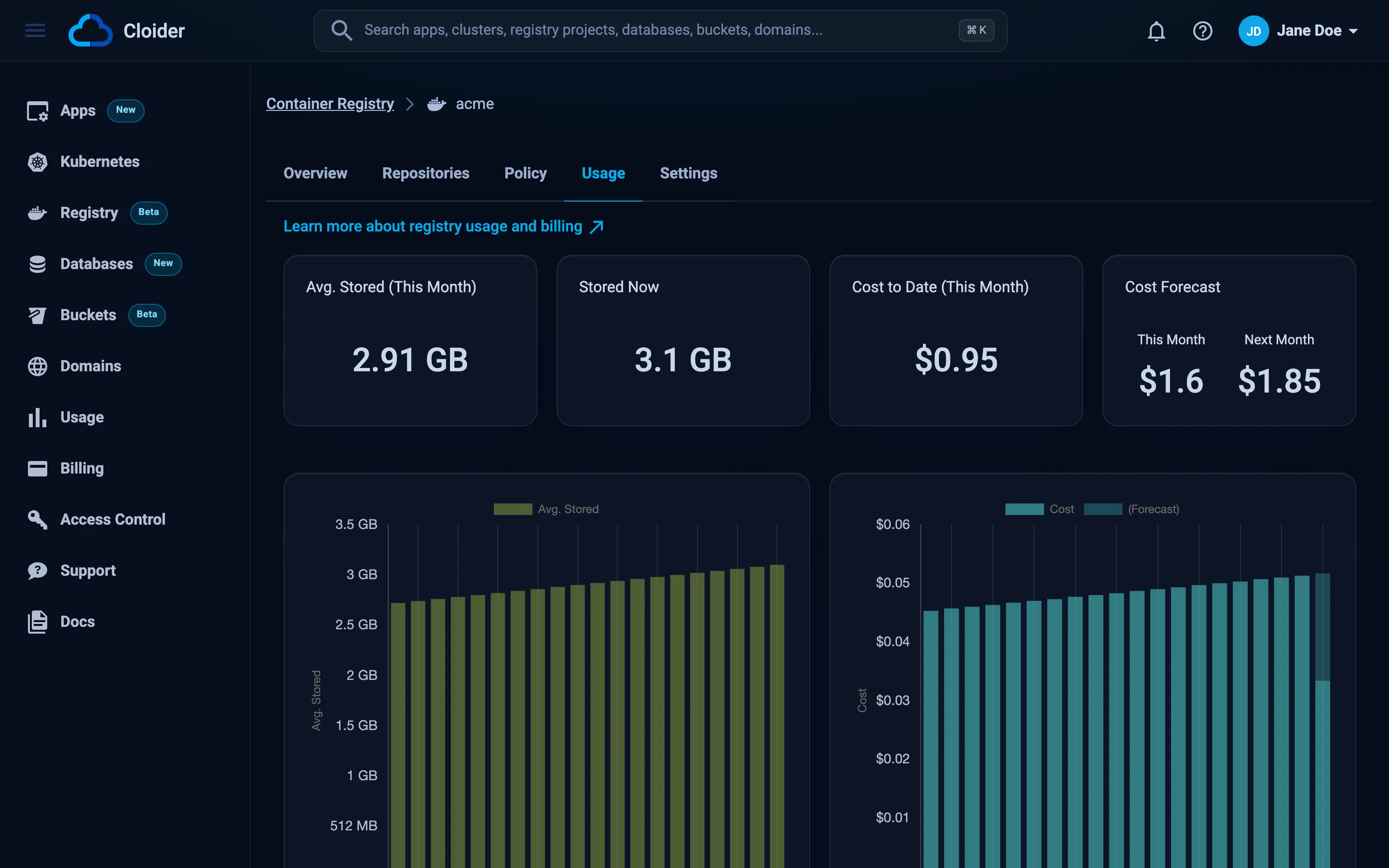
Open the project and go to the Usage tab. It shows:
- Avg. Stored (This Month): the average GB stored this month, the figure you are billed on.
- Stored Now: the latest sample.
- Cost to Date (This Month).
- Cost Forecast: This Month and Next Month, if the project keeps storing what it stores now.
- Two daily charts for the last 31 days: Avg. Stored and Cost, with today's forecast.
A new project shows What the project stores is sampled every few minutes, and shows here once the first samples are in until the first samples arrive.
The project's Overview tab also shows Storage used of the limit, and the Projects tab of the Registry page shows each project's Size next to its limit. The account wide Usage page lists every registry project with your other resources.
cloider registry usage acme
Project:              acme
Month:                2026-10
Average storage:      1.84 GiB
Cost so far:          $0.06
Forecast this month:  $0.10
Forecast next month:  $0.15

DATE        STORAGE   COST
2026-10-18  1.72 GiB  $0.00
2026-10-19  1.80 GiB  $0.00
2026-10-20  2.01 GiB  $0.00
The amounts above are illustrative; yours depend on what you store and the current price. Every resource of the account, registry projects included:
cloider usage
The current price per GB:
cloider pricing
The Terraform provider doesn't read usage. Use the dashboard, the CLI, the API or MCP.
curl https://cloider.com/api/registry/projects/r4t6yu/usage \
  -H "Authorization: Bearer $CLOIDER_TOKEN"
{
  "hashed_id": "r4t6yu",
  "name": "acme",
  "status": "Ready",
  "size_bytes": 2158221312,
  "size_sampled_at": "2026-10-20T10:55:00Z",
  "storage_limit_gi": 5,
  "daily_usage": [
    {
      "resource_type": "registry",
      "date": "2026-10-20T00:00:00Z",
      "total_cost": 0.0021,
      "metrics": {"storage": 2.01, "storage_cost": 0.0021}
    }
  ],
  "monthly_usage": {
    "avg_storage_usage": 1.84,
    "storage_total_cost": 0.06,
    "total_cost": 0.06,
    "days": 20,
    "forecast_this_month": 0.10,
    "forecast_next_month": 0.15
  },
  "forecast_rest_of_day": 0.0011,
  "date": "2026-10-20",
  "month": "2026-10"
}
The response is trimmed and the amounts are illustrative. metrics.storage and avg_storage_usage are in GB (GiB), costs in US dollars. The live stored size and repository count, as the registry counts them right now, are at:
curl https://cloider.com/api/registry/projects/r4t6yu/summary \
  -H "Authorization: Bearer $CLOIDER_TOKEN"
{"repository_count": 3, "used_bytes": 2158221312, "limit_bytes": 5368709120}
Ask your agent:
How much has the acme registry project cost this month, and what is the forecast?
It calls the get_usage tool with the kind and name:
{"kind": "registry", "name": "acme"}
The storage limit is a cap, not a price
Each project has a storage limit between 1 and 20 GB. It protects you from a runaway pipeline: a push that would take the project past the limit is refused. You don't pay for the limit, only for what is stored, so a 20 GB limit on a project storing 1 GB costs the same as a 5 GB limit.
Change the limit in the project's Settings tab, with cloider registry set acme --storage-limit 20, the storage_limit_gi Terraform attribute, or PUT /registry/projects/<id>/settings. See Change a project's settings.
How to lower the registry bill
- Set up a retention policy that keeps only the images you need, for example the 10 most recent builds per repository and every release. See Retention policies.
- Delete what you don't need by hand: old repositories, test images, abandoned branches. See Repositories and tags.
- Use small base images:
alpine,distrolessor-slimvariants, and multi-stage builds that leave compilers out of the final image. - Mind build caches: a
mode=maxregistry cache can be as large as the image. Keep one cache tag per repository, not one per branch. - Build only the platforms you run: an amd64 plus arm64 image stores both.
- Leave untagged images to the nightly cleanup, or delete them right away if you need the space now.
Billing, invoices and the free plan
Registry storage appears on your monthly bill with your other resources; see Billing and the billing model. The free plan allows one project (the apps project isn't counted).
Frequently asked questions
How is the Cloider container registry billed?
By the storage your images take, per GB per month, billed by the hour. Cloider samples each project's stored size every few minutes and charges the average. Pushes, pulls and traffic are free.
Do I pay for the storage limit?
No. The storage limit only caps how much a project can store; a push past it is refused. You pay for what is actually stored.
Are pulls or bandwidth charged?
No. There are no charges for pushes, pulls or network traffic, only for stored image data.
Do untagged images cost money?
Yes, until they are deleted. An untagged image still takes storage until the nightly cleanup removes it, or until you delete it.
Is the apps project billed?
Yes. The apps project, where your apps' images are built, is measured and billed like any other project. Cloider keeps each app's last two deployed images there.
Where do I see the registry price?
On the pricing page, in the dashboard's new project form, and with cloider pricing in the CLI.