Create a container registry project
A project is where your container images live in the Cloider Container Registry. This page shows how to create one with every tool, explains each setting (name, storage limit, public pulls, immutable tags), and lists the naming rules and the errors you can hit.
Creating a project takes a few seconds. Once it is Ready, you can push images to registry.cloider.com/<project>/<repository>:<tag>.
Before you begin
- A Cloider account. See Create an account.
- The Owner or Admin role in the account. Members with the Restricted role, and read-only API tokens, can see projects but not create them. See Accounts and roles.
- For the CLI, Terraform, API or MCP tabs: an API token with read and write access. See API tokens.
- A name nobody else on Cloider uses. See Project naming rules.
Project settings
| Setting | What it does | Default | Change later? |
|---|---|---|---|
| Project Name | The path every image in the project lives under: registry.cloider.com/<name>/... | none, required | No |
| Storage Limit | The most the project may store, 1 to 20 GB. A push that would take the project past it is refused | 5 GB | Yes, in Settings |
| Public pulls | Anyone can pull the project's images without a token, and the project is listed publicly on the registry host. Pushing still needs a token | Off (private) | Yes, in Settings |
| Immutable tags | A pushed tag always points to the same image: pushing over it or deleting it fails, latest included | Off | Yes, in Settings |
You are billed for the storage your images actually use, not for the storage limit. See Usage and billing.
Create a project
- Dashboard
- CLI
- Terraform
- API
- MCP
- Open Registry in the sidebar. If you have no project yet, the page says Container Registry, Private projects for your container images.
- Click Create Project.
- In Project Name, type
acme. The hint under the field repeats the rules: 3 to 63 lowercase letters, numbers and-, with at least one letter. - In Storage Limit, keep
5GB or choose up to 20 GB. - Leave Public pulls off for a private project.
- Turn Immutable tags on only if no tag,
latestincluded, should ever be pushed over. You can protect only some tags later with immutability rules. - Check the Connection box: it shows the Registry host and an example Image name, such as
registry.cloider.com/acme/my-app:1.0. - Click Create project.
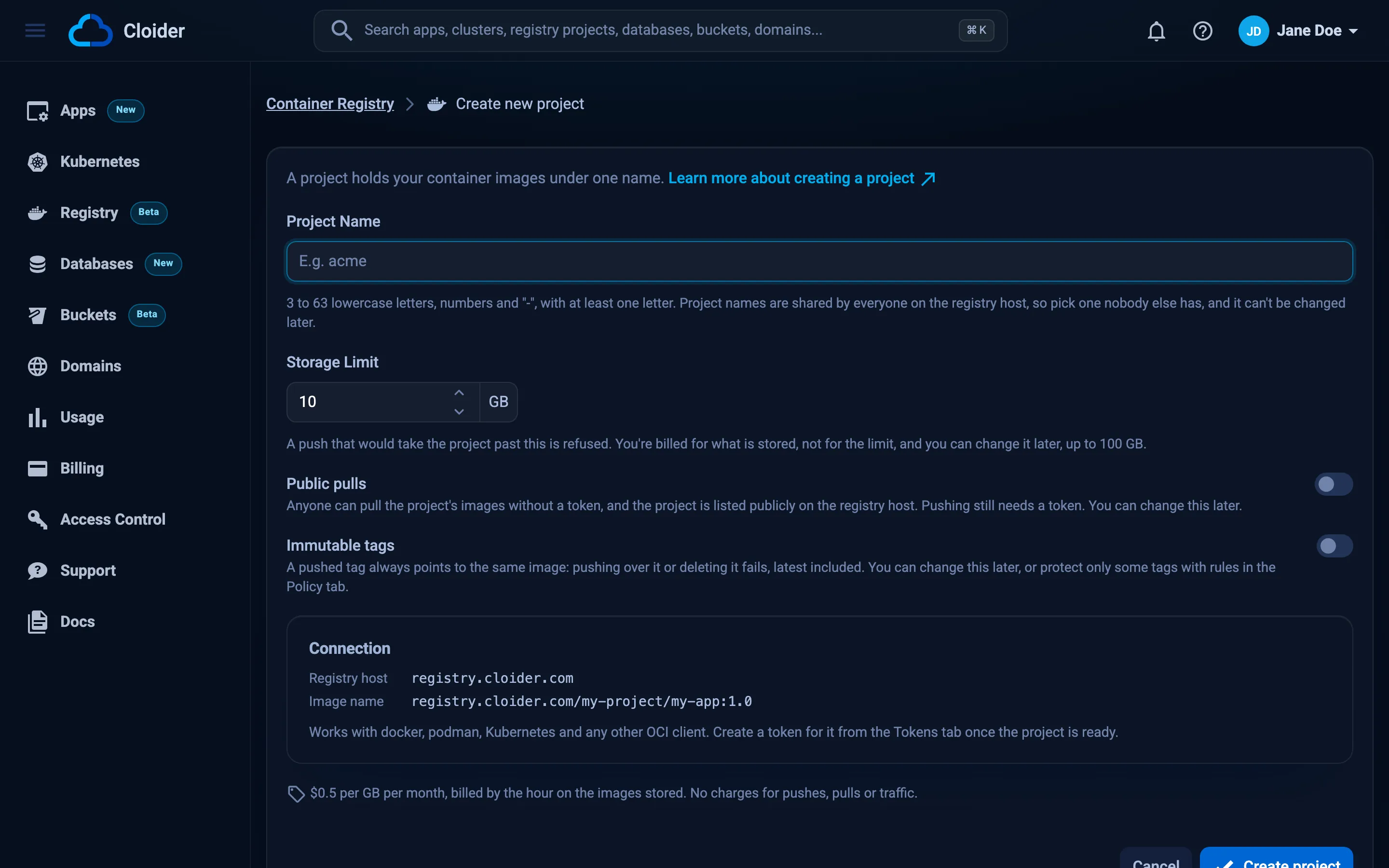
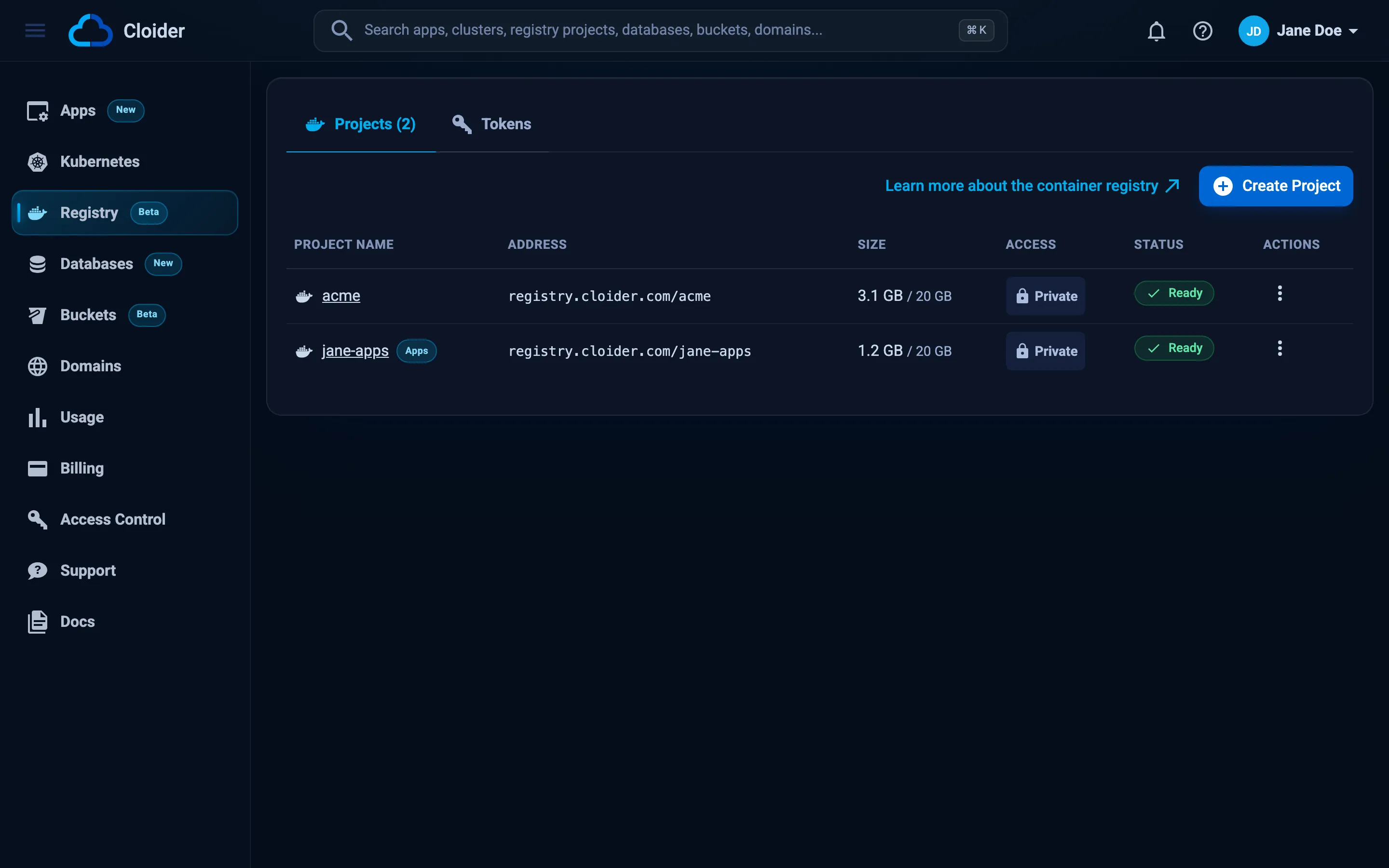
The dashboard returns to the Projects tab of the Registry page, with the new project highlighted. Its status goes from Creating to Ready within seconds.
cloider registry create acme --wait
✓ Created project acme
✓ Project acme is ready
Push images to registry.cloider.com/acme/<repository>:<tag>, after `cloider registry login`.
The flags:
| Flag | Meaning |
|---|---|
--storage-limit <GiB> | The most the project may store, 1 to 20. Default: the platform's default, 5 |
--public | Let anyone pull its images without a token |
--immutable-tags | Refuse pushing over or deleting any tag, latest included |
-w, --wait | Wait until the project is ready |
--timeout <duration> | How long --wait waits, default 15m |
More examples:
# A public project with a 20 GB limit
cloider registry create acme-public --public --storage-limit 20

# A project for release images whose tags never change
cloider registry create acme-releases --immutable-tags

# Print the full project as JSON, for scripts
cloider registry create acme-staging --wait -o json
terraform {
  required_providers {
    cloider = {
      source = "cloider/cloider"
    }
  }
}

resource "cloider_registry" "acme" {
  name             = "acme"
  storage_limit_gi = 5
  public           = false
  immutable_tags   = false
}

# The prefix of every image, registry.cloider.com/acme
output "image_prefix" {
  value = cloider_registry.acme.url
}

# The host to docker login to, registry.cloider.com
output "registry_host" {
  value = cloider_registry.acme.host
}
terraform apply
cloider_registry.acme: Creating...
cloider_registry.acme: Creation complete after 4s [id=r4t6yu]

Apply complete! Resources: 1 added, 0 changed, 0 destroyed.

Outputs:

image_prefix = "registry.cloider.com/acme"
registry_host = "registry.cloider.com"
| Attribute | Type | Notes |
|---|---|---|
name | String, required | Changing it replaces the project and deletes its images |
storage_limit_gi | Number | 1 to 20, default 5 |
public | Boolean | Default false |
immutable_tags | Boolean | Default false |
id, host, url, status, created_at | Read-only | status is Ready, Failed or Terminating |
See cloider_registry for the full reference and imports.
curl -X POST https://cloider.com/api/registry/projects \
  -H "Authorization: Bearer $CLOIDER_TOKEN" \
  -H "Content-Type: application/json" \
  -d '{"name": "acme", "storage_limit_gi": 5, "public": false, "immutable_tags": false}'
{"hashed_id": "r4t6yu"}
storage_limit_gi can be left out or set to 0 for the default. Then read the project back:
curl https://cloider.com/api/registry/projects/r4t6yu \
  -H "Authorization: Bearer $CLOIDER_TOKEN"
{
  "hashed_id": "r4t6yu",
  "name": "acme",
  "public": false,
  "apps": false,
  "storage_limit_gi": 5,
  "status": "Ready",
  "size_bytes": 0,
  "size_sampled_at": null,
  "host": "registry.cloider.com",
  "url": "registry.cloider.com/acme",
  "username": "acme",
  "created_at": "2026-10-20T09:12:44Z"
}
The defaults and the maximum storage limit are available before you create anything:
curl https://cloider.com/api/registry/projects/options \
  -H "Authorization: Bearer $CLOIDER_TOKEN"
{"host": "registry.cloider.com", "default_storage_limit_gi": 5, "max_storage_limit_gi": 20}
See Registry endpoints for every field.
Ask your agent:
Create a private container registry project called acme with a 10 GB storage limit and wait until it is ready.
It calls the create_registry_project tool:
{"name": "acme", "storage_limit_gi": 10, "wait": true}
The tool also takes public and immutable_tags. See MCP tools.
Project naming rules
A project name is the first path segment of every image in it, and it is shared by every Cloider account. It must:
- be 3 to 63 characters long,
- use only lowercase letters
a-z, digits0-9and hyphens-, - contain at least one letter (a name of digits alone is refused),
- start and end with a letter or a digit, with no
--, - not be
library, and not start withcloider, - not be used by any other project on Cloider.
| Name | Valid? | Why |
|---|---|---|
acme | Yes | |
acme-staging | Yes | |
team42 | Yes | |
ac | No | Shorter than 3 characters |
Acme | No | Uppercase letter |
acme_images | No | _ isn't allowed |
acme--images | No | Contains -- |
-acme | No | Starts with - |
2024 | No | No letter |
library | No | Reserved |
cloider-images | No | Starts with a reserved prefix |
The name can't be changed later. To move to a new name, create the new project, copy your images over (see Copy images between projects) and delete the old project.
Project statuses
| Status | Meaning |
|---|---|
| Creating | The project is being set up. This takes seconds |
| Ready | You can push, pull, browse and change policies |
| Failed | The project couldn't be set up. Delete it from its Settings tab and create it again, or contact support |
| Terminating | The project and its images are being deleted |
The Repositories and Policy tabs only appear once a project is Ready. See Status values for every product.
Verify
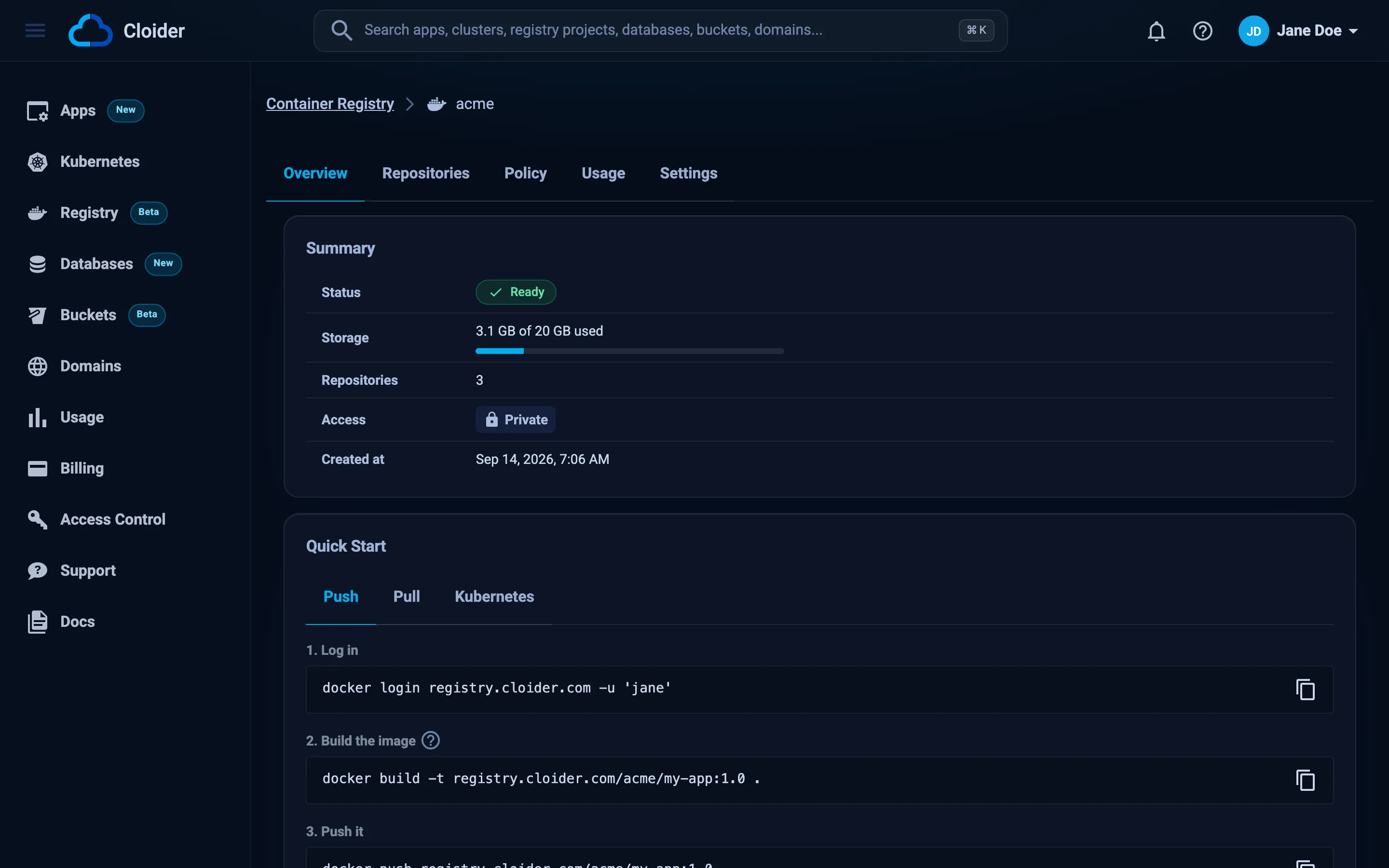
Open the project from the Projects tab. The Overview tab shows:
- Summary: the Status, Storage used of the limit, the number of Repositories, the Access (Private or Public pulls) and Created at.
- Quick Start: copyable Push, Pull and Kubernetes steps, already filled in with the project's address and your registry username.
- Connection Details: the Registry host, the Project name and the Image prefix. Click a row to copy it.
From the CLI:
cloider registry get acme
Name:          acme
Status:        Ready
Access:        private
Tags:          mutable
Host:          registry.cloider.com
Images:        registry.cloider.com/acme/<repository>:<tag>
Storage:       0 B of 5 GiB
Repositories:  0
Created:       2026-10-20 09:12
cloider registry status acme prints only the status, which is handy in scripts.
Change a project's settings
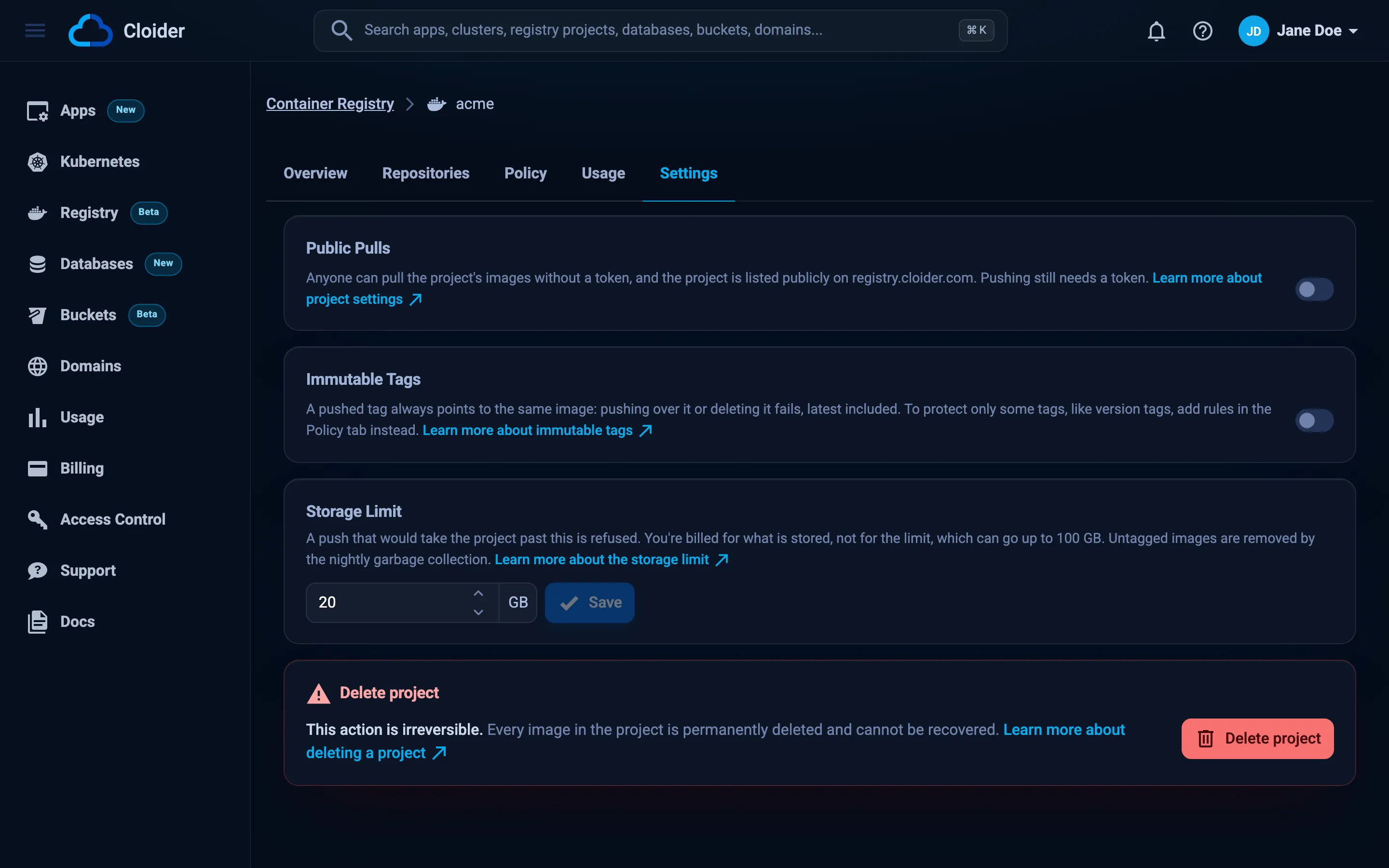
The Settings tab of a project changes Public Pulls, Immutable Tags and the Storage Limit. Making a project public asks you to confirm in a Make Project Public dialog, and making it private warns that anything pulling without a token stops working.
- Dashboard
- CLI
- Terraform
- API
- MCP
- Open the project and go to the Settings tab.
- To change the limit, set a new value in Storage Limit and click Save.
- To allow pulls without a token, turn on Public Pulls and click Make public in the dialog.
- To freeze every tag, turn on Immutable Tags and click Make immutable.
cloider registry set acme --storage-limit 20
cloider registry set acme --public          # asks to confirm, add --yes in scripts
cloider registry set acme --private
cloider registry set acme --immutable-tags
cloider registry set acme --mutable-tags
✓ Project acme is private, with a 20 GiB storage limit
Change the attributes and apply. Only name replaces the project.
resource "cloider_registry" "acme" {
  name             = "acme"
  storage_limit_gi = 20
  public           = false
  immutable_tags   = true
}
The settings endpoint takes both public and storage_limit_gi, so send the current value of the one you don't change:
curl -X PUT https://cloider.com/api/registry/projects/r4t6yu/settings \
  -H "Authorization: Bearer $CLOIDER_TOKEN" \
  -H "Content-Type: application/json" \
  -d '{"public": false, "storage_limit_gi": 20}'
The response is the updated project. Immutable tags has its own endpoint:
curl -X PUT https://cloider.com/api/registry/projects/r4t6yu/immutable-tags \
  -H "Authorization: Bearer $CLOIDER_TOKEN" \
  -H "Content-Type: application/json" \
  -d '{"immutable_tags": true}'
Ask your agent:
Raise the acme registry project's storage limit to 20 GB.
It calls the update_registry_project tool:
{"project": "acme", "storage_limit_gi": 20}
The tool also takes public and immutable_tags as true or false.
The storage limit caps future pushes. If a project already stores more than a new, lower limit, every push is refused until you delete images or raise the limit again.
Troubleshooting
| Error | Cause and fix |
|---|---|
This project name is already taken | A project on Cloider already uses that name. Project names are shared by every account. Choose another one |
Project name is reserved | The name is library or starts with cloider |
Project name must have at least one letter | Names of digits alone are refused. Add a letter |
Storage limit must be between 1 and 20 GB | Choose a limit in that range |
Free plan users can not create more than one project. UPGRADE NOW! | The free plan allows one project (the apps project isn't counted). Upgrade on Billing or delete the project you have |
Your account is suspended. Upgrade to a paid plan to continue using our services. | See Billing |
You have read-only access to this account, you can not create projects! | Your role is Restricted, or your API token is read-only. Ask an Owner or Admin |
The container registry isn't available at the moment! | The registry is temporarily unavailable. Try again later or contact support |
Operation failed, Couldn't create the project! | Creating the project failed. Try again in a moment |
Another change to this project is in progress, try again in a moment! | Two settings changes or a change and a delete ran at once. Retry |
The project must be ready to change its settings. | Wait until the project is Ready |
More registry problems are on Troubleshooting.
Next steps
- Create a registry token or run
cloider registry login. - Push and pull images.
- Run the images on a Kubernetes cluster.
- Set up a retention policy so old images don't pile up.