Registry tokens for docker, CI and Kubernetes
A registry token is the password that docker, your CI pipelines and your Kubernetes clusters use to log in to the Cloider Container Registry. Each token has a scope (all projects or only some), a permission (Pull only or Pull & push) and an optional expiry. This page explains how tokens work and how to create, use, change, rotate and delete them with every tool.
At a glance
| Username | Your account's registry username, the same for every token |
| Password | The token's secret, shown once when the token is created |
| Scope | All projects, including ones created later, or Only specific projects |
| Permission | Pull & push (pull, push and delete images) or Pull only (pull images) |
| Expiry | Never, or 1 to 3650 days. Can't be changed after creation |
| Limit | 50 tokens per account |
| Where to manage | Registry page, Tokens tab, or Access Control, Registry Tokens tab. Also the CLI, Terraform, API and MCP |
| Cost | Free |
How registry tokens work
A registry login is a username and a password. On Cloider:
- The username is your account's registry username. It is created the first time you need one, from the account's email address, and never changes. Every token of the account logs in with it.
- The password is a token's secret. The secret tells the registry which token is logging in, and so which projects it reaches and what it may do.
Docker and other clients keep one login per registry host. All projects share registry.cloider.com, so a machine is logged in with one token at a time. That's why a token can reach several projects: give each machine, pipeline or cluster one token that covers every project it needs, rather than one token per project.
What each permission allows
| Action | Pull only | Pull & push |
|---|---|---|
| Log in | Yes | Yes |
| Pull images, list repositories and tags | Yes | Yes |
| Push images and tags | No | Yes |
| Delete images, tags and repositories through the registry API | No | Yes |
| Change project settings, policies or create tokens | No | No |
Tokens never manage projects. Settings, policies and other tokens are changed with your Cloider login or an API token, so a leaked registry token can't make a project public, raise its storage limit or create more tokens.
Which token for which job?
| Used by | Scope | Permission | Expiry | Example name |
|---|---|---|---|---|
| Your computer | All projects | Pull & push | 30 days (cloider registry login does this for you) | cloider cli (macbook) |
| A CI pipeline that builds and pushes | The projects it pushes to | Pull & push | 90 days or 1 year, rotated | ci-deploy |
| A Kubernetes cluster or server that runs images | The projects it runs | Pull only | 1 year or never | prod-cluster |
| A deploy step that only pulls | The projects it deploys | Pull only | 90 days | deploy-staging |
Create a token
- Dashboard
- CLI
- Terraform
- API
- MCP
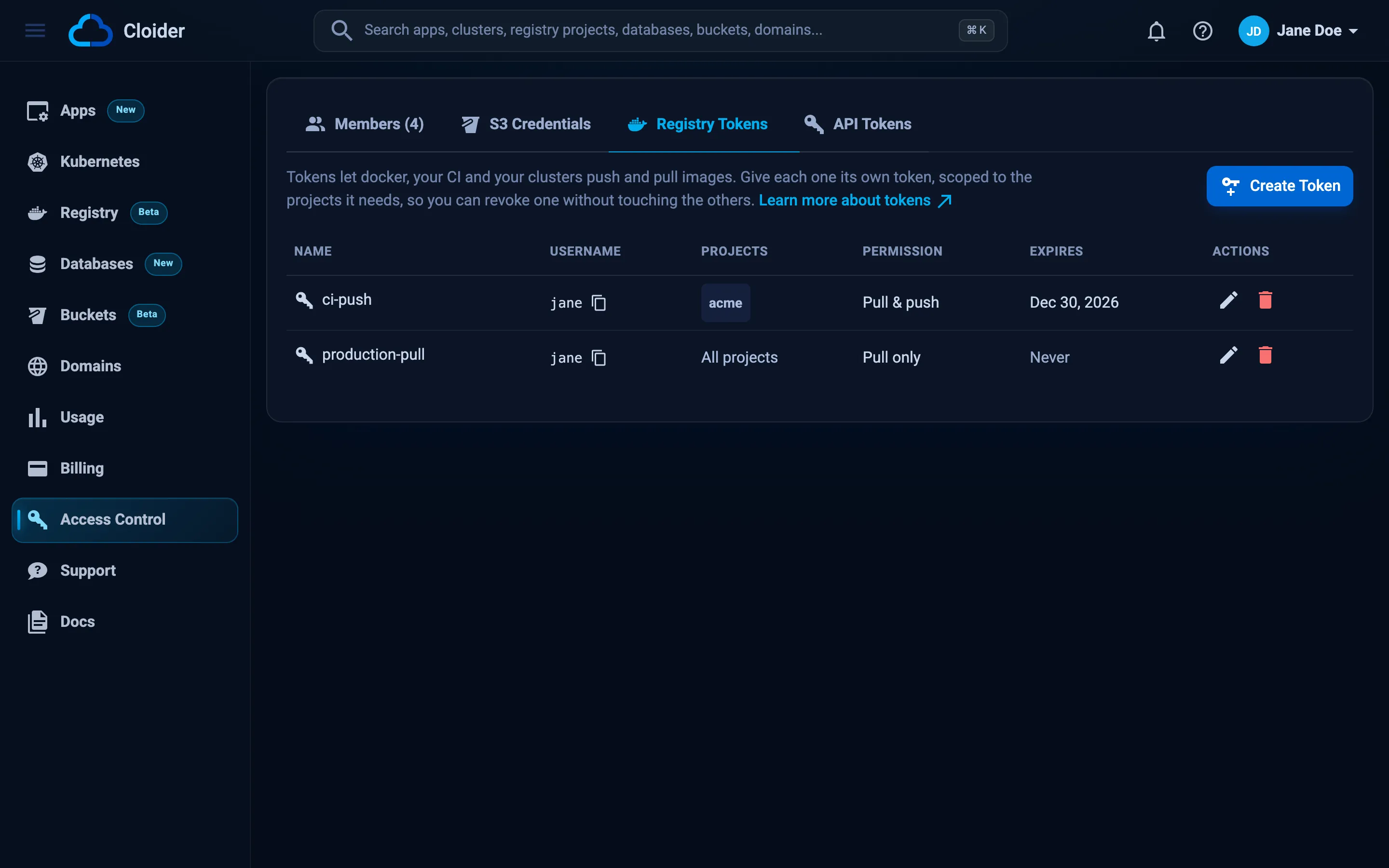
- Open Registry in the sidebar and go to the Tokens tab. (The same list is in Access Control, on the Registry Tokens tab.)
- Click Create Token. The button is disabled until you have a project that is Ready.
- In Name, describe what the token is for, for example
ci-deployorprod-cluster. Up to 64 characters. - Under Projects, choose All projects, including ones created later, or Only specific projects and pick them from the list.
- Under Permission, choose Pull & push (pull, push and delete images) or Pull only (pull images, for clusters and deploys).
- In Expires, choose Never, 7 days, 30 days, 90 days or 1 year. The expiry can't be changed later.
- Click Create token.
The Token created dialog shows, once:
- Registry host, Username and Secret, each copied with a click,
- a Docker login command,
- a Kubernetes pull secret command,
- a Download JSON button that saves the login in Docker's
config.jsonformat, usable as~/.docker/config.json, as GitLab'sDOCKER_AUTH_CONFIGor as a Kubernetes.dockerconfigjsonsecret.
Copy what you need, then click I've saved the secret. The secret can't be shown again.
cloider registry token create --label ci-deploy --project acme --expires-days 365
✓ Created registry token ci-deploy
Username:    acme
Secret:      xxxxxxxxxxxxxxxxxxxxxxxxxxxxxxxxxxxxxxxxxxxxxxxx
Host:        registry.cloider.com
Projects:    acme
Permission:  Pull & Push
Expires:     2027-10-20 09:55

Docker:
  echo 'xxxxxxxxxxxxxxxxxxxxxxxxxxxxxxxxxxxxxxxxxxxxxxxx' | docker login registry.cloider.com -u 'acme' --password-stdin
Kubernetes pull secret:
  kubectl create secret docker-registry cloider-registry --docker-server=registry.cloider.com --docker-username='acme' --docker-password='xxxxxxxxxxxxxxxxxxxxxxxxxxxxxxxxxxxxxxxxxxxxxxxx'
! The secret is not shown again, keep it now.
| Flag | Meaning |
|---|---|
--label <label> | Required. What the token is for |
--project <project> | A project the token reaches, by name or id. Repeat for several |
--all | Every project of the account, including later ones. This is what you get without --project |
--read-only | Pull only, never push or delete |
--expires-days <days> | Days until it stops working, 1 to 3650, or 0 for never (the default) |
More examples:
# A pull-only token for a cluster, valid for a year
cloider registry token create --label prod-cluster --project acme --read-only --expires-days 365

# A token that reaches two projects
cloider registry token create --label ci-deploy --project acme --project acme-staging

# The API's answer as JSON ({"token": {...}, "secret": "..."}), for a script
cloider registry token create --label nightly-build --project acme -o json

# Only the username and the secret, one per line
cloider registry token create --label nightly-build --project acme -q
resource "cloider_registry" "acme" {
  name = "acme"
}

resource "cloider_registry_token" "ci" {
  label           = "ci-deploy"
  projects        = [cloider_registry.acme.id]
  read_only       = false
  expires_in_days = 365
}

output "registry_username" {
  value = cloider_registry_token.ci.username
}

output "registry_secret" {
  value     = cloider_registry_token.ci.secret
  sensitive = true
}
terraform apply
terraform output -raw registry_secret
| Attribute | Notes |
|---|---|
label | Required |
projects | Set of project ids. Set this or all_projects |
all_projects | Every project, later ones included. Default false |
read_only | Pull only. Default false |
expires_in_days | 1 to 3650, or 0 for never (default). Changing it replaces the token |
username, secret, expires_at, id, created_at | Read-only. secret is sensitive and only known for a token this configuration created |
Terraform keeps the secret in its state, so treat the state as sensitive. See cloider_registry_token.
curl -X POST https://cloider.com/api/registry/tokens \
  -H "Authorization: Bearer $CLOIDER_TOKEN" \
  -H "Content-Type: application/json" \
  -d '{
    "label": "ci-deploy",
    "all_projects": false,
    "projects": ["r4t6yu"],
    "read_only": false,
    "expires_in_days": 365
  }'
projects takes project ids (hashed_id). expires_in_days is 0 for never.
{
  "token": {
    "hashed_id": "t9w1qe",
    "label": "ci-deploy",
    "username": "acme",
    "all_projects": false,
    "read_only": false,
    "expires_at": "2027-10-20T09:55:02Z",
    "projects": ["r4t6yu"],
    "status": "Ready",
    "created_at": "2026-10-20T09:55:02Z"
  },
  "secret": "xxxxxxxxxxxxxxxxxxxxxxxxxxxxxxxxxxxxxxxxxxxxxxxx"
}
The secret is in this response only. See Registry token endpoints.
Ask your agent:
Create a pull-only registry token called prod-cluster for the acme project that expires in a year.
It calls the create_registry_token tool:
{"label": "prod-cluster", "projects": ["acme"], "read_only": true, "expires_days": 365}
The answer holds the username and the secret. Ask the agent to put the secret where it is needed (a CI secret, a Kubernetes Secret) rather than in the chat, if you can.
Use a token
docker login
echo "$CLOIDER_REGISTRY_SECRET" | docker login registry.cloider.com -u acme --password-stdin
Podman, nerdctl, skopeo, crane and helm take the same username and secret; see Push and pull images.
Kubernetes pull secret
kubectl create secret docker-registry cloider-registry \
  --docker-server=registry.cloider.com \
  --docker-username='acme' \
  --docker-password="$CLOIDER_REGISTRY_SECRET" \
  -n default
Secrets are per namespace: add -n <namespace> to create it where the pod runs. Then reference cloider-registry in imagePullSecrets. See Use with Kubernetes.
Docker config.json
The Download JSON button, or this command, gives the login in Docker's config.json format:
AUTH=$(printf '%s:%s' acme "$CLOIDER_REGISTRY_SECRET" | base64 | tr -d '\n')
cat > cloider-registry.json <<EOF
{
  "auths": {
    "registry.cloider.com": {
      "username": "acme",
      "password": "$CLOIDER_REGISTRY_SECRET",
      "auth": "$AUTH"
    }
  }
}
EOF
Use it as ~/.docker/config.json, as a CI variable such as GitLab's DOCKER_AUTH_CONFIG, or as the .dockerconfigjson key of a Kubernetes Secret.
cloider registry login for your own computer
For your own machine you don't need to create a token by hand: cloider registry login creates one labelled cloider cli (<hostname>) that reaches every project, with a 30 day expiry by default, and logs docker in with it. Running it again replaces that token. See Push and pull images.
List tokens
- Dashboard
- CLI
- Terraform
- API
- MCP
Open Registry, Tokens (or Access Control, Registry Tokens). The table shows each token's Name, Username, Projects (All projects, the project names, or None left when every project it named was deleted), Permission (Pull & push or Pull only), and Expires (a date, Never, or Expired).
cloider registry token list
USERNAME  LABEL                  PROJECTS             PERMISSION   EXPIRES           STATUS  CREATED
acme      ci-deploy              acme                 Pull & Push  2027-10-20 09:55  Ready   2026-10-20 09:55
acme      prod-cluster           acme                 Pull         never             Ready   2026-10-12 14:20
acme      cloider cli (macbook)  all projects         Pull & Push  2026-11-19 09:30  Ready   2026-10-20 09:30
-o wide adds the token ids, which update, delete and Terraform imports take.
Terraform reads the tokens it manages from state. To bring an existing token under Terraform, import it by id (its secret stays unknown):
import {
  to = cloider_registry_token.ci
  id = "t9w1qe"
}
curl https://cloider.com/api/registry/tokens \
  -H "Authorization: Bearer $CLOIDER_TOKEN"
[
  {
    "hashed_id": "t9w1qe",
    "label": "ci-deploy",
    "username": "acme",
    "all_projects": false,
    "read_only": false,
    "expires_at": "2027-10-20T09:55:02Z",
    "projects": ["r4t6yu"],
    "status": "Ready",
    "created_at": "2026-10-20T09:55:02Z"
  }
]
Secrets are never returned after creation.
Ask your agent:
Which registry tokens do we have, and which ones expire this year?
It calls the list_registry_tokens tool, which takes no arguments:
{}
Change a token
You can change a token's name, projects and permission. The change applies to the existing secret, so nothing has to log in again. The expiry can't be changed: create a new token instead.
- Dashboard
- CLI
- Terraform
- API
- MCP
- In the token list, click the pencil (Edit) next to the token.
- Change Name, Projects or Permission.
- Click Save changes.
# Add a second project
cloider registry token update ci-deploy --project acme --project acme-staging

# Make it pull only
cloider registry token update prod-cluster --read-only

# All projects, with push again
cloider registry token update ci-deploy --all --read-only=false
✓ Updated registry token ci-deploy
--project replaces the token's projects with the ones you list. Options you leave out keep their value.
Change label, projects, all_projects or read_only and apply; the token is updated in place. Changing expires_in_days replaces the token with a new one and a new secret.
The update takes the whole form (label, scope and permission):
curl -X PUT https://cloider.com/api/registry/tokens/t9w1qe \
  -H "Authorization: Bearer $CLOIDER_TOKEN" \
  -H "Content-Type: application/json" \
  -d '{"label": "ci-deploy", "all_projects": false, "projects": ["r4t6yu", "k2m8pz"], "read_only": false}'
The response is the full token list.
Ask your agent:
Make the prod-cluster registry token pull only.
It calls the update_registry_token tool:
{"token": "prod-cluster", "read_only": true}
Delete a token
Deleting a token revokes it right away: anything still logged in with it can no longer pull or push. Clusters that already pulled an image keep running it, but can't pull again (for example on a new node or a restart).
- Dashboard
- CLI
- Terraform
- API
- MCP
- In the token list, click the trash icon (Delete) next to the token.
- In Delete Token, click Delete.
cloider registry token delete ci-deploy
The command asks you to type the token's label to confirm. In scripts, add --yes:
cloider registry token delete ci-deploy --yes
✓ Deleted registry token ci-deploy
Remove the cloider_registry_token resource and apply, or run:
terraform destroy -target=cloider_registry_token.ci
curl -X DELETE https://cloider.com/api/registry/tokens/t9w1qe \
  -H "Authorization: Bearer $CLOIDER_TOKEN"
The response is the remaining token list.
Ask your agent:
Delete the registry token called ci-deploy.
It calls the delete_registry_token tool:
{"token": "ci-deploy"}
Rotate a token
To replace a token's secret without downtime:
- Create a new token with the same scope and permission, for example
ci-deploy-2027. - Put the new secret everywhere the old one is used: CI variables, Kubernetes Secrets, servers.
- Check that pulls and pushes work with the new secret.
- Delete the old token.
For a Kubernetes pull secret, replace it in place:
kubectl create secret docker-registry cloider-registry \
  --docker-server=registry.cloider.com \
  --docker-username='acme' \
  --docker-password="$NEW_SECRET" \
  -n default --dry-run=client -o yaml | kubectl apply -f -
With Terraform, the time_rotating resource and create_before_destroy rotate a token on a schedule; see cloider_registry_token.
Expired tokens
When a token reaches its expiry, the registry stops accepting it, and pulls and pushes with it fail with unauthorized. The token stays in the list with an Expired tag until you delete it. Its expiry can't be extended: create a new token, swap the secret, and delete the expired one.
Security best practices
- Give every machine, pipeline and cluster its own token, so you can revoke one without touching the others.
- Use Pull only wherever nothing is pushed: clusters, servers, deploy jobs.
- Scope tokens to Only specific projects when a consumer needs just one or two.
- Set an expiry on push tokens and rotate them.
- Store secrets in a secret manager or your CI's masked variables, never in a repository.
- Pass secrets with
--password-stdin, never as-pon the command line, where they end up in shell history and process lists.
Troubleshooting
| Error | Cause and fix |
|---|---|
Create Token is disabled, or Choose a project that is ready, or create one first | A token needs at least one project that is Ready to reach. Create a project first |
Choose at least one project | With Only specific projects, pick at least one |
One of the projects doesn't exist any more, reload and try again | A chosen project was deleted. Reload and choose again |
An account can have up to 50 registry tokens, delete one you no longer use! | Delete unused tokens |
Expiry must be between 1 and 3650 days, or never | Choose an expiry in that range, or 0 for never |
Name must not be empty or Name must not exceed 64 characters | Give the token a label of 1 to 64 characters |
You have read-only access to this account, you can not create registry tokens! | Your role is Restricted or your API token is read-only |
The registry token must be ready to be changed. | The token is being created or deleted. Wait a moment |
The registry token is busy, try again in a moment! | The token is being created or deleted. Retry |
unauthorized when logging in | The secret is wrong, the token expired or was deleted, or the username is not your registry username |
| Lost the secret | Secrets can't be recovered. Delete the token and create a new one |
Next steps
- Use a pull-only token from Kubernetes.
- Push from GitHub Actions or GitLab CI.
- API tokens, which manage your Cloider account (not the registry login).