Track Cloider usage, costs and forecasts
The Usage page shows what every resource in the account has used and cost since the start of the month, and forecasts the month's total. It is updated continuously, so it is the place to watch spending before the invoice arrives. Every member can see it.
At a glance
| Where | Dashboard, Usage |
| Who | Every member: Owner, Admin and Restricted |
| Period | The current calendar month, plus the last 31 days of daily figures per resource |
| Updated | Clusters and databases within seconds, apps within a minute, buckets and registry projects within a few minutes |
| Shows | Average usage, cost to date, forecast for this month and next month, daily costs |
| Tools | Dashboard, cloider usage, GET /api/usage, the get_usage MCP tool |
View usage
- Dashboard
- CLI
- Terraform
- API
- MCP
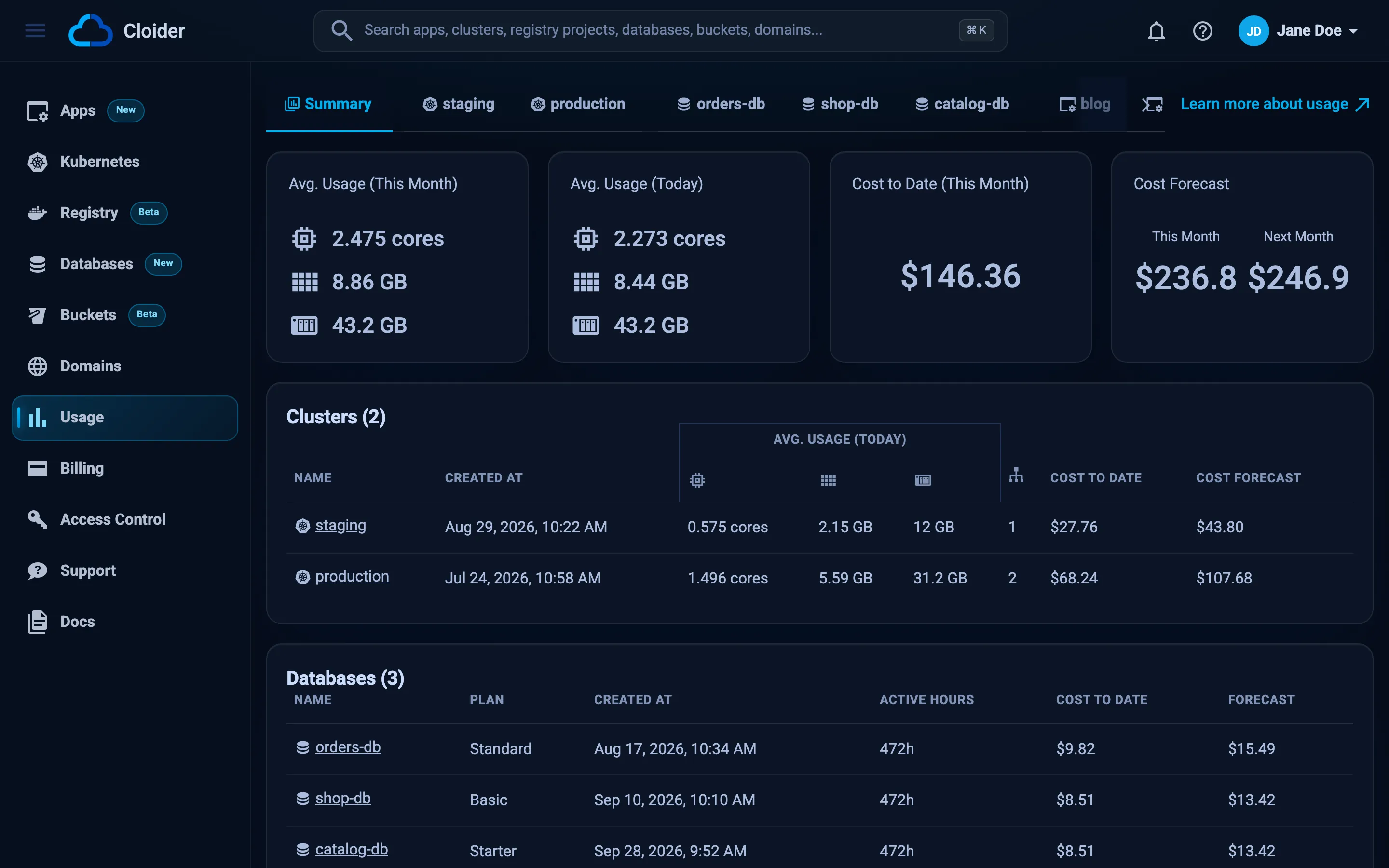
Open Usage in the sidebar. The Summary tab opens first; the tabs next to it open one resource each, grouped as clusters, databases, apps, buckets and registry projects.
cloider usage
NAME          KIND              STATUS  MONTH TO DATE  FORECAST THIS MONTH
production    cluster           Ready   $22.40         $36.12
orders-db     database          Ready   $9.50          $15.00
blog          app               Ready   $1.84          $2.96
acme-assets   bucket            Ready   $0.31          $0.48
acme          registry project  Ready   $0.12          $0.19
Total                                   $34.17         $54.75
One resource in detail:
cloider app usage blog
cloider bucket usage acme-assets
cloider registry usage acme
Add -o json for the full figures, including daily usage.
The Terraform provider doesn't read usage. Use the Dashboard, CLI or API tab.
curl -H "Authorization: Bearer $CLOIDER_TOKEN" https://cloider.com/api/usage
The response has one list per product: clusters, databases, apps, buckets and registry_projects. Each resource carries a monthly_usage object with its totals for the month, for example:
{
  "clusters": [
    {
      "cluster_name": "production",
      "status": "Ready",
      "monthly_usage": {
        "avg_cpu_usage": 840,
        "avg_memory_usage": 1946,
        "avg_volumes_usage": 20,
        "compute_total_cost": 18.8,
        "volumes_total_cost": 1.2,
        "lb_total_cost": 2.4,
        "total_cost": 22.4,
        "days": 19,
        "forecast_this_month": 36.12,
        "forecast_next_month": 57.03
      }
    }
  ],
  "databases": [],
  "apps": [],
  "buckets": [],
  "registry_projects": []
}
CPU is in millicores and memory in MiB. Per resource endpoints back the dashboard's resource tabs: GET /api/apps/<id>/usage, GET /api/buckets/<id>/usage and GET /api/registry/projects/<id>/usage.
What has my Cloider account cost so far this month, and what is the forecast?
{}
For one app, bucket or registry project:
{"kind": "app", "name": "blog"}
The Summary tab
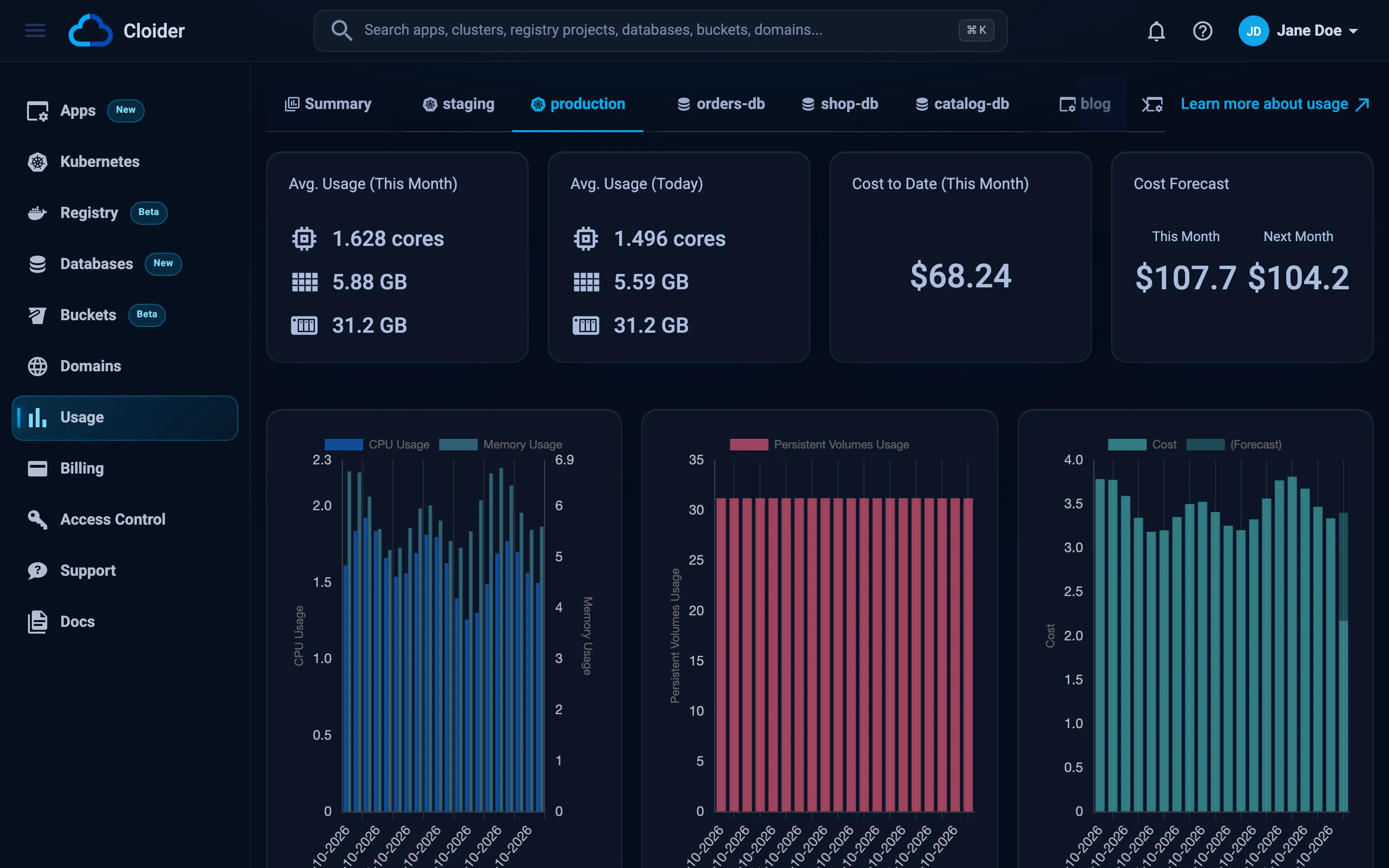
The top of the Summary tab has four cards for the whole account:
| Card | Shows |
|---|---|
| Avg. Usage (This Month) | Average CPU (cores), memory (GB) and volumes (GB) of clusters and apps since the first of the month |
| Avg. Usage (Today) | The same averages for today |
| Cost to Date (This Month) | What the account has accrued since the first of the month |
| Cost Forecast | This Month (cost to date plus the rest of the month at the current rate) and Next Month (a full month at the current rate) |
Below them, a chart shows each day's cost per resource, with today's expected remainder marked (Forecast), and a table per product lists every resource with its usage today, its cost to date and its forecast. The clusters table also counts each cluster's active load balancers.
Resource tabs
Click a resource's name in a table, or its tab, to see that resource alone: its daily usage and cost over the last 31 days, its month to date cost and its forecast. A database's tab separates the time it ran on its plan from the time it was paused. The same view appears on the resource's own page: the Insights tab of an app and the Usage tab of a bucket or a registry project.
How the figures are calculated
- Compute counts each running container at the larger of its request and its use, converted to compute units. See Billing model.
- Volumes and storage are averaged over time: a bucket that held 10 GB for half the month and 30 GB for the other half averages 20 GB.
- Forecasts assume today's usage, statuses and prices continue. Starting a big workload or pausing a cluster changes the forecast from the next sample.
- Deleted resources stay in the list, marked as terminated, for 60 days after their last usage, with what they cost before they were deleted.
The figures on the Usage page are the ones the invoice is built from at the end of the month.
Troubleshooting
| Symptom | Cause and fix |
|---|---|
| A new resource shows no cost yet | Usage is sampled regularly, from every few seconds to every few minutes depending on the product. Wait a few minutes. |
| A paused cluster still has a cost | Its persistent volumes are still billed while it is paused. Delete volumes you don't need, or delete the cluster. |
| A deleted resource is still listed | Deleted resources stay visible for 60 days so you can see what they cost. |
| The forecast jumped | A forecast projects the current rate over the rest of the month, so a change in usage, a resize or a pause moves it at once. |
Next steps
- Billing: the monthly invoices.
- Billing model: what is metered and how.
- Pricing: every price and unit.
Frequently asked questions
How do I see what my Cloider account costs?
Open Usage in the dashboard. It shows the cost to date for the current month, the forecast for this month and next month, and each resource's usage and cost. cloider usage prints the same per resource.
Can members see usage and costs?
Yes. Every member, including Restricted members, can see the Usage page. Only the Owner can see invoices.
How accurate is the cost forecast?
The forecast assumes current usage, statuses and prices stay the same for the rest of the month. It changes as soon as usage does.
How often is usage updated?
Continuously. Clusters and databases show changes within seconds, apps within a minute, and buckets and registry projects within a few minutes.
Why is a deleted resource still on the Usage page?
Deleted resources stay listed for 60 days after their last usage so you can see what they cost before they were deleted.