Cloider billing and monthly invoices
Billing shows the account's monthly invoices: one per month, with a line for every resource and what it cost. Only the account Owner can see it. To follow costs during the month, use Usage instead.
At a glance
| Where | Dashboard, Billing (in the sidebar for the Owner only) |
| Who | The account Owner. Admins and Restricted members can't see invoices |
| When | One invoice per month, issued early in the next month, once the last day's usage is finalized |
| Contents | One item per resource, with lines for compute, storage, load balancers and database plans |
| Tools | Dashboard, cloider billing, GET /api/billing, the get_billing MCP tool |
| How it's priced | See Billing model |
View your invoices
- Dashboard
- CLI
- Terraform
- API
- MCP
- Open Billing in the sidebar. The Invoices list shows each invoice's Month, Amount and Status.
- Click an invoice to open it. The Invoice dialog lists every resource with its lines.
- Click the printer icon (Print) next to the title to print the invoice or save it as a PDF from your browser's print dialog.
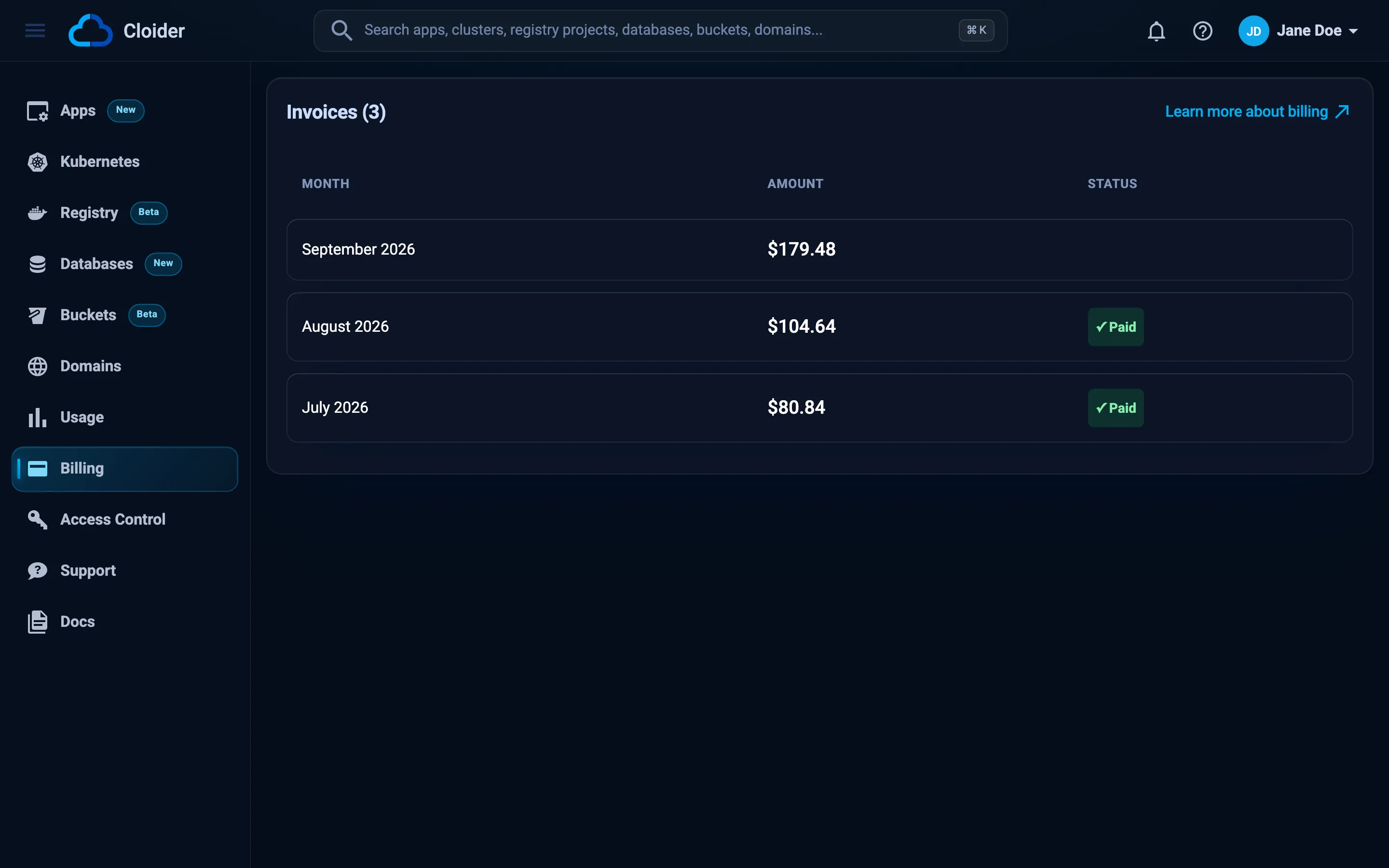
Before the first invoice, the page says Your monthly bill is not due yet!.
cloider billing
MONTH            AMOUNT   STATUS
September 2026   $45.63   Unpaid
August 2026      $38.10   Paid
Show one invoice's items by its month:
cloider billing show "September 2026"
The table lists each item with its service, quantity and unit, price and amount, followed by the total. Add -o json for the full invoice.
The Terraform provider doesn't read invoices. Use the Dashboard, CLI or API tab.
GET /api/billing returns every invoice of the account, newest first, with its items:
curl -H "Authorization: Bearer $CLOIDER_TOKEN" https://cloider.com/api/billing
[
  {
    "month": "September 2026",
    "amount": 45.63,
    "paid": false,
    "created_at": "2026-10-01T02:10:00Z",
    "items": [
      {
        "service_type": "PostgreSQL",
        "description": "Database: \"orders-db\"",
        "amount": 15.00,
        "subitems": [
          {
            "service": "PostgreSQL",
            "description": "Plan: Starter ($15/mo)",
            "qty": 720,
            "unit": "Hour",
            "price": 0.020833,
            "amount": 15.00
          }
        ]
      }
    ]
  }
]
The token must be a Read & Write token generated by the Owner. Any other token or role gets 403 with You don't have access to this account billing page!.
Show me last month's Cloider invoice with every item.
{"month": "September 2026"}
Without month, the tool lists every invoice. The CLI behind the MCP server must be logged in as the Owner with Read and write access.
What an invoice contains
An invoice has one item per resource that cost something that month. Each item has lines (subitems) for what was metered:
| Item | Lines | Unit |
|---|---|---|
Cluster: "<name>" | Compute (average CPU and memory, usage time), Persistent Volumes (average GB), one LoadBalancer line per load balancer (its name and IP) | Compute-Hour, GB-Hour, Hour |
App: "<name>" | Compute | Compute-Hour |
Database: "<name>" | The engine (for example PostgreSQL) with its plan and monthly price, and Persistent Volume for time spent paused | Hour, GB-Hour |
Bucket: "<name>" | Object Storage (average GB stored) | GB-Hour |
Registry project: "<name>" | Container Registry (average GB stored) | GB-Hour |
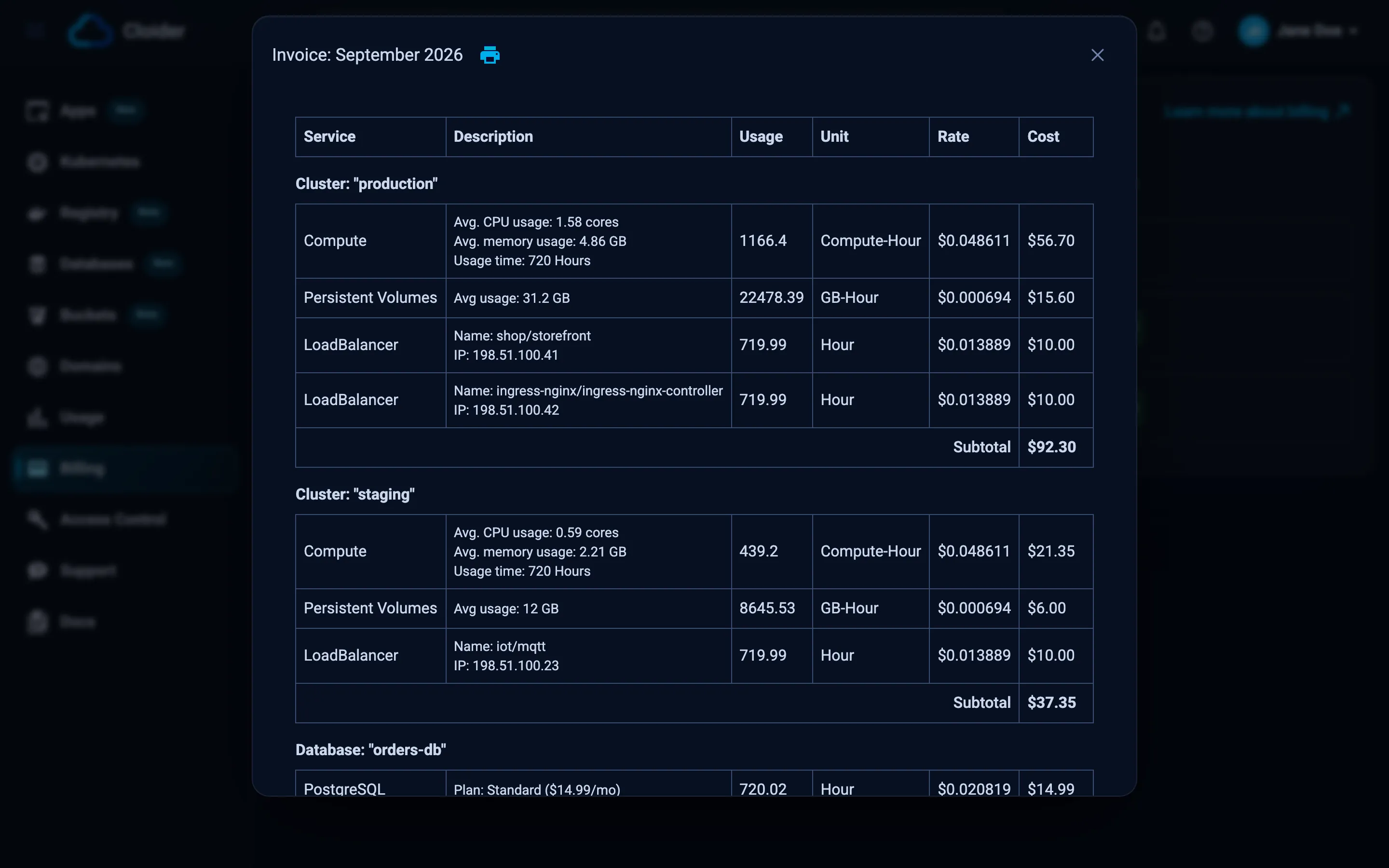
The invoice dialog's columns are:
| Column | Meaning |
|---|---|
| Service | What the line is for. When prices changed during the month, the line names its price period |
| Description | Detail such as Avg. CPU usage: 0.84 cores, Avg usage: 20 GB or Plan: Starter ($15/mo) |
| Usage | The quantity, in the line's unit |
| Unit | Compute-Hour, GB-Hour or Hour |
| Rate | The hourly rate: the monthly price divided by 720 |
| Cost | Usage times rate |
Items with several lines end with a Subtotal, and the invoice ends with Total Amount.
- A Compute-Hour is one compute unit for one hour. See compute units.
- A GB-Hour is one GB stored or provisioned for one hour. 20 GB for a whole 720 hour month is 14,400 GB-Hours.
- If a database changed plan during the month, it has one line per plan, each with the dates it covers.
When is an invoice issued?
Cloider issues invoices once a month for the month that just ended, early on the first days of the new month, after the last day's usage has been finalized. A month with nothing to bill doesn't get an invoice. Deleted resources appear on the invoice for the part of the month they existed.
Paying an invoice
An invoice shows a ✓ Paid tag in the dashboard (Paid in cloider billing, "paid": true in the API) once its payment has been recorded. For questions about payment, an invoice or pricing, open a support request with the type Billing/Payment/Pricing Question or Issue.
Troubleshooting
| Symptom | Cause and fix |
|---|---|
| No Billing in the sidebar | You aren't the account Owner. Only the Owner sees invoices. |
You don't have access to this account billing page! | The request came from an Admin, a Restricted member, or a Read token. Use the Owner's dashboard session or a Read & Write token the Owner generated. |
| Your monthly bill is not due yet! | No invoice has been issued yet. The first one arrives early in the month after you start using resources. |
| An amount looks wrong | Compare it with the resource's daily figures on Usage, then open a Billing support request. |
Next steps
- Usage: costs to date and forecasts.
- Billing model: how every line is metered.
- Pricing: current prices and units.
Frequently asked questions
Where do I find my Cloider invoices?
In the dashboard under Billing, which only the account Owner sees. You can also run cloider billing or call GET /api/billing with the Owner's Read & Write token.
When does Cloider send the monthly invoice?
Early in each month, for the month before, once the last day of usage has been finalized. No invoice is created for a month that cost nothing.
Why can an Admin not see invoices?
Billing is restricted to the account Owner, who is billed for every resource in the account. Admins can see costs on the Usage page.
What is a Compute-Hour on my invoice?
One compute unit used for one hour. A compute unit is one vCPU, or the memory paired with one vCPU at the current ratio, whichever a workload uses more of.
How do I print or save an invoice as PDF?
Open the invoice in Billing and click the printer icon next to its title. Choose Save as PDF in your browser's print dialog.