Manage DNS records for a custom domain
DNS records are the answers Cloider's nameservers give for a custom domain: the address of example.com, the alias
behind www.example.com, where its email goes, and so on. You manage them from the dashboard, the cloider dns CLI
commands, the cloider_dns_record Terraform resource, the API or an AI agent. This page explains how records work on
Cloider, then gives the exact format, rules and examples for every record type.
At a glance
| Which domains | Custom domains. Free cloider.app subdomains don't take records |
| When they are used | Once the domain uses Cloider's nameservers |
| Record types | A, AAAA, CNAME, ALIAS, MX, TXT, NS, CAA, HTTPS, SPF, SRV, PTR |
| Name | Relative to the domain: www, _dmarc, *. Blank for the domain itself (@) |
| Several values | One record per type and name, with one value per line |
| TTL | 60 to 172800 seconds. The dashboard and the CLI suggest 300 |
| Takes effect | Cloider's nameservers answer with the change right after you save. Resolvers see it within the old TTL |
| Cost | No charge |
How records work on Cloider
A record on Cloider has four fields:
| Field | API name | What it is | Example |
|---|---|---|---|
| Record type | record_type | One of the types on this page | A |
| Record name | record_name | The name under the domain. Blank means the domain itself | www for www.example.com |
| Value | record_value | One or more values, one per line | 203.0.113.10 |
| TTL (seconds) | ttl | How long resolvers may cache it, 60 to 172800 | 300 |
What do I type as the record name?
Type the part in front of the domain, never the full name. Cloider appends the domain for you.
| You want an answer for | Domain in Cloider | Record name |
|---|---|---|
example.com | example.com | leave blank (shown as @) |
www.example.com | example.com | www |
api.staging.example.com | example.com | api.staging |
_dmarc.example.com | example.com | _dmarc |
google._domainkey.example.com | example.com | google._domainkey |
_sip._tcp.example.com | example.com | _sip._tcp |
any name under example.com without its own record | example.com | * |
Typing www.example.com as the name creates www.example.com.example.com, which is almost never what you want.
For the domain itself, leave the name blank or type @, which Cloider saves as blank. The dashboard and the CLI show a
blank name as @. In Terraform, leave name out: @ is refused there, since the record would read back with a blank
name.
One record per type and name, many values
Cloider keeps one record per type and name. To give a name several values, for example two IP addresses or two mail servers, put them in the same record, one per line:
203.0.113.10
203.0.113.11
Adding a second record of the same type and name is refused with
A record already exists for 'www'. Instead of creating separate records, edit the existing record and add multiple values on separate lines. This applies to every type except CNAME and ALIAS, which take exactly one value, and PTR.
Empty lines and spaces around values are removed when you save. The same value twice in one record is refused with
Duplicate value found: <value>.
In Terraform, the record's values are a list: values = ["203.0.113.10", "203.0.113.11"]. In the CLI and the API,
separate them with a newline character.
Add a DNS record
- Dashboard
- CLI
- Terraform
- API
- MCP
- Open Domains in the sidebar and click the custom domain.
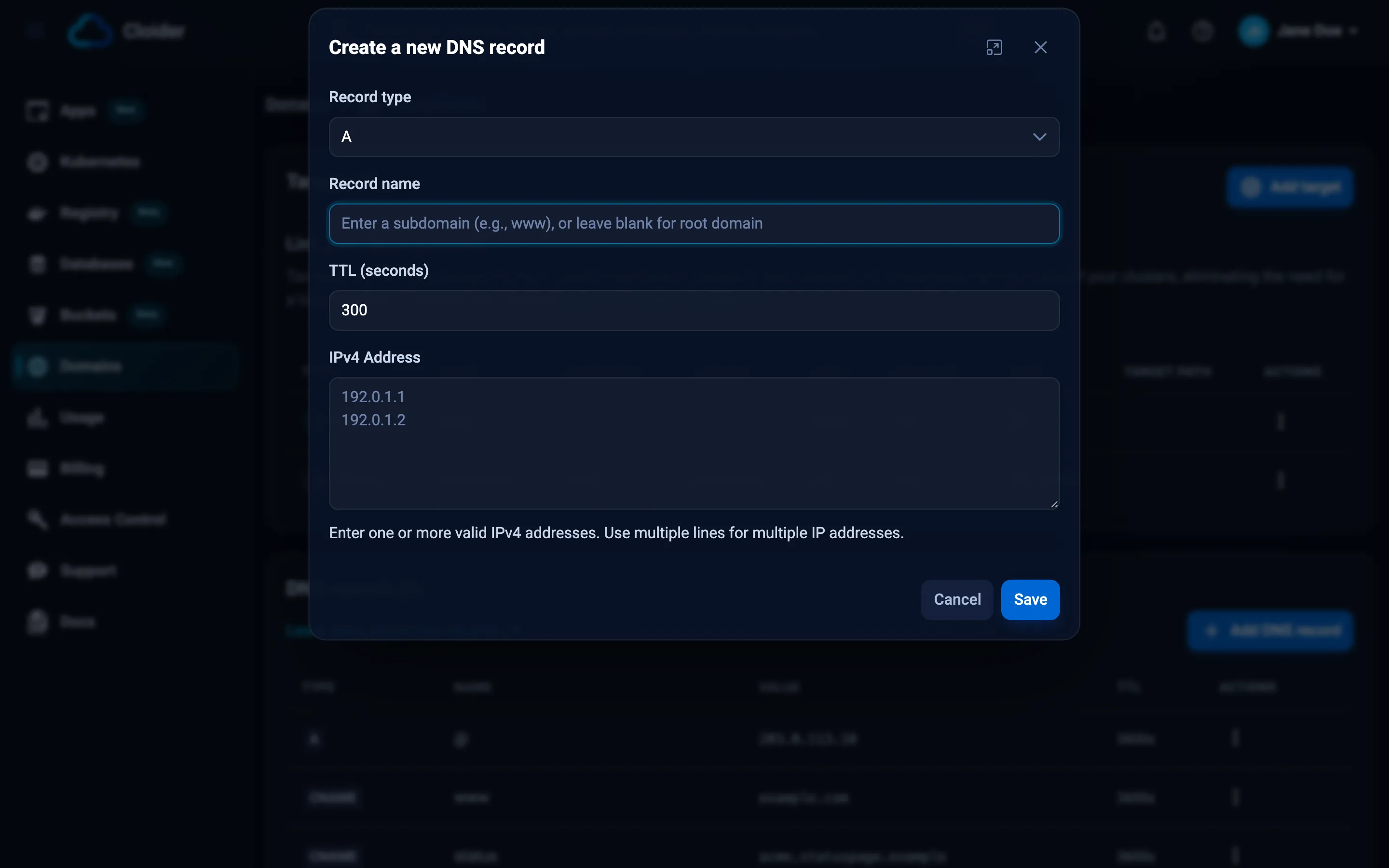
- In the DNS records section, click Add DNS record. The Create a new DNS record dialog opens.
- Choose the Record type.
- Type the Record name, or leave it blank for the domain itself.
- Set TTL (seconds). It starts at
300. - Type the value in the box below. Its label and hint change with the type, for example IPv4 Address for
Aor Mail Server forMX. - Click Save. A message confirms DNS record created successfully, and the record appears in the list.
If a value breaks a rule, the dialog shows the message under the field and keeps what you typed.
cloider dns create example.com --type A --name api --value 203.0.113.10 --ttl 300
✓ Added A record api -> 203.0.113.10
| Flag | Short | Default | Meaning |
|---|---|---|---|
--type | -t | A | Record type, case insensitive |
--name | -n | blank | Record name; blank for the domain itself |
--value | -v | required | Record value; separate several values with newlines |
--ttl | 300 | Time to live in seconds, 60 to 172800 |
Several values in one record, using bash's $'...' quoting for the newline:
cloider dns create example.com --type A --name www --value $'203.0.113.11\n203.0.113.12'
resource "cloider_dns_record" "www" {
  domain = "example.com"
  type   = "A"
  name   = "www"
  values = ["203.0.113.10", "203.0.113.11"]
  ttl    = 300
}
name defaults to "", the domain itself. Each resource is one record: every value of one type at one name. See
cloider_dns_record.
curl -X POST https://cloider.com/api/domains/example.com/dns-records \
  -H "Authorization: Bearer $CLOIDER_TOKEN" \
  -H "Content-Type: application/json" \
  -d '{"record_type": "A", "record_name": "www", "record_value": "203.0.113.10\n203.0.113.11", "ttl": 300}'
{
  "id": 1042,
  "domain_name": "example.com",
  "record_type": "A",
  "record_name": "www",
  "record_value": "203.0.113.10\n203.0.113.11",
  "ttl": 300,
  "internal": false,
  "created_at": "2026-10-20T10:04:11Z",
  "updated_at": "2026-10-20T10:04:11Z"
}
A value that breaks a rule is answered with status 400 and the messages per field:
{
  "errors": {
    "record_value": ["Private IP address detected: 192.168.1.10. Consider if this is intended for public DNS"]
  },
  "data": null
}
Point www.example.com at 203.0.113.10 and 203.0.113.11.
{"domain": "example.com", "type": "A", "name": "www", "value": "203.0.113.10\n203.0.113.11", "ttl": 300}
List a domain's DNS records
- Dashboard
- CLI
- Terraform
- API
- MCP
Open the domain under Domains. The DNS records section lists every record with its Type, Name (a blank
name shows as @), Value and TTL, and an Actions menu with Edit and Delete.
cloider dns list example.com
TYPE    NAME      VALUE                                   TTL
A       @         203.0.113.80                            300
CNAME   www       acme-web.cloider.app.                   3600
MX      @         10 mx1.mail.example.net.                3600
TXT     _dmarc    v=DMARC1; p=quarantine; rua=mailto:dmarc@example.com  3600
Add -o wide for the ID column, which get, update and delete take, or -o json for the API's answer.
Terraform has no data source for listing records. Import existing records into cloider_dns_record resources by id;
see Import an existing record.
curl https://cloider.com/api/domains/example.com/dns-records \
  -H "Authorization: Bearer $CLOIDER_TOKEN"
The answer is an array of records, sorted by type and then name. A domain that isn't in your account returns an empty
array. One record is GET /api/dns-records/<id>.
List the DNS records of example.com.
{"domain": "example.com"}
Edit a DNS record
Editing can change any field, including the type and the name. The same rules as for a new record apply.
- Dashboard
- CLI
- Terraform
- API
- MCP
- In the domain's DNS records section, open the record's Actions menu and click Edit.
- Change the fields in the Edit DNS record dialog.
- Click Save.
cloider dns update changes only the flags you give and keeps the rest:
cloider dns list example.com -o wide      # find the id
cloider dns update 1042 --ttl 3600
✓ Updated A record www -> 203.0.113.10
--value replaces all of the record's values, so give every value you want to keep:
cloider dns update 1042 --value $'203.0.113.10\n203.0.113.12'
Change the resource and run terraform apply. Changing domain replaces the record; any other attribute is updated in
place.
PUT replaces the record, so send all four fields:
curl -X PUT https://cloider.com/api/dns-records/1042 \
  -H "Authorization: Bearer $CLOIDER_TOKEN" \
  -H "Content-Type: application/json" \
  -d '{"record_type": "A", "record_name": "www", "record_value": "203.0.113.10\n203.0.113.12", "ttl": 3600}'
The response is the updated record.
Raise the TTL of the www A record on example.com to one hour.
{"record_id": 1042, "ttl": 3600}
Delete a DNS record
Deleting removes the record from your account, and Cloider's nameservers stop answering with it within a few seconds.
- Dashboard
- CLI
- Terraform
- API
- MCP
Open the record's Actions menu, click Delete, and confirm Are you sure you want to delete this DNS record? with Delete.
cloider dns delete 1042
Delete the A record www -> 203.0.113.10 of example.com? [y/N] y
✓ Deleted DNS record 1042
Add --yes to skip the question in scripts.
Remove the cloider_dns_record resource and run terraform apply.
curl -X DELETE https://cloider.com/api/dns-records/1042 \
  -H "Authorization: Bearer $CLOIDER_TOKEN"
{"message": "DNS record deleted successfully"}
Delete the www A record of example.com.
{"record_id": 1042}
Rules for every record
These checks run whenever you add or edit a record:
| Rule | Message |
|---|---|
| The domain is a custom domain | Can't add records on subdomains. |
| A type is given | Record type is required |
| TTL is 60 to 172800 | TTL must be between 60 and 172800 seconds |
| The value isn't empty | Record value cannot be empty |
| No value twice in one record | Duplicate value found: <value> |
| No identical record already | Duplicate record already exists with the same type, name, and value |
| One record per type and name | <TYPE> record already exists for '<name>'. Instead of creating separate records, edit the existing record and add multiple values on separate lines. |
| A CNAME is alone at its name | CNAME record cannot coexist with other record types for the same name: <name> |
| Nothing else at a CNAME's name | Cannot create <TYPE> record: CNAME already exists for name: <name> |
| One ALIAS per name | ALIAS record already exists for '<name>'. Edit it instead of creating another one |
| No A or AAAA next to an ALIAS, in either direction | ALIAS record cannot coexist with A or AAAA records for the same name: <name> |
Members with read-only access and read-only API tokens can list records but not change them. A suspended account can't add or edit records.
Record types
A record
An A record maps a name to one or more IPv4 addresses.
To point the domain itself at Cloider, use the ALIAS record a custom domain comes with rather than
an A record with Cloider's address: the ALIAS follows the address on its own.
| Value | IPv4 addresses, one per line |
| Example | 203.0.113.10 |
| Common uses | The apex of a domain, a host with a fixed address |
cloider dns create example.com --type A --value 203.0.113.10
Rules:
- Each value must be an IPv4 address:
Invalid IPv4 address: 203.0.113. Expected format: 192.168.1.1. An IPv6 address is refused withIPv6 address detected: 2001:db8::10. Use AAAA record type for IPv6 addresses. - Private and loopback addresses (
10.0.0.0/8,172.16.0.0/12,192.168.0.0/16,127.0.0.0/8) are refused withPrivate IP address detected: 192.168.1.10. Consider if this is intended for public DNS. - Several names can use the same address, such as the apex and
www.
AAAA record
An AAAA record maps a name to one or more IPv6 addresses.
| Value | IPv6 addresses, one per line |
| Example | 2001:db8::10 |
cloider dns create example.com --type AAAA --value 2001:db8::10
An IPv4 address is refused with IPv4 address detected: 203.0.113.10. Use A record type for IPv4 addresses, and other
invalid values with Invalid IPv6 address: <value>. Expected format: 2001:db8::1.
CNAME record
A CNAME record makes a name an alias of another name: resolvers look up the target and use its answers.
| Value | Exactly one domain name; the trailing dot is optional |
| Example | acme-web.cloider.app. |
| Common uses | www and other subdomains pointing at Cloider, a hosted service, a CDN |
cloider dns create example.com --type CNAME --name www --value acme-web.cloider.app.
Rules, most of them from the DNS standard:
- Not at the apex. A blank name, or
@, is refused withCNAME records cannot be used for the root domain (record name cannot be empty). Use anALIASor anArecord for the apex. - One value only:
CNAME records can only have one target. Remove additional values. - A name, never an IP address:
IP address detected: 203.0.113.10. Use A record type for IPv4 addresses, not CNAME. - A full name with at least one dot:
Invalid domain name: web. CNAME must point to a fully qualified domain name (e.g., 'example.com'). - No other record at the same name, in either direction (see Rules for every record).
ALIAS record
An ALIAS record points a name at a host name, like a CNAME, but also works on the domain itself, where DNS doesn't
allow a CNAME. Cloider's nameservers look up the target's IPv4 and IPv6 addresses and answer A and AAAA lookups
for the name with them, so resolvers only ever see addresses. Other records at the same name, such as MX and TXT,
keep working.
A custom domain gets an ALIAS record for the domain itself when it's added, unless it's under another of the
account's custom domains (such as www.example.com next to example.com). It points at cloider.app until a target
routes the domain to an app, then at that app's free subdomain, such as acme-web.cloider.app, or it stays on
cloider.app if the app has none. Only an ALIAS that still points at cloider.app is moved. It's the recommended way
to point the domain at Cloider.
| Value | Exactly one domain name; the trailing dot is optional |
| Example | myapp.herokuapp.com |
| Common uses | The apex of a domain served by Cloider (your app's free subdomain, or cloider.app), or pointing at a hosting service, load balancer or CDN that gives you a host name, not an IP address |
cloider dns create example.com --type ALIAS --value myapp.herokuapp.com
How it's answered:
- The answers carry the queried name,
example.com, and the target's current addresses. When the target's addresses change, the answers follow without you editing the record. - The TTL of an answer is the lower of the record's TTL and the target's own TTL, where a target TTL under 30 seconds counts as 30 and one over an hour as an hour.
- A target without IPv6 addresses gives an empty
AAAAanswer, as anAonly host would. - A target in the same domain, such as
www.example.comforexample.com, is answered from its records directly, following itsCNAMEandALIASrecords. Any other target is looked up in public DNS, even one in another domain on Cloider. - A
CNAMEin the same domain that points at the name, such aswwwpointing atexample.com, is answered with theALIAS's addresses too. - Private and loopback IPv4 addresses in the target's answer, the ones an
Arecord refuses, are left out. - Services that pick addresses by location, such as CDNs, see Cloider's nameservers as the client, so they answer with addresses near Cloider rather than near the visitor.
- If the target can't be looked up, the nameservers keep answering with the addresses they last saw for up to an hour,
with a 30 second TTL, then answer
SERVFAILso resolvers try again soon.
Rules:
- One value only:
ALIAS records can only have one target. Remove additional values. - A name, never an IP address:
IP address detected: 203.0.113.10. Use A or AAAA record types for IP addresses, not ALIAS. - A full name with at least one dot:
Invalid domain name: web. ALIAS must point to a domain name like 'myapp.herokuapp.com'. - Not its own name:
An ALIAS record can't point to its own name. - No
A,AAAAorCNAMErecord at the same name, in either direction (see Rules for every record). The record the domain was created with is the exception: while it still points at Cloider (cloider.appor a name under it), anA,AAAAorALIASwith a blank name takes its place instead of being refused.
To check what it answers, ask for the A record: dig @ns1.cloider.com example.com A +short. There is no ALIAS
type in DNS itself, so dig can't ask for one.
MX record
An MX record says which servers receive email for a name, each with a priority. Lower numbers are tried first.
| Value | <priority> <mail server>, one per line. Priority 0 to 65535 |
| Example | 10 mx1.mail.example.net. |
cloider dns create example.com --type MX --ttl 3600 \
  --value $'10 mx1.mail.example.net.\n20 mx2.mail.example.net.'
Messages: MX record missing priority or hostname: <value>. Expected format: '10 mail.example.com',
Invalid priority in MX record: <priority>. Must be a number between 0-65535, and
Invalid hostname in MX record: <host>. Must be a valid domain name. Provider specific values are in
Email DNS records.
TXT record
A TXT record holds free text. It carries SPF, DKIM and DMARC policies and the verification tokens that Google,
Microsoft and other services ask you to add.
| Value | Text, one value per line. Up to 4096 characters per value |
| Example | v=spf1 include:mail.example.net ~all |
cloider dns create example.com --type TXT --ttl 3600 \
  --value $'v=spf1 include:mail.example.net ~all\ngoogle-site-verification=rXOxyZounnZasA8Z7oaD3c14JdjS9aKSWvsR1EbUSIQ'
- Don't add quotes. Type the text as the service gives it, without surrounding
". Quotes you type become part of the value. - Each line is its own TXT record in DNS answers. An SPF policy and several verification tokens can share a name.
- Long values are fine. A value over 255 characters, such as a DKIM key, is sent as several strings of one record, which is how DNS stores long text. Values over 4096 characters are refused.
- A value over 255 characters with no space in it is refused with
TXT record appears to be very long without spaces. Consider breaking it into multiple records. DKIM keys (v=DKIM1; k=rsa; p=...) contain spaces and are accepted.
NS record
An NS record names the nameservers for a name. At the apex it lists the domain's own nameservers; on a subdomain it
delegates that subdomain to other nameservers.
| Value | Nameserver host names, one per line, each ending with a dot |
| Example | ns1.cloider.com. |
# Delegate dev.example.com to another DNS provider
cloider dns create example.com --type NS --name dev --ttl 86400 \
  --value $'ns1.other-dns.example.net.\nns2.other-dns.example.net.'
A value without the trailing dot is refused with
NS record should end with a dot: <value>. Consider: <value>.. The domain itself doesn't need NS records, see
Does the domain need NS records?.
CAA record
A CAA record lists the certificate authorities allowed to issue certificates for a name. Without any CAA record,
every authority may.
| Value | <flags> <tag> <value>, one per line. Flags 0 to 255; tag issue, issuewild or iodef |
| Example | 0 issue "letsencrypt.org" |
cloider dns create example.com --type CAA --ttl 3600 \
  --value $'0 issue "letsencrypt.org"\n0 iodef "mailto:security@example.com"'
Cloider's certificates for custom domains come from Let's Encrypt. If you add CAA records, include
0 issue "letsencrypt.org", or Cloider can't get a certificate for the domain. See
HTTPS certificates.
Messages: CAA record incomplete: <value>. Expected format: '0 issue "letsencrypt.org"',
Invalid flags in CAA record: <flags>. Must be a number 0-255, and
Invalid tag in CAA record: <tag>. Must be 'issue', 'issuewild', or 'iodef'.
HTTPS record
An HTTPS record (service binding) gives HTTPS clients connection hints, such as the HTTP versions a host supports,
before they connect.
| Value | <priority> <target> [parameters], one per line. Priority 0 to 65535; target . or a host name |
| Example | 1 . alpn="h2,h3" |
cloider dns create example.com --type HTTPS --value '1 . alpn="h2,h3"'
Messages: HTTPS record incomplete: <value>. Expected: 'priority target [params]',
Invalid priority in HTTPS record: <priority>. Must be 0-65535, and
Invalid target in HTTPS record: <target>. Must be '.' or valid hostname. Only add an HTTPS record when you know the
hints match what the server behind the name supports.
SRV record
An SRV record says on which host and port a service runs, for protocols that look services up this way, such as SIP,
XMPP and some game servers.
| Name | _<service>._<protocol>, for example _sip._tcp |
| Value | <priority> <weight> <port> <target>, one per line. Each number 0 to 65535 |
| Example | 10 60 5060 sip1.example.com. |
cloider dns create example.com --type SRV --name _sip._tcp --ttl 3600 \
  --value $'10 60 5060 sip1.example.com.\n20 40 5060 sip2.example.com.'
A value without four parts is refused with
SRV record must have exactly 4 parts: <value>. Expected: 'priority weight port target'.
SPF record
The SPF record type is a retired way of publishing an SPF policy. Mail servers look SPF up as TXT, so publish your
policy as a TXT record.
Cloider accepts SPF records that start with v=spf1 (SPF record must start with 'v=spf1') and returns them for
TXT queries too.
Don't keep an SPF record and a TXT record with an SPF policy at the same name. Both are returned to TXT queries,
and a name with two SPF policies fails SPF checks, so your mail can be rejected. Use one TXT record.
PTR record
A PTR record maps a reverse DNS name, such as 10.113.0.203.in-addr.arpa, to a host name. Reverse DNS for an IP
address is delegated by whoever owns the address block, usually your hosting or network provider, so a PTR record
only has an effect in a reverse zone that has been delegated to Cloider. Cloider doesn't check the format of PTR
values; enter one host name ending with a dot.
Wildcard records
A record named * answers for every name under the domain that has no record of the queried type: with an A record
* pointing at 203.0.113.10, anything.example.com and a.b.example.com both resolve to it.
cloider dns create example.com --type A --name '*' --value 203.0.113.10
- A wildcard doesn't answer for the domain itself. Add a blank name record for
example.com. - A name's own record of the same type wins over the wildcard.
- Answers carry the queried name, as resolvers expect.
Wildcard records don't route traffic by themselves: a target routes one exact host name.
How fast do changes take effect?
Cloider's nameservers answer with a new or changed record right after you save it. Resolvers that cached the old
answer keep it until its TTL runs out, so the change reaches everyone within the old record's TTL. A name that didn't
exist before can be cached as "doesn't exist" by resolvers that looked for it, for at most 300 seconds: the time set
by the SOA record that Cloider's negative answers carry.
Check what Cloider answers right now, bypassing caches:
dig @ns1.cloider.com www.example.com A +short
Import an existing record into Terraform
Records created in the dashboard or the CLI can be brought under Terraform by their id:
cloider dns list example.com -o wide
import {
  to = cloider_dns_record.www
  id = "1042"
}
See Import existing resources.
Troubleshooting
| Problem | Cause and fix |
|---|---|
Can't add records on subdomains. | Free cloider.app subdomains have no records. Add a custom domain |
... record already exists for '...' | Edit the existing record and add the value on a new line |
CNAME records cannot be used for the root domain ... | Use an ALIAS or A record for the apex, and CNAME for subdomains |
Private IP address detected: ... | Public DNS can't point at private addresses. Use the public address |
The record exists but dig doesn't show it | Check the name (www, not www.example.com), ask @ns1.cloider.com directly, and check that the domain uses Cloider's nameservers |
| The old value still shows up | A resolver has it cached. Wait for the old TTL, or test with dig @ns1.cloider.com |
More checks are in Domains troubleshooting.
Next steps
- Email DNS records: MX, SPF, DKIM and DMARC for Google Workspace and Microsoft 365.
- Targets: serve an app or a cluster Service on the domain.
cloider dnscommand reference andcloider_dns_record.
Frequently asked questions
Which DNS record types does Cloider support?
A, AAAA, CNAME, ALIAS, MX, TXT, NS, CAA, HTTPS, SPF, SRV and PTR records, on custom domains that use Cloider's nameservers.
How do I add several IP addresses or mail servers to one name?
Put them in one record, one value per line. Cloider keeps one record per type and name, and refuses a second record of the same type and name.
What do I type for the root domain?
Leave the record name blank. The dashboard and the CLI show a blank name as @.
Can I put a CNAME on my root domain?
No. DNS doesn't allow a CNAME at the apex of a domain. Use an ALIAS record for example.com, which Cloider answers with the target's addresses, or an A record, and a CNAME for www.example.com.
Should I put quotes around TXT values?
No. Enter the text exactly as the service gives it, without surrounding quotes. Quotes you type become part of the value.
What TTL values are allowed?
Any number of seconds from 60 to 172800 (two days). The dashboard and the CLI start at 300.
Can I point a record at a private IP address?
No. Addresses in 10.0.0.0/8, 172.16.0.0/12, 192.168.0.0/16 and 127.0.0.0/8 are refused for A records.