Point your domain to Cloider's nameservers
Cloider's nameservers are ns1.cloider.com, ns2.cloider.com, ns3.cloider.com and ns4.cloider.com. When you set
them as your domain's nameservers at your registrar, Cloider answers DNS for the domain with the records you manage in
Cloider. This page shows how to change the nameservers at popular registrars, how to check the change, and exactly how
Cloider's nameservers answer queries.
At a glance
| Nameservers | ns1.cloider.com, ns2.cloider.com, ns3.cloider.com, ns4.cloider.com |
| Set them at | Your registrar, where the domain is registered |
| Time to take effect | Usually minutes to a few hours, up to 48 hours |
| What they answer with | The records on the domain's DNS records list in Cloider, plus the domain's SOA and NS records |
| Record types answered | A, AAAA, CNAME, MX, TXT, NS, SOA, SRV, PTR, CAA, HTTPS, SPF. ALIAS records are answered as A and AAAA |
| Transport | UDP and TCP on port 53 |
| DNSSEC | Not supported. Turn DNSSEC off at your registrar before switching |
| Cost | No charge |
Where to find the nameservers
The four names are the same for every domain and every account. You find them:
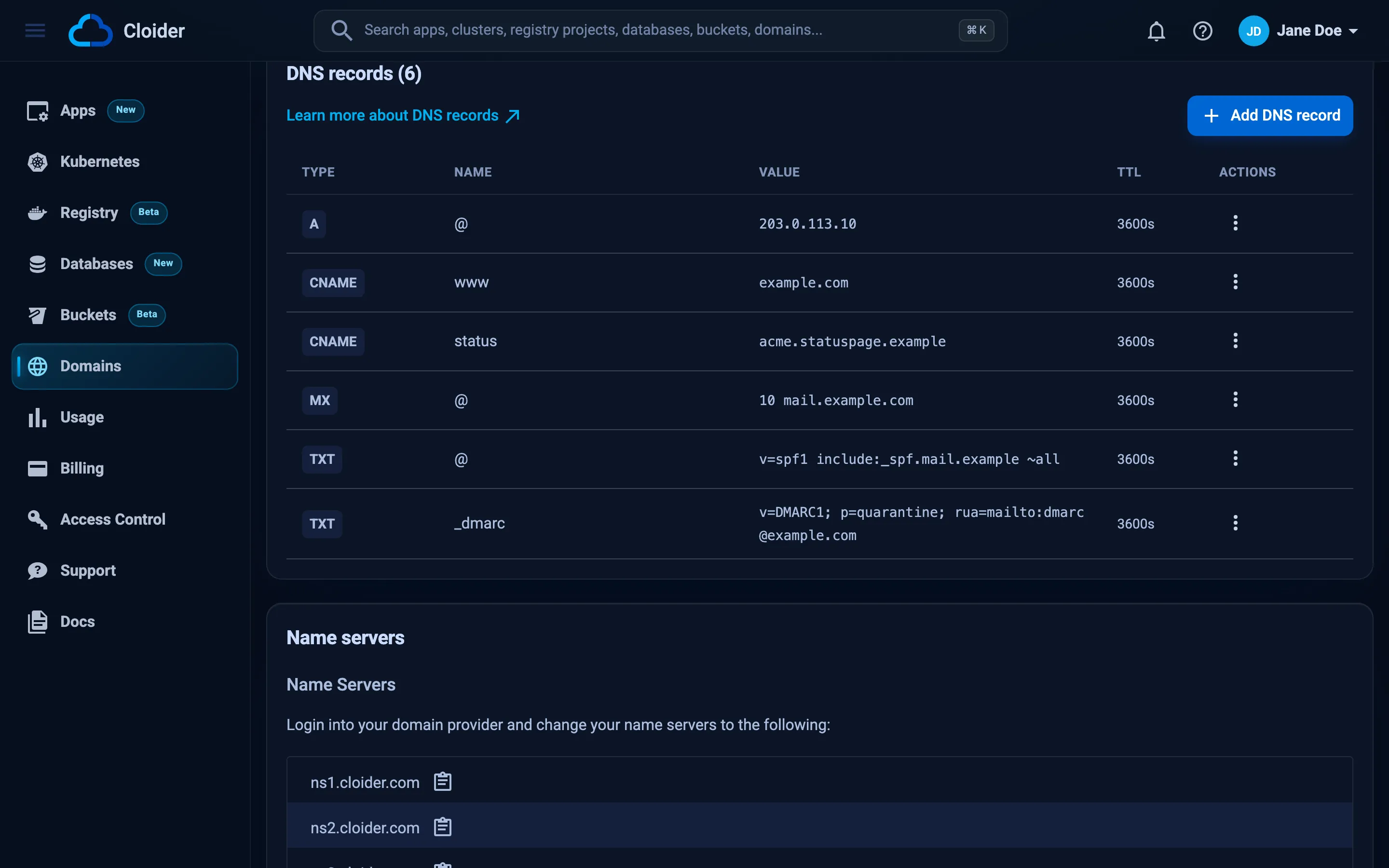
- Dashboard: on the Activate Cloider DNS step when you add a custom domain, and in the Name servers section of every custom domain's page, each with a copy button. The text reads Login into your domain provider and change your name servers to the following:.
- CLI:
cloider domain create example.comprints them. - Terraform: the
nameserversattribute of thecloider_optionsdata source. - API:
nameserversinGET https://cloider.com/api/options.
Before you change the nameservers
- Add the domain to Cloider. See Add a custom domain.
- Copy the records the domain already uses into Cloider, especially
MXandTXTrecords for email. Once the nameservers switch, only Cloider's records answer. See Recreate your existing DNS records. - Turn off DNSSEC if it is enabled. At most registrars this is a DNSSEC switch or a list of DS records to delete. Cloider's nameservers don't sign answers, and a domain that keeps a DS record while its nameservers don't sign stops resolving for every resolver that validates DNSSEC.
- Lower the TTL of important records at your current DNS provider a day ahead, if you can. That shortens the time some visitors see old answers.
Change the nameservers at your registrar
At every registrar the change is the same: find the domain's nameserver setting, switch from the registrar's own DNS to custom nameservers, enter the four Cloider names, remove any others, and save. Registrars rename their menus from time to time, so if a label below doesn't match, look for Nameservers, DNS or Custom DNS in the domain's settings, or search your registrar's help center for "change nameservers".
- Namecheap
- GoDaddy
- Cloudflare
- Squarespace Domains
- Amazon Route 53
- Other registrars
- Sign in to Namecheap and open Domain List.
- Click Manage next to the domain.
- In the Nameservers section, change the dropdown from Namecheap BasicDNS to Custom DNS.
- Enter
ns1.cloider.comandns2.cloider.com, click Add Nameserver and enterns3.cloider.comandns4.cloider.com. - Click the green check mark to save.
Namecheap says the change can take up to 48 hours, and it is often visible much sooner.
- Sign in to GoDaddy and open your Domain Portfolio.
- Select the domain, then open its DNS settings and the Nameservers tab.
- Click Change Nameservers and choose to use your own nameservers.
- Enter the four Cloider nameservers, adding fields as needed.
- Save, and confirm the warning that GoDaddy's DNS records will no longer be used.
Domains registered with Cloudflare Registrar use Cloudflare's own nameservers, and Cloudflare doesn't let you replace them with another provider's. Keep DNS at Cloudflare and point the host names you serve at Cloider from there, as described in Keep your current DNS provider. Set those records to DNS only (grey cloud).
Domains registered elsewhere but using Cloudflare DNS: change the nameservers at the registrar where the domain is registered, using that registrar's steps. Cloudflare's dashboard can't change them for you.
Squarespace Domains took over domains registered with Google Domains.
- Sign in to Squarespace and open the Domains dashboard.
- Select the domain and open its DNS settings.
- Find Domain nameservers and choose to use custom nameservers.
- Enter the four Cloider nameservers and save.
For domains registered with Route 53 (the registrar part of the service):
- Open the Route 53 console and choose Registered domains.
- Select the domain and choose the action to edit its name servers.
- Replace the four
awsdnsname servers withns1.cloider.com,ns2.cloider.com,ns3.cloider.comandns4.cloider.com. - Save the change.
A Route 53 hosted zone for the domain stops being used once the name servers change. Delete it when you no longer need it, to stop paying for it.
Porkbun, Gandi, IONOS, OVHcloud, Hostinger, Dynadot and most other registrars work the same way:
- Open the domain's settings at the registrar.
- Find Nameservers (sometimes under DNS) and choose custom or external nameservers.
- Enter all four Cloider nameservers and remove the registrar's.
- Save.
Some registrars also offer "glue records" or "child nameservers" in the same area. You don't need them for Cloider.
Some country code registries test new nameservers before accepting a change, and expect them to answer for the domain
with SOA and NS records. Cloider's nameservers answer both within seconds of the domain being added. If your
registrar still reports a failed nameserver check, keep DNS at your current provider and point the host names at
Cloider from there, or contact support.
Does the domain need NS records?
No. Cloider's nameservers answer NS queries for the domain itself with ns1.cloider.com to ns4.cloider.com, and
SOA queries with the domain's SOA record, within seconds of the domain being added. Tools and services that ask "which
nameservers does example.com use?" get the right answer from Cloider without any record of yours.
An NS record you add at the apex replaces those four in the answer, so leave the name blank only for nameservers the
domain is really delegated to. NS records on another name, such as dev, are answered as you add them.
Check that the nameservers have changed
There are two places to look: the registry, which says which nameservers the domain uses, and Cloider's nameservers, which answer with your records.
# What the .com registry hands out (use your TLD's servers for other TLDs)
dig example.com NS @a.gtld-servers.net +noall +authority

# Follow the whole chain from the root, for any TLD
dig +trace example.com A

# What Cloider's nameservers answer for the domain
dig @ns1.cloider.com example.com A +short
example.com.		172800	IN	NS	ns1.cloider.com.
example.com.		172800	IN	NS	ns2.cloider.com.
example.com.		172800	IN	NS	ns3.cloider.com.
example.com.		172800	IN	NS	ns4.cloider.com.
On Windows, use nslookup against Cloider's nameserver, and your registrar's dashboard or a whois lookup for the
registry's view:
nslookup -type=A example.com ns1.cloider.com
If the registry still lists the old nameservers, the change hasn't been saved or published yet: check the registrar.
If it lists Cloider's nameservers but your browser still sees the old site, resolvers still have old answers cached.
Wait, or test with a public resolver such as dig @1.1.1.1 example.com.
How Cloider's nameservers answer
Cloider's nameservers are authoritative only: they answer questions about domains added to Cloider, from the
records you add, and they don't look up other names for you. Knowing their behavior helps you read dig output.
| Behavior | What you see |
|---|---|
| Authoritative answers | Answers for domains added to Cloider carry the aa flag. Recursion isn't offered (no ra flag), so don't use ns1.cloider.com as your computer's resolver |
| Other domains | A query for a domain that isn't added to Cloider gets REFUSED |
| Record types | A, AAAA, CNAME, MX, TXT, NS, SOA, SRV, PTR, CAA, HTTPS and SPF queries are answered. Other types get an empty answer. An ALIAS record answers A and AAAA queries with its target's addresses, and SERVFAIL when the target can't be looked up |
| TTL | Each answer carries the TTL you set on the record, 60 to 172800 seconds. An ALIAS answer carries the target's TTL when that is lower, at least 30 seconds and at most an hour |
| Name exists, type doesn't | Status NOERROR with an empty answer (NODATA), for example an AAAA query for a name that has only an A record |
| Name doesn't exist | Status NXDOMAIN. The apex always exists, since it has SOA and NS records even before you add any |
| CNAME | A query for a name that has a CNAME returns the CNAME. When the target is in the same domain, its records (or an ALIAS's addresses) follow in the same answer, up to 8 CNAMEs deep. Otherwise your resolver follows the CNAME itself, also to another domain on Cloider |
| Wildcards | A record named * answers for any name below the domain that has no record of the queried type, under the queried name. It doesn't answer for the apex |
| TXT | Each value is a TXT record of its own. A value longer than 255 characters is sent as several strings in one record, as the DNS standard requires |
| SPF type | Records of type SPF are also returned for TXT queries, because mail servers look SPF up as TXT |
| SOA | Every domain has an SOA record naming ns1.cloider.com as the primary nameserver and hostmaster.cloider.com as the contact. NXDOMAIN and empty answers carry it in the authority section, so resolvers cache them for at most 300 seconds |
| NS | The apex answers with ns1.cloider.com to ns4.cloider.com, unless you add NS records there |
| Transport | UDP and TCP on port 53. A UDP answer too big for the client comes back truncated, and the client asks again over TCP |
| DNSSEC | Answers aren't signed |
Move your DNS away from Cloider
To move the domain to another DNS provider later:
- Recreate every record at the new provider. List them with
cloider dns list example.comor export them withcloider dns list example.com -o json. - Change the nameservers at your registrar to the new provider's.
- Wait at least 48 hours, so resolvers stop asking Cloider.
- Delete the domain in Cloider if you no longer route it with targets. See Delete a domain.
The domain's page in the dashboard reminds you of this order: Make sure to configure your domain with another DNS provider before deleting this domain.
Next steps
- DNS records: add the records the domain needs.
- Targets: route the domain to an app, a cluster Service or a bucket's website.
- Troubleshooting: what to do when the domain doesn't resolve.
Frequently asked questions
What are Cloider's nameservers?
ns1.cloider.com, ns2.cloider.com, ns3.cloider.com and ns4.cloider.com. Enter all four at your registrar as custom nameservers.
How long does a nameserver change take?
Usually from a few minutes to a few hours. Resolvers can keep the old nameservers cached for up to 48 hours, so plan for that in the worst case.
Do I need to transfer my domain to Cloider?
No. The domain stays registered at your registrar. You only change its nameservers there.
Does Cloider DNS support DNSSEC?
No. Turn DNSSEC off at your registrar, by removing the DS record, before you switch the nameservers to Cloider. Otherwise validating resolvers reject the domain's answers.
Can I use Cloider's nameservers with a domain registered at Cloudflare?
Domains registered with Cloudflare Registrar keep Cloudflare's nameservers. Keep DNS at Cloudflare and add CNAME or A records that point the host names you serve at Cloider, in DNS only mode.