Route a domain to apps, services and buckets with targets
A target is a route from a domain, or a path of it, to a Cloider app, to a Service in a
Kubernetes cluster, or to a bucket's static website. With
targets, https://example.com/ can serve the web app, https://example.com/api a Service in your production
cluster, and https://example.com/docs another app, each over HTTPS, while https://docs.example.com/ serves a
website straight from a bucket. A custom domain can also point straight at a
LoadBalancer in one of your clusters, for any port and protocol. This page is the
complete reference for targets: how they route, every field, path rewrites, and the errors you can hit.
For the same topic from the other side, see Domains for apps and Expose Kubernetes services.
At a glance
| Routes | A host name and a path prefix, such as example.com/api |
| To | An app, a Service port in one of your clusters, a bucket's static website, or a LoadBalancer's IP |
| Types | App, Cluster, Bucket and LoadBalancer |
| Domains | Free subdomains and custom domains. A LoadBalancer target needs a custom domain |
| Paths | One target per path per domain. The longest matching path wins. Bucket and LoadBalancer targets always use / |
| Rewrites | Optional target_path replaces the matched path before the request is forwarded |
| Protocol to your code | Plain HTTP. Cloider terminates HTTPS. A LoadBalancer target passes every port and protocol straight through |
| Certificates | Automatic. See HTTPS certificates. None for a LoadBalancer target: you manage its TLS |
| Cost | No charge. Targets replace a load balancer and an Ingress controller. A LoadBalancer target is free, the LoadBalancer Service it points at is billed |
| Tools | Dashboard, cloider target, cloider_target, /api/targets, MCP |
How does a target route a request?
- The browser looks up the host name. It must resolve to Cloider: free subdomains always do, and a custom domain does once you point it at Cloider.
- Cloider terminates HTTPS with the certificate for that host name.
- Among the host name's targets, the one with the longest
paththat matches the request wins. A path matches itself and everything below it:/apimatches/apiand/api/orders. - If the target has a
target_pathdifferent from itspath, the matched prefix is replaced. - The request is forwarded as plain HTTP to the app's port or to the Service's port. For a Bucket target, the bucket's website answers it, as described in Static websites.
Plain http:// requests are redirected to https://.
A LoadBalancer target is the exception: Cloider only answers the domain's DNS lookups with the LoadBalancer's IP, and none of the steps above happen. See Point a domain at a LoadBalancer.
Target fields
| Field (API) | Dashboard | CLI flag | Terraform | Meaning |
|---|---|---|---|---|
domain_name | the domain's page | <domain> argument | domain | The domain to route. Its name is the host name served |
target_type | Target type | --app, --bucket, or --cluster with --service or --loadbalancer | app_id, bucket_id, or cluster_id with service or loadbalancer | App, Bucket, Cluster or LoadBalancer. Defaults to Cluster in the API |
app_id | App | --app <name or id> | app_id | The app's id. App targets only |
bucket_id | Bucket | --bucket <name or id> | bucket_id | The bucket's id. Bucket targets only |
bucket_name | set for you | set for you | set for you | The bucket's name, shown in lists. Bucket targets only |
cluster_id | Cluster | --cluster <name or id> | cluster_id | The cluster's id. Cluster and LoadBalancer targets only |
cluster_name | set for you | set for you | set for you | The cluster's name, shown in lists |
namespace | Namespace | --service or --loadbalancer <namespace>/<service> | namespace, or loadbalancer | The Service's namespace. Cluster and LoadBalancer targets only |
service | Service | --service or --loadbalancer <namespace>/<service> | service, or loadbalancer | The Service's name. Cluster and LoadBalancer targets only |
loadbalancer_ip | set for you | set for you | loadbalancer_ip | The IP the domain's A record points at, empty while the LoadBalancer has none. LoadBalancer targets only |
port | Port | --port (default: the Service's only port) | port | The Service's port, which must speak HTTP |
protocol | from the port | --protocol (default: the port's own) | protocol (default TCP) | TCP or UDP, as the Service declares the port |
path | Path | --path (default /) | path (default /) | The path prefix on the domain. Always / for Bucket and LoadBalancer targets |
target_path | Target path | --target-path (default: --path) | target_path (default: path) | The path the request is forwarded with. Always / for Bucket and LoadBalancer targets |
For an app target you only choose the app: Cloider routes to the app's port itself, and the response carries the app's app_name and app_label. For a bucket target you only choose the bucket, and the response carries its bucket_name. Every target has an id, hashed_id, such as
t4k9vq, and a created_at time.
Before you begin
- A domain in your account: a free subdomain or a custom domain.
- For an app target: an app that has deployed. The dashboard offers only
Readyapps; the CLI, Terraform, the API and MCP also accept aPausedone. - For a cluster target: a cluster with a Service to route to. List them with
cloider cluster services <cluster>or in the dashboard's target dialog. See Deploy a workload. - For a bucket target: a public bucket in the Ready state with its static website on. See Static websites.
- For a LoadBalancer target: a custom domain with no other targets, and a LoadBalancer Service that has an IP, in a cluster that is Ready or Paused.
- Write access to the account. Members with read-only access can see targets but not change them.
Route a domain to an app
- Dashboard
- CLI
- Terraform
- API
- MCP
- Open Domains in the sidebar and click the domain.
- In the Targets section, click Add target. The Add a new target dialog opens.
- Choose App as the Target type. The App list shows each app with its port and status, and only
Readyapps can be picked. The firstReadyapp is picked for you, and the line under the list says where requests go, for example routes to blog on port 3000. - Keep Path as
/to route the whole domain, or type a path such as/blog. - Target path copies what you type in Path until you change it yourself. Keep it equal to the path to forward requests as they are made, or see Rewrite the path.
- Click Save. The dialog closes and the target appears in the Targets list.
You don't choose a cluster, namespace, Service or port for an app: Cloider routes to the app's own port. If no app is
Ready yet, the dialog says None of your apps are Ready yet. Wait for an app to finish deploying before adding an
App target.
cloider target create example.com --app web
cloider target create example.com --app blog --path /blog
✓ Routed example.com/ to the app
✓ Routed example.com/blog to the app
--app takes the app's name, label or id.
resource "cloider_target" "web" {
  domain = "example.com"
  app_id = "w4d8hz" # from `cloider app list -o wide`
}

resource "cloider_target" "blog" {
  domain = "example.com"
  path   = "/blog"
  app_id = "a7c2mq"
}
curl -X POST https://cloider.com/api/targets \
  -H "Authorization: Bearer $CLOIDER_TOKEN" \
  -H "Content-Type: application/json" \
  -d '{"domain_name": "example.com", "target_type": "App", "app_id": "w4d8hz", "path": "/"}'
{
  "hashed_id": "t4k9vq",
  "domain_name": "example.com",
  "message": "Target created successfully"
}
Route example.com to the web app, and example.com/blog to the blog app.
{"domain": "example.com", "app": "web"}
{"domain": "example.com", "app": "blog", "path": "/blog"}
Route a domain to a Service in a cluster
- Dashboard
- CLI
- Terraform
- API
- MCP
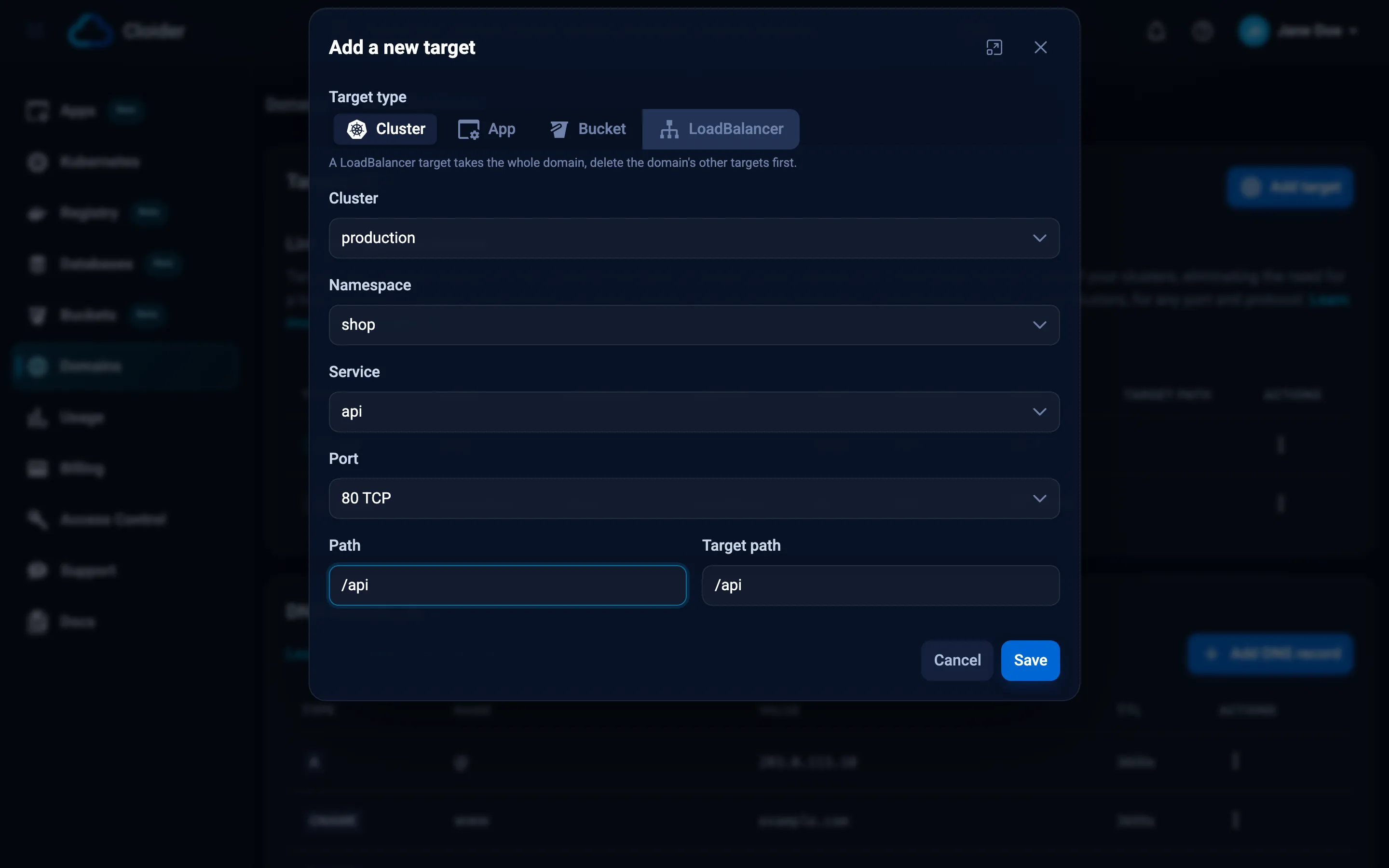
- Open the domain under Domains and click Add target.
- Choose Cluster as the Target type. It is the type the dialog opens on when you have a cluster with a Service.
- Pick the Cluster, then the Namespace, the Service and the Port. The lists show the Services that
exist in the cluster right now, and each list starts on its first entry. A port reads like
80 TCP. - Set Path. Target path follows it until you change it.
- Click Save.
If the cluster you pick has no Services, the dialog says The selected cluster "staging" has no Kubernetes services. You need to deploy at least one service to this cluster before adding targets. and the other fields stay disabled.
cloider cluster services production
cloider target create example.com --cluster production --service shop/api --port 80 --path /api
✓ Routed example.com/api to production/shop/api:80
--service is <namespace>/<service>. --port can be left out when the Service has a single port.
resource "cloider_target" "api" {
  domain     = "example.com"
  path       = "/api"
  cluster_id = cloider_cluster.production.id
  namespace  = "shop"
  service    = "api"
  port       = 80
}
Find the cluster's id and its Services with GET /api/clusters/services:
curl https://cloider.com/api/clusters/services -H "Authorization: Bearer $CLOIDER_TOKEN"
[
  {
    "id": "c8m2pd",
    "name": "production",
    "services": [
      {"service": "api", "namespace": "shop", "ports": [{"protocol": "TCP", "port": 80}]},
      {"service": "web", "namespace": "shop", "ports": [{"protocol": "TCP", "port": 80}]}
    ]
  }
]
Then create the target:
curl -X POST https://cloider.com/api/targets \
  -H "Authorization: Bearer $CLOIDER_TOKEN" \
  -H "Content-Type: application/json" \
  -d '{
    "domain_name": "example.com",
    "target_type": "Cluster",
    "cluster_id": "c8m2pd",
    "cluster_name": "production",
    "namespace": "shop",
    "service": "api",
    "port": 80,
    "protocol": "TCP",
    "path": "/api"
  }'
{
  "hashed_id": "t7p3xr",
  "domain_name": "example.com",
  "message": "Target created successfully"
}
Send cluster_name too: it is stored as given and shown in target lists.
Route example.com/api to the api service in the shop namespace of my production cluster.
{"domain": "example.com", "cluster": "production", "service": "shop/api", "port": 80, "path": "/api"}
The agent can first call list_cluster_services to find the namespace, Service and port.
Route a domain to a bucket's website
A Bucket target serves a bucket's static website on the domain. It takes the whole
domain: its path and target path are always /, and the website maps every request path to a file in the bucket.
Turn the bucket's website on first.
- Dashboard
- CLI
- Terraform
- API
- MCP
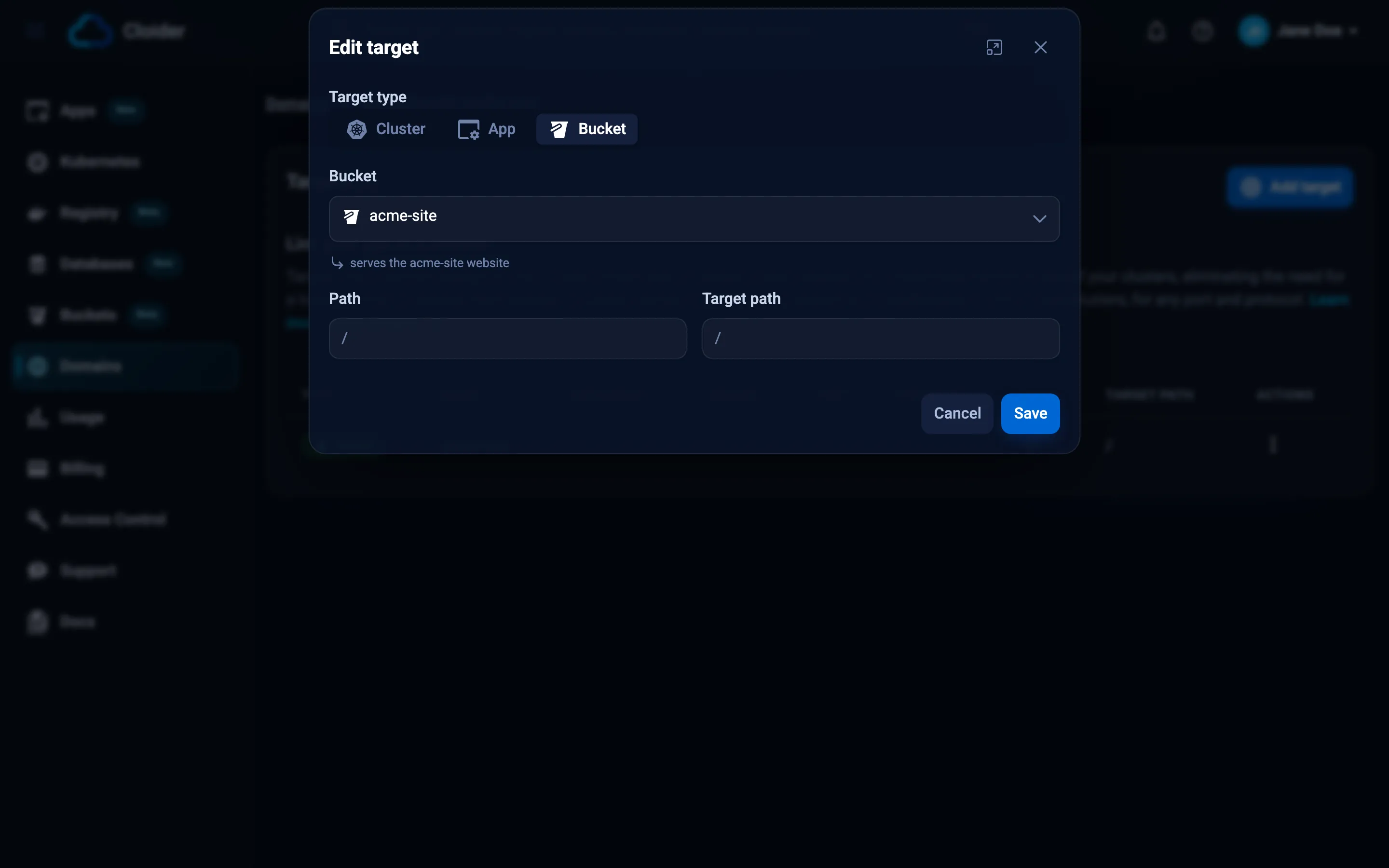
- Open the domain under Domains and click Add target.
- Choose Bucket as the Target type. The Bucket list shows your buckets, and only
Readybuckets with their website on can be picked: one whose website is off is marked website off, and one that isn'tReadyshows its status. The first bucket that can be picked is picked for you, and the line under the list reads, for example, serves the acme-site website. - Path and Target path are set to
/and can't be changed. - Click Save.
If no bucket has its website on, the dialog says None of your buckets has its website on. Turn it on from a bucket's Settings before adding a Bucket target. Turn it on as described in Static websites.
cloider target create docs.example.com --bucket acme-site
✓ Routed docs.example.com/ to the bucket's website
--bucket takes the bucket's name or id, and can't be combined with --app or --cluster.
resource "cloider_target" "docs" {
  domain    = "docs.example.com"
  bucket_id = cloider_bucket.site.id
}
The cloider_bucket needs public = true and website = true.
curl -X POST https://cloider.com/api/targets \
  -H "Authorization: Bearer $CLOIDER_TOKEN" \
  -H "Content-Type: application/json" \
  -d '{"domain_name": "docs.example.com", "target_type": "Bucket", "bucket_id": "s3w8qn"}'
{
  "hashed_id": "t9b3ks",
  "domain_name": "docs.example.com",
  "message": "Target created successfully"
}
Serve the acme-site bucket's website on docs.example.com.
{"domain": "docs.example.com", "bucket": "acme-site"}
The route starts answering shortly after the target is saved, once Cloider has set it up. For a custom domain, HTTPS works once its certificate is issued.
Point a domain at a LoadBalancer
A LoadBalancer target gives a custom domain an A record to the IP of a LoadBalancer Service in one of your clusters. Unlike the other targets, nothing is routed through Cloider: clients connect straight to the LoadBalancer, so it carries every port and protocol the Service exposes, TCP or UDP.
When do you need a LoadBalancer target?
You need a LoadBalancer target when a Cluster target can't do what you want. A Cluster target forwards HTTP to one Service port per path, with Cloider's HTTPS certificate and an optional path rewrite, and nothing more. Use a LoadBalancer target for:
- Traffic that isn't HTTP, or several ports on one name: databases you run yourself, MQTT, game servers, SMTP, custom TCP or UDP protocols.
- Your own ingress controller or Gateway API implementation, such as Traefik or Envoy Gateway, for routing and features a Cluster target doesn't offer: routing by header or method, weighted and canary traffic splits, redirects, authentication, rate limits, or your controller's own middleware and annotations.
- Your own TLS: certificates you bring or issue yourself, client certificate authentication (mTLS), or TLS passed through to your pods.
For a plain website or HTTP API, a Cluster target is simpler and has no load balancer charge.
Cloider only points the domain at the LoadBalancer's IP. Everything a Cluster target does for you becomes yours to set up and keep running:
- The ingress controller or Gateway API implementation, if you serve HTTP: installing it in the cluster, exposing it
with a Service of
type: LoadBalancer, upgrading it, and keeping it healthy. - The routes: the Ingress, Gateway and HTTPRoute objects (or your controller's own resources) that send each host name and path to your Services.
- The TLS certificates: issuing them for the domain and renewing them before they expire, for example with
cert-manager and Let's Encrypt. Cloider issues no certificate for a LoadBalancer target's domain, and doesn't
redirect
http://tohttps://. - The load balancer's cost: the LoadBalancer Service is billed per hour like any other, see Load balancers.
A LoadBalancer target can't share its domain with other targets
A LoadBalancer target takes the whole domain. Its path and target path are always /, and it can't be combined with
any other target on the same domain: the domain's A record sends every request to the LoadBalancer, so an App, Cluster
or Bucket target there would never be reached. Cloider refuses both orders, a LoadBalancer target on a domain that
already has targets and any target on a domain that has a LoadBalancer target. Use a domain of its own, such as
play.example.com, next to the domain your website uses. To send more host names to the same ingress controller,
point each of them at that domain with a CNAME record.
What happens to the domain's DNS records?
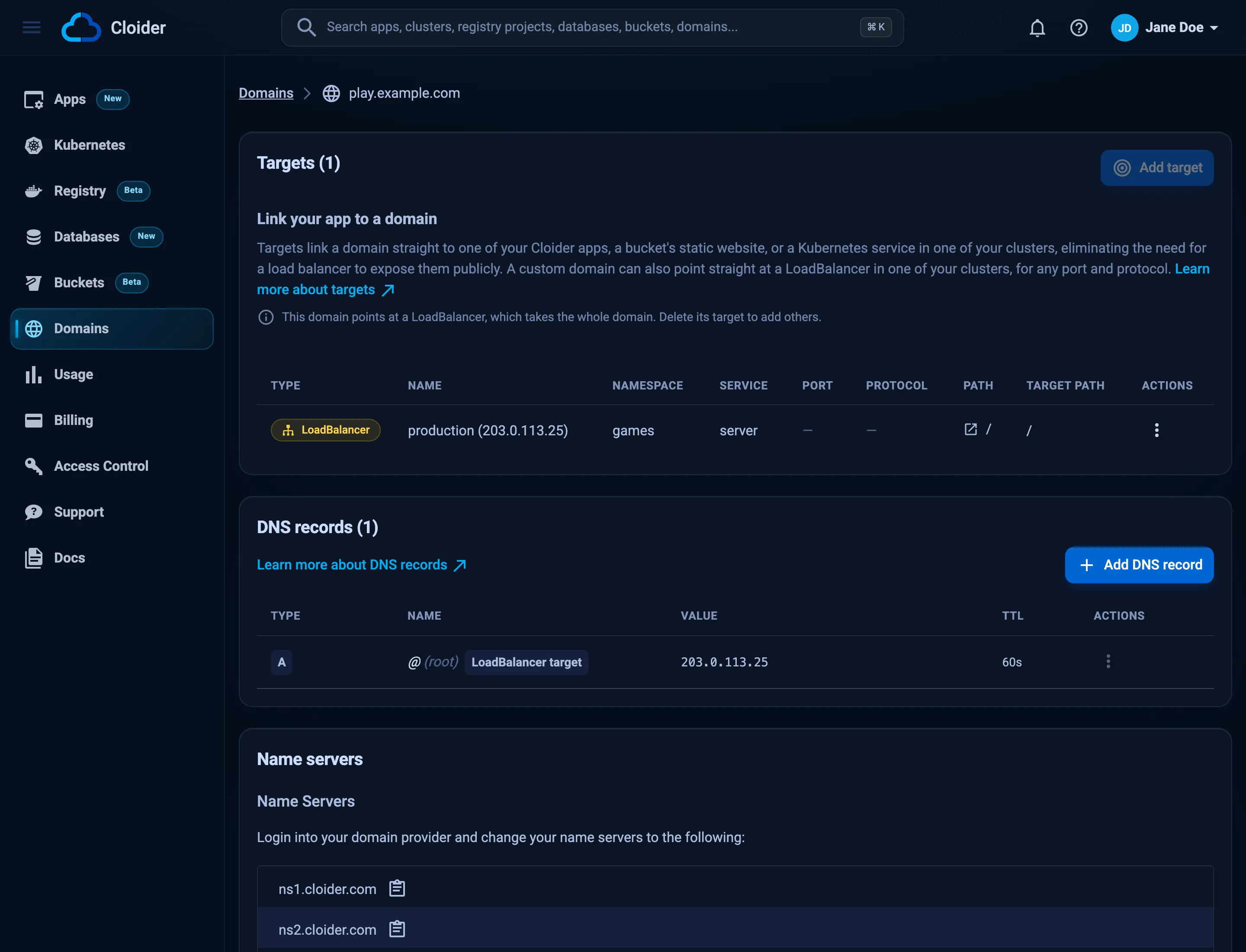
- The A record replaces the
ALIASrecord the domain was created with. It shows in the domain's DNS records marked LoadBalancer target, with a TTL of 60 seconds, and can only be changed through the target. - If the Service is recreated and gets a new IP, the record follows it within about a minute. While the LoadBalancer is gone or has no IP, the domain has no A record.
- Deleting the target deletes the A record and gives the domain its
ALIASback.
Create a LoadBalancer target
- Dashboard
- CLI
- Terraform
- API
- MCP
- Open the custom domain under Domains and click Add target.
- Choose LoadBalancer as the Target type. The LoadBalancer list shows each LoadBalancer that has an IP, as cluster, namespace and name, with the IP next to it. The line under the list reads, for example, points play.example.com at 203.0.113.25 on every port and protocol, with no HTTPS from Cloider.
- Path and Target path are set to
/and can't be changed. - Click Save. The domain's DNS records show the new A record right away.
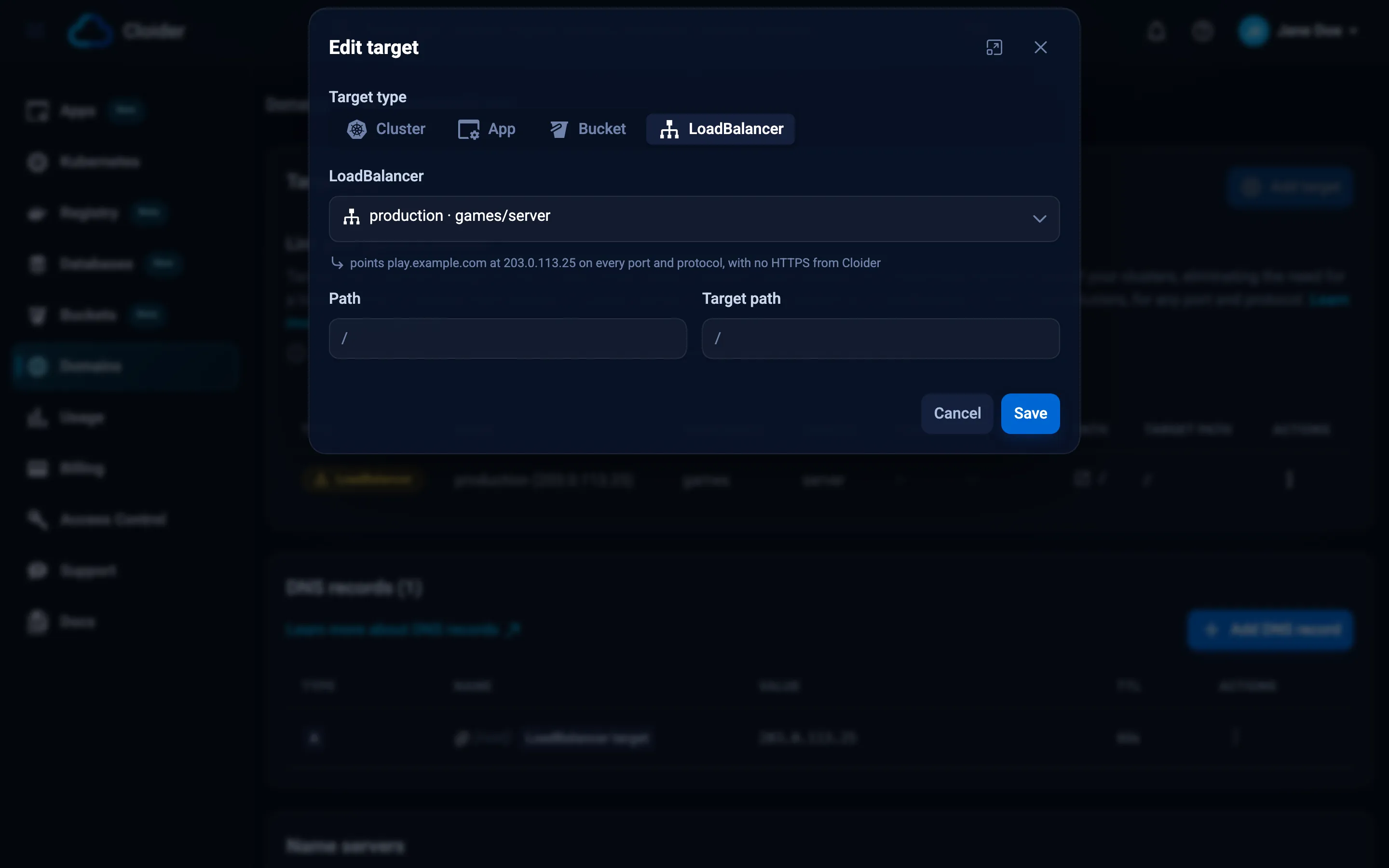
The LoadBalancer type is offered on custom domains only, and can't be picked while the domain has other targets.
cloider cluster services production
cloider target create play.example.com --cluster production --loadbalancer games/server
✓ Routed play.example.com/ to LoadBalancer games/server
cloider cluster services lists each Service's TYPE and EXTERNAL-IP. --loadbalancer takes
<namespace>/<service>, needs --cluster, and can't be combined with --service, --port, --protocol, --app or
--bucket.
resource "cloider_target" "games" {
  domain       = "play.example.com"
  cluster_id   = cloider_cluster.production.id
  loadbalancer = "games/server"
}
loadbalancer_ip is the IP the domain points at.
curl -X POST https://cloider.com/api/targets \
  -H "Authorization: Bearer $CLOIDER_TOKEN" \
  -H "Content-Type: application/json" \
  -d '{"domain_name": "play.example.com", "target_type": "LoadBalancer", "cluster_id": "k7m2xq", "namespace": "games", "service": "server"}'
{
  "hashed_id": "t2l8vd",
  "domain_name": "play.example.com",
  "message": "Target created successfully"
}
Point play.example.com at the server LoadBalancer in the games namespace of my production cluster.
{"domain": "play.example.com", "cluster": "production", "loadbalancer": "games/server"}
The domain resolves to the LoadBalancer once its nameservers point at Cloider, see Add a custom domain.
List a domain's targets
- Dashboard
- CLI
- Terraform
- API
- MCP
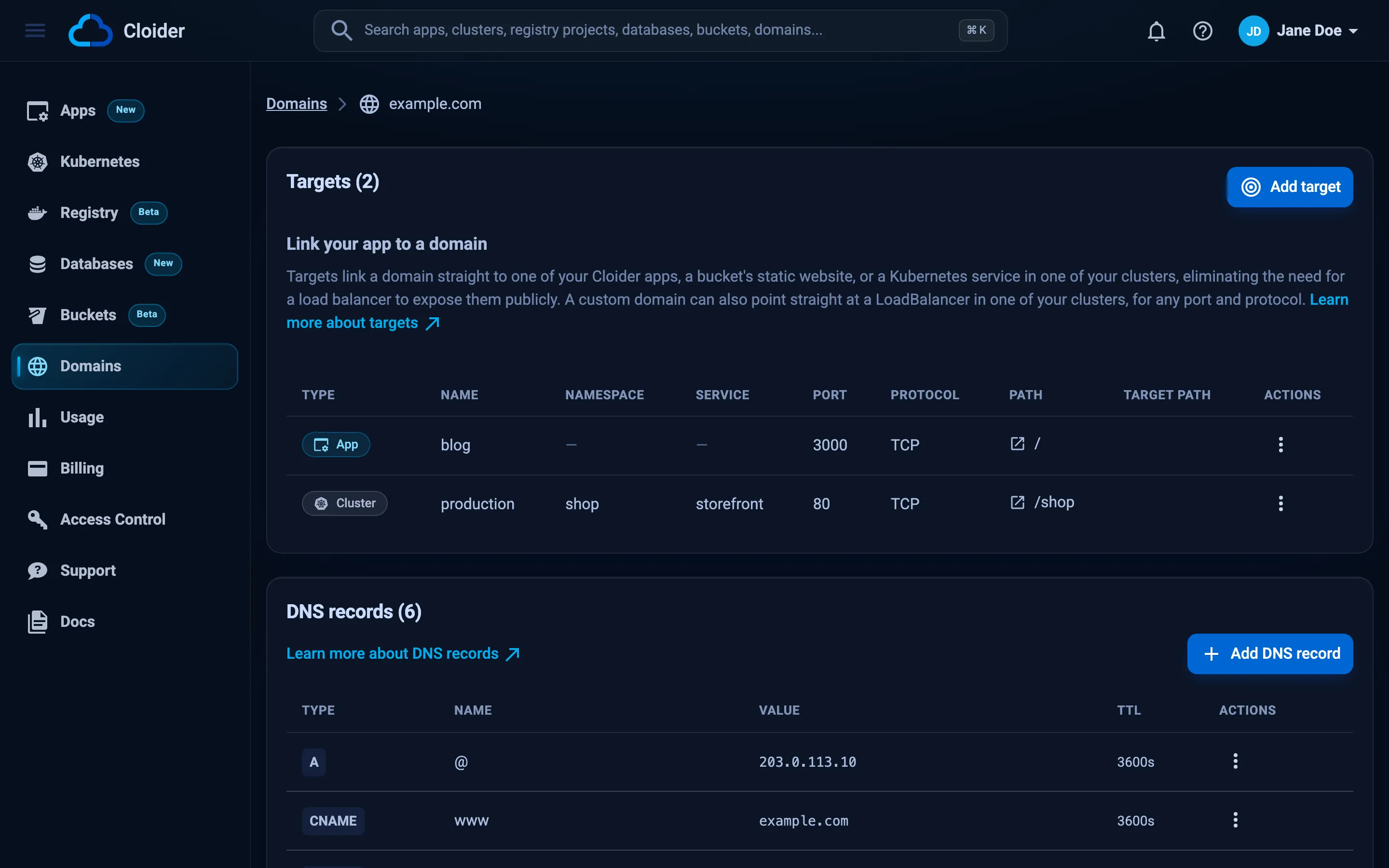
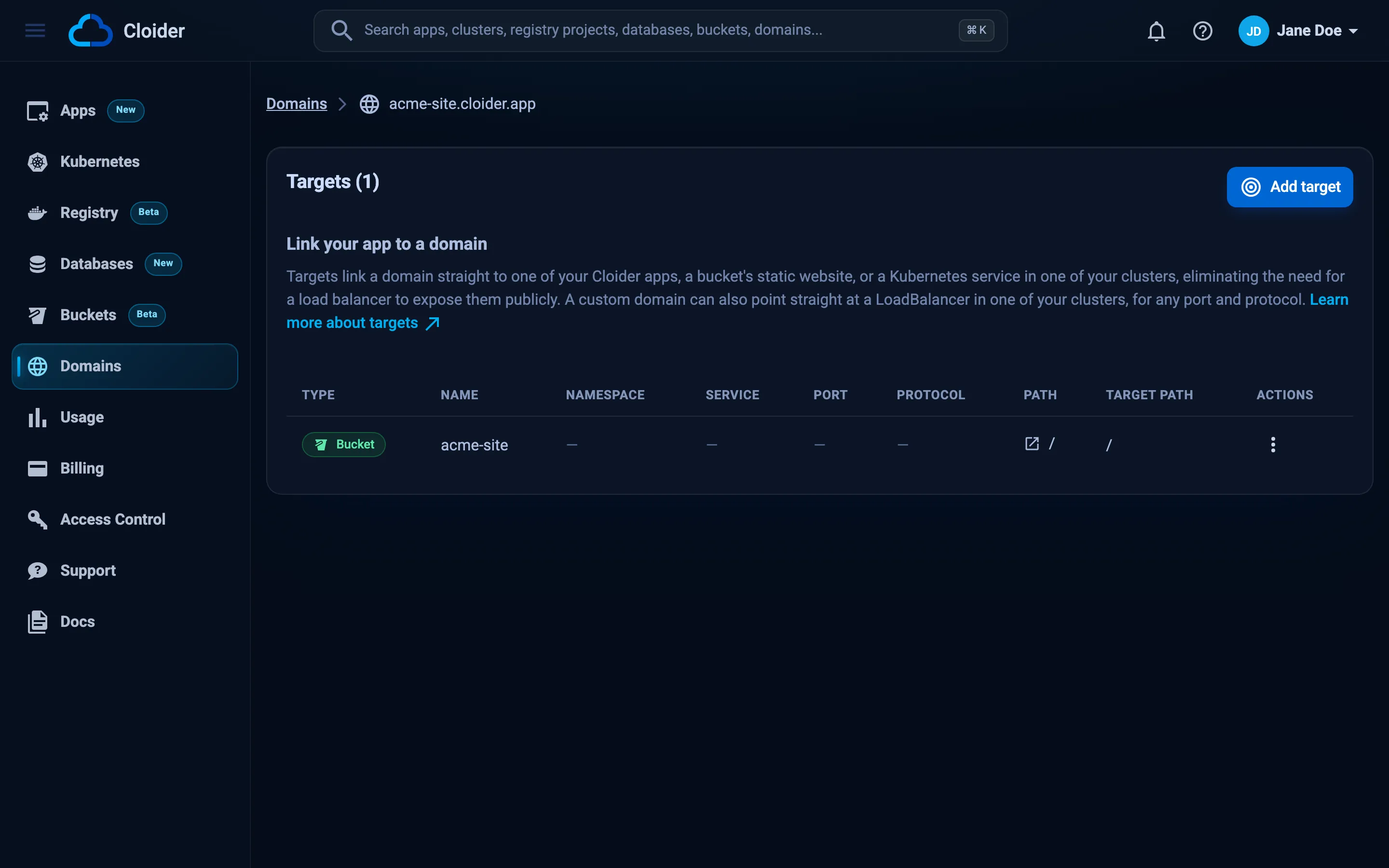
The Targets section of the domain's page lists each target with its Type (App, Bucket or
Cluster), Name (the app, bucket or cluster), Namespace, Service, Port, Protocol, Path (with
a link that opens it) and Target path. Namespace and Service are only shown for cluster targets, and Port and
Protocol not for bucket targets. Each row's Actions menu has URL, which copies the address of the route, such
as https://example.com/shop, Edit and Delete.
A warning icon next to a name explains, on hover, why a target won't serve as set up, for example App is Paused - requests will fail until it is Ready. or The bucket's website is off - requests will fail until it is turned on. A target whose app, bucket, cluster or Service no longer exists is greyed out, and its Edit action is disabled.
cloider target list example.com
ROUTE              TARGET                    TARGET PATH   PROTOCOL
example.com/docs   app docs                  /             -
example.com/api    production/shop/api:80    /api          TCP
example.com/       app web                   /             -
A bucket target shows as website of bucket <name>. Add -o wide for the ID column, which update and delete
take.
cloider domain get example.com shows the domain's type, status and creation time with the same table of targets
under it.
Terraform has no data source for targets. Existing targets can be imported as <domain>/<id>:
import {
  to = cloider_target.api
  id = "example.com/t7p3xr"
}
curl -G https://cloider.com/api/targets \
  -H "Authorization: Bearer $CLOIDER_TOKEN" \
  --data-urlencode "domain_name=example.com"
[
  {
    "hashed_id": "t7p3xr",
    "domain_name": "example.com",
    "target_type": "Cluster",
    "cluster_id": "c8m2pd",
    "cluster_name": "production",
    "app_id": "",
    "app_name": "",
    "app_label": "",
    "bucket_id": "",
    "bucket_name": "",
    "namespace": "shop",
    "service": "api",
    "port": 80,
    "protocol": "TCP",
    "path": "/api",
    "target_path": "/api",
    "created_at": "2026-10-20T11:20:03Z"
  }
]
Targets are listed newest first. domain_name is required, and a domain that isn't yours answers 403 with
You don't have permission to access targets for this domain. App and Bucket targets come back with an empty
namespace and service.
GET /api/domains/example.com returns the domain itself with the same list in targets.
Which targets does example.com have?
{"domain": "example.com"}
The answer is the domain with its targets, including each target's hashed_id, which update_domain_target and
delete_domain_target take as target_id.
Route several paths of one domain
Each path of a domain routes to exactly one target, and the longest matching path wins. A typical layout:
| Path | Goes to | Requests it receives |
|---|---|---|
/ | app web | everything no longer path matches: /, /pricing, /about/team |
/api | Service shop/api:80 in production | /api, /api/orders, /api/orders/42 |
/docs | app docs, target path / | /docs/intro arrives as /intro |
cloider target create example.com --app web
cloider target create example.com --cluster production --service shop/api --path /api
cloider target create example.com --app docs --path /docs --target-path /
A second target with a path the domain already routes is refused with
This path is already in use on this domain. Please choose a different path. Edit the existing target instead.
Rewrite the path
By default a request reaches the app or Service with the exact path it was made with. Set a target path to replace
the matched path prefix before the request is forwarded:
| Path | Target path | Request | Forwarded as |
|---|---|---|---|
/api | (empty, same as path) | /api/orders | /api/orders |
/api | / | /api/orders | /orders |
/api | / | /api | / |
/api | /v2 | /api/orders | /v2/orders |
/ | /v1 | /orders | /v1/orders |
/docs | / | /docs/intro?lang=en | /intro?lang=en |
cloider target create example.com --app docs --path /docs --target-path /
A trailing slash on the target path is ignored: /v2/ and /v2 behave the same.
A rewrite changes the path the app sees, not the links it generates. An app served at /docs with a target path of /
still writes links such as /intro or /assets/app.js, which the browser requests from /, not /docs. Configure
the app's base path (for example basePath in Next.js or base in Vite), or give it its own subdomain such as
docs.example.com.
Edit a target
Editing can change the path, the target path and what the target points at, including switching between an app, a
cluster Service and a bucket's website. Cloider replaces the route in one step. A target moved to a bucket must have
the path /.
- Dashboard
- CLI
- Terraform
- API
- MCP
Open the target's Actions menu, click Edit, change the fields in the Edit target dialog and click Save.
cloider target update keeps whatever you don't give:
cloider target list example.com -o wide                 # find the id
cloider target update example.com t7p3xr --path /v2      # move the route
cloider target update example.com t7p3xr --app api       # point it at an app instead
cloider target update example.com t7p3xr --port 8080     # another port of the same Service
cloider target update example.com t4k9vq --bucket acme-site  # serve a bucket's website at /
✓ Updated example.com/v2 to production/shop/api:80
When you change --path and the target path was the same as the old path, the target path moves with it.
Change the cloider_target and run terraform apply. Changing domain replaces the target; the other attributes are
updated in place.
PUT replaces the target, so send every field, as for a new one:
curl -X PUT https://cloider.com/api/targets/t7p3xr \
  -H "Authorization: Bearer $CLOIDER_TOKEN" \
  -H "Content-Type: application/json" \
  -d '{"domain_name": "example.com", "target_type": "App", "app_id": "k2v9wd", "path": "/api", "target_path": "/"}'
{
  "hashed_id": "t7p3xr",
  "domain_name": "example.com",
  "message": "Target updated successfully"
}
Move the /api target of example.com to the api app.
{"domain": "example.com", "target_id": "t7p3xr", "app": "api"}
Delete a target
Deleting a target stops its route right away. The domain, its DNS records and the app or Service stay. When a domain's
last target is deleted, its status becomes Suspended.
- Dashboard
- CLI
- Terraform
- API
- MCP
Open the target's Actions menu, click Delete and confirm Are you sure you want to delete this target? with Delete.
cloider target delete t7p3xr
Delete target t7p3xr? Its route stops answering. [y/N] y
✓ Deleted target t7p3xr
Add --yes in scripts.
Remove the cloider_target resource and run terraform apply.
curl -X DELETE https://cloider.com/api/targets/t7p3xr \
  -H "Authorization: Bearer $CLOIDER_TOKEN"
{"message": "Target deleted successfully"}
Delete the target t7p3xr of example.com.
{"target_id": "t7p3xr"}
Targets when an app, cluster or bucket changes
| Event | What happens to its targets |
|---|---|
| App or cluster paused | Targets stay. Requests fail until you resume it |
| App redeployed | Targets stay and keep routing to the new version |
| App's port changed | The route follows the app's port on the next deploy. The dashboard shows App now listens on port 8080; edit and save this target to update it. until you save the target |
| App deleted | Its targets are deleted with it. See Domains for apps |
| Cluster deleted, or a Service removed | The targets stay and point at nothing. The dashboard shows Orphaned targets detected!. Delete them or point them elsewhere. A LoadBalancer target's A record is removed within a minute |
| LoadBalancer recreated with a new IP | The A record follows the new IP within a minute |
| Bucket's website turned off | Refused while targets point at it: Domains still point at this website, remove their targets first. |
| Bucket made private | Refused while its website is on: The bucket's website needs it public, turn the website off first. |
| Bucket deleted | Its website stops and its targets are deleted with it. The domains stay |
Limits
| Limit | Message |
|---|---|
path and target_path start with / and contain only letters, digits and / _ . - | Path must start with / and may only contain letters, numbers and / _ . -, Target path must start with / and may only contain letters, numbers and / _ . - |
| One target per path per domain | This path is already in use on this domain. Please choose a different path. |
| Service, namespace and cluster names together at most 57 characters | Service and namespace names are too long for this cluster (combined limit exceeded) |
| An app name of 50 characters or fewer always works; a longer one can be refused | This app's name is too long to be exposed on a domain. |
The app has deployed (Ready or Paused) | This app is not ready yet. Wait until it finishes deploying, then add the target. |
| A port is required for cluster targets | Valid port is required |
A bucket target takes the whole domain: path and target_path are / | A bucket website is served at the root of its domain, the path must be /, A bucket website is served at the root of its domain, the target path must be / |
The bucket is Ready with its website on | This bucket is not ready yet. Wait until it is created, then add the target., Turn on the bucket's website first, from its Settings. |
| The port speaks HTTP | Not checked. An HTTPS or non-HTTP port answers with errors |
| A LoadBalancer target needs a custom domain | A LoadBalancer target needs a custom domain. |
| A LoadBalancer target takes the whole domain | A LoadBalancer takes the whole domain, the path must be /, A LoadBalancer target takes the whole domain. Delete the domain's other targets first, or use another domain., This domain points at a LoadBalancer, which takes the whole domain. Delete that target first, or use another domain. |
| The LoadBalancer has an IP | This LoadBalancer has no IP yet. Wait until it gets one, then add the target. |
The domain has no A, AAAA, ALIAS or CNAME record of its own at its root, other than the one it was created with | The domain has an A, AAAA, ALIAS or CNAME record of its own. Delete it from the domain's DNS records first, then add the target. |
| Request bodies | Larger uploads may be refused with 413 Request Entity Too Large. Upload big files straight to object storage instead |
For raw TCP or UDP traffic, such as a database or a game server, use a LoadBalancer Service and point a custom domain at it.
Troubleshooting
| Problem | Cause and fix |
|---|---|
| Add target is disabled | There is nothing to route to yet: You have no apps yet. Create one under Apps before adding an app target., No clusters found. You need to create at least one cluster before adding cluster targets. or You have no buckets yet. Create one under Buckets and turn on its website before adding a bucket target. |
| None of your buckets has its website on. ... | Turn on the static website in a bucket's Settings tab, then add the target |
Turn on the bucket's website first, from its Settings. | The bucket's website is off. Turn it on, then add the target |
A bucket website is served at the root of its domain, the path must be / | Bucket targets take the whole domain. Leave the path as /, or use a domain of its own such as docs.example.com |
This path is already in use on this domain. ... | Edit or delete the target that has the path |
This app is not ready yet. ... | Wait for the app's first deploy to finish |
App not found!, Bucket not found! | The id is wrong or belongs to another account. Check cloider app list -o wide or cloider bucket list -o wide |
LoadBalancer not found! ... | No Service of type LoadBalancer has that namespace and name in the cluster. Check cloider cluster services <cluster> |
This record is managed by the domain's LoadBalancer target, ... | The A record belongs to the target. Edit or delete the target instead |
404 Not Found from the API on create | The domain isn't in your account. Add it first; www.example.com is a domain of its own |
say where to route to with --app, --bucket or --cluster (CLI) | Add --app <app>, --bucket <bucket> or --cluster <cluster> --service <namespace>/<service> |
shop/api has several ports (80/TCP, 9090/TCP), pick one with --port (CLI) | Add --port 80 |
no service shop/api in cluster production, see cloider cluster services (CLI) | Check the namespace and the Service name |
The page shows 404 | The host name reaches Cloider but no target's path matches. Add a target for / |
502 Bad Gateway or 503 | Nothing answers behind the target: the app or cluster is paused, the pods aren't ready, or the port is wrong |
| Browser certificate warning on a custom domain | The certificate isn't issued yet. See HTTPS certificates |
| The domain doesn't resolve | Targets other than LoadBalancer targets don't create DNS records. See Point the host names you serve at Cloider |
More cases are in Domains troubleshooting.
Next steps
- HTTPS certificates: how targets get their certificates.
- Expose Kubernetes services: targets from the cluster's point of view.
- Static websites: serve a bucket on a domain with a Bucket target.
cloider target,cloider_targetand the Targets API.
Frequently asked questions
What is a target on Cloider?
A target is a route from a domain, or a path of it, to a Cloider app, to a Service port in one of your Kubernetes clusters, or to a bucket's static website. Cloider serves it over HTTPS and forwards requests to apps and Services as plain HTTP.
Can a domain serve a bucket's static website?
Yes. Turn on the bucket's static website, then add a target of type Bucket that points the domain at it, for example cloider target create docs.example.com --bucket acme-site. A Bucket target takes the whole domain, at the path /.
Can one domain route to several apps?
Yes. Add one target per path, for example / to the web app, /api to a cluster Service and /docs to a docs app. The longest matching path wins.
How do I strip a path prefix before it reaches my app?
Set the target path. A target with path /api and target path / forwards /api/orders as /orders.
Do I need an Ingress or a load balancer?
No. Targets replace both for HTTP traffic, and Ingress objects inside a Cloider cluster aren't served by Cloider. Use a LoadBalancer Service, with a LoadBalancer target for its domain, for traffic that isn't HTTP or for features a Cluster target doesn't offer, such as your own ingress controller, Gateway API or TLS.
Who manages TLS certificates for a LoadBalancer target?
You do. Cloider only gives the domain an A record to the LoadBalancer's IP: it issues no certificate, renews none and doesn't redirect http to https. Run your own ingress controller or Gateway API implementation behind the LoadBalancer and issue certificates with a tool such as cert-manager.
Does a target create DNS records?
Only a LoadBalancer target, which gives the domain an A record to the LoadBalancer's IP. Otherwise a free subdomain already resolves to Cloider, and a custom domain comes with an ALIAS record for the domain itself, which the first target to an app points at the app's free subdomain. For other host names of a custom domain, add a CNAME or A record that points at Cloider.
Can a domain point at a Kubernetes LoadBalancer?
Yes, a custom domain can. Add a target of type LoadBalancer, for example cloider target create play.example.com --cluster production --loadbalancer games/server. The domain gets an A record to the LoadBalancer's IP, which follows the IP if the Service is recreated, and carries every port and protocol. It takes the whole domain and can't be combined with other targets, and you manage the ingress controller, routes and TLS certificates behind it.
What happens to a target when I pause my app or cluster?
The target stays, but requests fail until you resume the app or cluster. You don't need to recreate it.