Add a custom domain to Cloider
A custom domain is a domain you own, such as example.com, or a subdomain of it, such as shop.example.com, that you
add to Cloider to serve an app, a Kubernetes Service or a bucket's
static website on it over HTTPS.
This page walks through the whole setup: adding the domain, moving its DNS to Cloider (or keeping your current DNS
provider), pointing the host names at Cloider, routing them with targets, and checking that HTTPS works.
At a glance
| Step | What you do | Where |
|---|---|---|
| 1 | Add example.com to Cloider | Cloider |
| 2 | Recreate the records the domain already has, such as email records | Cloider |
| 3 | Change the domain's nameservers to ns1.cloider.com to ns4.cloider.com | Your registrar |
| 4 | Point the host names you serve at Cloider: an ALIAS for the domain itself, a CNAME for each subdomain | Cloider |
| 5 | Add a target that routes the domain to an app, a Service or a bucket's website | Cloider |
| 6 | Wait for DNS and the HTTPS certificate, then check | Your terminal |
Plan for 10 minutes of work, then up to 48 hours of waiting for the nameserver change in the worst case. Most domains are working within an hour or two.
Before you begin
- A registered domain. Cloider doesn't sell domains. Buy one from any registrar, such as Namecheap, GoDaddy, Cloudflare, Squarespace Domains or Amazon Route 53, and keep the login: you change the nameservers there.
- Something to serve. A deployed app whose status is
Ready, a cluster with a Service to route to, or a public bucket with its static website on. You can add the domain first and the target later. - Write access. A member with read-only access, or a read-only API token, can't add domains.
- A free subdomain you keep. Step 4 points your subdomains, such as
www, at one of your freecloider.appsubdomains, for example the one your app was created with. See Free subdomains. - New to DNS? Read DNS basics first.
Choose how the domain's DNS is hosted
You have two options. Both serve the domain from Cloider over HTTPS; they differ in who answers DNS for it.
| Use Cloider's nameservers | Keep your current DNS provider | |
|---|---|---|
| You change | The nameservers, at your registrar | Nothing at the registrar |
| Records live in | Cloider: dashboard, CLI, Terraform, API, MCP | Your DNS provider's dashboard |
| Good for | Managing DNS next to your apps, as code with Terraform | Domains with many records, or DNS features Cloider doesn't have, such as DNSSEC |
| Steps on this page | 1 to 6 | 1, then Keep your current DNS provider, then 5 and 6 |
The rest of this page follows the first option, and the second one has its own section.
Step 1: Add the domain to Cloider
Adding the domain reserves it for your account with the status Pending, and adds an ALIAS record for the domain
itself that points at Cloider: at cloider.app at first, and at your app's free subdomain once you route the domain to
the app (see step 4). Cloider doesn't check who owns the domain or
where its nameservers point at this stage.
- Dashboard
- CLI
- Terraform
- API
- MCP
- Open Domains in the sidebar, click Add Domain and choose Custom Domain.
- In Domain or subdomain, type the domain, for example
example.com. - Click Check Availability. If no other account holds the domain, Cloider adds it to yours and opens the next step, Add DNS records (Optional).
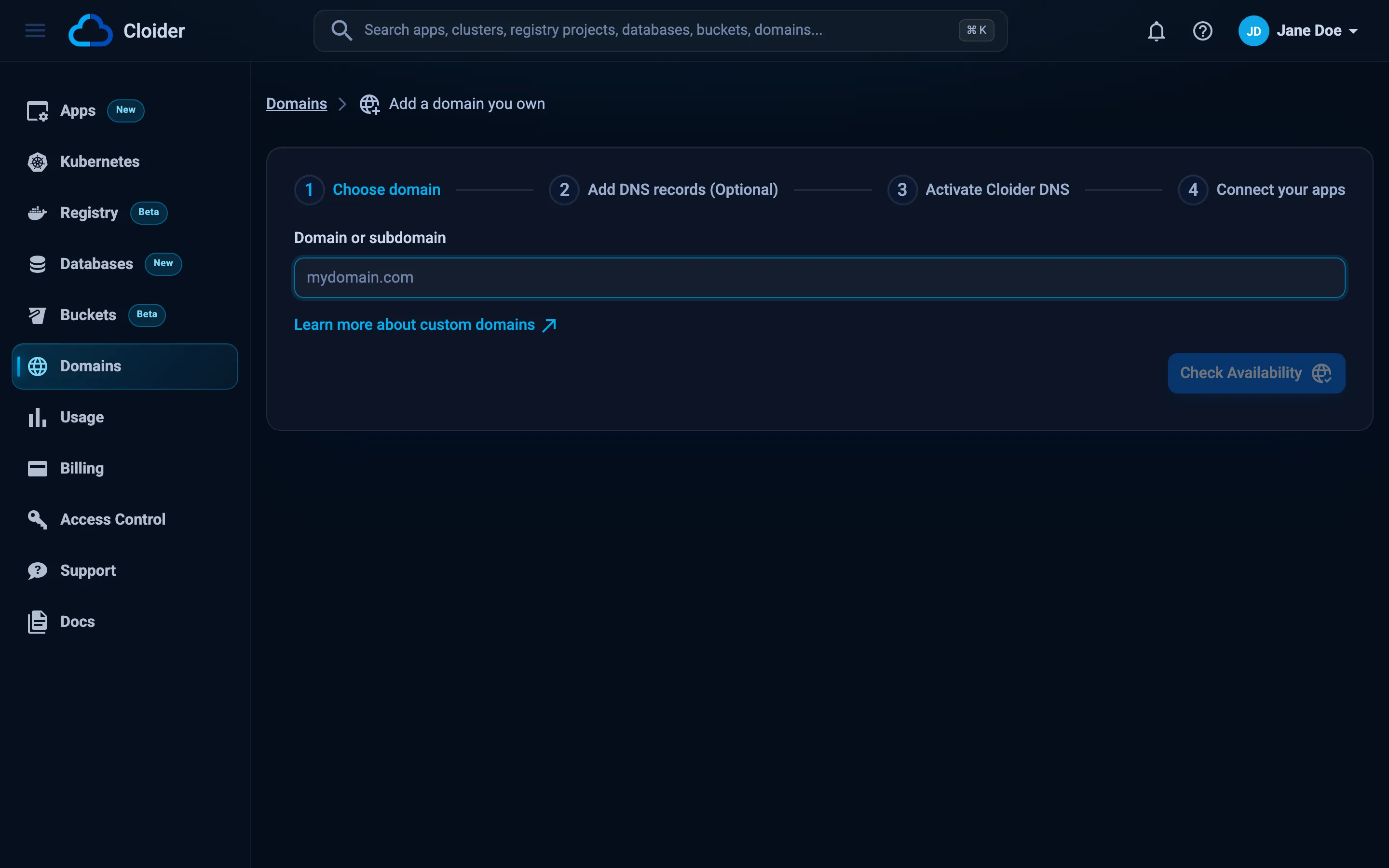
The page then guides you through the remaining steps in order: Add DNS records (Optional) (step 2 below), Activate Cloider DNS, which lists the nameservers (step 3), and Connect your apps, where you add targets (step 5). The final Add domain button is enabled once the domain has a target.
cloider domain create example.com
✓ Added example.com
Point it at these nameservers at your registrar:
  ns1.cloider.com
  ns2.cloider.com
  ns3.cloider.com
  ns4.cloider.com
Then add records with `cloider dns create example.com ...` and routes with `cloider target create example.com ...`.
Any name that doesn't end in .cloider.app is added as a custom domain. The CLI lowercases the name and drops a
trailing dot, so Example.COM. is added as example.com.
resource "cloider_domain" "example" {
  name = "example.com"
}

# The nameservers to set at the registrar
data "cloider_options" "current" {}

output "nameservers" {
  value = data.cloider_options.current.nameservers
}

output "status" {
  value = cloider_domain.example.status
}
terraform apply
Outputs:

nameservers = tolist([
  "ns1.cloider.com",
  "ns2.cloider.com",
  "ns3.cloider.com",
  "ns4.cloider.com",
])
status = "Pending"
See cloider_domain and cloider_options.
curl -X POST https://cloider.com/api/domains \
  -H "Authorization: Bearer $CLOIDER_TOKEN" \
  -H "Content-Type: application/json" \
  -d '{"domain_name": "example.com", "domain_type": "CustomDomain"}'
{
  "domain_name": "example.com",
  "domain_type": "CustomDomain",
  "status": "Pending",
  "created_at": "2026-10-20T09:30:02Z"
}
The nameservers to use are in nameservers of GET /api/options:
curl https://cloider.com/api/options -H "Authorization: Bearer $CLOIDER_TOKEN"
{
  "subdomain_roots": ["cloider.app"],
  "nameservers": ["ns1.cloider.com", "ns2.cloider.com", "ns3.cloider.com", "ns4.cloider.com"]
}
Add my domain example.com to Cloider and tell me which nameservers to set.
{"domain": "example.com"}
The tool's answer lists the nameservers to set at the registrar.
Which domain names can I add?
Any domain or subdomain you control, as long as it follows these rules. The API checks them and answers with the message shown.
| Rule | Message when broken |
|---|---|
At least two labels, such as example.com | Invalid domain format |
| 3 to 253 characters | Domain name must be at least 3 characters, Domain name must not exceed 253 characters |
| Letters, digits, dots and hyphens only | Domain name must contain only letters, numbers, dots, and hyphens |
| No two dots in a row | Domain name must not have consecutive dots |
| Doesn't start or end with a dot or a hyphen | Domain name must not start with special characters, Domain name must not end with special characters |
Not a Cloider domain (the label before the TLD isn't cloider) | Disallowed domain name |
| Not held by another Cloider account | The domain already created by a different user, if you own this domain contact support |
Not a public suffix that many owners share, such as co.uk or github.io | Domain name is a public suffix shared by many owners, add your own domain under it, such as example.co.uk |
Not under a domain another Cloider account holds, such as shop.example.com when another account has example.com | This domain is under example.com, which belongs to another Cloider account. If you own example.com, contact support |
| No domain under it held by another Cloider account | A domain under this one belongs to another Cloider account. If you own example.com, contact support |
Names are stored in lowercase. Internationalized names must be entered in their xn-- (Punycode) form, since only
letters, digits, dots and hyphens are accepted.
If another account already holds a domain you own, for example a former colleague's account, contact support with proof of ownership.
Step 2: Recreate your existing DNS records
If the domain is already in use, for example for email or a website elsewhere, copy its records into Cloider before you change the nameservers. The moment the nameservers switch, only the records in Cloider answer, so any record you didn't copy stops working.
Look up the current records in your current DNS provider's dashboard. The records most often forgotten:
| Record | Name | Why it matters |
|---|---|---|
MX | apex | Without it, email to you@example.com bounces |
TXT (SPF) | apex | Without it, your mail lands in spam |
TXT (DKIM) | <selector>._domainkey | Signs your outgoing mail |
TXT (DMARC) | _dmarc | Your email authentication policy |
TXT (verification) | apex or a service specific name | Google, Microsoft, Apple and others re-check these |
CNAME, A | www, mail, autodiscover, ... | Websites and services on subdomains |
CAA | apex | Which certificate authorities may issue certificates |
The apex already has an ALIAS record that points at Cloider. If your website stays elsewhere, add its A
record with a blank name: it takes the place of Cloider's ALIAS.
You can also check what a name answers today with dig:
dig example.com MX +short
dig example.com TXT +short
dig _dmarc.example.com TXT +short
dig www.example.com +short
Then add each record in Cloider. In the dashboard, click Add DNS record on this step. With the CLI:
cloider dns create example.com --type MX --value "10 mx1.mail.example.net." --ttl 3600
cloider dns create example.com --type TXT --value "v=spf1 include:mail.example.net ~all" --ttl 3600
Every type and its rules are in DNS records, and email setups for Google Workspace and Microsoft 365 are in Email DNS records. A brand new domain has nothing to copy, so skip this step.
Step 3: Change the nameservers at your registrar
Sign in to your registrar, open the domain's DNS or nameserver settings, choose custom nameservers, and enter all four:
ns1.cloider.com
ns2.cloider.com
ns3.cloider.com
ns4.cloider.com
Remove any other nameservers from the list. In the dashboard, the same four names are on the Activate Cloider DNS step and in the Name servers section of the domain's page, each with a copy button.
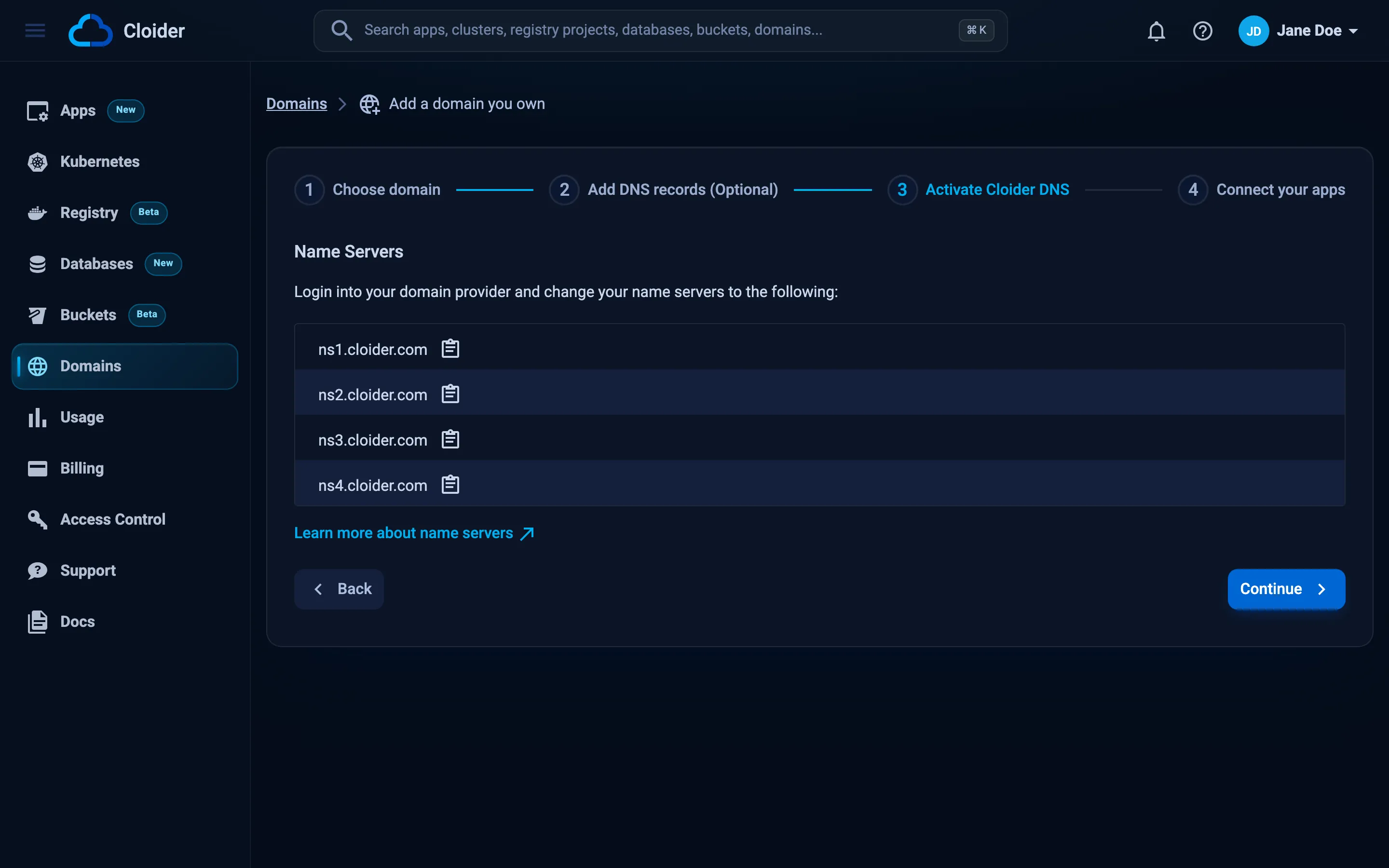
Step by step instructions for Namecheap, GoDaddy, Cloudflare, Squarespace Domains, Amazon Route 53 and others are in Nameservers. The registry usually publishes the change within minutes to a few hours, and resolvers can keep the old nameservers cached for up to 48 hours.
If DNSSEC is enabled for the domain, turn it off (remove the DS record at the registrar) before you change the nameservers. Cloider's nameservers don't sign answers, and resolvers that validate DNSSEC reject unsigned answers for a domain that still has a DS record, so the domain would stop resolving for many visitors.
Step 4: Point the host names you serve at Cloider
A target doesn't add DNS records, so each host name you route needs a record that sends it to Cloider's HTTPS entry
point: the same place every cloider.app subdomain resolves to.
| Host name | Record on example.com | Value |
|---|---|---|
example.com (the apex) | ALIAS with a blank name, added with the domain in step 1 | Your app's free subdomain, such as acme-web.cloider.app, or cloider.app for an app without one |
www.example.com, shop.example.com, any subdomain | CNAME with the name www, shop, ... | A free subdomain you hold, such as acme-web.cloider.app. |
For the apex, use an ALIAS record to your app's free subdomain, or to
cloider.app if the app has none. A CNAME can't be used at the apex, which is a rule of DNS itself, and an ALIAS does
the same job: Cloider's nameservers answer it with the current address of its target, so you never copy an IP address
into your records.
Cloider sets this up for you. The domain is added with an ALIAS to cloider.app, and when a target first routes it to
an app that has a free subdomain (step 5), the ALIAS moves to that
subdomain. An ALIAS you changed to point anywhere else is left as it is.
The apex record is on the domain's DNS records list like any other, so you can change or delete it. While it still
points at Cloider, an A, AAAA or ALIAS record you add with a blank name takes its place instead of being refused
next to it. If the apex has no record that points at Cloider, for example because you deleted it, add the ALIAS
yourself:
cloider dns create example.com --type ALIAS --value acme-web.cloider.app
✓ Added ALIAS record @ -> acme-web.cloider.app
Then add a CNAME for each subdomain. With the CLI:
cloider dns create example.com --type CNAME --name www --value acme-web.cloider.app. --ttl 3600
✓ Added CNAME record www -> acme-web.cloider.app.
In Terraform, where declaring the apex ALIAS also brings it under Terraform's management:
resource "cloider_dns_record" "apex" {
  domain = cloider_domain.example.name
  type   = "ALIAS"
  values = ["acme-web.cloider.app"]
  ttl    = 300
}

resource "cloider_dns_record" "www" {
  domain = cloider_domain.example.name
  type   = "CNAME"
  name   = "www"
  values = ["acme-web.cloider.app."]
  ttl    = 3600
}
An A record stores a copy of Cloider's address, while an ALIAS or a CNAME follows it automatically. Use an
ALIAS for the apex and a CNAME for every other name.
Step 5: Route the domain with a target
A target sends requests for a path of the domain to an app or a cluster Service, or the whole domain to a bucket's
static website. This is what makes the domain serve something, and it switches the domain's status from Pending to
Active.
- Dashboard
- CLI
- Terraform
- API
- MCP
- On the Connect your apps step, or on the domain's page under Domains, click Add target.
- In Add a new target, choose the Target type: App to pick one of your apps, Cluster to pick a cluster, Namespace, Service and Port, or Bucket to pick a bucket whose website is on.
- Leave Path as
/to route the whole domain, and leave Target path empty unless you need to rewrite the path. - Click Save.
To an app:
cloider target create example.com --app web
✓ Routed example.com/ to the app
To a Service in a cluster:
cloider target create example.com --cluster production --service shop/web --port 80
✓ Routed example.com/ to production/shop/web:80
To a bucket's static website:
cloider target create example.com --bucket acme-site
✓ Routed example.com/ to the bucket's website
# To an app, by its id from `cloider app list -o wide`
resource "cloider_target" "web" {
  domain = cloider_domain.example.name
  app_id = "w4d8hz"
}
# Or to a Service in a cluster
resource "cloider_target" "shop" {
  domain     = cloider_domain.example.name
  cluster_id = cloider_cluster.production.id
  namespace  = "shop"
  service    = "web"
  port       = 80
}
# Or to a bucket's static website
resource "cloider_target" "site" {
  domain    = cloider_domain.example.name
  bucket_id = cloider_bucket.site.id
}
curl -X POST https://cloider.com/api/targets \
  -H "Authorization: Bearer $CLOIDER_TOKEN" \
  -H "Content-Type: application/json" \
  -d '{"domain_name": "example.com", "target_type": "App", "app_id": "w4d8hz", "path": "/"}'
{
  "hashed_id": "t4k9vq",
  "domain_name": "example.com",
  "message": "Target created successfully"
}
Route example.com to the web app.
{"domain": "example.com", "app": "web"}
Every option, including path routing and rewrites, is in Targets.
Step 6: Wait for DNS and HTTPS
Once the nameservers have switched and the name resolves to Cloider, Cloider requests a certificate for the host name from Let's Encrypt. This usually takes a minute or two after DNS resolves. Until then, browsers show a certificate warning for the domain. See HTTPS certificates.
Verify
Check each link of the chain, from the registry to the certificate:
# 1. The registry hands out Cloider's nameservers (for .com domains)
dig example.com NS @a.gtld-servers.net +noall +authority

# 2. Cloider's nameservers answer with your records
dig @ns1.cloider.com example.com A +short
dig @ns1.cloider.com www.example.com A +short

# 3. Your usual resolver sees the same answers
dig example.com A +short

# 4. HTTPS works and the certificate is for your domain
curl -sSI https://example.com
example.com.		172800	IN	NS	ns1.cloider.com.
example.com.		172800	IN	NS	ns2.cloider.com.
example.com.		172800	IN	NS	ns3.cloider.com.
example.com.		172800	IN	NS	ns4.cloider.com.
203.0.113.80
acme-web.cloider.app.
203.0.113.80
HTTP/2 200
In the dashboard, the domain appears on the Domains page with the status Active.
Serve both example.com and www.example.com
A target routes the host name of the domain it belongs to. To serve www.example.com as well as example.com, add
www.example.com as a domain of its own and give it a target too. Its DNS record (the www CNAME from step 4) stays on
example.com.
cloider domain create www.example.com
cloider target create www.example.com --app web
The CLI prints the nameservers again for www.example.com. You don't need to change anything for it at the registrar:
www.example.com is answered by the nameservers of example.com.
Cloider routes both names to the same app, and each gets its own certificate. Cloider doesn't redirect one name to the
other. If you want www to redirect to the apex, do it in your app.
Keep your current DNS provider
You can serve a domain from Cloider without moving its DNS. Skip step 3, and add the records that point at Cloider at your current DNS provider instead of in Cloider:
- Add the domain to Cloider (step 1).
- Add the records below at your DNS provider.
- Add targets in Cloider (step 5) and wait for the certificate (step 6).
| Host name | Record at your DNS provider | Value |
|---|---|---|
example.com (the apex) | A with a blank name or @ | 195.181.240.88 |
www.example.com, shop.example.com, any subdomain | CNAME with the name www, shop, ... | A free subdomain you hold, such as acme-web.cloider.app. |
195.181.240.88 is Cloider's HTTPS entry point, the address cloider.app and every free subdomain resolve to. If your
provider can point the apex at a host name (an ALIAS or ANAME record, or CNAME flattening at Cloudflare), point it at
your app's free subdomain, or cloider.app, instead of adding the A record, so it follows Cloider's address on its own.
If your DNS provider can proxy traffic, as Cloudflare does with the orange cloud, set the records that point at Cloider to DNS only. A proxy terminates HTTPS itself and can stop Cloider from completing the certificate check for the domain.
Records you add in Cloider aren't used while the domain's nameservers point elsewhere.
Troubleshooting
| Problem | Cause and fix |
|---|---|
The domain already created by a different user, if you own this domain contact support | Another Cloider account added the domain first. Contact support |
Disallowed domain name | Names under Cloider's own domains can't be added. Use a free subdomain |
Domain name is a public suffix shared by many owners, add your own domain under it, such as example.co.uk | A public suffix belongs to no one. Add the domain you registered under it |
This domain is under ..., which belongs to another Cloider account | Another account holds a domain above this one, and its DNS records would answer for this name. Contact support if you own it |
A domain under this one belongs to another Cloider account | Another account added a name under this domain first. Contact support if you own the domain |
| Check Availability stays disabled | The dashboard expects a name such as example.com, with a TLD of at least two letters. Remove https:// and any path |
dig example.com returns NXDOMAIN | The domain has no records in Cloider, or the registry still points at the old nameservers. See Troubleshooting |
| Email stopped arriving after the switch | The MX record wasn't copied. Add it in Cloider, see Email DNS records |
| Certificate warning in the browser | The name doesn't resolve to Cloider yet, or the certificate is still being issued. See HTTPS certificates |
404 page on the domain | The name reaches Cloider but no target matches. Add a target for the host name and path |
More cases, with dig and nslookup checks, are in Domains troubleshooting.
Next steps
- Nameservers: registrar by registrar instructions.
- DNS records: every record type you can add.
- Targets: path routing and rewrites.
- HTTPS certificates: how certificates are issued and renewed.
Frequently asked questions
How do I connect my own domain to a Cloider app?
Add the domain in Domains, change its nameservers at your registrar to ns1.cloider.com through ns4.cloider.com, add a CNAME to one of your free cloider.app subdomains for each subdomain (the domain itself already has an ALIAS record that points at Cloider), then add a target that routes the domain to the app.
Do I have to move my DNS to Cloider?
No. You can keep your current DNS provider and point the domain at Cloider there: an A record to 195.181.240.88 for the domain itself, or an ALIAS to the app's free subdomain if the provider has one, and a CNAME to a free cloider.app subdomain for each subdomain. Moving DNS to Cloider lets you manage records next to your apps and with Terraform.
Does Cloider verify that I own the domain?
Cloider doesn't run an ownership check when you add a domain. A domain only serves traffic from Cloider once its DNS points at Cloider, which only its owner can arrange.
Why can't I use a CNAME for example.com itself?
DNS doesn't allow a CNAME at the apex of a domain, because the apex must also hold other records. Use an ALIAS record for the apex, which Cloider adds when you add the domain and points at your app's free subdomain once you route the domain to the app, and CNAME records for subdomains such as www. At a DNS provider without ALIAS records, use an A record to 195.181.240.88.
How long does it take for my custom domain to work?
Usually under an hour or two after you change the nameservers, and up to 48 hours in the worst case. The HTTPS certificate is issued a minute or two after the domain resolves to Cloider.
Can I add a subdomain like shop.example.com without adding example.com?
Yes. Add shop.example.com as a custom domain and route it with a target, and add a CNAME for shop at whichever DNS provider hosts example.com.