Free cloider.app subdomains
A free subdomain is a name under cloider.app, such as blog.cloider.app, that you claim for your Cloider account at no
charge. It resolves to Cloider and is covered by Cloider's HTTPS certificate from the moment you claim it, so you can
put an app, a Kubernetes Service or a bucket's
static website on it without touching DNS. This
page covers the naming rules, the availability check, claiming, routing and releasing a subdomain.
At a glance
| Parent domain | cloider.app |
| Format | <label>.cloider.app, one label only: blog.cloider.app, not api.blog.cloider.app |
| Label rules | 2 to 63 characters; lowercase letters, digits and -; starts with a letter; doesn't start or end with - |
| Cost | No charge |
| HTTPS | Immediate, with Cloider's certificate for *.cloider.app |
| DNS records | Not editable. Use a custom domain for records |
| Who can claim it | The first account to claim a name holds it until it is deleted |
| Status | Pending until a target routes to it, then Active |
When should I use a free subdomain?
Use a free subdomain when you want a working HTTPS address now: for a new app, a staging environment, a preview, an internal tool or a demo. Use a custom domain for your production site, for email, or whenever you need DNS records.
You can use both at once. A common setup routes example.com and acme-staging.cloider.app to the same app or to
different ones.
Naming rules
A free subdomain is <label>.cloider.app. The label must follow every rule below. The API checks them when you claim
or check a name, and the dashboard checks them as you type.
| Rule | Allowed | Refused | Message |
|---|---|---|---|
| Length 2 to 63 characters | qa, acme-shop | a | Subdomain name must be at least 2 characters |
| Lowercase letters, digits and hyphens only | shop-2 | shop_2, shop! | Subdomain name must contain only letters, numbers, and hyphens |
| Starts with a letter | v2-api | 2-api | Subdomain name cannot start with numbers |
| Doesn't start or end with a hyphen | my-app | -app, app- | Subdomain name must not start with hyphens, Subdomain name must not end with hyphens |
| No dots: one level only | blog-api | api.blog | Subdomain name cannot contain dots (multi-level subdomains not allowed) |
| No spaces | myapp | my app | Subdomain name must not have spaces |
Ends in .cloider.app | blog.cloider.app | blog.example.app | Invalid root domain name |
| Not taken by another account | This subdomain is already taken. Please try another one. |
The CLI and the API lowercase a name before checking it, so Blog.cloider.app is claimed as blog.cloider.app. The
dashboard asks you to type it in lowercase.
Short words such as blog or shop are often taken. Add your company or project name, as in acme-blog, or a short
random suffix. When you create an app, Cloider suggests <app-name>-<4 random characters>, for example blog-x7k2, for
exactly this reason.
Check whether a subdomain is available
The availability check tells you whether a name can be claimed, and why not if it can't. It only reads: it never claims the name.
- Dashboard
- CLI
- Terraform
- API
- MCP
The Subdomain field on Create App checks the name as you type and shows either that it is available or the reason it can't be used. See Free subdomains for apps.
On Domains, Add Domain, Subdomain, the Check availability button checks the name and, when it is free, claims it straight away. See Claim a subdomain below.
cloider domain check acme-blog.cloider.app
✓ acme-blog.cloider.app is available
When the name can't be claimed, the command exits with status 1 and says why:
Error: blog.cloider.app is not available: This subdomain is already taken. Please try another one.
Terraform has no availability check. A cloider_domain whose name is taken fails at
terraform apply with the API's message. Run cloider domain check first if you aren't sure.
curl -G https://cloider.com/api/domains/availability \
  -H "Authorization: Bearer $CLOIDER_TOKEN" \
  --data-urlencode "domain_name=acme-blog.cloider.app"
{
  "domain_name": "acme-blog.cloider.app",
  "available": true,
  "reason": ""
}
When the name can't be claimed, available is false and reason is the message to show:
{
  "domain_name": "blog.cloider.app",
  "available": false,
  "reason": "This subdomain is already taken. Please try another one."
}
Is acme-blog.cloider.app still free?
{"domain": "acme-blog.cloider.app"}
The check answers You already own this subdomain. Connect it to the app from Domains instead. for a name your account
already holds. That name is yours: add a target to it instead of claiming it again.
Claim a free subdomain
Claiming a subdomain reserves it for your account with the status Pending. To serve something on it, add a
target in the same step or later.
- Dashboard
- CLI
- Terraform
- API
- MCP
- Open Domains in the sidebar, click Add Domain and choose Subdomain.
- Type the label in Subdomain Name, for example
acme-blog. The menu next to it shows the parent domain,.cloider.app. - Click Check availability. If the name is free, Cloider claims it and moves to Connect your apps.
- Click Add target, choose App, Cluster or Bucket as the Target type, pick what to route to and click Save. See Targets for every field.
- Click Add subdomain. The button is enabled once the subdomain has at least one target.
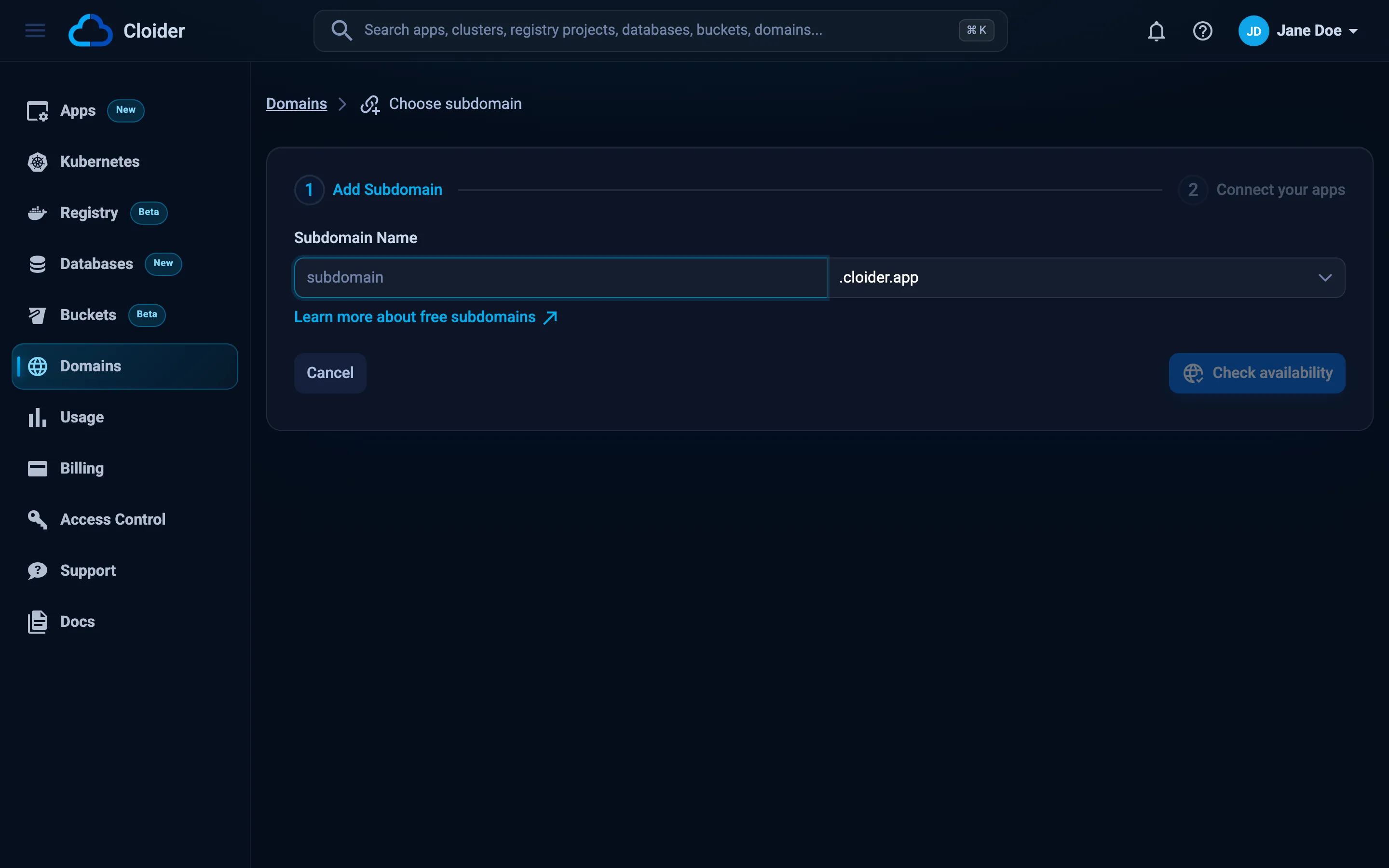
Until a target is added, the page says The subdomain will be activated once it's connected to an app with a
target. If you leave at that point, the subdomain stays in your account as Pending.
cloider domain create acme-blog.cloider.app
✓ Claimed acme-blog.cloider.app
Route it with `cloider target create acme-blog.cloider.app --app <app>`.
The CLI claims any name that ends in a Cloider subdomain parent as a free subdomain, and adds anything else as a custom domain. Route it to an app:
cloider target create acme-blog.cloider.app --app blog
✓ Routed acme-blog.cloider.app/ to the app
resource "cloider_domain" "blog" {
  name = "acme-blog.cloider.app"
}

resource "cloider_target" "blog" {
  domain = cloider_domain.blog.name
  app_id = "a7c2mq" # from `cloider app list -o wide`
}

output "url" {
  value = "https://${cloider_domain.blog.name}"
}
To build the name from the parent domain Cloider offers instead of writing cloider.app, read it from the
cloider_options data source:
data "cloider_options" "current" {}

resource "cloider_domain" "preview" {
  name = "acme-preview.${data.cloider_options.current.subdomain_roots[0]}"
}
curl -X POST https://cloider.com/api/domains \
  -H "Authorization: Bearer $CLOIDER_TOKEN" \
  -H "Content-Type: application/json" \
  -d '{"domain_name": "acme-blog.cloider.app", "domain_type": "Subdomain"}'
{
  "domain_name": "acme-blog.cloider.app",
  "domain_type": "Subdomain",
  "status": "Pending",
  "created_at": "2026-10-20T09:12:44Z"
}
domain_type must be Subdomain for a free subdomain. If your account already holds the name, the API returns the
existing domain instead of an error.
Claim acme-blog.cloider.app and route it to the blog app.
The agent claims the name, then routes it:
{"domain": "acme-blog.cloider.app"}
{"domain": "acme-blog.cloider.app", "app": "blog"}
Claim a subdomain while creating an app
When you create an app from the dashboard, cloider deploy or cloider app create, Cloider claims a free subdomain
for it and adds the target for you, unless you turn this off. That is the fastest path for an app. See
Domains for apps.
Verify
Open https://acme-blog.cloider.app in a browser once the target exists and the app or Service is running. From a
terminal:
curl -I https://acme-blog.cloider.app
HTTP/2 200
content-type: text/html; charset=utf-8
The domain's status is Active as soon as a target routes to it:
cloider domain list
DOMAIN                  TYPE          STATUS   CREATED
example.com             CustomDomain  Active   2026-10-12 09:14
acme-blog.cloider.app   Subdomain     Active   2026-10-20 09:12
Can I add DNS records to a free subdomain?
No. Free subdomains don't take DNS records: the API answers Can't add records on subdomains., and the domain page in
the dashboard shows targets only. A free subdomain always resolves to Cloider's HTTPS entry point, which is all a target
needs.
If you need records, for example to receive email or to verify a domain with another service, use a custom domain.
Change an app's subdomain
A subdomain can't be renamed. To move to a new name:
- Claim the new subdomain, for example
acme-blog-v2.cloider.app. - Add a target that routes it to the same app or Service.
- Check that the new address works.
- Delete the old subdomain. See Delete a domain.
cloider domain create acme-blog-v2.cloider.app
cloider target create acme-blog-v2.cloider.app --app blog
curl -I https://acme-blog-v2.cloider.app
cloider domain delete acme-blog.cloider.app
Once you delete a subdomain, any account can claim the name.
Release a free subdomain
Delete the domain to release the name. Its targets are deleted with it, so the address stops serving your app.
- Dashboard: on Domains, open the domain's actions menu and click Delete.
- CLI:
cloider domain delete acme-blog.cloider.app - Terraform: remove the
cloider_domainresource and runterraform apply. - API:
DELETE https://cloider.com/api/domains/acme-blog.cloider.app - MCP: the
delete_domaintool.
Deleting an app also deletes the free subdomains that were claimed with it, unless you choose to keep them. See Delete a domain for the details.
Troubleshooting
| Message | Cause and fix |
|---|---|
This subdomain is already taken. Please try another one. | Another account holds the name. Choose another label |
You already own this subdomain. Connect it to the app from Domains instead. | Your account already holds it. Add a target to it |
Invalid root domain name | The name doesn't end in .cloider.app. Use a custom domain for other names |
Subdomain name cannot contain dots (multi-level subdomains not allowed) | Only one label is allowed. Use api-blog, not api.blog |
Subdomain name cannot start with numbers | Start the label with a letter: v2-api, not 2-api |
Can't add records on subdomains. | Free subdomains have no editable records. Use a custom domain |
The address shows a 404 page | No target matches the path. Add a target, see Targets |
More cases are in Domains troubleshooting.
Next steps
- Targets: route paths of the subdomain to apps and cluster Services, or the subdomain to a bucket's static website.
- Add a custom domain: use your own domain as well.
- Domains for apps: subdomains claimed when an app is created.
Frequently asked questions
Is the cloider.app subdomain really free?
Yes. Free subdomains have no charge. You pay only for the app or cluster that serves the traffic.
Does a free subdomain have HTTPS?
Yes. Every name under cloider.app is covered by Cloider's certificate for *.cloider.app, so HTTPS works as soon as a target routes the subdomain to an app, a Service or a bucket's website.
Can I use a multi-level subdomain such as api.blog.cloider.app?
No. A free subdomain has exactly one label in front of cloider.app. Use a hyphen instead, as in api-blog.cloider.app, or use a custom domain.
How many free subdomains can I claim?
Claim one per address you need, for example one per app or environment. Each must follow the naming rules and not be taken by another account.
Can I add DNS records such as MX or TXT to a cloider.app subdomain?
No. Free subdomains don't take DNS records. Add a custom domain to manage records.
What happens to the name when I delete it?
It is released. Its targets are deleted with it, and any account can claim the name afterwards.