Database backups and restore
Cloider backs up every database automatically, with nothing to set up. Every database gets a full backup every 14 days, and every change in between is recorded as it happens, so you can restore your data as it is now or as it was at any second of the last 14 days. A restore always creates a new database, and the original keeps running untouched. Backups are included in the database's price.
At a glance
| Backups | A full backup every 14 days, at night (UTC), plus every change recorded continuously. No setup needed |
| Restore window | Any second of the last 14 days, up to the moment you restore. See how far back |
| Restore options | Newest full backup plus incremental, your data as it is now (the default), or Specific date & time, any second of the window in UTC |
| What a restore brings back | The whole server: every database, user and grant, or for Redis every key and its expiry time. See what is restored |
| Restore | Into a new database (a fork) with the same name, user, password, plan, version, trusted sources and SSL mode |
| Cost | Backups are free. A restored database is a new database, billed by its plan |
| Deleting the database | Deletes its backups and recorded changes too |
| Managed with | The Backups tab, cloider db backups and cloider db restore, the API and MCP. Not Terraform |
How do Cloider database backups work?
Cloider backs up each running database automatically. Backups are kept apart from the database's own storage, and older ones are removed automatically.
Full backups and recorded changes
Every 14 days, at night (UTC), Cloider takes a full backup of the whole server. In between, every change written to the database is recorded continuously: PostgreSQL's write-ahead log (WAL), MySQL's binary log, MongoDB's oplog and Redis's append-only file (AOF). Combined, they allow a consistent recovery to a specific point in time, called point-in-time recovery (PITR).
There is no list of backups to pick from. A restore starts from the full backup taken before the moment you want and replays the recorded changes up to it, so both restore options are point-in-time restores of the whole server.
How far back can I restore?
The last 14 days, up to the moment you restore. Cloider keeps the full backup and the changes it needs to reach back that far, and removes older ones automatically. Deleting a database deletes all of its backups.
A new database's window opens with its first full backup, which is taken the first night after the database is created. Until then the Backups tab shows "You can restore a backup after the first full backup is completed."
Redis
Redis records every write in its append-only file (AOF), with a timestamp for each second, and Cloider archives the new writes about once a minute. The full backup every 14 days is an AOF rewrite.
Your Redis user has full rights, so it can switch the AOF or its timestamps off with CONFIG SET appendonly no or CONFIG SET aof-timestamp-enabled no. Cloider switches them back on within about a minute and takes a new full backup. The restore window then starts at that backup.
Snapshots of a Redis database taken before it had point-in-time recovery, named YYYY-MM-DD_HH-MM, are still listed by cloider db backups, and you can restore one by name with cloider db restore <database> <name> until they expire, around mid-November 2026.
A paused database isn't running, so no full backups are taken and there are no changes to record. To restore it, resume it first.
See what you can restore
The Backups tab, cloider db backups and the API show the start of the restore window.
- Dashboard
- CLI
- Terraform
- API
- MCP
- Open the database and go to the Backups tab.
- Summary says how the database is backed up.
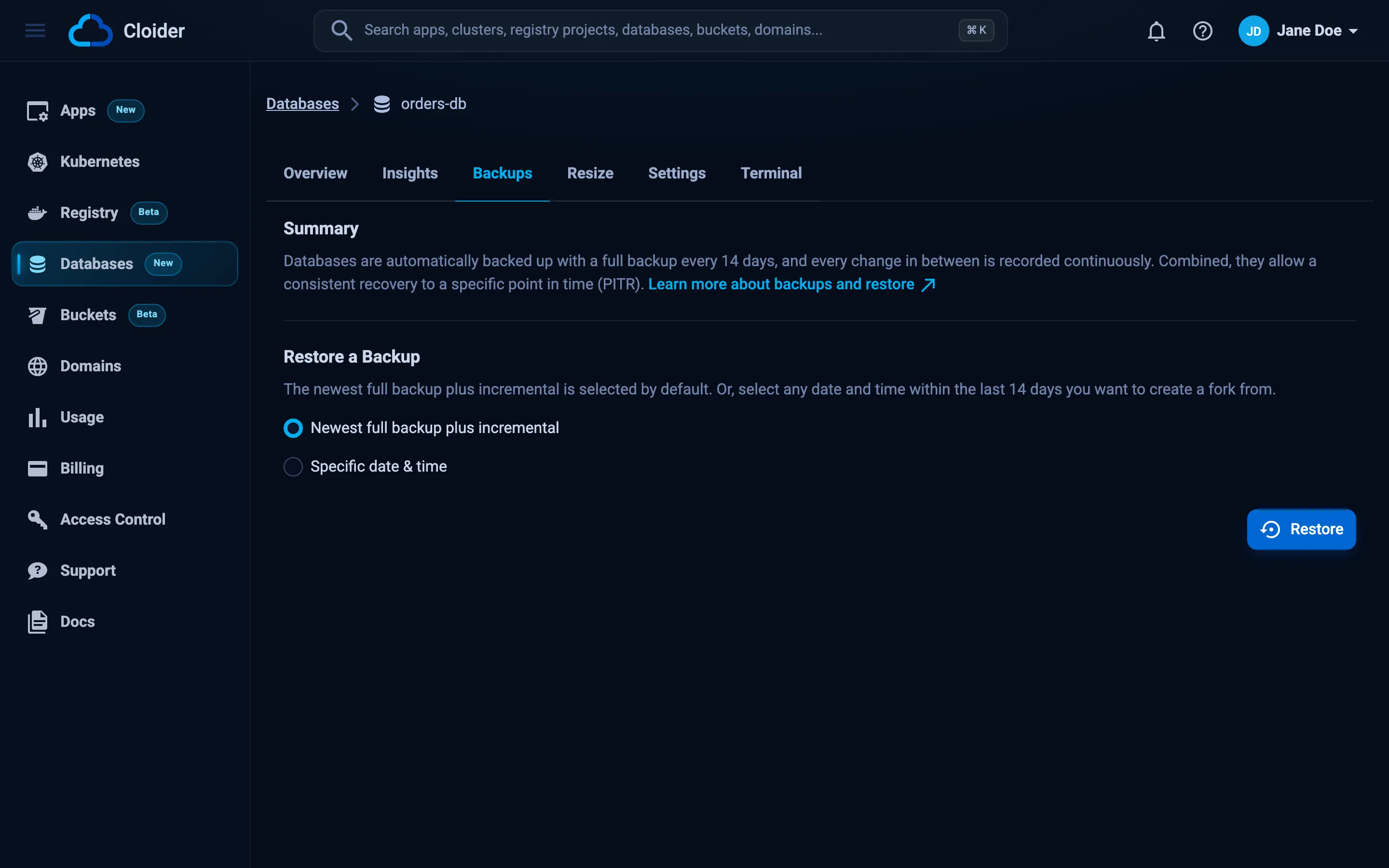
- Under Restore a Backup, pick Specific date & time. The hint under Time (UTC) gives the start of the window, for example "Restorable from Oct 13, 2026 at 01:31:07 UTC."
A new database shows "You can restore a backup after the first full backup is completed." until its first full backup has run.
cloider db backups orders-db
Nothing to show.

Restore the newest full backup plus every change since with `cloider db restore orders-db`,
or any moment from 2026-10-13 01:31:07 UTC until now with `cloider db restore orders-db --time <time>`.
There are no backups to list, so -o json prints []. The last line gives the start of the window.
The Terraform provider doesn't list or restore backups. Use the dashboard, the CLI or the API. You can then bring a restored database under Terraform with an import block, see import existing resources.
The window of a database:
curl https://cloider.com/api/databases/p0q9zm/pitr-window \
  -H "Authorization: Bearer $CLOIDER_TOKEN"
{"available": true, "earliest": "2026-10-13T01:31:07Z", "latest": "2026-10-27T09:12:03Z"}
latest is the time of the request. Before the first full backup, the response is {"available": false}.
Which backups does cache have?
{"database": "cache"}
Restore a backup into a new database
Restoring creates a new database, called a fork, and leaves your current database running unchanged. Use the fork to recover deleted rows, inspect old data, test a migration on real data or replace the original.
Every database has two restore options:
| Option | What the new database holds | CLI | API body |
|---|---|---|---|
| Newest full backup plus incremental (the default) | The newest full backup plus every change since: your data as it is at the moment you restore | cloider db restore orders-db | {"latest": true} |
| Specific date & time | Your data as it was at any second of the window, picked in UTC, for example the second before a DROP TABLE or a bad migration | --time 2026-10-25T14:29:00Z | {"target_time": "2026-10-25T14:29:00Z"} |
| Precision | To the second: everything committed by the time you pick is restored, nothing after it. MySQL counts a statement at the second it started, so one still running at that time is restored too. Redis restores to the end of the second you pick, so writes made during that second are kept |
| Requirement | The database must be running, not paused, for both options |
| Duration | Cloider loads the full backup taken before your time, then replays the changes after it, up to about 4 weeks of them. Minutes for most databases, longer for busy ones |
- Dashboard
- CLI
- Terraform
- API
- MCP
- Open the database and go to the Backups tab.
- Under Restore a Backup, keep Newest full backup plus incremental to restore your data as it is now, or pick Specific date & time. Then choose the day in the Date calendar, where only days inside the window can be selected, and enter the time in Time (UTC) as
HH:mm:ss. - Click Restore.
- The Restore Backup dialog says what the new database will hold, for example "This creates a new database with your data as it was on Oct 25, 2026 at 14:29:00 UTC. Your current database is left untouched. Continue?" Click Create fork.
A time outside the window shows "Pick a moment from Oct 13, 2026 at 01:31:07 UTC on." or "Pick a moment in the past." under Time (UTC), and Restore stays disabled.
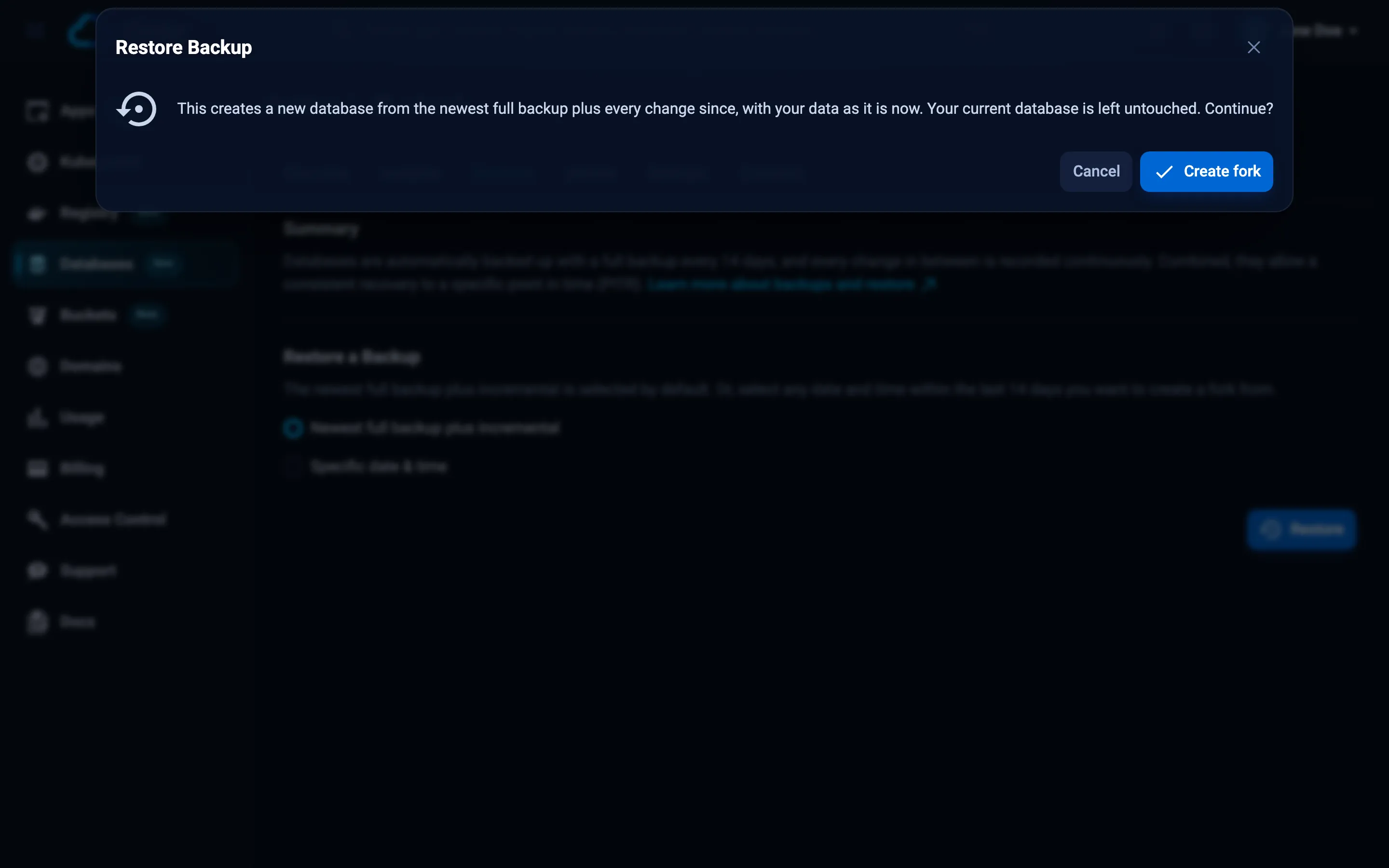
The dashboard takes you to the Databases list, where the new database is highlighted with the status Creating until it is ready.
Without a backup or --time, cloider db restore restores the newest:
cloider db restore orders-db --wait
Restore orders-db from the newest backup into a new database? [y/N] y
✓ Restoring orders-db from the newest backup into a new database orders-db-2026-10-27-09-12-03
✓ The restored database is ready: `cloider db get orders-db-2026-10-27-09-12-03`
To a point in time:
cloider db restore orders-db --time 2026-10-25T14:29:00Z --wait
Restore orders-db as of 2026-10-25 14:29:00 UTC into a new database? [y/N] y
✓ Restoring orders-db from 2026-10-25 14:29:00 UTC into a new database orders-db-2026-10-25-14-29-00
✓ The restored database is ready: `cloider db get orders-db-2026-10-25-14-29-00`
--time takes RFC 3339 with any offset, or "YYYY-MM-DD HH:MM:SS" in UTC.
In scripts, add --yes to skip the question, and -q to print only the new database's id.
The Terraform provider can't restore backups. Restore with the dashboard, the CLI or the API, then import the new database if you want Terraform to manage it:
import {
  to = cloider_database.orders_restored
  id = "w4t6yb"
}
curl -X POST https://cloider.com/api/databases/p0q9zm/restore \
  -H "Authorization: Bearer $CLOIDER_TOKEN" \
  -H "Content-Type: application/json" \
  -d '{"latest": true}'
{"hashed_id": "w4t6yb", "database_label": "orders-db-2026-10-27-09-12-03"}
The body takes exactly one of these fields:
| Field | Restores |
|---|---|
latest | true: the newest, the newest full backup plus every change since |
target_time | This moment, RFC 3339, for example 2026-10-25T14:29:00Z. It must be inside the window |
backup | A Redis snapshot taken before point-in-time recovery, by its name from GET /api/database/backups, until it expires, see Redis |
Poll GET /api/databases/w4t6yb/status until the new database is Ready.
Restore orders-db to how it was at 14:29 UTC today, before the migration.
{"database": "orders-db", "time": "2026-10-25T14:29:00Z", "wait": true}
Without backup or time, the tool restores the newest:
{"database": "orders-db", "wait": true}
What the new database gets
| Property | Value in the restored database |
|---|---|
| Label | The original's label plus the moment restored to, for example orders-db-2026-10-27-09-12-03 (with -1, -2 added if taken) |
| Name, user, password | The same as the original |
| Engine, version, plan | The same as the original |
| Trusted sources, SSL mode | The same as the original |
| Id, host and port | New. The host is <name>-<new id>.db.cloider.com, and the port is newly assigned |
| Data | The whole server as it was at that moment, see below |
| Backups | Its own, starting with its first full backup the first night after it is created |
Because the name, user and password are the same, switching an app to the restored database only means changing the host and the port in its connection string.
What is restored and what isn't
| Engine | Restored | Not restored |
|---|---|---|
| PostgreSQL | The whole server: every database, role, password, ownership and grant | Changes committed after the moment restored to |
| MySQL | The whole server: every database with its views, routines and triggers, every account, password and grant | Statements started after the moment restored to |
| MongoDB | The whole server: every database, collection, index, user and role | Writes after the moment restored to |
| Redis | The whole server: all 16 logical databases, every key and its expiry time | Writes after the end of the second restored to, ACL users you created yourself (ACL SETUSER), CONFIG SET changes |
Redis expiry times are absolute, so a key whose time to live ran out since the moment restored to is gone in the new database, as it is in the original.
Replace a database with a backup
Cloider doesn't overwrite a running database with a backup. To go back to earlier data:
Option 1: switch to the restored database. Restore into a new database, check the data, then point your app at the new database (only the host and port change) and delete the old one when you no longer need it. This is the quickest way, with no copying.
Option 2: copy the data back. Restore into a new database, then copy what you need into the original with the engine's tools. For example, to replace one PostgreSQL table:
# Dump one table from the restored database
PGPASSWORD="$(cloider db password orders-db-2026-10-25-14-29-00)" \
  pg_dump -h orders-db-w4t6yb.db.cloider.com -p 21388 -U orders_db_user -d orders-db \
  --data-only --table=public.orders -Fc -f orders.dump

# Empty the table in the original, then load the old rows
cloider db exec orders-db "TRUNCATE public.orders;"
PGPASSWORD="$(cloider db password orders-db)" \
  pg_restore -h orders-db-p0q9zm.db.cloider.com -p 20417 -U orders_db_user -d orders-db \
  --data-only orders.dump
Both databases must trust your IP for this, see trusted sources.
Make your own backups
Cloider's backups protect against mistakes and failures within the restore window. For longer retention, copies outside Cloider, or a file you can download, export the data yourself with the engine's tools. Each of these runs from your machine against the public host:
# PostgreSQL: custom format dump of one database
PGPASSWORD="$(cloider db password orders-db)" \
  pg_dump -h orders-db-p0q9zm.db.cloider.com -p 20417 -U orders_db_user -d orders-db -Fc -f orders-db.dump

# MySQL: one database, consistent for InnoDB tables
MYSQL_PWD="$(cloider db password shop-db)" \
  mysqldump -h shop-db-k7x2wd.db.cloider.com -P 22861 -u shop_db_user --ssl-mode=REQUIRED \
  --single-transaction --no-tablespaces shop-db | gzip > shop-db.sql.gz

# MongoDB: one database to a gzipped archive
mongodump --uri "mongodb://catalog_db_user:$(cloider db password catalog-db)@catalog-db-m3v8rt.db.cloider.com:24309/catalog-db?directConnection=true&tls=true" \
  --tlsCAFile ca.crt --gzip --archive=catalog-db.archive

# Redis: a snapshot of the whole server
REDISCLI_AUTH="$(cloider db password cache)" \
  redis-cli -h cache-c5n1qa.db.cloider.com -p 26742 --user cache_user --tls --cacert ca.crt --rdb cache.rdb
To keep them off your machine, upload them to a Cloider bucket. The guide back up a database to a bucket automates this on a schedule.
Troubleshooting
You can restore a backup after the first full backup is completed.
The database is new. Its first full backup is taken the first night after it is created, and the restore window opens then.
Point-in-time recovery isn't available for this database yet. It starts after its first full backup!
The same, through the CLI or the API: a new database has no full backup to replay changes onto yet. Try again after its first night.
The database must be running to restore it to a point in time!
Both restore options need the database running, and it is paused or still changing. Resume it, or wait until it is Ready, then restore.
Pick a point in time between ... UTC and now!
The time is before the start of the window or in the future. The window starts 14 days back, or at the database's first full backup if that is more recent, see cloider db backups or GET /api/databases/<id>/pitr-window.
Choose one of the newest backup, a backup or a point in time!
The API request sets more than one of latest, backup and target_time. Send exactly one.
Invalid backup selected!
The request sets none of latest, backup and target_time, or backup isn't in the YYYY-MM-DD_HH-MM format. Send {"latest": true} or a target_time.
Free plan users can not create more than one database. UPGRADE NOW!
A restore creates a database, and accounts on the free plan can have only one. Delete the other database first or upgrade, see billing.
The moment I need is outside the window
Full backups that fall out of the window, and the changes recorded before them, are removed automatically. For Redis, switching the AOF off also moves the start of the window, see Redis. For longer retention, make your own backups.
The restored database shows Failed
The restore didn't complete, so the new database doesn't hold a usable copy. Your original database isn't affected. Delete the failed one and try again, or contact support if it fails again.
Next steps
Frequently asked questions
How often are Cloider databases backed up?
Every database gets a full backup every 14 days, and every change in between is recorded continuously. Backups start automatically when a database is created, with no setup and no extra cost.
How far back can I restore a database?
Any second of the last 14 days, up to the moment you restore. cloider db backups <database> shows where the window starts.
Does restoring a backup overwrite my database?
No. A restore always creates a new database, with the same name, user, password and plan. The original database keeps running unchanged.
What happens to backups when I delete a database?
They are deleted with it, together with its recorded changes. Restore or export anything you want to keep before deleting a database.
Can I restore a database to a specific time?
Yes: any second of the last 14 days, picked in UTC, into a new database. Without a time, Cloider restores the newest full backup plus every change since, your data as it is now.
Can I download a Cloider backup file?
No. Cloider's backups can only be restored into a new database. To get a file, export the data yourself with pg_dump, mysqldump, mongodump or redis-cli --rdb.