Bucket versioning and restoring files
Versioning keeps the earlier contents of a file every time it is overwritten or deleted, so a mistake (a bad upload, a script that deletes the wrong folder, ransomware encrypting your files) can be undone. With versioning on, you can list every version of a file, download any of them, make an earlier one current again, and bring deleted files back.
This page explains how versions and delete markers work, how to turn versioning on, and how to restore files with every tool.
At a glance
| Default | Off on a new bucket, unless you turn on Versioning when creating it |
| States | Never enabled (shown as Off), Enabled, Suspended |
| Can it be turned off? | Once enabled, versioning can only be suspended. Versions kept so far stay until you delete them or a lifecycle rule expires them |
| Cost | Every kept version uses storage and is billed like any file |
| Restore | Dashboard Files tab, cloider bucket restore, the API, MCP, or any S3 tool |
| Who can change it | Members who manage resources, and read and write access keys through the S3 API |
How does versioning work?
Without versioning, a bucket keeps exactly one copy of each key: uploading to an existing key replaces it, and deleting removes it for good.
With versioning enabled, every upload creates a new version with its own version id, and the previous one is kept:
- The newest version is the current one. Plain downloads and listings see only current versions.
- An overwrite adds a new current version. The old one becomes noncurrent and stays available.
- A delete doesn't remove data. It adds a delete marker as the newest version, so the file disappears from listings and plain downloads answer
NoSuchKey, but every earlier version is still there. - Undeleting a file means removing its delete marker: the version before it becomes current again.
- Permanently deleting a specific version (by its version id) is the only way to destroy kept data, apart from lifecycle rules.
Suspended versioning
Suspending versioning stops keeping new versions, without deleting the ones already kept. While suspended, an upload or delete replaces the file's single "null" version instead of adding a new one, so the content it replaces is gone for good. Versions created while versioning was enabled stay in the history and can still be restored.
A bucket can't go back to the never versioned state. To get rid of old versions after suspending, delete them or let a lifecycle rule expire noncurrent versions.
Turn versioning on or off
You can turn versioning on when you create the bucket (then even the first upload is versioned) or at any time later once the bucket is Ready.
- Dashboard
- CLI
- Terraform
- API
- MCP
- Open Buckets in the sidebar, click the bucket, and select the Settings tab.
- Click the Versioning switch.
- Confirm with Enable in Enable Versioning, or Suspend in Suspend Versioning.
A Suspended tag shows next to the switch while versioning is suspended.
Show the current state (Enabled, Suspended, or Off for a bucket that was never versioned):
cloider bucket versioning acme-backups
Off
Turn it on, or suspend it:
cloider bucket versioning acme-backups on
✓ Versioning of acme-backups is Enabled
cloider bucket versioning acme-backups off
✓ Versioning of acme-backups is Suspended
resource "cloider_bucket" "backups" {
  name       = "acme-backups"
  versioning = true
}
Setting versioning = false after true suspends versioning and keeps the versions already kept.
curl -X PUT https://cloider.com/api/buckets/k9d4mz/versioning \
  -H "Authorization: Bearer $CLOIDER_TOKEN" \
  -H "Content-Type: application/json" \
  -d '{"enabled": true}'
{"status": "Enabled"}
{"enabled": false} suspends it and answers {"status": "Suspended"}. Read the state with GET /api/buckets/k9d4mz/versioning, which answers Enabled, Suspended or an empty string for a bucket that was never versioned.
Turn on versioning for acme-backups.
It calls the set_bucket_versioning tool:
{"bucket": "acme-backups", "enabled": true}
get_bucket_versioning reads the current state.
A read and write access key can also change versioning through the S3 API (aws s3api put-bucket-versioning), and the dashboard always shows the bucket's real state.
List the versions of a file
- Dashboard
- CLI
- Terraform
- API
- MCP
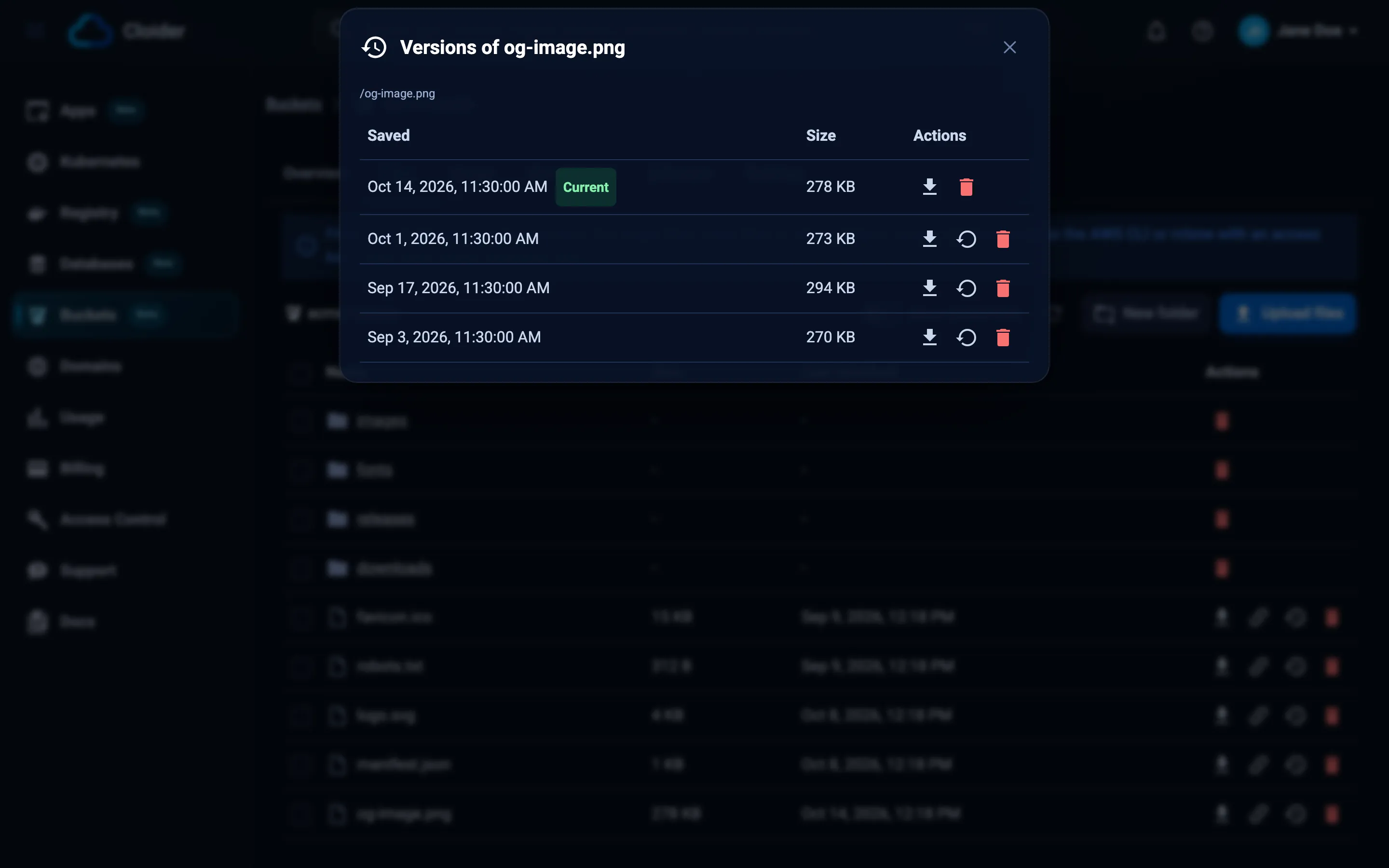
- Open the bucket's Files tab and find the file.
- Click its Versions button (the clock icon). It only appears on versioned buckets.
- The Versions of dialog lists every version, newest first, with when it was Saved and its Size. The current one is tagged Current, delete markers Deleted.
cloider bucket versions acme-backups orders/latest.sql.gz
VERSION ID                          SIZE       MODIFIED
3HL4kqtJlcpXroDTDmJ.rmSpXd3dIbrH    48.2 MiB   2026-10-20 03:00  latest
Ux8Lw0q7M2Nn1pZ5t9QvKc4RbYdE6sAa    47.9 MiB   2026-10-19 03:00
8sQmV2rT5xLpK0wN3jHcYbZ7fD1gE4uA    47.1 MiB   2026-10-18 03:00
A delete marker shows deleted as its size. When a file has more than 1000 versions, only the newest 1000 are listed.
Not available in Terraform. Use the dashboard, the CLI, the API or an S3 tool.
curl -G https://cloider.com/api/buckets/k9d4mz/objects/versions \
  --data-urlencode "key=orders/latest.sql.gz" \
  -H "Authorization: Bearer $CLOIDER_TOKEN"
{
  "versions": [
    {"version_id": "3HL4kqtJlcpXroDTDmJ.rmSpXd3dIbrH", "size": 50541363, "last_modified": "2026-10-20T01:00:04Z", "is_latest": true, "delete_marker": false},
    {"version_id": "Ux8Lw0q7M2Nn1pZ5t9QvKc4RbYdE6sAa", "size": 50226741, "last_modified": "2026-10-19T01:00:03Z", "is_latest": false, "delete_marker": false}
  ],
  "truncated": false
}
truncated is true when the file has more versions than the 1000 newest listed.
{"bucket": "acme-backups", "key": "orders/latest.sql.gz"}
Restore an earlier version
Restoring a version makes its content current again. Cloider does this by adding a copy of the version as the newest version, with its content type and metadata, so the history stays complete: the version you replace remains available too, and you can undo the restore the same way.
- Dashboard
- CLI
- Terraform
- API
- MCP
- Open the file's Versions dialog from the Files tab.
- Click Restore on the version you want.
- Confirm with Restore in Restore Version.
To check a version first, click its Download button.
cloider bucket restore acme-backups orders/latest.sql.gz --version-id Ux8Lw0q7M2Nn1pZ5t9QvKc4RbYdE6sAa
✓ Restored orders/latest.sql.gz in acme-backups
Download a version without restoring it:
cloider bucket download acme-backups orders/latest.sql.gz \
  --version-id Ux8Lw0q7M2Nn1pZ5t9QvKc4RbYdE6sAa --dest ./orders-2026-10-19.sql.gz
Not available in Terraform.
curl -X POST https://cloider.com/api/buckets/k9d4mz/objects/restore \
  -H "Authorization: Bearer $CLOIDER_TOKEN" \
  -H "Content-Type: application/json" \
  -d '{"key": "orders/latest.sql.gz", "version_id": "Ux8Lw0q7M2Nn1pZ5t9QvKc4RbYdE6sAa"}'
{"success": true}
Restore yesterday's version of orders/latest.sql.gz in acme-backups.
The agent lists the versions with list_bucket_object_versions, then calls:
{"bucket": "acme-backups", "key": "orders/latest.sql.gz", "version_id": "Ux8Lw0q7M2Nn1pZ5t9QvKc4RbYdE6sAa"}
Versions larger than 5 GB can't be restored this way: download the version with an S3 tool and upload it again (see Restore with S3 tools).
Restore a deleted file
A deleted file on a versioned bucket is hidden behind a delete marker. Undeleting it removes that marker, so the file is back exactly as it was, under the same key.
- Dashboard
- CLI
- Terraform
- API
- MCP
- Open the bucket's Files tab and go to the folder the file was in.
- Turn on Show deleted files. The table now lists the deleted files of that folder with when they were Deleted, and folders that hold deleted files.
- Click Restore on the file.
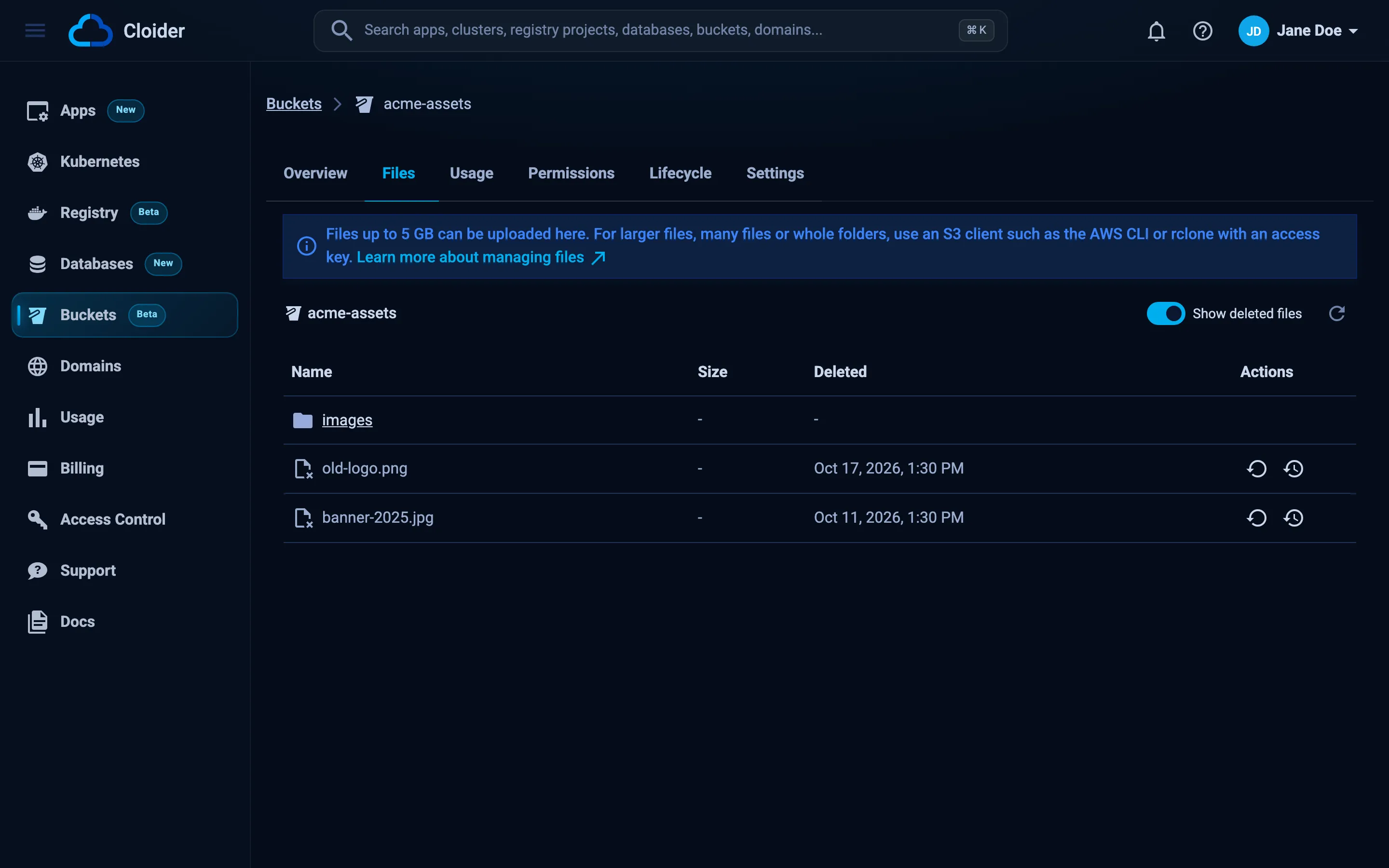
You can also open the deleted file's Versions dialog and click Undelete on its newest delete marker, or Restore on an older version.
List the deleted files a folder can still restore:
cloider bucket deleted acme-assets images/
KEY                  DELETED           MARKER VERSION ID
images/banner.png    2026-10-20 10:12  b1Zq9Xc3Vn7Lk2Mp5Rt8Wy4Hs6Jd0Fg
images/logo-old.png  2026-10-19 16:44  N4fK8sP2qR6tV0xZ3bD7hJ1mW5yC9eA
Undelete one by restoring its delete marker:
cloider bucket restore acme-assets images/banner.png --version-id b1Zq9Xc3Vn7Lk2Mp5Rt8Wy4Hs6Jd0Fg
✓ Restored images/banner.png in acme-assets
Not available in Terraform.
List a folder's deleted files:
curl -G https://cloider.com/api/buckets/b7r2xw/objects/deleted \
  --data-urlencode "prefix=images/" \
  -H "Authorization: Bearer $CLOIDER_TOKEN"
{
  "prefix": "images/",
  "folders": [],
  "objects": [
    {"key": "images/banner.png", "name": "banner.png", "deleted_at": "2026-10-20T08:12:31Z", "marker_version_id": "b1Zq9Xc3Vn7Lk2Mp5Rt8Wy4Hs6Jd0Fg"}
  ],
  "next_token": ""
}
A page can be empty and still have a next_token; keep requesting with token until it is empty. Then restore the marker:
curl -X POST https://cloider.com/api/buckets/b7r2xw/objects/restore \
  -H "Authorization: Bearer $CLOIDER_TOKEN" \
  -H "Content-Type: application/json" \
  -d '{"key": "images/banner.png", "version_id": "b1Zq9Xc3Vn7Lk2Mp5Rt8Wy4Hs6Jd0Fg"}'
I deleted images/banner.png from acme-assets by mistake, bring it back.
The agent finds the delete marker with list_deleted_bucket_objects and restores it:
{"bucket": "acme-assets", "key": "images/banner.png", "version_id": "b1Zq9Xc3Vn7Lk2Mp5Rt8Wy4Hs6Jd0Fg"}
Only the latest delete marker of a file can be undone. If a file was deleted, re-created and deleted again, restore one of its earlier content versions instead.
Permanently delete versions
Deleting a specific version removes that data for good. Use it to remove a file that must really disappear (for example personal data), or to cut storage costs. To clean up old versions regularly, a lifecycle rule with noncurrent days is easier.
- Dashboard
- CLI
- Terraform
- API
- MCP
- Open the file's Versions dialog.
- Click Delete permanently on a version and confirm with Delete.
Deleting the Current version makes the file go back to its previous version, or disappear if it has none.
cloider bucket rm-versions acme-backups orders/latest.sql.gz \
  --version-id 8sQmV2rT5xLpK0wN3jHcYbZ7fD1gE4uA --version-id Ux8Lw0q7M2Nn1pZ5t9QvKc4RbYdE6sAa
Permanently delete 2 versions of orders/latest.sql.gz? This can't be undone. [y/N] y
✓ Deleted 2 versions of orders/latest.sql.gz
Add --yes in scripts.
Not available in Terraform.
curl -X POST https://cloider.com/api/buckets/k9d4mz/objects/versions/delete \
  -H "Authorization: Bearer $CLOIDER_TOKEN" \
  -H "Content-Type: application/json" \
  -d '{"key": "orders/latest.sql.gz", "version_ids": ["8sQmV2rT5xLpK0wN3jHcYbZ7fD1gE4uA"]}'
{"failed": []}
Up to 1000 version ids per request.
{"bucket": "acme-backups", "key": "orders/latest.sql.gz", "version_ids": ["8sQmV2rT5xLpK0wN3jHcYbZ7fD1gE4uA"]}
Restore with S3 tools
Any S3 tool with a read and write access key can work with versions directly. With the AWS CLI:
# List versions and delete markers under a prefix
aws s3api list-object-versions --bucket acme-backups --prefix orders/ --profile cloider

# Download a specific version
aws s3api get-object --bucket acme-backups --key orders/latest.sql.gz \
  --version-id Ux8Lw0q7M2Nn1pZ5t9QvKc4RbYdE6sAa ./orders.sql.gz --profile cloider

# Make it current again by uploading it as the newest version
aws s3 cp ./orders.sql.gz s3://acme-backups/orders/latest.sql.gz --profile cloider

# Undelete a file by deleting its delete marker
aws s3api delete-object --bucket acme-backups --key images/banner.png \
  --version-id b1Zq9Xc3Vn7Lk2Mp5Rt8Wy4Hs6Jd0Fg --profile cloider

# Permanently delete one version
aws s3api delete-object --bucket acme-backups --key orders/latest.sql.gz \
  --version-id 8sQmV2rT5xLpK0wN3jHcYbZ7fD1gE4uA --profile cloider
To make an earlier version current, download it and upload it again as shown, which is also what the dashboard does. Restoring with aws s3api copy-object and a versionId in the copy source can occasionally report success while the previous version stays current, so check the result with list-object-versions if you use it.
How much does versioning cost?
Every version and delete marker the bucket keeps counts toward its stored data and is billed like any file. A 50 MB file overwritten every night with versioning on stores about 1.5 GB after a month. Keep this in check with a lifecycle rule:
[
  {"id": "old-versions", "prefix": "", "enabled": true, "expire_days": 0, "noncurrent_days": 30, "abort_multipart_days": 7}
]
cloider bucket lifecycle set acme-backups -f rules.json
This removes versions 30 days after they were replaced or deleted. See Lifecycle rules and Usage and billing.
Troubleshooting
| Message | Cause and fix |
|---|---|
This is already the current version! | The version you picked is the current one. Pick an older version |
Only the latest deletion can be undone! | You picked an older delete marker. Restore the newest marker, or an earlier content version |
This version doesn't exist anymore! | The version was deleted meanwhile, by someone else or a lifecycle rule |
Versions over 5 GB can't be restored from the dashboard, use an S3 client! | Download the version and upload it again with an S3 tool |
The bucket must be ready to change its settings. | Wait until the bucket is Ready |
The bucket's policy denies this, change the policy first. | A bucket policy denies s3:PutBucketVersioning to everyone. Edit the policy |
| No Versions button or Show deleted files switch | The bucket was never versioned. Turn versioning on; files deleted before that can't be recovered |
| A file overwritten while versioning was suspended can't be restored | Suspended versioning replaces the null version. Only versions created while versioning was enabled are kept |
Next steps
- Expire old versions automatically.
- Protect data with versioning, read only keys and policies.
- Back up a database to a versioned bucket.
Frequently asked questions
How do I restore a deleted file from a Cloider bucket?
If the bucket has versioning enabled, open its Files tab, turn on Show deleted files, and click Restore on the file. With the CLI, find the delete marker with cloider bucket deleted <bucket> and run cloider bucket restore <bucket> <key> --version-id <marker version id>. Without versioning, deleted files can't be recovered.
Can I turn versioning off again?
Versioning can be suspended but not removed. While suspended, new overwrites and deletes no longer keep earlier versions, and the versions kept so far stay until you delete them or a lifecycle rule expires them.
Are old versions billed?
Yes. Every kept version and delete marker counts toward the bucket's stored data. A lifecycle rule with noncurrent days removes old versions automatically.
Does restoring a version delete the newer versions?
No. Restoring adds a copy of the chosen version as the newest version. The versions in between stay in the history and can be restored too.
Can I recover files deleted before versioning was turned on?
No. Versioning only keeps versions of uploads, overwrites and deletes that happen while it is enabled.