Protect data in Cloider buckets
Data in a bucket can be lost in three ways: someone deletes or overwrites it by mistake, a tool or script misbehaves, or an attacker gets hold of an access key. Cloider gives you four building blocks against these, which you combine to the level of protection a bucket needs: versioning, scoped access keys, bucket policies and lifecycle rules.
This page explains what each one protects against, gives a complete recipe for a backup bucket that a leaked key can't destroy, and states clearly what Cloider doesn't offer (object lock).
At a glance
| Risk | What protects against it |
|---|---|
| A file is deleted or overwritten by mistake | Versioning: restore the earlier version or the deleted file |
| A script deletes a whole folder | Versioning, plus a Deny policy on deletes for the key the script uses |
| A tool only needs to read but holds a write key | A read only access key |
| A leaked key reaches every bucket | Keys scoped to the buckets they need |
| A leaked write key destroys history or turns versioning off | A Deny bucket policy on s3:DeleteObjectVersion, s3:PutBucketVersioning and s3:PutLifecycleConfiguration |
| A member makes a destructive change in the dashboard | Roles: give members who only need to look the read-only role |
| Files must be kept unchangeable for a fixed period (compliance) | Not available: object lock isn't offered. See Object lock, retention and legal hold |
Versioning: undo deletes and overwrites
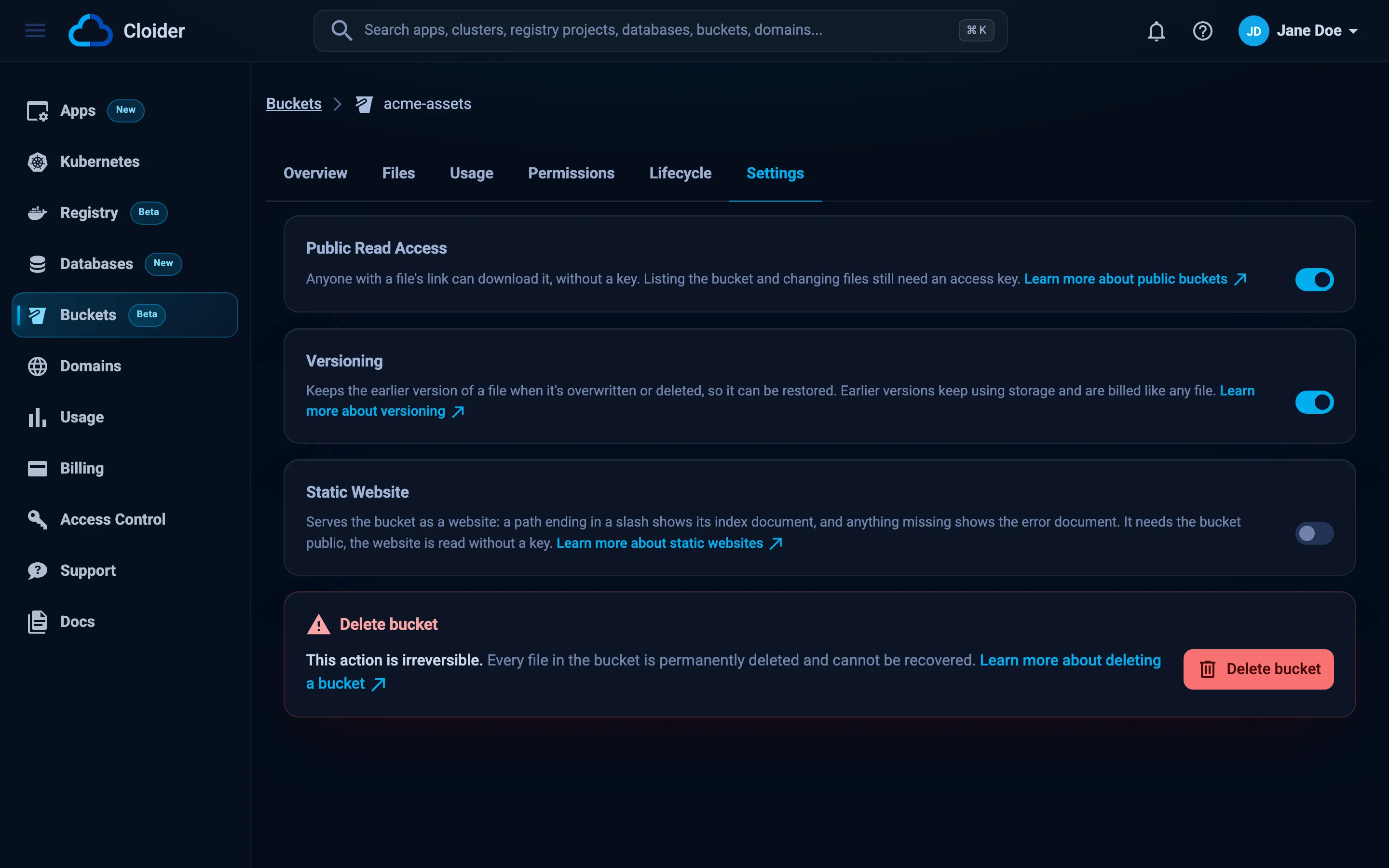
Versioning is the most important protection for any bucket holding data you can't recreate. With it enabled, an overwrite keeps the previous version and a delete only adds a delete marker, so every mistake can be undone from the dashboard, the CLI or any S3 tool. Turn it on in the bucket's Settings tab under Versioning, or when creating the bucket.
What versioning doesn't stop on its own:
- Anyone with a read and write key can permanently delete versions by version id.
- Anyone with a read and write key can suspend versioning or add a lifecycle rule through the S3 API, and from then on new overwrites and deletes are no longer kept, or old versions expire.
- Kept versions cost storage. Expire them after a sensible period with a lifecycle rule, rather than never keeping them.
The policy in the recipe below closes the first two gaps. See Versioning for how to restore files.
Least privilege access keys
Every access key has a scope (all buckets or chosen ones) and a permission (read and write, or read only). Narrow scopes limit what a leaked key can do:
- Give each app, server and CI pipeline its own key, so one leak means one key to delete.
- Scope keys to only the buckets they use, rather than all buckets.
- Use read only keys for anything that only reads: CDNs, restore jobs, analytics, a laptop browsing backups.
- Rotate keys regularly and delete keys nobody uses.
cloider bucket key listshows when each was created.
A key can never change a bucket's visibility or policy, or create or delete buckets: those actions are only available through Cloider's own tools, where they need a member's login or an API token.
Bucket policies: deny what nobody should do
A bucket policy's Deny statements override every key's permission, so they turn "should not" into "cannot". Typical protections:
- deny
s3:DeleteObjectands3:DeleteObjectVersionto the key a backup tool uses, so it can add backups but not remove them, - deny writes under a folder to everyone, to freeze it,
- deny
s3:PutBucketVersioningands3:PutLifecycleConfigurationto everyone, so versioning can't be suspended and no expiry rule can be slipped in through the S3 API.
A Deny naming everyone ("Principal": "*") applies to the dashboard and the cloider CLI too. That is the point: to undo the protection, a member has to edit or remove the policy first, a deliberate step that access keys can't take. See Bucket policies.
Recipe: a backup bucket a leaked key can't destroy
This setup suits database dumps, server backups and exports. The backup tool can write new backups, but neither it nor anyone holding its key can delete them, destroy history, suspend versioning or add an expiry rule. Old versions are cleaned up after 90 days by a lifecycle rule that only an account member can change.
1. Create a versioned bucket.
cloider bucket create acme-backups --versioning --wait
2. Add a lifecycle rule that removes replaced and deleted versions after 90 days and cleans up unfinished uploads. Do this before step 4, which locks lifecycle changes.
[
  {"id": "keep-90-days", "prefix": "", "enabled": true, "expire_days": 0, "noncurrent_days": 90, "abort_multipart_days": 7}
]
cloider bucket lifecycle set acme-backups -f rules.json
3. Create a key for the backup tool, scoped to this bucket only:
cloider bucket key create --label backup-writer --bucket acme-backups
Note its access key id, here CLDRZ8Q4M2X7KD1PLW0B, and store the secret in the backup tool's configuration.
4. Set the protection policy.
{
  "Version": "2012-10-17",
  "Statement": [
    {
      "Sid": "WriterNeverDeletes",
      "Effect": "Deny",
      "Principal": {"AWS": ["CLDRZ8Q4M2X7KD1PLW0B"]},
      "Action": ["s3:DeleteObject"],
      "Resource": ["arn:aws:s3:::acme-backups/*"]
    },
    {
      "Sid": "HistoryIsPermanent",
      "Effect": "Deny",
      "Principal": "*",
      "Action": ["s3:DeleteObjectVersion"],
      "Resource": ["arn:aws:s3:::acme-backups/*"]
    },
    {
      "Sid": "SettingsAreFixed",
      "Effect": "Deny",
      "Principal": "*",
      "Action": ["s3:PutBucketVersioning", "s3:PutLifecycleConfiguration"],
      "Resource": ["arn:aws:s3:::acme-backups"]
    }
  ]
}
cloider bucket policy set acme-backups -f protect-backups.json
5. Verify with the backup key that writes work and destructive actions don't:
aws s3 cp ./test.txt s3://acme-backups/test.txt --profile backup-writer          # works
aws s3 rm s3://acme-backups/test.txt --profile backup-writer                     # AccessDenied
aws s3api put-bucket-versioning --bucket acme-backups \
  --versioning-configuration Status=Suspended --profile backup-writer            # AccessDenied
What this gives you:
| Who | Can do | Can't do |
|---|---|---|
| The backup tool's key | Upload new backups, overwrite (which keeps the old version), read and list | Delete files, delete versions, suspend versioning, change lifecycle rules, change the policy |
| Any other access key | What its own permission allows | Delete versions, suspend versioning, change lifecycle rules, change the policy |
| An account member in the dashboard or CLI | Restore versions, read everything, and change or remove the policy | Delete versions or change versioning and lifecycle while the policy is in place |
To change the setup later (for example to delete old backups by hand or to change the retention), a member edits the policy in the bucket's Permissions > Bucket Policy tab, makes the change, and sets the policy again.
Object lock, retention and legal hold
Cloider buckets don't offer S3 Object Lock. You can't set a default retention period on a bucket, a retention date (governance or compliance mode) on an object, or a legal hold. Access keys can't enable these features, and bucket policies can't grant them.
If you need write once, read many (WORM) storage for a regulatory requirement, the combination above (versioning, a Deny policy on version deletes and settings, and keys that can't change policies) prevents deletion by anyone without account access, but it is not a certified compliance mode: an account member can still remove the policy. Keep a copy with a provider that offers certified object lock if your regulation requires it.
Keep a second copy
Versioning protects against changes within one bucket, not against the bucket itself being deleted. Deleting a bucket deletes every file and version in it. For data you can't lose, keep a second copy:
- in a second bucket written by a separate key, for example with
rclone sync cloider:acme-assets cloider:acme-assets-copyon a schedule, - or outside Cloider, with a tool such as rclone or restic.
Restrict who can delete buckets with roles: members with the read-only role can't delete buckets, and API tokens can be read only.
Encryption in transit
The S3 endpoint and the bucket addresses are served over HTTPS (https://s3.eu-central-2.cloider.com), so data travels encrypted between your tools and the storage. Configure your tools with the https:// endpoint as shown throughout these docs. To keep data unreadable to anyone but you, encrypt it before uploading, for example with restic, rclone's crypt remote, or gpg.
Next steps
- Turn on versioning and learn to restore files.
- Write bucket policies.
- Expire old versions with lifecycle rules.
- Back up a database to a bucket.
Frequently asked questions
Does Cloider support S3 Object Lock?
No. Cloider buckets don't offer object lock, retention periods or legal holds. Use versioning together with a bucket policy that denies s3:DeleteObjectVersion, s3:PutBucketVersioning and s3:PutLifecycleConfiguration to protect data from deletion by access keys.
How do I protect backups from ransomware or a leaked access key?
Turn on versioning, give the backup tool its own key scoped to the backup bucket, and set a bucket policy that denies that key s3:DeleteObject and denies everyone s3:DeleteObjectVersion, s3:PutBucketVersioning and s3:PutLifecycleConfiguration. The key can then add backups but can't destroy any, and only an account member can remove the policy.
Can an access key turn off versioning?
A read and write access key can suspend versioning through the S3 API, unless a bucket policy denies s3:PutBucketVersioning. A read only key can't.
Does versioning protect against deleting the bucket?
No. Deleting a bucket deletes every file and every version in it. Keep a second copy in another bucket or outside Cloider for data you can't lose, and give members who don't need to delete resources the read-only role.
Is data encrypted in transit?
Yes. The S3 endpoint https://s3.eu-central-2.cloider.com and every bucket address are served over HTTPS. To keep data private from everyone but you, encrypt it before uploading, for example with restic or rclone crypt.