Switch between Cloider accounts
One Cloider user can work in several accounts: their own, and every account they have been invited to as a member. In the dashboard you switch between them from the account menu. Every other tool uses an API token, which belongs to a single account, so you keep one token (or CLI profile) per account.
At a glance
| Tool | How you choose the account |
|---|---|
| Dashboard | Account menu, Switch account, then pick on Select an account |
| CLI | One profile per account: cloider login --profile acme, then cloider profile use acme or --profile acme |
| Terraform | One provider block per account, told apart by alias |
| REST API | The token you send decides the account |
| MCP | One server entry per account, each running cloider --profile <name> mcp |
Which account am I in?
- Dashboard: the name and picture in the top right corner are the account's, not yours. In your own account they are your own.
- CLI:
cloider whoamiprints the User and the Account separately. - API:
GET /api/whoamireturnsuser,accountandrole.
Switch accounts in the dashboard
- Dashboard
- CLI
- Terraform
- API
- MCP
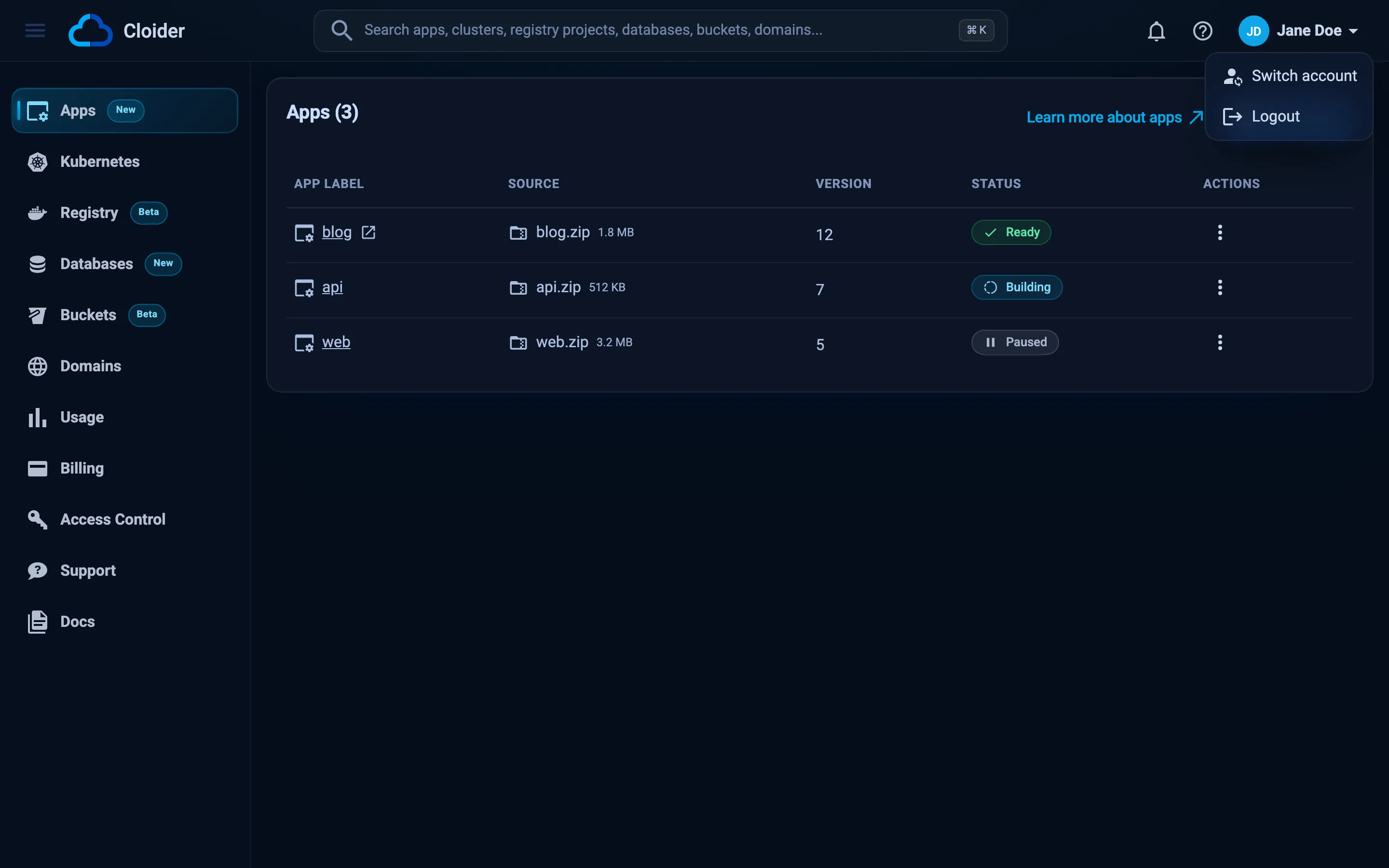
- Click your account's name or picture in the top right corner.
- Click Switch account. The item only appears if you belong to at least one other account.
- The Select an account screen lists your own account (with the Owner chip) and every account you are a member of, each with your role in it.
- Click the account to open.
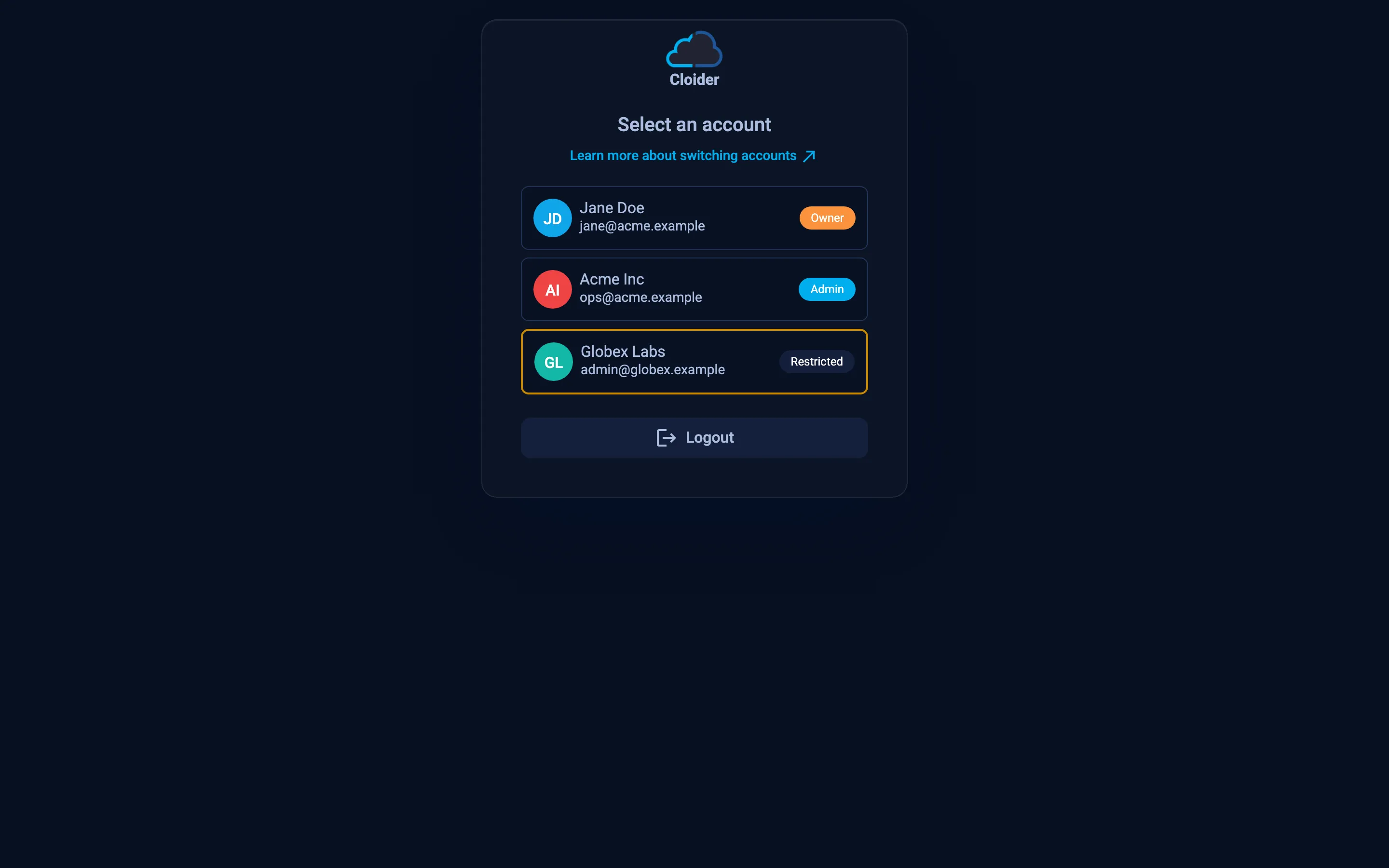
Accounts you were invited to but haven't opened yet are highlighted as pending; opening one accepts the invitation. The screen also has a Logout button.
A CLI login belongs to one account. Log in once per account, each under its own profile name; in the browser, pick that account under Account:
cloider login                    # the default profile, for example your own account
cloider login --profile acme     # pick "Acme Inc" in the browser
Then choose the profile per command, per shell, or as the default:
cloider --profile acme cluster list     # one command
export CLOIDER_PROFILE=acme             # this shell
cloider profile use acme                # from now on
cloider profile list
NAME     CURRENT  ACCOUNT        API                      TOKEN
acme     *        ops@acme.com   https://cloider.com/api  /Users/jane/.cloider/tokens/acme
default           jane@acme.com  https://cloider.com/api  /Users/jane/.cloider/token
CLOIDER_TOKEN and CLOIDER_TOKEN_FILE take precedence over profiles. See Auth and profiles commands.
A token reaches one account, so use one provider block per account, each with its own token or CLI profile, told apart by alias:
provider "cloider" {
  profile = "acme"
}

provider "cloider" {
  alias   = "personal"
  profile = "default"
}

resource "cloider_bucket" "assets" {
  name = "acme-assets"
}

resource "cloider_bucket" "scratch" {
  provider = cloider.personal
  name     = "jane-scratch"
}
The account is decided by the API token in the Authorization header. Generate a token in each account you want to reach (switch to the account in the dashboard first, then Access Control, API Tokens), and send the right one:
curl -H "Authorization: Bearer $ACME_TOKEN" https://cloider.com/api/whoami
POST /api/auth/select-account, which the dashboard uses to switch, only works with a dashboard session.
Add one MCP server per account, each running the CLI with that account's profile:
claude mcp add cloider -- cloider mcp
claude mcp add cloider-acme -- cloider --profile acme mcp
Your agent then has both sets of tools and can tell them apart by server name. See MCP setup.
When the dashboard asks you to pick an account
If you belong to at least one other account, the dashboard shows Select an account after you sign in, instead of opening an account straight away. Pick one to continue. Users who aren't members anywhere else go straight to their own account.
Leave an account
To stop being a member of an account, switch to it, open Access Control, and choose Leave account in the menu on your own row. See Access control.
Troubleshooting
| Symptom | Cause and fix |
|---|---|
| No Switch account in the menu | You aren't a member of any other account, or your memberships are deactivated. Ask the account's Owner or an Admin. |
| An account you were invited to is missing | You signed in with a different email address than the one invited. Sign in with the invited address, or ask for an invitation to the address you use. |
| The CLI works in the wrong account | Check cloider whoami. A CLOIDER_TOKEN in your environment overrides profiles; unset it or use --profile. |
This endpoint can't be used with an API token! | Switching accounts is a dashboard action. With tokens, use one token per account. |
Next steps
Frequently asked questions
How do I switch accounts in the Cloider dashboard?
Click the account name in the top right corner, click Switch account, and pick the account on the Select an account screen.
Can one API token work in several accounts?
No. A token belongs to the account it was generated in. Use one token, or one CLI profile, per account.
How do I use the Cloider CLI with several accounts?
Log in once per account with cloider login --profile <name>, choosing the account in the browser. Then pick the profile with --profile, the CLOIDER_PROFILE variable or cloider profile use.
Why do I see Select an account every time I sign in?
Because you are a member of at least one other account besides your own, so the dashboard asks which one to open.