Resize a database to a larger plan
Resizing moves a database to a larger plan, which gives it more CPU, RAM and storage. The database keeps its data, host, port, user and password. It restarts once to apply the new size, so it is unavailable for a short time. A database can only be resized up: a smaller plan isn't possible, because a storage volume can grow but not shrink.
At a glance
| Direction | Larger plans only: Hobby, Starter, Basic, Standard, Plus, Pro |
| What changes | CPU, RAM and storage, to the new plan's sizes. For MySQL, also the server settings tuned per plan, such as the connection limit |
| What stays | Data, host names, port, user, password, trusted sources, SSL mode, backups |
| Downtime | One restart. The status is Upgrading until the database is Ready again |
| Requirement | The database must be Ready (not paused) |
| Billing | The new plan's price starts once the resize has been applied |
See plans and sizes for the CPU, RAM and storage of each plan and engine.
When should I resize?
The Insights tab shows when a database is getting too small for its plan:
- Storage used is getting close to the plan's storage. A full disk stops writes, so resize before it fills up.
- Memory stays near the plan's RAM, or queries slow down as the data grows. For Redis, the whole dataset has to fit in RAM.
- CPU stays near the plan's limit at busy times.
- Connections come close to the maximum the server allows.
Resize a database
- Dashboard
- CLI
- Terraform
- API
- MCP
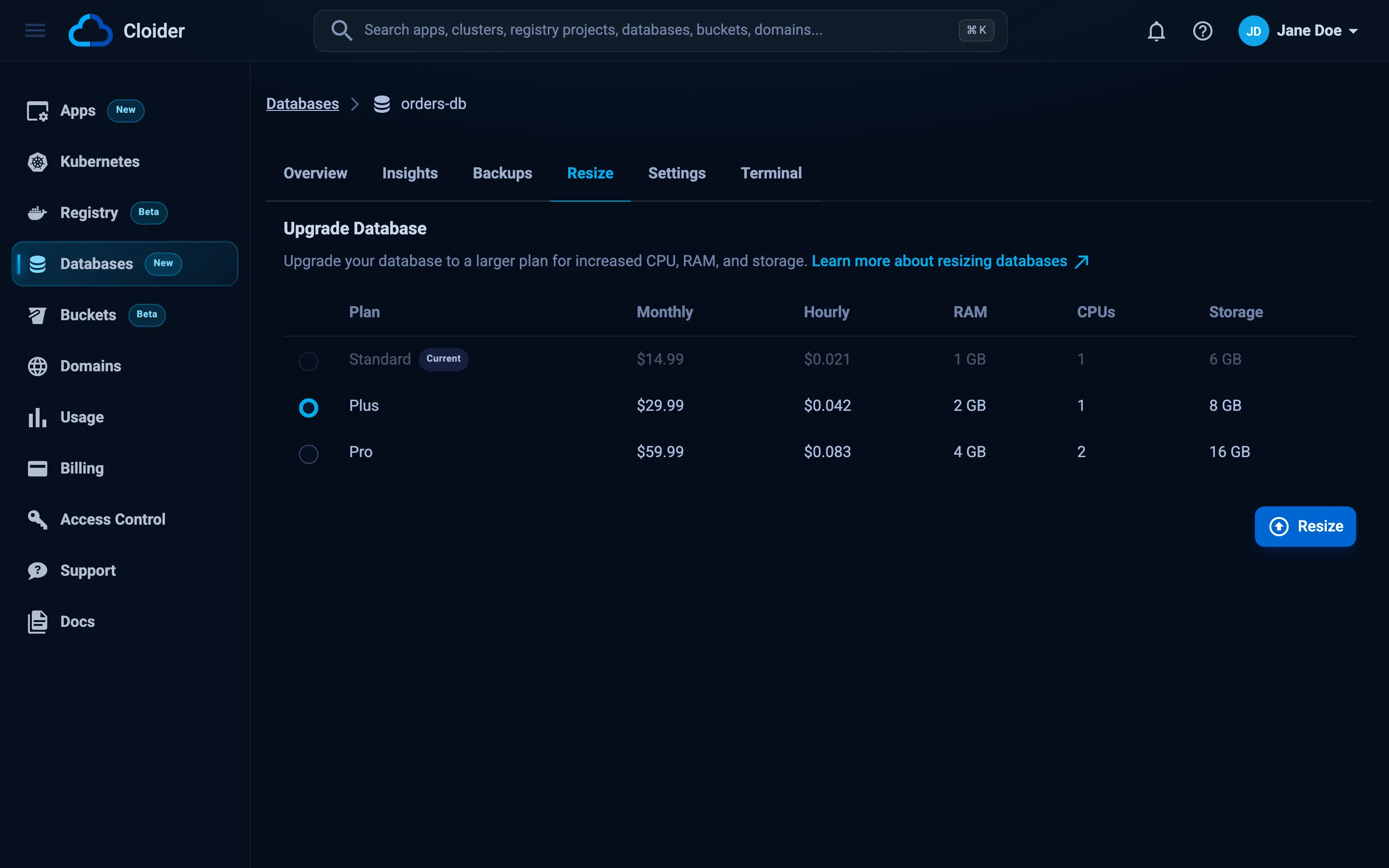
- Open the database and go to the Resize tab.
- Under Upgrade Database, the table lists your current plan (marked Current) and every larger plan, with its monthly and hourly price, RAM, CPUs and storage. The next plan up is selected.
- Select the plan you want and click Resize.
- The Upgrade Database dialog shows the old and new plan and the new monthly price, and warns that the database restarts and that resizing can't be reverted to a smaller plan. Click Restart & resize.
The dashboard takes you to the Databases list, where the database shows Upgrading until it is Ready on the new plan. On the largest plan, the tab says "This database is already on the largest plan."
cloider db resize orders-db --plan plus --wait
Resize orders-db from Standard to Plus? It restarts the database. [y/N] y
✓ Resizing orders-db to Plus
✓ Database orders-db runs on Plus
--plan is required and takes the plan name in any letter case. Add --yes to skip the question in scripts. --wait waits up to --timeout (15 minutes by default).
Change plan to a larger one:
resource "cloider_database" "orders" {
  name   = "orders-db"
  engine = "postgresql"
  plan   = "plus"   # was "standard"

  lifecycle {
    prevent_destroy = true
  }
}
terraform apply
  # cloider_database.orders will be updated in-place
  ~ resource "cloider_database" "orders" {
        id   = "p0q9zm"
      ~ plan = "standard" -> "plus"
        # (unchanged attributes hidden)
    }

Plan: 0 to add, 1 to change, 0 to destroy.
Terraform can't resize a database down. Setting a smaller plan makes Terraform plan to destroy the database and create a new, empty one, which deletes its data and backups. Keep prevent_destroy = true on databases that hold data you care about, so Terraform refuses such a plan.
curl -X PUT https://cloider.com/api/databases/p0q9zm/plan \
  -H "Authorization: Bearer $CLOIDER_TOKEN" \
  -H "Content-Type: application/json" \
  -d '{"database_plan": "Plus"}'
{"success": true}
database_plan takes the capitalized plan name. The status changes to Upgrading. Poll GET /api/databases/p0q9zm/status until it is Ready, then database_plan in GET /api/databases/p0q9zm shows the new plan.
orders-db is running out of storage. Move it to the Plus plan.
{"database": "orders-db", "plan": "Plus", "wait": true}
What happens during a resize?
- The database's status changes to
Upgrading. - Its storage volume is grown to the new plan's size. The data stays on the same volume.
- The database restarts with the new CPU and RAM. For MySQL, the server settings for the new plan, such as the connection limit and the buffer pool size, are applied at the same time.
- Once the database answers again and the volume has its new size, the status returns to
Readyand billing switches to the new plan.
During the restart, open connections are closed and new ones are refused. Most drivers and connection pools reconnect on their own. Plan a resize for a quiet moment, and make sure your app retries failed queries.
Move to a smaller plan
There is no way to shrink a database in place. To move to a smaller plan, create a new database on that plan and copy the data over:
-
Create a database with the same engine on the smaller plan, for example
orders-small. -
Copy the data with the engine's tools. For PostgreSQL:
PGPASSWORD="$(cloider db password orders-db)" \pg_dump -h orders-db-p0q9zm.db.cloider.com -p 20417 -U orders_db_user -d orders-db -Fc -f orders.dumpPGPASSWORD="$(cloider db password orders-small)" \pg_restore -h orders-small-h8j2kc.db.cloider.com -p 21105 -U orders_small_user -d orders-small \--no-owner --no-privileges orders.dumpFor MySQL use
mysqldumpandmysql, for MongoDBmongodumpandmongorestore, and for Redis aredis-cli --rdbsnapshot or a key by key copy. -
Point your app at the new database, check that everything works, then delete the old one.
The new database has its own host, port, user and password.
Troubleshooting
A database can only be upgraded to a larger plan.
The plan you chose is the current plan or a smaller one. Pick a larger plan, or move to a smaller plan by copying the data.
The database must be running to be upgraded.
The database is paused, or busy with another change (Creating, Starting, Upgrading, Pausing). Resume it or wait until it is Ready, then resize.
Invalid database plan
The plan name isn't one of Hobby, Starter, Basic, Standard, Plus or Pro. The API needs the capitalized name.
This plan isn't available at the moment!
The plan can't be chosen for this engine right now. cloider pricing lists the plans on offer.
You have read-only access to this account, you can not upgrade databases!
Your role or your API token is read-only. Use an account role or a token with write access.
Next steps
Frequently asked questions
Does resizing a database delete data?
No. Resizing to a larger plan keeps the data, host, port, user and password. The database restarts once to apply the new CPU, RAM and storage.
How long is a database unavailable during a resize?
Only while it restarts. The status shows Upgrading during the whole resize and returns to Ready when the database is back on the new plan.
Can I downgrade a database to a smaller plan?
No. Storage volumes can grow but not shrink, so a database can only move to a larger plan. To use a smaller plan, create a new database on it and copy the data with pg_dump, mysqldump, mongodump or a Redis snapshot.
When does the new plan's price start?
When the resize has been applied and the database runs on the new plan. You are never billed for resources the database does not have yet.
Can I resize a paused database?
No. Resume the database first. A resize needs the database to be Ready.