Connect to a Cloider database
Every Cloider database has the same six connection details: a host, a port, a user, a password, a database name and, when SSL is on, a CA certificate. This page shows where to find each one, when to use the public or the private host, and the connection string and command line for every engine.
For code examples in your language, see the engine pages: PostgreSQL, MySQL, MongoDB and Redis.
Connection details at a glance
| Detail | Example (orders-db, PostgreSQL) | Where it comes from |
|---|---|---|
| Public host | orders-db-p0q9zm.db.cloider.com | <name>-<id>.db.cloider.com |
| Private host | orders-db-p0q9zm.db.cloider.internal | <name>-<id>.db.cloider.internal |
| Port | 20417 | Assigned when the database is created. The same for both hosts |
| User | orders_db_user | Chosen when the database is created |
| Password | 32 random characters | Generated by Cloider. Shown on request only |
| Database name | orders-db | The database's name. For Redis, the logical database number, 0 by default |
| CA certificate | orders-db-ca.crt | Only when SSL is on. See SSL/TLS |
The <id> in the host is the database's id, a short string of lower case letters and digits that never changes. It is also in the dashboard's URL for the database and in cloider db list -o wide.
Find the connection details
- Dashboard
- CLI
- Terraform
- API
- MCP
- Open Databases in the sidebar.
- Click the database's name. The name is a link once the database is Ready.
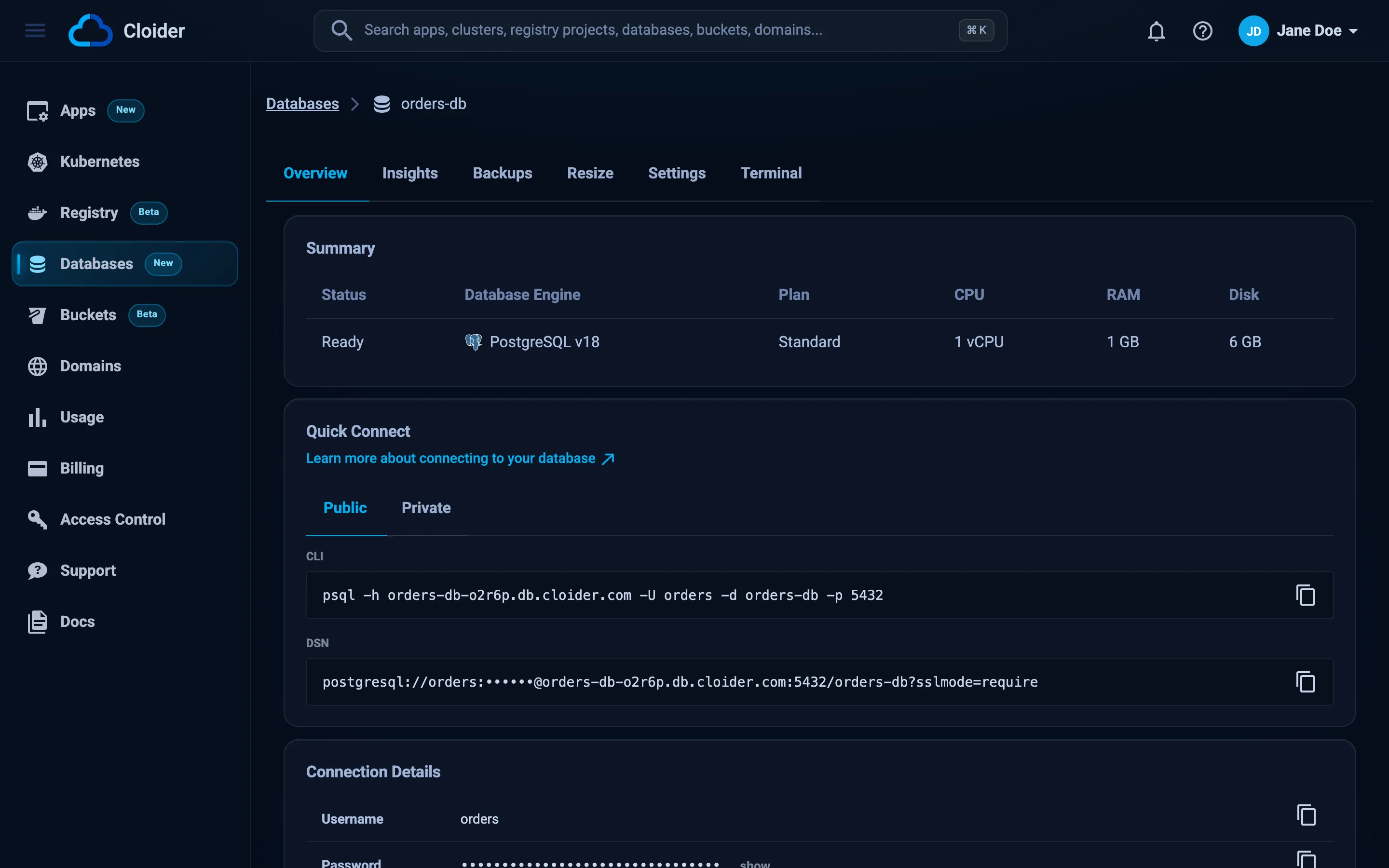
- The Overview tab shows:
- Summary: status, engine, plan, CPU, RAM and disk.
- Quick Connect: a ready to paste CLI command and a DSN (connection string), on a Public and a Private tab.
- Connection Details: Username, Password, DB name, Private host, Public host, Port and, with SSL on, SSL with a download button for the CA certificate.
Click any row or box to copy it. Copying the CLI command or the DSN copies it with the real password filled in, while the page itself shows the password masked.
cloider db get orders-db
Name:             orders-db
Engine:           PostgreSQL 18
Plan:             Standard
Status:           Ready
Host:             orders-db-p0q9zm.db.cloider.com
Private host:     orders-db-p0q9zm.db.cloider.internal
Port:             20417
Database:         orders-db
User:             orders_db_user
SSL:              yes
Trusted sources:  anywhere
Created:          2026-09-02 14:12

Password: `cloider db password orders-db`, connect: `cloider db connect orders-db`
Add -o json for the full API response, or -o wide to also show the id.
The cloider_database resource exports every detail as an attribute:
output "host"         { value = cloider_database.orders.host }
output "private_host" { value = cloider_database.orders.private_host }
output "port"         { value = cloider_database.orders.port }
output "user"         { value = cloider_database.orders.user }
output "database"     { value = cloider_database.orders.name }

output "password" {
  value     = cloider_database.orders.password
  sensitive = true
}

output "ca_certificate" {
  value     = cloider_database.orders.ca_certificate
  sensitive = true
}
curl https://cloider.com/api/databases/p0q9zm \
  -H "Authorization: Bearer $CLOIDER_TOKEN"
{
  "hashed_id": "p0q9zm",
  "database_name": "orders-db",
  "database_label": "orders-db",
  "database_user": "orders_db_user",
  "service": "PostgreSQL",
  "database_version": "18",
  "status": "Ready",
  "database_plan": "Standard",
  "trusted_sources": [{"name": "Allow Everything", "code": "*", "type": "Anywhere"}],
  "created_at": "2026-09-02T14:12:08Z",
  "database_port": "20417",
  "ssl": true,
  "host": "orders-db-p0q9zm.db.cloider.com",
  "private_host": "orders-db-p0q9zm.db.cloider.internal"
}
The port is returned as a string.
How do I connect to orders-db?
{"database": "orders-db"}
The tool returns the host, private host, port, database name, user, SSL and trusted sources. The password comes from a separate tool, get_database_password.
Get the database password
Cloider generates a random 32 character password for the database user when the database is created. It uses only letters, digits, _, - and ., so it can be used in a connection string as is. The password can't be changed from the dashboard, CLI, Terraform or API.
- Dashboard
- CLI
- Terraform
- API
- MCP
On the Overview tab, in Connection Details, click show next to Password to reveal it, or click the row to copy it.
cloider db password orders-db
Xq7rT2-vLp9_aZk4.Nw8sYb3HcD6mJe1
Use it in a script without printing it:
export PGPASSWORD="$(cloider db password orders-db)"
Read cloider_database.orders.password. It is a sensitive attribute, so Terraform hides it in plan output, but it is stored in the state file.
terraform output -raw password
curl "https://cloider.com/api/database/password?id=p0q9zm" \
  -H "Authorization: Bearer $CLOIDER_TOKEN"
Xq7rT2-vLp9_aZk4.Nw8sYb3HcD6mJe1
The response is plain text, not JSON. Note the path: /api/database/password (singular), with the id in the id query parameter.
Get the password of orders-db.
{"database": "orders-db"}
Reading the password is a read operation, so every member of the account and every API token can do it, including read-only ones. Treat access to the account as access to the database, and keep the trusted sources narrow so that a leaked password alone isn't enough.
Get the CA certificate
When SSL is on, the database's TLS certificate is signed by Cloider's own certificate authority (CA). Clients that verify the server, which Redis and MongoDB clients do by default, need that CA certificate. Get it from the SSL row on the Overview tab (the download button saves <name>-ca.crt), with cloider db cert orders-db -f ca.crt, from the ca_certificate Terraform attribute, from GET /api/database/cert?id=<id> or with the get_database_ca_cert MCP tool. SSL/TLS explains each engine's TLS options in detail.
Public and private endpoints
Every database can be reached at two host names. They lead to the same database, on the same port, with the same user and password.
| Public host | Private host | |
|---|---|---|
| Example | orders-db-p0q9zm.db.cloider.com | orders-db-p0q9zm.db.cloider.internal |
| Reachable from | The internet: your computer, CI, servers in other clouds | Your Cloider apps and Kubernetes clusters |
| Trusted sources that apply | * and IPv4 addresses or ranges | *, and your apps and clusters |
| Use it for | Local development, admin tools, CI jobs, external services | Your application running on Cloider |
Which host should my app use?
Use the private host for anything that runs on Cloider, and the public host for everything else. Traffic to the private host stays inside Cloider's network, and the app and cluster entries in trusted sources only match connections that arrive on the private host. Your laptop, CI runners and servers elsewhere can't resolve or reach the private host, so they use the public host.
Which port does my database use?
Each database gets its own port when it is created, and keeps it for life. The port is in the connection details, and it is never the engine's default port (5432 for PostgreSQL, 3306 for MySQL, 27017 for MongoDB, 6379 for Redis).
Always pass the port explicitly. A client that falls back to the engine's default port won't reach a Cloider database. If your network only allows outbound traffic to known ports, allow your database's port.
Connection strings by engine
A connection string (also called a DSN or a database URL) puts every detail in one value, which most frameworks read from an environment variable such as DATABASE_URL. These are the exact formats the dashboard's DSN box uses. Replace PASSWORD with the password, and use the private host from your Cloider apps and clusters.
| Engine | SSL on | SSL off |
|---|---|---|
| PostgreSQL | postgresql://orders_db_user:PASSWORD@orders-db-p0q9zm.db.cloider.com:20417/orders-db?sslmode=require | postgresql://orders_db_user:PASSWORD@orders-db-p0q9zm.db.cloider.com:20417/orders-db |
| MySQL | mysql://shop_db_user:PASSWORD@shop-db-k7x2wd.db.cloider.com:22861/shop-db | mysql://shop_db_user:PASSWORD@shop-db-k7x2wd.db.cloider.com:22861/shop-db |
| MongoDB | mongodb://catalog_db_user:PASSWORD@catalog-db-m3v8rt.db.cloider.com:24309/catalog-db?directConnection=true&tls=true | mongodb://catalog_db_user:PASSWORD@catalog-db-m3v8rt.db.cloider.com:24309/catalog-db?directConnection=true |
| Redis | rediss://cache_user:PASSWORD@cache-c5n1qa.db.cloider.com:26742/0 | redis://cache_user:PASSWORD@cache-c5n1qa.db.cloider.com:26742/0 |
Notes:
- PostgreSQL:
sslmode=requireencrypts the connection without checking the certificate. Usesslmode=verify-full&sslrootcert=ca.crtto also verify it, see SSL/TLS. - MySQL: the URL has no SSL parameter, because
mysql://parsers don't agree on one. MySQL clients negotiate TLS on their own when the server offers it. Set your driver's SSL option to require it, see MySQL. - MongoDB: the user is created in the database named in the path, so no
authSourceis needed. Withtls=true, the client must trust the CA certificate (for exampletlsCAFile=ca.crt). - Redis:
rediss://(two s) is TLS. With SSL on, Redis accepts only TLS connections, and the client must trust the CA certificate./0selects logical database 0.
Connect with a command line client
These are the commands the dashboard's CLI box shows. They read the password from an environment variable, so it doesn't end up in your shell history. The cloider db connect command runs the same commands for you.
- PostgreSQL
- MySQL
- MongoDB
- Redis
PGPASSWORD='PASSWORD' PGSSLMODE=require psql -h orders-db-p0q9zm.db.cloider.com -U orders_db_user -d orders-db -p 20417
# SSL on
MYSQL_PWD='PASSWORD' mysql -h shop-db-k7x2wd.db.cloider.com -P 22861 -u shop_db_user shop-db --ssl-mode=REQUIRED

# SSL off
MYSQL_PWD='PASSWORD' mysql -h shop-db-k7x2wd.db.cloider.com -P 22861 -u shop_db_user shop-db --ssl-mode=DISABLED --get-server-public-key
# SSL on, with the CA certificate saved as ca.crt
mongosh "mongodb://catalog_db_user:PASSWORD@catalog-db-m3v8rt.db.cloider.com:24309/catalog-db?directConnection=true&tls=true" --tlsCAFile ca.crt

# SSL off
mongosh "mongodb://catalog_db_user:PASSWORD@catalog-db-m3v8rt.db.cloider.com:24309/catalog-db?directConnection=true"
# SSL on, with the CA certificate saved as ca.crt
REDISCLI_AUTH='PASSWORD' redis-cli -h cache-c5n1qa.db.cloider.com -p 26742 --user cache_user --tls --cacert ca.crt

# SSL off
REDISCLI_AUTH='PASSWORD' redis-cli -h cache-c5n1qa.db.cloider.com -p 26742 --user cache_user
Connect with cloider db connect
cloider db connect fetches the password (and the CA certificate when the client needs it) and starts the engine's own client, already logged in. The client (psql, mysql, mongosh or redis-cli) has to be installed, and your IP has to be in the database's trusted sources.
cloider db connect orders-db
psql (18.0)
SSL connection (protocol: TLSv1.3, cipher: TLS_AES_256_GCM_SHA384, compression: off, ALPN: postgresql)
Type "help" for help.

orders-db=>
| Flag | Meaning |
|---|---|
--print | Print the command instead of running it, without the password |
--private | Use the private host, for running it from inside a Cloider cluster |
cloider db connect cache --print
redis-cli -h cache-c5n1qa.db.cloider.com -p 26742 --user cache_user --tls --cacert ca.crt
Password: `cloider db password cache`
CA certificate: `cloider db cert cache -f ca.crt`
If the client isn't installed, or you don't want to open the firewall to your IP, use cloider db shell instead. It runs the client next to the database, needs nothing installed and ignores trusted sources.
Connect from your computer or CI
To connect from outside Cloider, use the public host and make sure the database trusts your public IP address:
# Trust the IP this machine connects from, then connect
cloider db trusted-sources orders-db --add-my-ip
cloider db connect orders-db
For CI runners, add the runner's fixed egress IP or range with --add 198.51.100.7. Runners whose IP changes on every job can run their queries with cloider db exec, which doesn't need a trusted source. See trusted sources.
Connect from a Cloider app or Kubernetes cluster
Apps and Kubernetes clusters on Cloider reach a database over the private host.
-
Add the app or cluster to the database's trusted sources, unless the database already trusts everything (
*):cloider db trusted-sources orders-db --add app:apicloider db trusted-sources orders-db --add cluster:production -
Build the connection string with the private host. Copy it from the Private tab of Quick Connect on the Overview tab, or build it:
postgresql://orders_db_user:PASSWORD@orders-db-p0q9zm.db.cloider.internal:20417/orders-db?sslmode=require -
Give it to your code as a secret environment variable.
- Cloider app
- Kubernetes cluster
Set it as a secret variable on the app, see environment variables:
cloider app env set api --secret \
  DATABASE_URL='postgresql://orders_db_user:PASSWORD@orders-db-p0q9zm.db.cloider.internal:20417/orders-db?sslmode=require'
Or set it on the first deploy:
cloider deploy --name api --secret-env DATABASE_URL='postgresql://orders_db_user:PASSWORD@orders-db-p0q9zm.db.cloider.internal:20417/orders-db?sslmode=require'
Store it in a Kubernetes Secret, with the CA certificate for clients that verify the server:
cloider db cert orders-db -f ca.crt

kubectl create secret generic orders-db \
  --from-literal=DATABASE_URL='postgresql://orders_db_user:PASSWORD@orders-db-p0q9zm.db.cloider.internal:20417/orders-db?sslmode=require' \
  --from-file=ca.crt=ca.crt
Then load it into your Deployment:
apiVersion: apps/v1
kind: Deployment
metadata:
  name: api
spec:
  replicas: 2
  selector:
    matchLabels:
      app: api
  template:
    metadata:
      labels:
        app: api
    spec:
      containers:
        - name: api
          image: registry.cloider.com/acme/api:1.0
          envFrom:
            - secretRef:
                name: orders-db
With Terraform, the cloider_database reference shows how to write the Secret from the database's attributes.
How many connections can my database handle?
Each database accepts a limited number of simultaneous connections, which depends on the engine and the plan. The Insights tab shows how many connections are open and the maximum the server allows. For MySQL, the maximum is set by the plan, from 20 on Hobby to 200 on Pro, see MySQL.
To stay under the limit:
- Use one connection pool per process, and size it so that all your processes together stay under the maximum. A small plan with a few app instances needs a pool of only a few connections each.
- Close connections you don't need, especially in scripts and serverless functions.
- If you run out, resize to a larger plan.
Troubleshooting
| Symptom | Likely cause | Fix |
|---|---|---|
| Connection times out | Your IP isn't in the trusted sources | cloider db trusted-sources orders-db --add-my-ip |
| Connection refused, or "could not translate host name" | Wrong host or port, or the database is paused | Copy the host and port from cloider db get, check the status is Ready |
| Private host doesn't resolve | You are connecting from outside Cloider | Use the public host |
| App can't connect on the private host | The app isn't in the trusted sources | cloider db trusted-sources orders-db --add app:<name> |
| Password authentication failed | Wrong password or user | Copy them again from the Overview tab |
| Certificate verify failed | The client doesn't trust Cloider's CA | Download the CA certificate and pass it to the client |
Database troubleshooting has the full list, with the exact error messages of each client.
Next steps
- Restrict who may connect
- Turn on and verify TLS
- Connect from code: PostgreSQL, MySQL, MongoDB, Redis
- Run queries from the browser or the CLI
Frequently asked questions
What is the host name of a Cloider database?
The public host is <name>-<id>.db.cloider.com, for example orders-db-p0q9zm.db.cloider.com. The private host, for Cloider apps and Kubernetes clusters, is <name>-<id>.db.cloider.internal. Both use the database's own port, shown in its connection details.
Why does my Cloider database not use port 5432 (or 3306, 27017, 6379)?
Every Cloider database gets its own port, assigned when the database is created and kept for life. It is never the engine's default port, so always pass the port from the connection details.
Where do I find the password of my database?
On the database's Overview tab, under Connection Details, click show next to Password. From a terminal, run cloider db password <database>. Terraform exposes it as the sensitive password attribute.
Can I change the database password?
No. Cloider generates the password when the database is created, and the dashboard, CLI, Terraform and API don't offer a way to change it.
Should my app use the public or the private host?
Apps and Kubernetes clusters running on Cloider should use the private host, which ends in .db.cloider.internal, and be added to the database's trusted sources. Everything outside Cloider, such as your laptop or CI, uses the public host.
Do I need to URL-encode the password in a connection string?
No. Cloider passwords only contain letters, digits, underscores, hyphens and dots, which are safe in URLs. Encoding them anyway does no harm.