Database insights (CPU, memory, storage, connections)
Insights show how much of its plan a database uses: CPU, memory, storage, disk reads and writes, network traffic and open connections. Cloider samples every running database once a minute and keeps daily figures for the last 31 days. Use them to see whether a database is the right size and when to resize it.
Insights are informational only. A database is billed by its plan, not by its measured usage.
At a glance
| Metrics | CPU, memory, storage used, disk read, disk write, network in, network out, connections |
| Sampling | Once a minute while the database is running. Nothing is sampled while it is paused |
| History | One average, highest and lowest value per metric and day, for the last 31 days |
| Where | The Insights tab, cloider db insights, GET /api/databases/<id>/insights, the get_database_insights MCP tool |
| Cost | Free |
What each metric means
| Metric | Unit | What it measures | When to act |
|---|---|---|---|
| CPU | Cores (millicores in the API, 1000 = 1 core) | Processor time the database uses | Averages near the plan's vCPU at busy times |
| Memory | GB (MiB in the API) | RAM the database server uses, including caches | Stays near the plan's RAM, or Redis data approaches it |
| Storage Used | GB (GiB in the API) | Space your data takes on the volume, not the volume's size | Approaches the plan's storage. A full disk stops writes |
| Disk Read, Disk Write | KB/s or MB/s (bytes per second in the API) | How much data is read from and written to the volume | High reads with high memory use can mean the working set doesn't fit in RAM |
| Network In, Network Out | KB/s or MB/s (bytes per second in the API) | Traffic received from and sent to clients | Unexpected spikes can mean a runaway query or a client fetching too much |
| Connections | Count | Open client connections. The max next to it is the most the server accepts | Stays close to the max: use a connection pool or a larger plan |
The values are averages over each sampled minute, and each day keeps its average, its highest (peak) and its lowest value. Connections made by Cloider's own monitoring aren't counted.
View insights
- Dashboard
- CLI
- Terraform
- API
- MCP
- Open the database and go to the Insights tab.
- Six charts show the last 31 days, one bar per day with the day's Avg. and Peak: CPU (cores), Memory (GB), Storage Used (GB), Disk I/O, Network and Connections. The CPU, memory and storage charts also draw a line at the plan's limit.
- Under the charts, the Usage table shows, for every metric, Avg. Usage (This Month), Avg. Usage (Today), Highest Usage (This Month) and Lowest Usage (This Month), with the day of the highest and lowest values. Hover a column's icon to see the metric's name and the plan's limit.
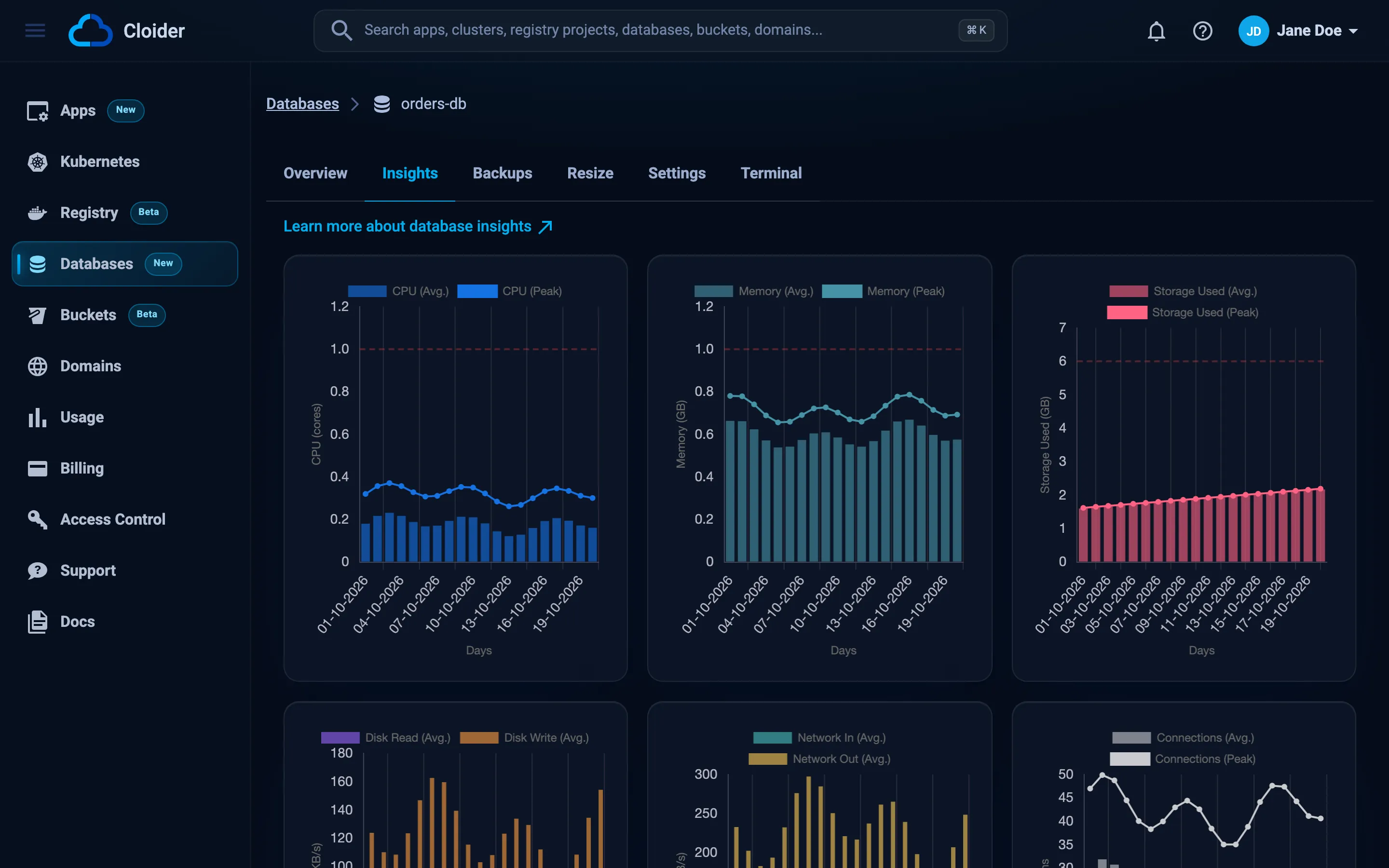
A new database shows "Performance insights become available once sufficient data has been collected." until its first samples are in.
Today's averages:
cloider db insights orders-db
Date:         2026-10-19
CPU:          84 millicores
Memory:       412 MiB
Storage:      2.31 GiB
Disk read:    18.2 KiB/s
Disk write:   96.5 KiB/s
Network in:   41.7 KiB/s
Network out:  233.9 KiB/s
Connections:  12 (max 100)
The month's statistics and the daily history are in the JSON output:
cloider db insights orders-db -o json
Terraform doesn't read insights. Use the dashboard, the CLI or the API.
curl https://cloider.com/api/databases/p0q9zm/insights \
  -H "Authorization: Bearer $CLOIDER_TOKEN"
{
  "date": "2026-10-19",
  "month": "October 2026",
  "today": {
    "cpu": 84.2, "memory": 412.6, "storage": 2.31,
    "disk_read": 18636, "disk_write": 98816,
    "net_rx": 42701, "net_tx": 239513, "connections": 12.4
  },
  "connections_max": 100,
  "month_stats": {
    "cpu": {"avg": 71.5, "max": 640.2, "max_date": "2026-10-07", "min": 12.1, "min_date": "2026-10-04"},
    "memory": {"avg": 398.3, "max": 702.9, "max_date": "2026-10-07", "min": 301.4, "min_date": "2026-10-01"},
    "storage": {"avg": 2.12, "max": 2.31, "max_date": "2026-10-19", "min": 1.94, "min_date": "2026-10-01"},
    "disk_read": null,
    "disk_write": null,
    "net_rx": null,
    "net_tx": null,
    "connections": {"avg": 10.8, "max": 37, "max_date": "2026-10-07", "min": 2, "min_date": "2026-10-04"}
  },
  "daily": [
    {
      "date": "2026-10-18",
      "stats": {
        "cpu": {"avg": 69.4, "max": 402.7, "min": 15.3},
        "memory": {"avg": 405.0, "max": 512.2, "min": 360.8},
        "storage": {"avg": 2.29, "max": 2.30, "min": 2.27},
        "disk_read": {"avg": 17201, "max": 912384, "min": 0},
        "disk_write": {"avg": 90112, "max": 1835008, "min": 2048},
        "net_rx": {"avg": 40960, "max": 655360, "min": 1024},
        "net_tx": {"avg": 228352, "max": 4194304, "min": 2048},
        "connections": {"avg": 11.2, "max": 29, "min": 3}
      }
    }
  ]
}
The response above is shortened (some month statistics are shown as null and only one day is listed). Units: cpu in millicores, memory in MiB, storage in GiB used, disk_* and net_* in bytes per second, connections as a count.
todayisnullbefore the day's first sample, for example while the database is paused.- A metric in
month_statsisnullwhen it has no data this month. dailycovers this month and at least the last 31 days. A day without samples hasnullstats.connections_maxis the most connections the server accepts, from the latest sample.
Is orders-db close to any of its plan limits this month?
{"database": "orders-db"}
The tool returns today's figures and each day of the month, which the agent compares with the plan's sizes from get_pricing.
Reading the charts
- Average vs peak. A day's average shows normal load, its peak the busiest minute. A high peak with a low average is a short burst, such as a nightly job, and usually doesn't need a bigger plan.
- Storage only grows with your data. Storage Used counts the data on the volume, not the volume's size. Deleted rows may not free space right away, depending on the engine (PostgreSQL reclaims it with
VACUUM, MySQL withOPTIMIZE TABLE). - Memory looks high on a healthy database. Databases keep recently used data in RAM as a cache, so memory close to the plan's RAM is normal for PostgreSQL, MySQL and MongoDB. Watch for slow queries and high disk reads together with it. For Redis, memory is the data itself: when it reaches the plan's RAM, resize.
- Connections near the max. Every open connection counts, including idle ones held by connection pools. See how many connections a database handles.
- Gaps. Days when the database was paused, or before it existed, have no bars.
Troubleshooting
Performance insights become available once sufficient data has been collected.
The database is new or has been paused, and no sample has been taken yet. Samples are taken once a minute while the database is running.
Connections show "-" with "Not available yet"
Some older databases don't report a connection count yet. The other metrics are still collected.
Could not load insights. Please try again later.
The dashboard couldn't load the insights. Reload the page. If it persists, use cloider db insights <database> -o json or contact support.
Next steps
Frequently asked questions
How often are database insights updated?
Cloider samples every running database once a minute. The Insights tab and cloider db insights show today's averages and a daily history for the last 31 days.
Am I billed for the CPU and memory shown in insights?
No. A database is billed by its plan at a fixed rate. Insights are informational and help you choose the right plan.
Why is my database memory always close to the plan limit?
PostgreSQL, MySQL and MongoDB use free RAM to cache data, so high memory use is normal. For Redis, memory is your data, so resize when it gets close to the plan's RAM.
Does Storage Used show the size of my volume?
No. It shows the space your data takes. The volume's size is the plan's storage, shown as the limit line on the chart.