Database terminal, cloider db shell and db exec
Cloider gives every database three ways to run commands without installing anything or opening the firewall: the Terminal tab in the dashboard, cloider db shell for an interactive session in your own terminal, and cloider db exec for one query or script at a time, which is what scripts, CI jobs and AI agents use. All three run the engine's own client next to the database, already logged in.
At a glance
| Terminal tab | cloider db shell | cloider db exec | cloider db connect | |
|---|---|---|---|---|
| Where it runs | Next to the database | Next to the database | Next to the database | On your machine |
| Interactive | Yes | Yes | No, one query or script | Yes |
| Needs a client installed | No | No | No | Yes (psql, mysql, mongosh or redis-cli) |
| Trusted sources apply | No | No | No | Yes |
| Best for | Quick look from the browser | Admin sessions from your terminal | Scripts, migrations, CI, AI agents | GUI-like local workflows, piping files, your own client settings |
The client is the engine's own:
| Engine | Client | How exec runs a query |
|---|---|---|
| PostgreSQL | psql | psql -c "<query>", stopping at the first error |
| MySQL | mysql | mysql -e "<query>" |
| MongoDB | mongosh | mongosh --eval "<javascript>" |
| Redis | redis-cli | redis-cli <command> |
Every session is logged in as the database's user, on the database named after your Cloider database, with the same privileges your application has. The database must be Ready: a paused database has nothing to connect to.
Use the browser terminal
- Open the database. The Terminal tab is there while the database is Ready.
- Click Terminal. It shows "Connecting to the database..." while the terminal starts, then a prompt.
- Type queries as you would in the engine's client. For PostgreSQL,
\dtlists tables and\qquits.
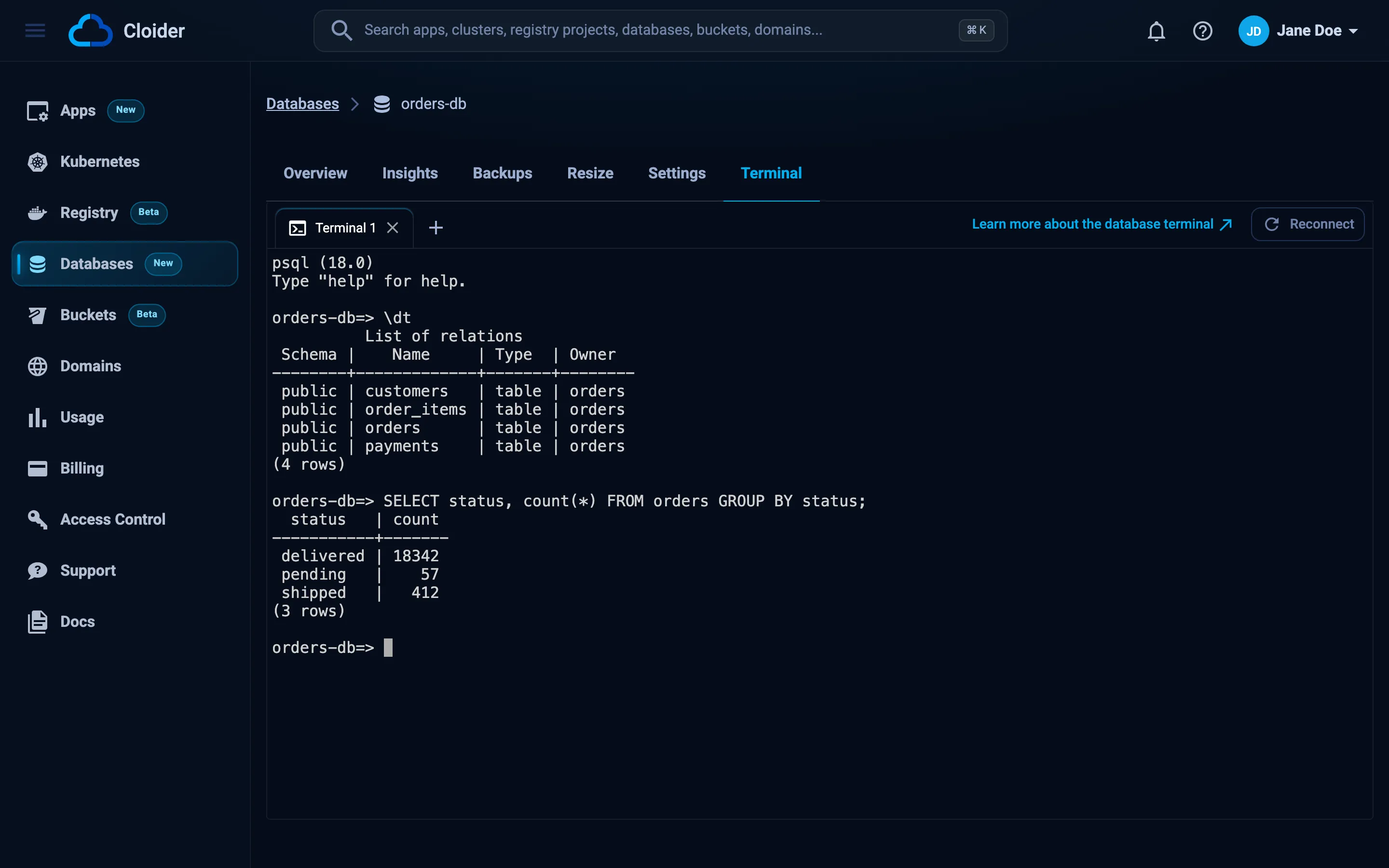
The terminal runs only while someone uses it. It stops after 10 minutes without activity, and starts again the next time you open the tab, which can take a few seconds. Leaving the tab ends the session.
Open a shell with cloider db shell
cloider db shell opens the same session in your own terminal:
cloider db shell orders-db
Connected, exit the shell to end the session.
psql (18.0)
Type "help" for help.

orders-db=>
Exit the client (\q in psql, exit in mysql, mongosh and redis-cli) to end the session. cloider db shell needs an interactive terminal on both ends, so it can't be used in scripts: use cloider db exec there.
Run a query with cloider db exec
cloider db exec sends one query, or a script on stdin, to the database's client and prints what it prints. It exits with the client's exit code, so scripts can check whether the query worked.
cloider db exec [flags] <database> [--] <query...>
Flags go before the database name. Everything after it is the query.
| Flag | Meaning | Default |
|---|---|---|
-i, --stdin | Send stdin to the client as a script, up to 2 MiB | |
--timeout | Stop after this long, up to 1h | 10m |
-o json | Print {"exit_code", "stdout", "stderr", "timed_out"} |
PostgreSQL
cloider db exec orders-db "SELECT count(*) FROM orders WHERE created_at > now() - interval '1 day';"
 count
-------
   318
(1 row)
# psql meta-commands work too
cloider db exec orders-db "\dt"

# Run a migration file. The script stops at its first error.
cloider db exec -i orders-db < migrations/0042_add_orders_status.sql

# Ask PostgreSQL for JSON when a program reads the result
cloider db exec orders-db "SELECT json_agg(t) FROM (SELECT id, status FROM orders LIMIT 3) t;"
MySQL
cloider db exec shop-db "SHOW TABLES;"
cloider db exec shop-db "SELECT id, sku, stock FROM products WHERE stock < 5;"
cloider db exec -i shop-db < schema.sql
MongoDB
The query is JavaScript, evaluated by mongosh in your database:
cloider db exec catalog-db "db.products.countDocuments({ inStock: true })"
cloider db exec catalog-db "db.products.find({ price: { \$lt: 10 } }).limit(5).toArray()"
cloider db exec catalog-db "db.products.createIndex({ sku: 1 }, { unique: true })"
cloider db exec -i catalog-db < seed.js
Escape $ in double quotes (\$lt), or use single quotes, so your shell doesn't expand it.
Redis
The arguments are one Redis command. One quoted argument is read as a command line, the way the redis-cli prompt reads it:
cloider db exec cache SET greeting "hello world"
cloider db exec cache GET greeting
cloider db exec cache "TTL session:9f2c"
cloider db exec cache INFO memory
"hello world"
Use it in scripts and CI
exec exits with the client's exit code, prints the client's stdout and stderr separately, and exits with 124 when --timeout stops it. Because it runs next to the database, CI runners with changing IP addresses don't need a trusted source, only a CLOIDER_TOKEN with write access.
#!/bin/sh
set -e
export CLOIDER_TOKEN="$CLOIDER_TOKEN"   # an API token with Read & Write access

for f in migrations/*.sql; do
  echo "Applying $f"
  cloider db exec -i orders-db < "$f"
done
With -o json, the result is one JSON object, which is easier for programs and AI agents to read:
cloider db exec -o json orders-db "SELECT now();"
{
  "exit_code": 0,
  "stdout": "              now\n-------------------------------\n 2026-10-19 14:03:11.52731+00\n(1 row)\n\n",
  "stderr": "",
  "timed_out": false
}
Since exec exits with the client's own code, the codes 1 to 5 can come from the client as well as from the CLI. With -o json, the JSON object is only printed when the query ran, which tells the two apart. See output and scripting.
Run queries with the API or MCP
- Dashboard
- CLI
- Terraform
- API
- MCP
Use the Terminal tab, described above.
cloider db exec orders-db "SELECT count(*) FROM orders;"
Terraform doesn't run queries. Use cloider db exec in a local-exec provisioner or in your pipeline, or a Terraform provider for the engine itself pointed at the database's host.
curl -N -X POST https://cloider.com/api/databases/p0q9zm/exec \
  -H "Authorization: Bearer $CLOIDER_TOKEN" \
  -H "Content-Type: application/json" \
  -d '{"command": ["SELECT count(*) FROM orders;"], "timeout": 60}'
The answer is a stream of server-sent events. Output arrives as base64 in stdout and stderr events, then one event says how the query ended, then end:
: open

event: stdout
data: IGNvdW50IAotLS0tLS0tCiAgIDMxOAooMSByb3cpCgo=

event: exit
data: 0

event: end
data: 1
| Request field | Meaning |
|---|---|
command | The query as a list of strings. Up to 64 KiB in total |
stdin | A script, base64 encoded (as JSON encodes bytes), up to 2 MiB. Leave it out to send no stdin |
timeout | Seconds, 1 to 3600. 0 or missing means 600 |
| Event | Data |
|---|---|
stdout, stderr | A chunk of output, base64 encoded |
exit | The client's exit code |
timeout | The timeout in seconds, when it stopped the query |
error | A message, when the query couldn't be run or was cut off |
end | Always last |
A database that isn't Ready answers 409 with a message such as This database is paused. Resume it to run a command!.
How many orders were placed in orders-db today?
{"database": "orders-db", "query": "SELECT count(*) FROM orders WHERE created_at::date = current_date;"}
The tool returns {exit_code, stdout, stderr, timed_out}. It takes query or script (a whole script, up to 2 MiB), and timeout_seconds (1 to 3600, default 600). Because a query can change or delete data, MCP clients treat database_exec like a delete and ask before running it.
Who can run commands
Running a command needs write access to the account. Members with read-only access and read-only API tokens get You have read-only access to this account, you can not run commands!. The session itself has the database user's privileges, whoever opens it.
Troubleshooting
This database is paused. Resume it to run a command!
Paused databases don't run. Resume the database, wait until it is Ready, and try again. While the database is starting, the message is This database is not ready yet!.
The terminal could not be started, try again in a moment!
The terminal didn't start in time. Wait a few seconds and open the tab or run cloider db shell again.
a shell needs a terminal on both ends
cloider db shell was run without an interactive terminal, for example in CI or with redirected input. Use cloider db exec instead.
give a query after the database, or -i to run a script from stdin
cloider db exec got no query. Put the query after the database name, or pass -i and a script on stdin. Remember that flags go before the database name: cloider db exec -i orders-db < file.sql, not cloider db exec orders-db -i.
The command could not be started, try again in a moment!
The query couldn't be started on Cloider's side. Try again. If it keeps happening, contact support.
Exit code 124
--timeout stopped the query. Raise it (up to 1h), or split the work into smaller queries.
Next steps
Frequently asked questions
Can I run SQL on a Cloider database without installing psql or mysql?
Yes. Open the Terminal tab of the database in the dashboard, or run cloider db shell <database> for an interactive session or cloider db exec <database> "<query>" for one query. The client runs next to the database, so nothing needs to be installed.
Do I need to add my IP to trusted sources to use the terminal or cloider db exec?
No. The terminal, cloider db shell and cloider db exec run next to the database inside Cloider, so trusted sources don't apply to them. cloider db connect runs a client on your machine and does need your IP to be trusted.
How do I run a SQL migration file with the Cloider CLI?
Pipe it to cloider db exec with -i: cloider db exec -i orders-db < migration.sql. Scripts can be up to 2 MiB, and a PostgreSQL script stops at its first error.
What user does the database terminal log in as?
The database's own user, on the database named after your Cloider database, with the same privileges your application has.
How long can a query run with cloider db exec?
Up to 10 minutes by default. Set --timeout to change it, up to one hour. When the timeout stops a query, the command exits with code 124.