Expose Kubernetes services on a domain with HTTPS
To make an HTTP service in your Cloider cluster reachable on the internet, you route a domain to it with a target. A target says "requests for this domain and path go to this Service, on this port", and Cloider takes care of the rest: the public entry point, the routing and the HTTPS certificate. You don't create Ingress objects or install an ingress controller, and there is no load balancer charge.
At a glance
| What you route | A domain, or a path of it (/, /api, ...), to a Service's port in a cluster |
| Domains | A free subdomain such as shop-staging.cloider.app, or your own domain such as example.com |
| HTTPS | Automatic. Free subdomains use Cloider's certificate; custom domains get a certificate of their own |
| Your Service | Any Service type, usually ClusterIP. It speaks plain HTTP on the port you route to |
| Cost | No load balancer charge. You pay only for the pods behind the Service |
| Ingress objects | Not served. Targets replace them |
| Tools | Dashboard (Domains), cloider target, cloider_target in Terraform, /api/targets, MCP |
How targets work
- The domain resolves to Cloider. A free subdomain does so from the start. A custom domain does once it uses Cloider's nameservers: the domain itself has an
ALIASrecord that points at Cloider from the start, and other host names need anAorCNAMErecord, since a target doesn't add one (see Add a custom domain). - Cloider terminates HTTPS for the domain.
- It picks the target whose
pathmatches the request, the longest one first. A target's path covers everything under it, so/catches whatever no longer path does. - It forwards the request as plain HTTP to the Service's port in your cluster, optionally rewriting the path.
Before you begin
- A cluster in the
Readystatus with a Service to expose. Deploy a workload creates thewebService in theshopnamespace used below. - A domain in your Cloider account:
- a free subdomain under
cloider.app, claimed in Domains or withcloider domain create shop-staging.cloider.app(see Free subdomains), or - your own domain, added, pointed at Cloider's nameservers and given a DNS record for each host name you serve (see Add a custom domain).
- a free subdomain under
- A role that can create resources. Members with read-only access can't create targets.
Find the Service to route to
Targets route to Services that Cloider sees in your clusters. List them with their namespaces and ports:
cloider cluster services staging
CLUSTER   NAMESPACE   SERVICE   PORTS
staging   shop        web       80/TCP
staging   shop        api       80/TCP
staging   iot         mqtt      1883/TCP
Cloider's own services in the cluster (cluster DNS, metrics server and the terminal) aren't listed. The same list is GET /api/clusters/services and the MCP tool list_cluster_services.
Create a target
Route shop-staging.cloider.app to port 80 of the web Service in the shop namespace of the staging cluster.
- Dashboard
- CLI
- Terraform
- API
- MCP
- Open Domains in the sidebar and click the domain, for example
shop-staging.cloider.app. - Under Link your app to a domain, click Add target.
- In Target type, choose Cluster.
- Pick the Cluster (
staging), the Namespace (shop), the Service (web) and the Port (80). - Leave Path as
/and Target path empty to route the whole domain as it is. - Click Save.
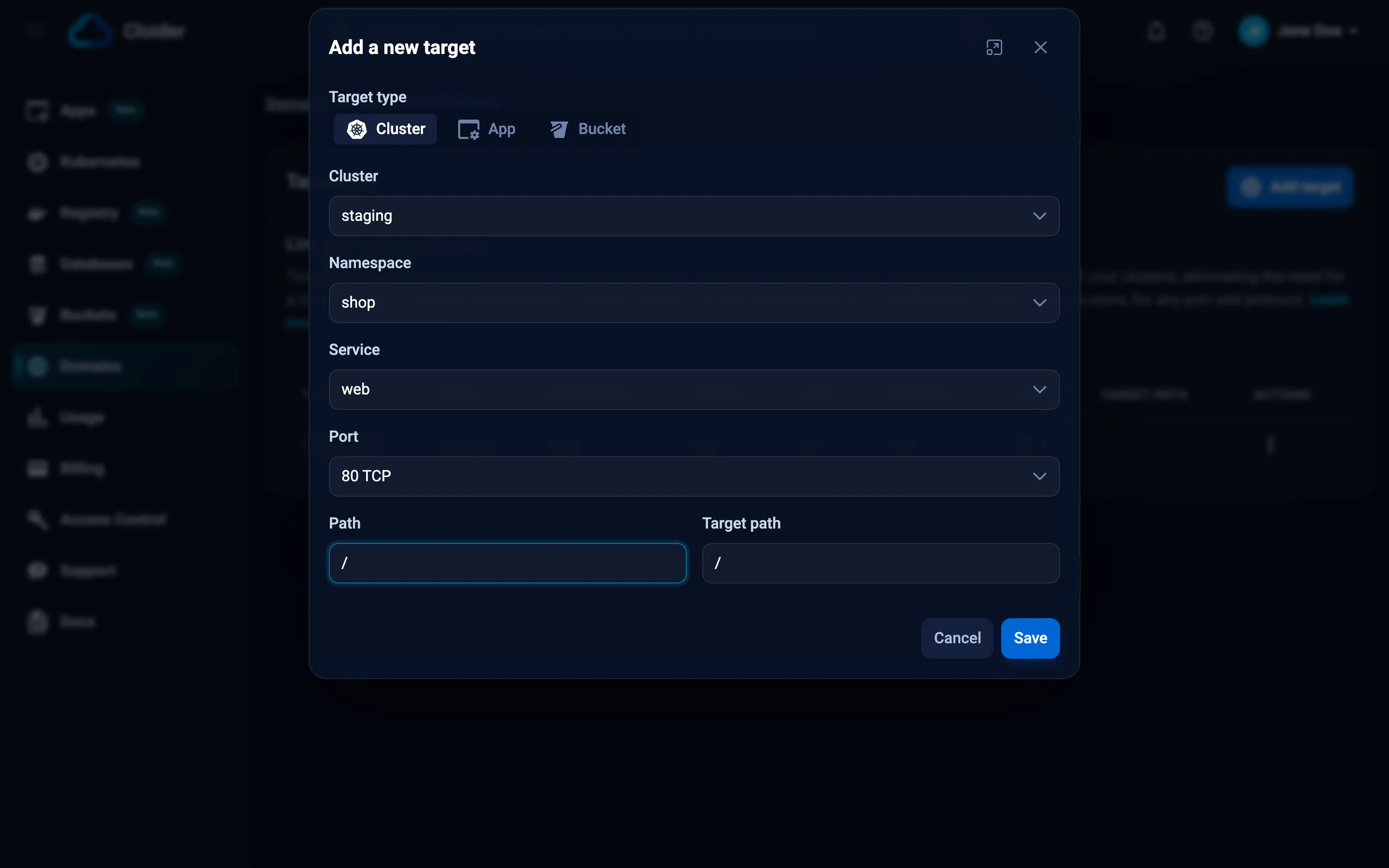
The target appears in the domain's table with its Type, Name, Namespace, Service, Port, Protocol, Path and Target path. Click the path to open it in a new tab. If the cluster has no Services yet, the form says so: deploy one first.
cloider target create shop-staging.cloider.app --cluster staging --service shop/web
✓ Routed shop-staging.cloider.app/ to staging/shop/web:80
--service is <namespace>/<service>. When the Service has a single port, it is used; otherwise pick one with --port.
| Flag | Default | What it does |
|---|---|---|
--cluster | The cluster, by name, label or id | |
--service | The Service, as <namespace>/<service> | |
--port | the Service's only port | The Service port to send requests to |
--protocol | the port's own | TCP or UDP, to pick between ports of the same number |
--path | / | The path on the domain to route |
--target-path | --path | The path the request reaches the Service with |
--app | Route to a Cloider app instead of a cluster. Can't be combined with --cluster |
List and change targets:
cloider target list shop-staging.cloider.app -o wide
cloider target update shop-staging.cloider.app t4k9 --port 8080
cloider target delete t4k9
resource "cloider_cluster" "staging" {
  name = "staging"
}

resource "cloider_domain" "shop" {
  name = "shop-staging.cloider.app"
}

# https://shop-staging.cloider.app/ reaches port 80 of the web Service in the shop namespace
resource "cloider_target" "shop" {
  domain     = cloider_domain.shop.name
  cluster_id = cloider_cluster.staging.id
  namespace  = "shop"
  service    = "web"
  port       = 80
}
| Attribute | Required | Description |
|---|---|---|
domain | yes | The domain to route. Changing it replaces the target |
cluster_id | with a cluster Service | The cluster's id |
namespace, service, port | with cluster_id | The Service and the port that speaks plain HTTP |
path | no | The path on the domain, and everything under it. Default / |
target_path | no | The path requests reach the Service with. Default path |
protocol | no | TCP or UDP. Default TCP |
When the Service itself is managed with the kubernetes provider, reference it (kubernetes_service_v1.web.metadata[0].name) so the target is created after it. See cloider_target.
curl -X POST https://cloider.com/api/targets \
  -H "Authorization: Bearer $CLOIDER_TOKEN" \
  -H "Content-Type: application/json" \
  -d '{
    "domain_name": "shop-staging.cloider.app",
    "target_type": "Cluster",
    "cluster_id": "x8f2kq",
    "cluster_name": "staging",
    "namespace": "shop",
    "service": "web",
    "port": 80,
    "protocol": "TCP",
    "path": "/",
    "target_path": "/"
  }'
{
  "hashed_id": "t4k9",
  "domain_name": "shop-staging.cloider.app",
  "message": "Target created successfully"
}
| Field | Description |
|---|---|
domain_name | Required. The domain, which must be in your account |
target_type | Cluster (the default) or App |
cluster_id | The cluster's id |
cluster_name | The cluster's name |
namespace, service, port | Required for a Cluster target |
protocol | TCP or UDP |
path | Default /. Starts with / and contains only letters, digits and / _ . - |
target_path | Default: path. Same characters as path |
List a domain's targets with GET /api/targets?domain_name=shop-staging.cloider.app, change one with PUT /api/targets/{id} (same body) and delete it with DELETE /api/targets/{id}. See the Targets API.
Ask your agent:
Serve the web service of the shop namespace in the staging cluster at shop-staging.cloider.app.
It calls create_domain_target:
{"domain": "shop-staging.cloider.app", "cluster": "staging", "service": "shop/web"}
The agent can find the Service first with list_cluster_services, and change or remove the target with update_domain_target and delete_domain_target.
Verify
curl -I https://shop-staging.cloider.app
HTTP/2 200
content-type: text/html; charset=utf-8
A free subdomain answers within moments. A custom domain answers once its DNS points to Cloider and its certificate has been issued, see HTTPS certificates.
Route several services on one domain
Each path of a domain routes to one target, so one domain can front several Services. The longest matching path wins:
| Domain path | Goes to | Created with |
|---|---|---|
example.com/ | shop/web:80 | cloider target create example.com --cluster production --service shop/web |
example.com/api | shop/api:80 | cloider target create example.com --cluster production --service shop/api --path /api |
example.com/grafana | monitoring/grafana:80 | cloider target create example.com --cluster production --service monitoring/grafana --path /grafana |
A request for https://example.com/api/orders goes to the api Service as /api/orders, and https://example.com/about goes to web.
A path can be used by only one target per domain. A second target with the same path is refused with This path is already in use on this domain. Please choose a different path..
Rewrite the path
By default a request reaches the Service with the path it was made with. Set a target path to replace the routed path:
cloider target create example.com --cluster production --service docs/docs --path /docs --target-path /
Now https://example.com/docs/intro reaches the docs Service as /intro. This is useful for apps that expect to be served at the root. Remember that such an app also generates links without the /docs prefix unless you configure its base path.
Use a custom domain
- Add the domain to your account and point it at Cloider's nameservers. See Add a custom domain and Nameservers.
- Add a DNS record for every other host name you serve. The domain itself comes with an
ALIASrecord that points at Cloider, but a target doesn't add records: use aCNAMEto one of your freecloider.appsubdomains forwwwand other subdomains. See Add a custom domain. - Create targets on it exactly as for a free subdomain. A subdomain such as
www.example.comis a domain of its own for targets, so add it withcloider domain createfirst.
cloider domain create example.com
cloider dns create example.com --type CNAME --name www --value shop-staging.cloider.app. --ttl 3600
cloider target create example.com --cluster production --service shop/web

cloider domain create www.example.com
cloider target create www.example.com --cluster production --service shop/web
See Domains and DNS for the domain side, and Targets for targets from the domain's point of view.
HTTPS certificates
Every target is served over HTTPS:
- Free subdomains (
*.cloider.app) are covered by Cloider's own certificate, so HTTPS works immediately. - Custom domains get a certificate issued for the host name automatically, through an HTTP challenge, once the domain resolves to Cloider. Until DNS points to Cloider, the certificate can't be issued.
Your Service receives plain HTTP: don't configure TLS in the app for traffic that comes through a target. See HTTPS certificates.
What about Ingress?
Ingress objects you create inside a Cloider cluster aren't served: Cloider doesn't publish them, so they have no effect. Targets do the same job, routing host names and paths to Services with HTTPS, and are managed from the dashboard, CLI, Terraform, API and MCP.
If you need your own ingress controller or Gateway API implementation, for routing, TLS or middleware a target doesn't offer, install it in the cluster, expose it with a Service of type LoadBalancer, and point a custom domain at it with a LoadBalancer target. Its Ingress or HTTPRoute objects are then served by your controller. You run the controller, its routes and its TLS certificates and their renewal yourself, and the domain can't have any other targets.
When you install a Helm chart that can create an Ingress, disable it (usually ingress.enabled: false) and create a target for the chart's Service. See Helm.
For non-HTTP traffic, such as raw TCP or UDP, use a Service of type LoadBalancer, with a LoadBalancer target for its domain.
Limits
- Path characters.
pathandtarget_pathstart with/and contain only letters, digits and/ _ . -. Other values are refused withPath must start with / and may only contain letters, numbers and / _ . -. - Name length. The Service name, the namespace and the cluster name together may not exceed 57 characters. Longer combinations are refused with
Service and namespace names are too long for this cluster (combined limit exceeded). Use shorter names. - Plain HTTP backends. The Service's port must speak HTTP, not HTTPS.
- One target per path. Each path of a domain routes to exactly one target.
Troubleshooting
404 or a default page on the domain: no target matches, or the target points at the wrong namespace, Service or port. Check cloider target list <domain> against cloider cluster services <cluster>.
502 Bad Gateway or 503 Service Temporarily Unavailable: the target matches but nothing answers behind it. Check that the Service has endpoints (kubectl get endpoints web -n shop), that the pods are ready, that the routed port is the Service port and not the container port, and that the app speaks plain HTTP. A paused cluster has no running pods, so its targets answer with errors until you resume it.
Certificate error on a custom domain: the domain doesn't resolve to Cloider yet, so its certificate couldn't be issued. Check the nameservers and that the host name has an A or CNAME record (see Domains troubleshooting), then wait for DNS to propagate.
Links or assets break under a path: the app generates absolute links for the root. Configure the app's base path, or give it its own subdomain instead of a path.
Orphaned targets detected! on the domain page: the targets point to a cluster, Service or app that no longer exists, for example after deleting a cluster. Delete them or point them at a Service that exists.
cluster staging has no services to route to yet (CLI) or no service shop/web in cluster staging: create the Service first, or check its namespace and name with cloider cluster services.
More cases are in Kubernetes troubleshooting and Domains troubleshooting.
Next steps
- Targets in the Domains section.
- Load balancers for TCP and UDP.
- Add a custom domain.
Frequently asked questions
How do I expose a Kubernetes service on a domain on Cloider?
Create a target that routes the domain to the Service. For example: cloider target create shop-staging.cloider.app --cluster staging --service shop/web. Cloider serves the domain over HTTPS and forwards requests to the Service port as plain HTTP.
Does Cloider Kubernetes support Ingress?
Ingress objects inside a Cloider cluster are not served. Use targets instead: they route host names and paths to Services and include automatic HTTPS certificates.
Do I get HTTPS for my Kubernetes services on Cloider?
Yes. Free subdomains under cloider.app are covered by Cloider's certificate right away, and custom domains get a certificate issued automatically once they resolve to Cloider.
Do targets cost anything?
There is no load balancer charge for targets. You pay for the pods behind the Service, like for any workload.
Can I route several paths of one domain to different services?
Yes. Create one target per path, for example / for the web Service and /api for the api Service. The longest matching path wins, and each path can have only one target.