Free subdomains and custom domains for Cloider apps
Every Cloider app can have a free address such as https://blog-x7k2.cloider.app, claimed when you create the app, and
any number of your own domains such as https://example.com or https://example.com/blog. An app is put on a domain
with a target: a route from a path of the domain to the app. Cloider serves every address over HTTPS with a
certificate it manages. This page covers the free subdomain, custom domains, path routing, and what happens to domains
when an app is paused or deleted.
At a glance
| Free subdomain | Custom domain | |
|---|---|---|
| Example | blog-x7k2.cloider.app | example.com, www.example.com |
| How you get it | Claimed when you create the app, or later from Domains | Added in Domains, then delegated to Cloider's nameservers at your registrar |
| HTTPS | Automatic | Automatic, once the domain points at Cloider |
| Routed to the app with | A target on /, created for you | A target you add |
| When the app is deleted | Deleted with it by default | Kept; only its route to the app is removed |
- The app's Address on the Overview tab is its first domain: the free subdomain claimed when it was created, if it has one.
- The address answers once the first version is running. Before that the Overview says live once the first build deploys.
- Requests reach the app as plain HTTP on its port. Cloider terminates TLS in front of it.
The free cloider.app subdomain
When you create an app, Cloider suggests <app-name>-<4 random characters>.cloider.app and checks that it is free as
you type. You can type your own label instead, with these rules:
- 2 to 63 characters: lowercase letters, digits and
-. - Starts with a letter, doesn't start or end with
-, and has no dots. - Not already taken by anyone.
- Dashboard
- CLI
- Terraform
- API
- MCP
On Create App, step Configure your app:
- Type a label in Subdomain, for example
blog-acme. The field shows blog-acme.cloider.app is available or why it can't be used. - Leave Give this app a free subdomain on.
- Click Create App.
Turning Give this app a free subdomain off creates the app with no address; a dialog, This app won't have an address, reminds you to connect a domain later.
cloider deploy and cloider app create claim <name>-<4 random characters>.cloider.app unless told otherwise:
cloider deploy --name blog --subdomain blog-acme       # blog-acme.cloider.app
cloider deploy --name blog --no-subdomain              # no address yet
Check a name first:
cloider domain check blog-acme.cloider.app
Claim a subdomain and route it to an existing app with cloider_domain and cloider_target:
resource "cloider_domain" "blog" {
  name = "blog-acme.cloider.app"
}

# The app's id comes from `cloider app list -o wide`
resource "cloider_target" "blog" {
  domain = cloider_domain.blog.name
  app_id = "a7c2mq"
}
Pass the full subdomain when creating the app (see Deploy from your computer):
{"app_name": "blog", "port": 3000, "source_token": "Wq3...staging-token", "subdomain": "blog-acme.cloider.app"}
Check availability first:
curl "https://cloider.com/api/domains/availability?domain_name=blog-acme.cloider.app" \
  -H "Authorization: Bearer $CLOIDER_TOKEN"
If the subdomain can't be claimed, the app is still created and the response carries a subdomain_error.
Deploy /home/me/blog as an app called blog on the subdomain blog-acme.
{"dir": "/home/me/blog", "name": "blog", "subdomain": "blog-acme"}
See Free subdomains for claiming more subdomains.
Put an app on your own domain
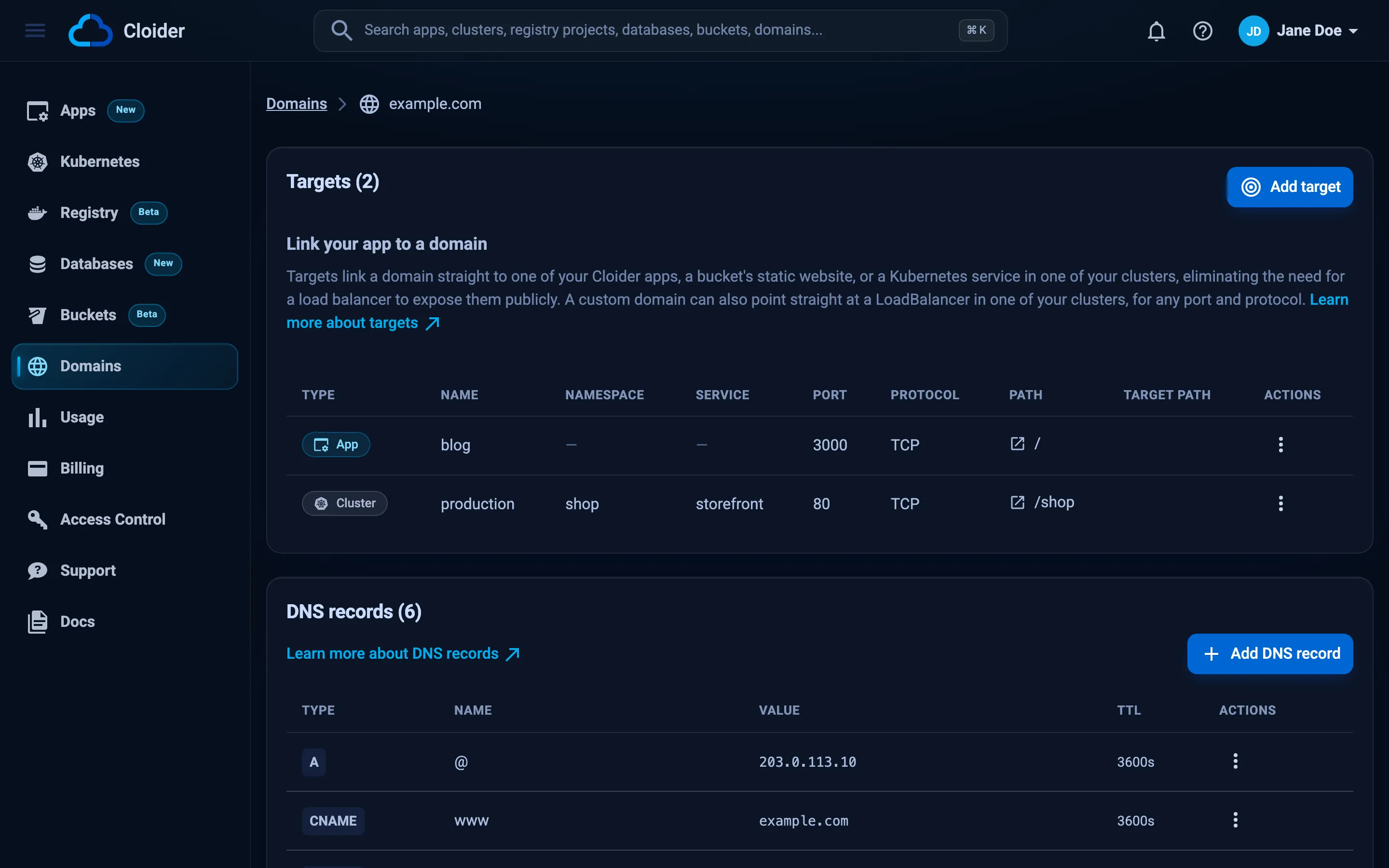
To serve an app on a domain you own, add the domain to Cloider, point it at Cloider's nameservers, add DNS records for the host names you serve, and add a target to the app.
- Add the domain. In Domains, add
example.com(or runcloider domain create example.com). Cloider shows the nameservers to use. See Add a custom domain. - Change the nameservers at your registrar to the ones Cloider shows, and wait for the change to propagate. See Nameservers.
- Add DNS records for the subdomains you serve. The domain itself comes with an
ALIASrecord that points at Cloider, and the target in step 4 points it at the app's free subdomain, but a target doesn't add records. Pointwww(or any subdomain) at your app's free subdomain with aCNAME, as Add a custom domain shows step by step. - Route it to the app with a target, as shown below. The app must have deployed: its status must be
Ready(orPaused).
- Dashboard
- CLI
- Terraform
- API
- MCP
- Open Domains in the sidebar and click your domain.
- Click Add target. In Add a new target, set Target type to App and pick the app under App.
- Set Path (
/for the whole domain) and, optionally, Target path. - Click Save. The domain serves the app over HTTPS once its certificate is issued.
cloider target create example.com --app web
cloider target create example.com --app blog --path /blog
✓ Routed example.com/ to the app
✓ Routed example.com/blog to the app
resource "cloider_domain" "example" {
  name = "example.com"
}

resource "cloider_target" "web" {
  domain = cloider_domain.example.name
  app_id = "w4d8hz"
}

resource "cloider_target" "blog" {
  domain = cloider_domain.example.name
  path   = "/blog"
  app_id = "a7c2mq"
}
See cloider_target.
curl -X POST https://cloider.com/api/targets \
  -H "Authorization: Bearer $CLOIDER_TOKEN" \
  -H "Content-Type: application/json" \
  -d '{"domain_name": "example.com", "target_type": "App", "app_id": "w4d8hz", "path": "/", "target_path": "/"}'
{
  "hashed_id": "t4k9vq",
  "domain_name": "example.com",
  "message": "Target created successfully"
}
Route example.com to the web app.
{"domain": "example.com", "app": "web"}
Route paths to different apps
A domain routes each path to one target, and a path covers everything under it, so / catches whatever no longer path
does. For example, example.com can serve the web app on /, the api app on /api and the blog app on /blog:
cloider target create example.com --app web
cloider target create example.com --app api --path /api
cloider target create example.com --app blog --path /blog
By default a request reaches the app with its full path (/api/users arrives as /api/users). Set a target path to
rewrite the prefix, for example to serve the api app at /api while it handles requests at /:
cloider target create example.com --app api --path /api --target-path /
Now https://example.com/api/users reaches the app as /users. An app served under a path must generate links and
redirects relative to that path, or use the target path to strip it.
See an app's domains
Every domain routed to the app is listed with it:
- Dashboard: the Address on the Overview tab, and each domain's page under Domains.
- CLI:
cloider app get blogprintsURLandDomains;cloider app open blogopens the URL in your browser. - API:
urlanddomainsonGET /api/apps/<id>:
{
  "url": "https://blog-x7k2.cloider.app/",
  "domains": [
    {"domain_name": "blog-x7k2.cloider.app", "domain_type": "Subdomain"},
    {"domain_name": "example.com", "domain_type": "CustomDomain"}
  ]
}
Remove a domain from an app
Delete the target that routes the domain to the app, from the domain's page in Domains, with
cloider target delete <target-id>, or by deleting the cloider_target in Terraform. The domain itself stays yours.
To give up a free subdomain entirely, delete the domain. See Targets and
Delete a domain.
Domains when an app is paused or deleted
- Paused: the domains and targets stay. The address keeps resolving but has no app behind it until you resume.
- Deleted: the app's free subdomains are deleted with it by default (the dashboard pre-selects them, and
cloider app delete --keep-domainskeeps them). A custom domain is never deleted with an app; it only loses its route to the app, and its other records and targets stay.
Troubleshooting
| Message | Cause and fix |
|---|---|
| This subdomain is already taken. Please try another one. | Pick another label |
| You already own this subdomain. Connect it to the app from Domains instead. | The subdomain is already in your account. Add a target to it instead of claiming it again |
| This app is not ready yet. Wait until it finishes deploying, then add the target. | Targets need a deployed app. Wait for the first build to be Ready |
| This path is already in use on this domain. Please choose a different path. | Another target uses that path. Delete or update it, or pick another path |
| This app's name is too long to be exposed on a domain. | Apps with very long names can't be routed from a domain. Create the app with a shorter name, for example under 50 characters |
| The custom domain doesn't load | The nameservers aren't pointing at Cloider yet, the host name has no A or CNAME record on the domain, or the certificate isn't issued yet. See Domains troubleshooting |
502 or an error page on the address | The app isn't answering on its port. See Troubleshooting apps |
Next steps
- Add a custom domain: delegate your domain to Cloider.
- Targets: every routing option.
- HTTPS certificates: how certificates are issued.
- DNS records: email and other records on the same domain.
Frequently asked questions
Does every Cloider app get a free domain?
Yes. When you create an app, Cloider claims a free subdomain such as blog-x7k2.cloider.app for it, or one you choose. You can turn this off and add a domain later.
How do I use my own domain for a Cloider app?
Add the domain in Domains, change its nameservers at your registrar to the ones Cloider shows, add a CNAME that points each subdomain at your app's free cloider.app subdomain (the domain itself already points at Cloider), then add a target that routes the domain, or a path of it, to the app. Cloider serves it over HTTPS once the certificate is issued.
Is HTTPS included?
Yes. Free subdomains and custom domains are served over HTTPS with certificates Cloider manages, and requests reach your app as plain HTTP on its port.
Can one domain serve several apps?
Yes. Add one target per path, for example / to the web app, /api to the api app and /blog to the blog app. Each path routes to one target.
Can I change an app's cloider.app subdomain?
Claim a new subdomain in Domains and add a target routing it to the app, then delete the old subdomain. The app's address shows the oldest domain routed to it.