Environment variables and secrets for Cloider apps
Environment variables are how you configure a Cloider app without changing its code: database URLs, API keys, feature
flags, NODE_ENV. An app has one list of environment variables for the running app, and two lists that only its
builds read, build arguments and build variables. Any variable can be a secret, whose value is never shown
again unless you ask for it. This page covers all three lists, secrets, limits, and every way to set them.
At a glance
| List | Who reads it | Applied by | Dashboard section | CLI |
|---|---|---|---|---|
| Environment variables | The running app, when its container starts | A restart of the app | Environment variables | cloider app env |
| Build arguments | Your Dockerfile build (ARG, RUN --mount=type=secret) | A rebuild | Build arguments | cloider app build-args |
| Build variables | A buildpack build (no Dockerfile) | A rebuild | Build variables | cloider app build-env |
- Secret values are never listed, in the dashboard, the CLI or the API. You read one by name, one at a time.
PORTis always set by Cloider to the app's port and overrides a variable of the same name.- Plain environment variables are also visible to a buildpack build. Secret environment variables never reach any build.
- Values are stored with the app on the platform, not in the source.
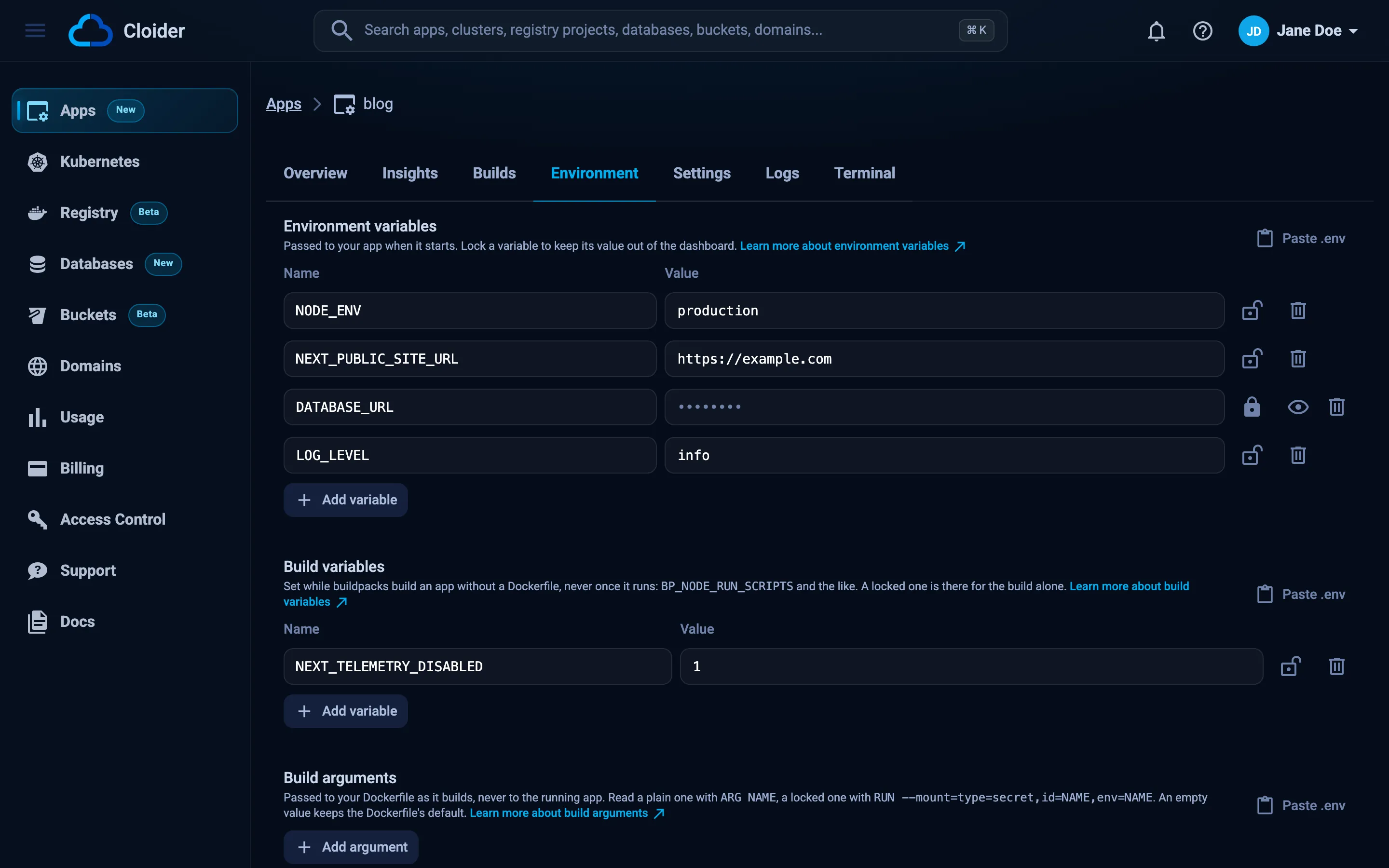
Set environment variables
Saving the environment restarts the app so its container picks up the new values. Nothing is rebuilt.
- Dashboard
- CLI
- Terraform
- API
- MCP
- Open the app and go to the Environment tab.
- Under Environment variables, click Add variable and fill in the Name and Value. To add several at
once, click Paste .env, paste
KEY=VALUElines and click Add these. - Click the lock icon on a row to store it as a secret (Click to store as a secret).
- Click Save changes.
To remove a variable, click its trash icon and save. Discard throws away unsaved edits.
set adds or replaces the variables you name and keeps the rest:
cloider app env set blog NODE_ENV=production LOG_LEVEL=info
cloider app env set blog --secret DATABASE_URL='postgres://blog:s3cret@orders-db.example:5432/blog'
✓ Saved, blog restarts with 2 variable(s)
✓ Saved, blog restarts with 3 variable(s)
List them. Secret values are never shown:
cloider app env list blog
KEY            VALUE
NODE_ENV       production
LOG_LEVEL      info
DATABASE_URL   (secret)
Read one value, secrets included, or remove variables:
cloider app env get blog DATABASE_URL
cloider app env unset blog LOG_LEVEL
Import a .env file. --secret stores every value in it as a secret, and --replace removes the variables the file
doesn't have:
cloider app env import blog .env.production
cloider app env import blog secrets.env --secret
cat .env.production | cloider app env import blog -
The file format is KEY=VALUE per line, with optional export , # comments, and single or double quotes.
The Terraform provider can't manage app variables. Use the dashboard, the CLI or the API.
GET lists the variables, with null as the value of every secret:
curl https://cloider.com/api/apps/a7c2mq/env \
  -H "Authorization: Bearer $CLOIDER_TOKEN"
[
  {"key": "NODE_ENV", "secret": false, "value": "production"},
  {"key": "LOG_LEVEL", "secret": false, "value": "info"},
  {"key": "DATABASE_URL", "secret": true, "value": null}
]
PUT replaces the whole list: a variable missing from it is removed, and a secret sent with "value": null keeps its
stored value. So you can send back what GET returned, with your changes:
curl -X PUT https://cloider.com/api/apps/a7c2mq/env \
  -H "Authorization: Bearer $CLOIDER_TOKEN" \
  -H "Content-Type: application/json" \
  -d '{"env_vars": [
    {"key": "NODE_ENV", "secret": false, "value": "production"},
    {"key": "DATABASE_URL", "secret": true, "value": null},
    {"key": "SENTRY_DSN", "secret": true, "value": "https://abc123@o1.ingest.example/42"}
  ]}'
{"success": true}
Read one value, secrets included, as plain text:
curl "https://cloider.com/api/apps/a7c2mq/env/value?key=DATABASE_URL" \
  -H "Authorization: Bearer $CLOIDER_TOKEN"
Ask your agent:
Set NODE_ENV=production on the blog app, and store DATABASE_URL as a secret with the connection string of orders-db.
It calls set_app_variables, once per kind of value:
{"app": "blog", "variables": {"NODE_ENV": "production"}}
{"app": "blog", "variables": {"DATABASE_URL": "postgres://blog:s3cret@orders-db.example:5432/blog"}, "secret": true}
list_app_variables, get_app_variable and unset_app_variables read and remove them.
You can also set environment variables when you create the app: on Configure your app in the dashboard, or with
--env, --secret-env and --env-file on cloider deploy and cloider app create.
Secret variables
A secret (locked) variable works exactly like a plain one inside the app. The difference is who can see it afterwards:
- Its value is never included when variables are listed: the dashboard shows a password field, the CLI
(secret), and the APInull. - You reveal one value at a time by name: the eye icon (Show) in the dashboard,
cloider app env get, orGET /api/apps/<id>/env/value. - Saving the list without touching a secret keeps its value.
Use secrets for passwords, tokens, private keys and connection strings with credentials. Members with read-only access can see which variables exist.
Build arguments and build variables
The two build lists work like the environment, with the same secrets and limits, but only a build reads them and the running app never sees them. Saving one of them rebuilds the version the app is serving (the button says Save and rebuild), or applies from the first build if the app hasn't deployed yet.
- Build arguments are for apps with a
Dockerfile. A plain one is passed as--build-arg NAME=valuefor anARG NAME; a secret one is passed as a build secret forRUN --mount=type=secret,id=NAME,env=NAME. An empty value isn't passed, so theARG's default applies. Names yourDockerfiledeclares are offered under Declared in your Dockerfile. - Build variables are for apps built with buildpacks. They are the build's environment, and win over a plain environment variable of the same name.
cloider app build-args set web NEXT_PUBLIC_API_URL=https://api.example.com
cloider app build-args set web --secret NPM_TOKEN=npm_xxxxxxxxxxxxxxxx
cloider app build-env set blog --secret NPM_TOKEN=npm_xxxxxxxxxxxxxxxx
✓ Saved 1 argument(s), building web again
✓ Saved 2 argument(s), building web again
✓ Saved 1 variable(s), building blog again
The API paths are /api/apps/<id>/build-args and /api/apps/<id>/build-env, with the same GET, PUT and
/value as /env; their PUT answers {"applied": "build"} or {"applied": "none"}. With MCP, pass
"kind": "build-args" or "kind": "build-env" to the variable tools. See
Build configuration for Dockerfile examples.
A build list can't be changed while a build is running or while the app is paused.
Which list should I use?
| You want to... | Use |
|---|---|
| Give the running app a database URL, API key or setting | Environment variable (secret for credentials) |
Bake a public URL into a frontend bundle built by your Dockerfile | Build argument |
Install private npm or pip packages in a Dockerfile build | Secret build argument, read with RUN --mount=type=secret |
| Install private packages in a buildpack build | Secret build variable |
| Configure how a buildpack builds your app | Build variable |
| Change the port | Not a variable: the app's Port setting, see Settings |
Variable names and limits
| Rule | Limit |
|---|---|
| Name | Starts with a letter or _, then letters, digits and _; up to 128 characters. Names are case sensitive |
| Variables per list | 100 |
| Size of one value | 16 KB |
| Size of a whole list | 64 KB (names plus values) |
| Duplicates | A name can appear once per list |
Values can be any text. A multi-line value such as a PEM key fits in one variable when you set it with the CLI or the
API, for example cloider app env set blog --secret TLS_KEY="$(cat key.pem)". For larger
configuration files, store them in a bucket or in your source.
Connect an app to a Cloider database
A typical setup puts the connection string of a managed database in a secret variable:
- Create the database, for example
orders-db, and copy its connection string from its connection details. - Add the app as a trusted source of the database, so the database accepts its connections.
- Set the connection string on the app as a secret:
cloider app env set blog --secret DATABASE_URL='postgres://orders:s3cret@orders-db.example:5432/orders?sslmode=require'
Verify
Check what the running app actually sees from inside its container:
cloider app exec blog printenv NODE_ENV
production
See Terminal and exec.
Troubleshooting
| Message | Cause and fix |
|---|---|
Variable name must start with a letter or underscore and contain only letters, numbers and underscores | Rename the variable, for example API-KEY to API_KEY |
This variable is set more than once | The list has two rows with the same name. Remove one |
This value exceeds the allowed size of 16KB | Store large values in a bucket or in your source |
The environment variables exceed the allowed size of 64KB | The whole list is too big. Move large values elsewhere |
An app can have at most 100 environment variables | Combine related values, for example into one JSON variable |
| This app is building, wait for that build to finish before changing its build variables! | Build lists can't change during a build. Wait and save again |
| This app is paused. Resume it before deploying a new version! | Build lists can't change while the app is paused. Resume it first |
| The app still sees an old value | Saving the environment restarts the app; check the new container is running on the Logs tab. A build argument or build variable needs a rebuild, which saving starts |
A variable is empty during a Dockerfile build | Set it as a build argument and declare ARG NAME in the stage that uses it. Environment variables don't reach a Dockerfile build |
Next steps
- Build configuration: Dockerfile
ARGand build secrets in depth. - Terminal and exec: inspect the running environment.
- Settings: the port and start command.
- Security: how Cloider protects tokens and secrets.
Frequently asked questions
How do I set environment variables on a Cloider app?
On the app's Environment tab in the dashboard, with cloider app env set <app> KEY=VALUE, with PUT /api/apps/<id>/env, or with the set_app_variables MCP tool. Saving restarts the app with the new values.
Are secret environment variables hidden?
A secret variable's value is never listed back by the dashboard, the CLI or the API. It can only be revealed by name, one value at a time. Inside the app it is an ordinary environment variable.
Do I need to redeploy after changing an environment variable?
No. Saving the environment restarts the running app with the new values, without a new build. Build arguments and build variables are different: saving them starts a rebuild.
What is the difference between build arguments and build variables?
Build arguments are passed to a Dockerfile build, as --build-arg for ARG or as build secrets. Build variables are the environment of a buildpack build, for apps without a Dockerfile. Neither reaches the running app.
Can I upload a .env file?
Yes. Use cloider app env import <app> .env, add --secret to store every value as a secret, and --replace to remove variables the file doesn't have. In the dashboard, click Paste .env and paste the file's contents.
Can I set PORT myself?
No. Cloider always sets PORT to the app's port setting and overrides a variable of the same name. Change the port on the Settings tab.