Kubernetes load balancers on Cloider
A load balancer gives a Kubernetes Service its own public IP address. On Cloider you create one the standard Kubernetes way, with a Service of type: LoadBalancer: the cluster assigns it an external IP, traffic to that IP on the Service's ports reaches your pods, and the load balancer is billed for the time it exists. This page shows how to create one, point a domain at it, and keep track of what it costs.
At a glance
| How to create one | A Service with spec.type: LoadBalancer |
| What you get | An external IP in the Service's status.loadBalancer.ingress, shown as EXTERNAL-IP by kubectl get svc |
| Protocols | The Service's ports, TCP or UDP |
| TLS | Passed through untouched. Your app terminates TLS itself |
| Billing | Per load balancer per month, prorated to the second while the Service has an external IP. See pricing |
| Where to see the cost | Usage in the dashboard, LoadBalancers Usage table of each cluster |
Load balancer or domain target?
Cloider has two ways to make a Service reachable from the internet. Pick by protocol, and by how much you want to run yourself:
| Domain target to a Service | type: LoadBalancer | |
|---|---|---|
| Traffic | HTTP and HTTPS | Any TCP or UDP port |
| Address | Your domain or a free *.cloider.app subdomain | A public IP, and a custom domain with a LoadBalancer target |
| HTTPS certificate | Automatic, issued and renewed by Cloider | Yours to issue and renew |
| Routing | By path (/, /api, ...), with an optional rewrite | Whatever you run behind it, such as your own ingress controller or Gateway API |
| Several services on one address | Yes, by path | One IP per Service, unless your own ingress controller routes them |
| Cost | No load balancer charge | Billed per load balancer |
| Typical use | Websites, APIs, dashboards | Databases you run yourself, MQTT, game servers, SMTP, custom TCP protocols, your own ingress controller or Gateway API |
For a website or an HTTP API, a target is simpler and cheaper. Use a load balancer when you need a raw port, or a feature a target doesn't offer, such as routing by header, traffic splits, authentication in the proxy, mTLS or certificates of your own. Then you run the ingress controller or Gateway API implementation, its routes and its TLS certificates and their renewal yourself.
Create a load balancer
This example publishes an MQTT broker (Eclipse Mosquitto) on TCP port 1883.
apiVersion: v1
kind: Namespace
metadata:
  name: iot
---
apiVersion: v1
kind: ConfigMap
metadata:
  name: mosquitto-config
  namespace: iot
data:
  mosquitto.conf: |
    listener 1883
    allow_anonymous true
---
apiVersion: apps/v1
kind: Deployment
metadata:
  name: mqtt
  namespace: iot
spec:
  replicas: 1
  selector:
    matchLabels:
      app: mqtt
  template:
    metadata:
      labels:
        app: mqtt
    spec:
      containers:
        - name: mosquitto
          image: eclipse-mosquitto:2.0.18
          ports:
            - name: mqtt
              containerPort: 1883
          volumeMounts:
            - name: config
              mountPath: /mosquitto/config
          resources:
            requests:
              cpu: 25m
              memory: 32Mi
      volumes:
        - name: config
          configMap:
            name: mosquitto-config
---
apiVersion: v1
kind: Service
metadata:
  name: mqtt
  namespace: iot
spec:
  type: LoadBalancer
  selector:
    app: mqtt
  ports:
    - name: mqtt
      port: 1883
      targetPort: mqtt
      protocol: TCP
A LoadBalancer Service is reachable by anyone on the internet. The example allows anonymous access to keep it short; in production configure authentication in the application itself.
- Dashboard
- CLI
- Terraform
- API
- MCP
- Open Kubernetes in the sidebar and click the cluster's name to open its terminal.
- Create
mqtt.yamlwithcat > mqtt.yaml <<'EOF', paste the manifest, and end withEOF. - Apply it and watch the Service until it has an external IP:
kubectl apply -f mqtt.yaml
kubectl get service mqtt -n iot --watch
NAME   TYPE           CLUSTER-IP     EXTERNAL-IP    PORT(S)          AGE
mqtt   LoadBalancer   10.43.52.190   <pending>      1883:31883/TCP   2s
mqtt   LoadBalancer   10.43.52.190   203.0.113.25   1883:31883/TCP   6s
Press Ctrl-C to stop watching.
With kubectl and the cluster's kubeconfig:
kubectl apply -f mqtt.yaml
kubectl get service mqtt -n iot
Or through the cluster's terminal, without a kubeconfig:
cloider cluster exec -i staging -- kubectl apply -f - < mqtt.yaml
cloider cluster exec staging -- kubectl get service mqtt -n iot -o jsonpath='{.status.loadBalancer.ingress[0].ip}'
203.0.113.25
With the kubernetes provider configured from the cluster's kube_config (see Deploy a workload):
resource "kubernetes_service_v1" "mqtt" {
  metadata {
    name      = "mqtt"
    namespace = "iot"
  }

  spec {
    type     = "LoadBalancer"
    selector = { app = "mqtt" }

    port {
      name        = "mqtt"
      port        = 1883
      target_port = "mqtt"
      protocol    = "TCP"
    }
  }

  # Waits until the load balancer has an IP
  wait_for_load_balancer = true
}

output "mqtt_ip" {
  value = kubernetes_service_v1.mqtt.status[0].load_balancer[0].ingress[0].ip
}
Apply the manifest through the cluster's exec endpoint, with the file base64 encoded as stdin:
curl -N -X POST https://cloider.com/api/clusters/x8f2kq/exec \
  -H "Authorization: Bearer $CLOIDER_TOKEN" \
  -H "Content-Type: application/json" \
  -d "{\"command\": [\"kubectl\", \"apply\", \"-f\", \"-\"], \"stdin\": \"$(base64 < mqtt.yaml | tr -d '\n')\"}"
See Web terminal and exec for the response format.
Ask your agent:
Apply mqtt.yaml to the staging cluster and tell me the external IP of the mqtt service once it has one.
It calls cluster_exec to apply the file, then to read the IP:
{"cluster": "staging", "command": "kubectl get service mqtt -n iot -o jsonpath='{.status.loadBalancer.ingress[0].ip}'"}
Test the connection
From your computer, with an MQTT client such as mosquitto_sub and mosquitto_pub:
mosquitto_sub -h 203.0.113.25 -p 1883 -t test &
mosquitto_pub -h 203.0.113.25 -p 1883 -t test -m "hello from cloider"
For any TCP service, nc tells you whether the port is open:
nc -vz 203.0.113.25 1883
Point a domain at the load balancer
The simplest way is a LoadBalancer target on a custom domain of
its own, such as mqtt.example.com. It gives the domain an A record to the load balancer's IP and keeps the record
on the IP if the Service is recreated:
cloider target create mqtt.example.com --cluster production --loadbalancer default/mqtt
Clients then connect to mqtt.example.com:1883. In the dashboard, open the domain, click Add target and choose
LoadBalancer. The target takes the whole domain and can't be combined with other targets, and Cloider adds no
HTTPS: TLS, its certificates and their renewal are yours.
To name the IP under a domain that serves other things, give it an A record yourself instead. If the domain's DNS is
hosted on Cloider (see Domains and DNS):
cloider dns create example.com --type A --name mqtt --value 203.0.113.25 --ttl 300
See DNS records for the dashboard and other tools.
The external IP belongs to the Service. If you delete the Service and create it again, it can get a different IP: a
LoadBalancer target follows it, an A record of your own must be updated. To change ports or selectors, edit the
Service in place (kubectl apply) rather than deleting it.
Several ports on one load balancer
One Service can expose several ports on the same IP, and it is still one load balancer:
apiVersion: v1
kind: Service
metadata:
  name: game
  namespace: games
spec:
  type: LoadBalancer
  selector:
    app: game
  ports:
    - name: game-udp
      port: 7777
      targetPort: 7777
      protocol: UDP
    - name: query
      port: 27015
      targetPort: 27015
      protocol: TCP
Every additional Service of type LoadBalancer is an additional load balancer with its own IP and its own charge.
How are load balancers billed?
A load balancer is billed per load balancer per month, prorated to the second, for as long as its Service has an external IP. A month is counted as 30 days. The current price is on the pricing page, in Pricing and in the output of cloider pricing.
- The meter starts when the Service gets its external IP, and stops when the Service is deleted or changed to another type.
- A Service that stays
<pending>has no IP and isn't billed. - Load balancers are counted by name (
<namespace>/<service>). If a Service of the same name is recreated, its time keeps adding to the same entry, and the entry records how many times it was recreated. - A load balancer is billed whatever the cluster's status, so delete LoadBalancer Services you don't need. See Pause and resume.
See what each load balancer costs
Open Usage in the dashboard sidebar. Each cluster has a LoadBalancers Usage table, with the price per load balancer per month in its title, and one row per load balancer:
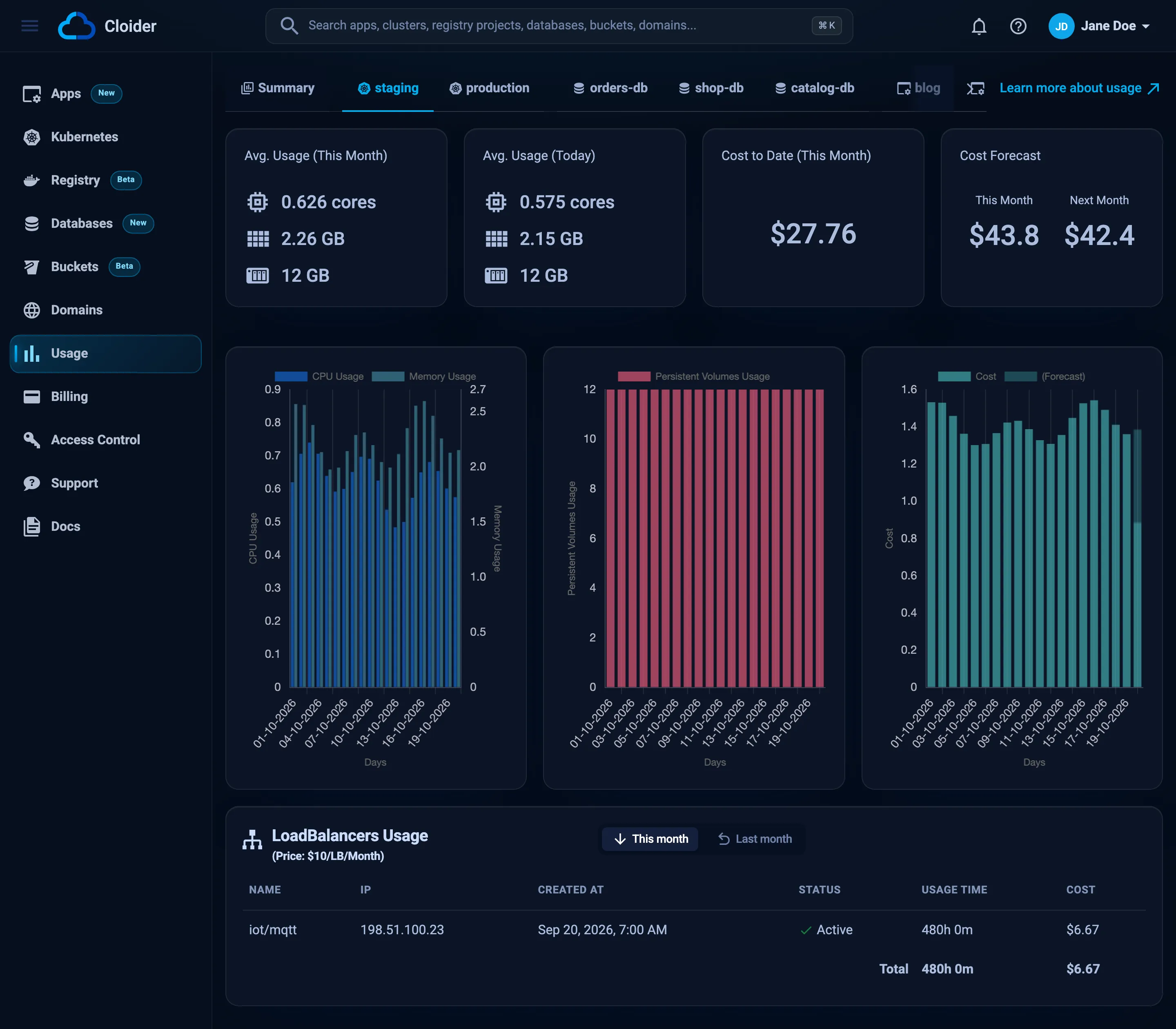
| Column | Meaning |
|---|---|
| Name | <namespace>/<service> |
| IP | The external IP |
| Created At | When the Service was created |
| Status | Whether it is still active, or was removed during the month |
| Usage Time | How long it has been active this month |
| Cost | What it cost this month so far |
The same data is in GET /api/usage (and cloider usage -o json), under each cluster's loadbalancers (this month) and loadbalancers_prev (last month):
{
  "clusters": [
    {
      "cluster_name": "staging",
      "loadbalancers": [
        {
          "name": "iot/mqtt",
          "ip": "203.0.113.25",
          "created_at": "2026-10-12T08:30:11Z",
          "is_active": true,
          "total_time_seconds": 604800,
          "recreations": 0
        }
      ]
    }
  ]
}
See Usage for the rest of the usage data.
List services and stop a load balancer
List every LoadBalancer Service in a cluster with its IP:
kubectl get services -A | grep -E "NAMESPACE|LoadBalancer"
Stop paying for one by deleting the Service, or by switching it to ClusterIP and publishing it with a target instead:
kubectl delete service mqtt -n iot
# or
kubectl patch service mqtt -n iot -p '{"spec": {"type": "ClusterIP"}}'
Troubleshooting
EXTERNAL-IP stays <pending>: run kubectl describe service <name> -n <namespace> and read the events. If nothing explains it after a few minutes, open a support request with the cluster id and the Service's name.
Connection refused or timeout on the IP: check that the Service's selector matches the pods' labels (kubectl get endpoints <name> -n <namespace> must list pod IPs), that targetPort is the port the container listens on, and that the app listens on 0.0.0.0 and not only on 127.0.0.1.
Works for TCP, not for UDP: check that the Service port has protocol: UDP and that the container port matches.
The IP changed: the Service was deleted and recreated. A LoadBalancer target follows the new IP within a minute; update an A record of your own, and edit Services in place from now on.
More cases are in Kubernetes troubleshooting.
Next steps
- Expose HTTP services on a domain, without a load balancer charge.
- DNS records to name your load balancer's IP.
- Pricing.
Frequently asked questions
How do I get a public IP for a Kubernetes service on Cloider?
Set the Service type to LoadBalancer. The cluster assigns it an external IP, which kubectl get service shows as EXTERNAL-IP, and traffic to that IP on the Service ports reaches your pods.
How much does a load balancer cost on Cloider?
A load balancer is billed per load balancer per month, prorated to the second for as long as its Service has an external IP. The current price is on the Cloider pricing page and in the output of cloider pricing.
Do I need a load balancer for a website on Cloider Kubernetes?
No. For HTTP and HTTPS, route a domain to a ClusterIP Service with a target. Targets include an automatic HTTPS certificate and have no load balancer charge.
Does a load balancer cost money while the cluster is paused?
Load balancers are metered by whether their Service has an external IP, whatever the cluster status. Delete LoadBalancer Services you do not need before pausing to be sure they are not billed.
Can one load balancer expose several ports?
Yes. A single Service of type LoadBalancer can list several ports, TCP or UDP, on the same IP, and it counts as one load balancer.