Connect to a Kubernetes cluster with kubectl
You connect to a Cloider cluster the same way you connect to any Kubernetes cluster: with a kubeconfig file. The kubeconfig holds the cluster's API endpoint, the certificate authority that signs it, and a client certificate that authenticates you as the cluster's admin. This page shows how to get it, how to merge several clusters into one kubeconfig, and how to use it with kubectl, Lens, k9s and other tools.
If you only need to run a few commands, the browser terminal and cloider cluster exec give you kubectl and helm already connected to the cluster, with nothing to install.
Before you begin
- A cluster in the
Readystatus. See Create a cluster. The kubeconfig only exists once the cluster isReady. kubectlinstalled on your computer (see below).- For the CLI, Terraform, API and MCP: an API token. See API tokens.
What is a kubeconfig?
A kubeconfig is a YAML file that tells kubectl and other Kubernetes clients where a cluster's API is and how to authenticate to it. It has three lists, clusters, users and contexts, and a current-context. A context joins one cluster with one user, and switching context switches which cluster your commands go to. By default kubectl reads ~/.kube/config, or the files listed in the KUBECONFIG environment variable.
A Cloider cluster's kubeconfig looks like this (the certificates are shortened):
apiVersion: v1
kind: Config
clusters:
- cluster:
    certificate-authority-data: LS0tLS1CRUdJTiBDRVJUSUZJQ0FURS0tLS0t...
    server: https://staging-x8f2kq.cloider.com
  name: staging
contexts:
- context:
    cluster: staging
    user: staging
  name: staging
current-context: staging
users:
- name: staging
  user:
    client-certificate-data: LS0tLS1CRUdJTiBDRVJUSUZJQ0FURS0tLS0t...
    client-key-data: LS0tLS1CRUdJTiBSU0EgUFJJVkFURSBLRVktLS0tLQ...
serveris the cluster's public API endpoint: the cluster name, a dash, the cluster id, on Cloider's domain, port 443.- The context in the downloaded file is named after the cluster. The CLI's
--mergerenames it tocloider-<cluster>so it doesn't clash with your other contexts. - The client certificate and key authenticate you as cluster admin. Treat the file like a password: anyone who has it has full control of the cluster.
The kubeconfig grants full admin access to the cluster. Don't commit it to git, paste it in tickets or share it in chat. Store it with 0600 permissions (the CLI does this for you) and in CI keep it in a secret variable.
Install kubectl
kubectl is the official Kubernetes command line client. Install a version within one minor version of your cluster's Kubernetes version.
- macOS
- Linux
- Windows
brew install kubectl
curl -LO "https://dl.k8s.io/release/$(curl -L -s https://dl.k8s.io/release/stable.txt)/bin/linux/amd64/kubectl"
sudo install -o root -g root -m 0755 kubectl /usr/local/bin/kubectl
On arm64 machines replace amd64 with arm64.
winget install -e --id Kubernetes.kubectl
Check it:
kubectl version --client
Get the kubeconfig
- Dashboard
- CLI
- Terraform
- API
- MCP
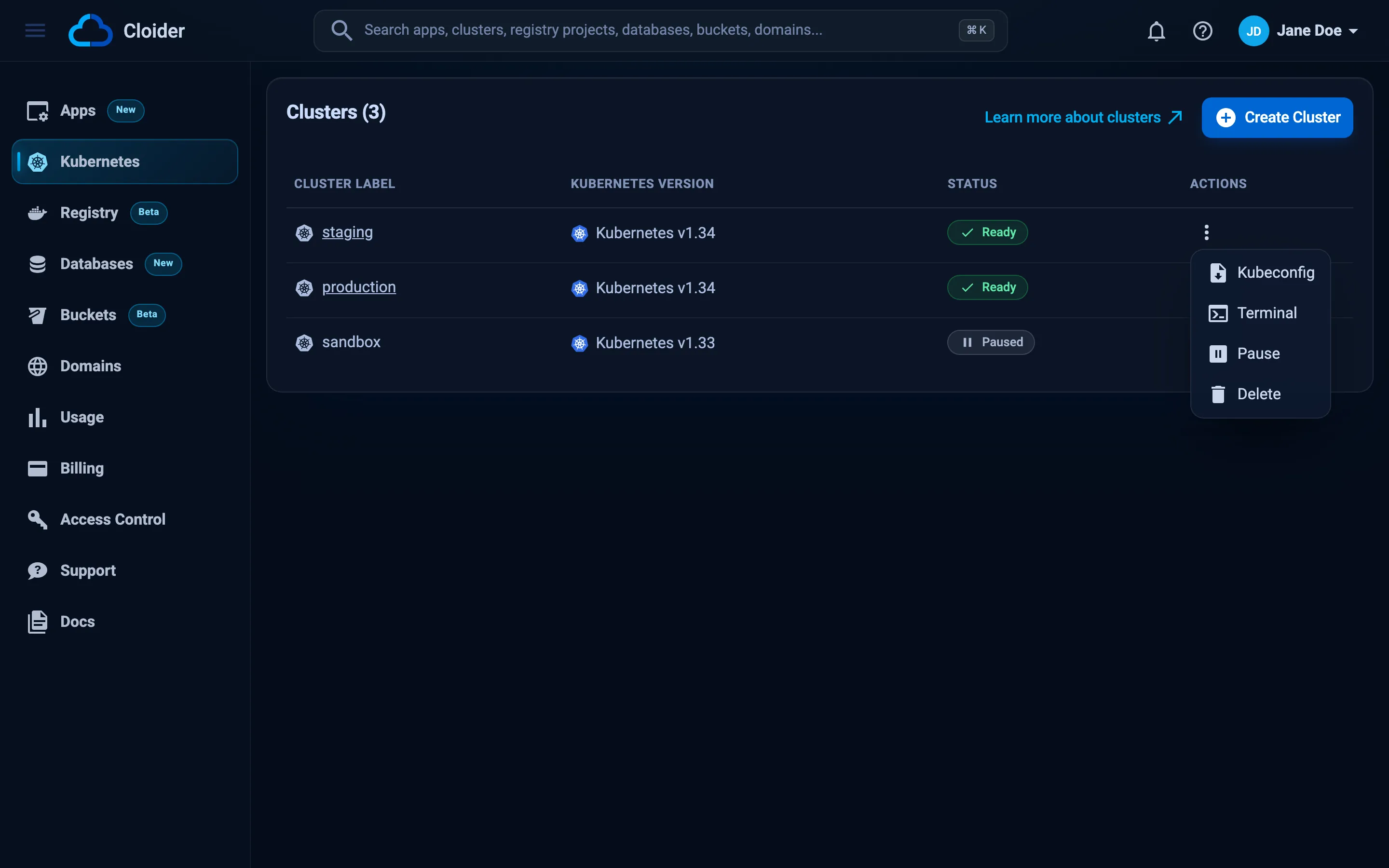
- Open Kubernetes in the sidebar.
- Click the actions button (the three dots) on the cluster's row.
- Click Kubeconfig. Your browser downloads a file named
config.
- Move it somewhere permanent and protect it:
mkdir -p ~/.kube
mv ~/Downloads/config ~/.kube/staging.yaml
chmod 600 ~/.kube/staging.yaml
export KUBECONFIG=~/.kube/staging.yaml
kubectl get namespaces
The Kubeconfig action is disabled until the cluster is Ready, and while it is paused.
The fastest way is to merge the cluster into your own kubeconfig and switch to it in one command:
cloider cluster kubeconfig staging --merge --use
✓ Added context cloider-staging to /Users/alex/.kube/config
Other ways to get it:
# Print it to stdout
cloider cluster kubeconfig staging > staging.yaml

# Write it to a file, created with 0600 permissions
cloider cluster kubeconfig staging -f ~/.kube/staging.yaml

# Merge under a context name of your choice, without switching to it
cloider cluster kubeconfig staging --merge --context acme-staging
| Flag | What it does |
|---|---|
-f, --file | Write to this file instead of stdout. With --merge, the kubeconfig to merge into |
--merge | Merge into your kubeconfig: the first file in $KUBECONFIG, else ~/.kube/config |
--context | Context name to merge as. Default cloider-<cluster> |
--use | With --merge, make it the current context |
With --merge, the cluster, user and context entries are all named after the context (cloider-staging), and an existing entry of the same name is replaced. That makes the command safe to run again, for example after recreating a cluster. The merged context becomes the current one when you pass --use, or when your kubeconfig has no current context yet. Without --use the CLI tells you how to switch:
✓ Added context cloider-staging to /Users/alex/.kube/config
Use it with `kubectl --context cloider-staging`, or `kubectl config use-context cloider-staging`.
The cloider_cluster resource and data source expose the kubeconfig as the sensitive kube_config attribute. Its raw field is the whole file, and host, cluster_ca_certificate, client_certificate and client_key are the parts the kubernetes and helm providers take. To write a kubeconfig file for kubectl, use the local provider:
resource "cloider_cluster" "staging" {
  name = "staging"
}

# KUBECONFIG=./kubeconfig-staging.yaml kubectl get pods -A
resource "local_sensitive_file" "kubeconfig" {
  filename        = "${path.module}/kubeconfig-staging.yaml"
  content         = cloider_cluster.staging.kube_config.raw
  file_permission = "0600"
}
To deploy with Terraform directly instead, see Kubernetes and Helm with Terraform.
GET /api/clusters/{id}/kubeconfig returns the kubeconfig as a file download named config:
curl -fsS https://cloider.com/api/clusters/x8f2kq/kubeconfig \
  -H "Authorization: Bearer $CLOIDER_TOKEN" \
  -o ~/.kube/staging.yaml
chmod 600 ~/.kube/staging.yaml
The body is the kubeconfig YAML shown above. Find the cluster id with GET /api/clusters. See the Clusters API.
Ask your agent:
Add the staging cluster to my kubeconfig and make it the current context.
It calls the get_cluster_kubeconfig tool:
{"cluster": "staging", "merge": true, "use": true}
Without merge or file, the tool returns the kubeconfig as text, which puts the cluster's credentials in the agent's context. Prefer merge or file (written with 0600 permissions), or let the agent run commands with cluster_exec instead.
Verify the connection
kubectl cluster-info
Kubernetes control plane is running at https://staging-x8f2kq.cloider.com
Check that you are cluster admin:
kubectl auth can-i '*' '*' --all-namespaces
yes
And look around:
kubectl get namespaces
kubectl get pods -A
kubectl top pods -A
kubectl top works out of the box because every cluster runs the Kubernetes metrics server. In kube-system you see Cloider's own pods, such as the cluster DNS and the terminal Deployment used by the browser terminal. Leave them in place.
Work with several clusters and contexts
Every cluster you merge with the CLI becomes its own context, so one kubeconfig can hold all of them:
cloider cluster kubeconfig staging --merge
cloider cluster kubeconfig production --merge
kubectl config get-contexts
CURRENT   NAME                 CLUSTER              AUTHINFO             NAMESPACE
*         cloider-staging      cloider-staging      cloider-staging
          cloider-production   cloider-production   cloider-production
Switch between them:
kubectl config use-context cloider-production
kubectl config current-context
Or run a single command against another cluster without switching:
kubectl --context cloider-staging get pods
Set a default namespace for a context so you don't have to pass -n every time:
kubectl config set-context cloider-staging --namespace shop
If you use kubectx and kubens, the merged contexts work with them too:
kubectx cloider-staging
kubens shop
Merge a downloaded kubeconfig by hand
If you downloaded the file from the dashboard and want it in ~/.kube/config without the CLI, flatten both files into one with kubectl:
cp ~/.kube/config ~/.kube/config.backup
KUBECONFIG=~/.kube/config:~/Downloads/config kubectl config view --flatten > /tmp/kubeconfig-merged
mv /tmp/kubeconfig-merged ~/.kube/config
chmod 600 ~/.kube/config
kubectl config use-context staging
The downloaded file names its cluster, user and context after the cluster (staging). If your kubeconfig already has entries with that name, kubectl config view --flatten keeps the first one it reads, so the new cluster is silently skipped. In that case use cloider cluster kubeconfig staging --merge, which names everything cloider-staging and replaces stale entries, or keep each cluster in its own file and list them in KUBECONFIG:
export KUBECONFIG=~/.kube/config:~/.kube/staging.yaml:~/.kube/production.yaml
Use Lens, k9s and other tools
Every Kubernetes tool that reads a kubeconfig works with Cloider clusters.
k9s is a terminal UI for Kubernetes. It reads the same kubeconfig as kubectl:
k9s --context cloider-staging
Lens (and its open source builds such as OpenLens) reads ~/.kube/config and the files in KUBECONFIG and lists each context as a cluster. After cloider cluster kubeconfig staging --merge, cloider-staging appears in Lens's cluster list; open it to browse workloads, logs and metrics. You can also add a downloaded kubeconfig file to Lens from its kubeconfig settings.
Helm uses the current context, or the one you name:
helm --kube-context cloider-staging list -A
VS Code's Kubernetes extension, Kustomize (kubectl apply -k), Skaffold, Tilt and Argo CD's CLI all read the kubeconfig as well.
Use the kubeconfig in CI
Store the kubeconfig in your CI system's secret store and write it to a file at the start of the job. For example in GitHub Actions, with the kubeconfig saved as the secret STAGING_KUBECONFIG:
jobs:
  deploy:
    runs-on: ubuntu-latest
    steps:
      - uses: actions/checkout@v4
      - name: Write kubeconfig
        run: |
          mkdir -p ~/.kube
          echo "${{ secrets.STAGING_KUBECONFIG }}" > ~/.kube/config
          chmod 600 ~/.kube/config
      - name: Deploy
        run: kubectl apply -f k8s/
Alternatively, install the CLI in the job and fetch the kubeconfig with an API token stored as CLOIDER_TOKEN, so the kubeconfig itself is never stored in CI:
curl -fsSL https://cloider.com/install.sh | sh
cloider cluster kubeconfig staging -f ~/.kube/config
kubectl apply -f k8s/
See CI/CD with GitHub Actions and CI/CD with GitLab for complete pipelines.
Troubleshooting
the cluster's kubeconfig has no clusters (CLI) or an empty file: the cluster isn't Ready yet, so it has no kubeconfig. Wait for Ready (cloider cluster status staging) and try again.
Unable to connect to the server: dial tcp: lookup staging-x8f2kq.cloider.com: no such host: the endpoint doesn't resolve. Check the host name in your kubeconfig against the cluster's id (cloider cluster list -o wide). A kubeconfig of a deleted cluster stops working for good; a new cluster has a new id and therefore a new endpoint.
kubectl hangs or times out: check that the cluster is Ready and not Paused. A paused cluster's API server is stopped, so nothing answers until you resume it. Also check that your network allows outgoing HTTPS (port 443) to the endpoint.
error: You must be logged in to the server (Unauthorized) or x509: certificate signed by unknown authority: the client certificate or the CA in your kubeconfig doesn't belong to this cluster, usually because the file was edited or entries from another cluster were mixed in during a manual merge. Download the kubeconfig again, or run cloider cluster kubeconfig staging --merge, which replaces the old entries.
error: context "cloider-staging" does not exist: the context was merged into a different file than the one kubectl reads. --merge writes to the first file in $KUBECONFIG, else ~/.kube/config. Run kubectl config get-contexts and check echo $KUBECONFIG.
CLI exits with code 3: the CLI isn't logged in or the token was revoked. Run cloider login. See CLI authentication.
More cases are in Kubernetes troubleshooting.
Next steps
- Deploy a workload with
kubectl apply. - Install software with Helm.
- Use the browser terminal and
cloider cluster exec.
Frequently asked questions
How do I get the kubeconfig of a Cloider cluster?
In the dashboard, open Kubernetes, click the actions button on the cluster and choose Kubeconfig. With the CLI, run cloider cluster kubeconfig staging --merge --use, which adds the cluster to ~/.kube/config as the context cloider-staging and switches to it. The API serves it at GET /api/clusters/{id}/kubeconfig.
What permissions does the Cloider kubeconfig have?
The kubeconfig authenticates with a client certificate that is cluster admin, so it can do anything in the cluster. Keep it private and store it with 0600 permissions.
Does the kubeconfig expire?
Cloider saves the kubeconfig when the cluster is created and serves that same file for as long as the cluster exists, so downloading it again gives you the same credentials. It stops working when the cluster is deleted. A new cluster always gets a new endpoint and new credentials.
How do I use several Cloider clusters with kubectl?
Merge each one with cloider cluster kubeconfig <cluster> --merge. Each becomes a context named cloider-<cluster> in the same kubeconfig. Switch with kubectl config use-context, or pass --context to a single command.
Can I use Lens or k9s with Cloider?
Yes. Lens and k9s read the same kubeconfig as kubectl. After merging a cluster with the CLI, it appears as the context cloider-<cluster> in both.