Create a Kubernetes cluster
You create a Cloider Kubernetes cluster by giving it a name and, optionally, a Kubernetes version. Cloider provisions its control plane and API endpoint, and the cluster moves from Creating to Starting to Ready, usually within a few minutes. This page shows how to do it with every tool, the naming rules, and what to do when creation is refused.
Before you begin
- A Cloider account. See Create an account.
- A role that can create resources. Members with read-only access can see clusters but not create them. See Access control.
- On the Free plan, no other cluster in the account. The Free plan allows one cluster at a time; delete the existing one or upgrade in Billing.
- For the CLI, Terraform, API and MCP: an API token with Read & Write permission. See API tokens.
Choose a name
The cluster name becomes part of the cluster's API endpoint (https://<name>-<id>.cloider.com) and of the context name in its kubeconfig, so pick something short and meaningful such as staging or production.
A cluster name must:
| Rule | Valid | Invalid |
|---|---|---|
Use only lower case letters, digits and - | shop-api | Shop_API |
| Start with a letter | web2 | 2web, -web |
Not end with - | web | web- |
| Not contain spaces | my-cluster | my cluster |
| Be at least 2 characters long | qa | q |
Names don't have to be unique. If the account already has a cluster called staging, a second one gets the label staging-1, then staging-2, and so on. The dashboard shows the label, and the CLI accepts either the label or the cluster id wherever a cluster is expected.
Choose a Kubernetes version
The dashboard, CLI and API offer the versions 1.34, 1.33 and 1.32, newest first. When you don't choose, the newest is used. The list of versions on offer is also returned by GET /api/options as cluster_versions, which is what the CLI and the Terraform cloider_options data source read.
A cluster keeps the version it was created with: there is no in-place upgrade. To move to another version, create a new cluster and deploy into it. See Limits and compatibility.
Create the cluster
- Dashboard
- CLI
- Terraform
- API
- MCP
- Open Kubernetes in the sidebar.
- Click Create Cluster. If the account has no cluster yet, the same button is on the welcome card.
- In Cluster Name, type
staging. - In Cluster Version, keep the newest version or pick another one.
- Click Create cluster.
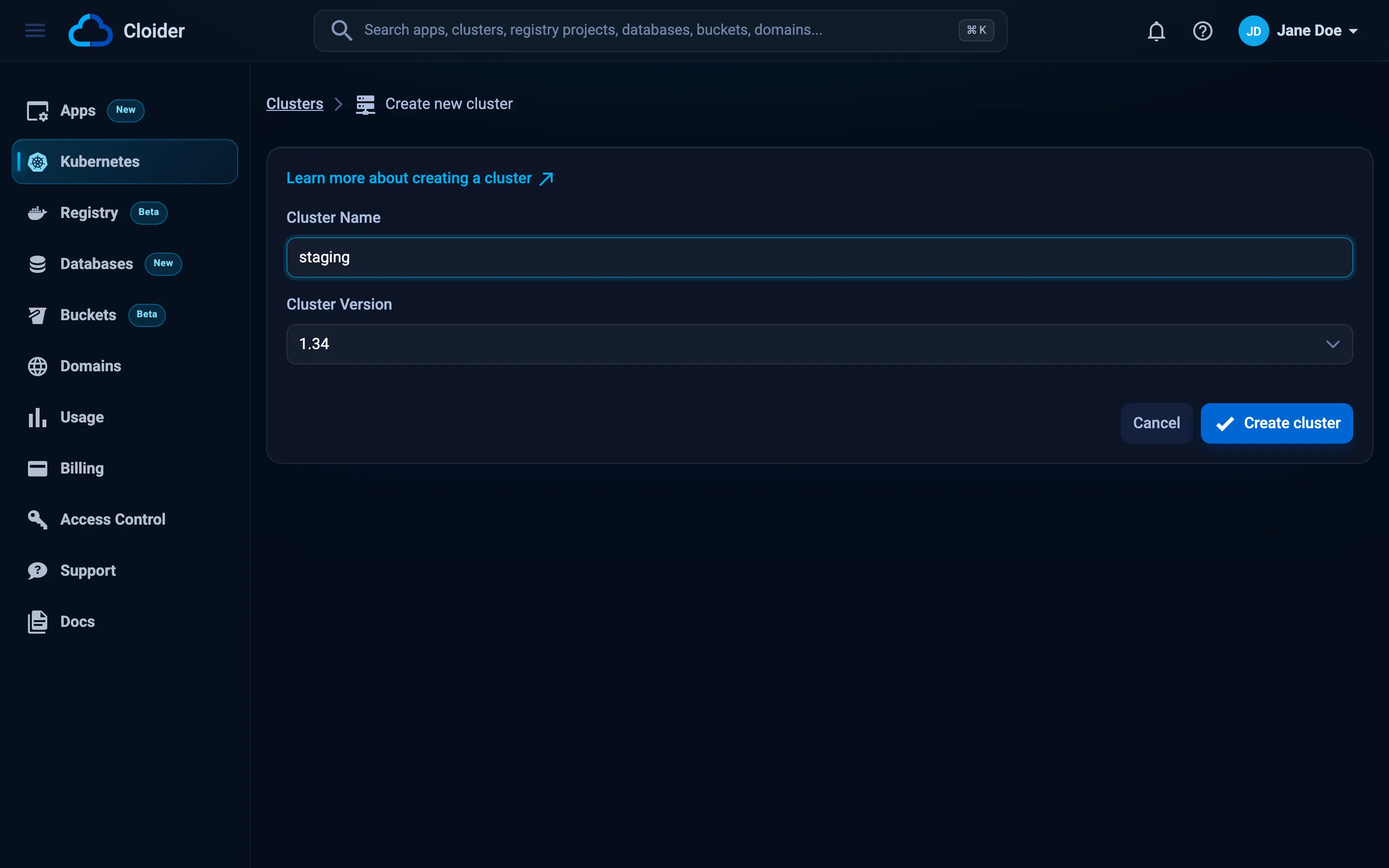
You are taken back to the cluster list, where the new cluster is highlighted. Its status updates on its own every 2 seconds, from Creating to Starting to Ready. The cluster name becomes a link once it is Ready.
cloider cluster create staging --wait
✓ Creating cluster staging (Kubernetes 1.34)
⠋ Waiting for cluster staging
✓ Cluster staging is ready. Get its kubeconfig with `cloider cluster kubeconfig staging --merge`.
Pick a version with --version:
cloider cluster create staging --version 1.33 --wait
| Flag | Default | What it does |
|---|---|---|
--version | the newest offered | Kubernetes version, one of the versions the API offers |
--wait, -w | off | Wait until the cluster is Ready |
--timeout | 15m | How long --wait waits |
Without --wait, the command returns as soon as creation starts and tells you to follow it with cloider cluster status staging. With -q it prints only the new cluster's id, and with -o json it prints the API's answer:
cloider cluster create staging -o json
{
  "hashed_id": "x8f2kq"
}
terraform {
  required_providers {
    cloider = {
      source = "cloider/cloider"
    }
  }
}

provider "cloider" {}

resource "cloider_cluster" "staging" {
  name = "staging"
}

output "cluster_status" {
  value = cloider_cluster.staging.status
}
terraform init
terraform apply
terraform apply waits until the cluster is Ready (up to 20 minutes by default), and kube_config then holds what the kubernetes and helm providers need. To pin a version, set version to one of the values of the cloider_options data source's cluster_versions:
data "cloider_options" "current" {}

resource "cloider_cluster" "staging" {
  name    = "staging"
  version = data.cloider_options.current.cluster_versions[0]

  # A new version replaces the cluster, so keep the one it was created with
  lifecycle {
    ignore_changes = [version]
  }

  timeouts = {
    create = "30m"
  }
}
A cluster can't be renamed or upgraded in place. Changing name or version in Terraform destroys the cluster, with everything running in it, and creates a new one.
See cloider_cluster for every attribute.
curl -X POST https://cloider.com/api/clusters \
  -H "Authorization: Bearer $CLOIDER_TOKEN" \
  -H "Content-Type: application/json" \
  -d '{"cluster_name": "staging", "cluster_version": "1.34", "is_ha": false}'
{
  "hashed_id": "x8f2kq"
}
| Field | Type | Required | Description |
|---|---|---|---|
cluster_name | string | yes | The cluster name, following the naming rules |
cluster_version | string | yes | One of 1.34, 1.33, 1.32 (see GET /api/options) |
is_ha | boolean | no | Must be false. true is rejected |
Then poll the status until it is Ready. The status endpoint answers with plain text:
curl https://cloider.com/api/clusters/x8f2kq/status \
  -H "Authorization: Bearer $CLOIDER_TOKEN"
Ready
See the Clusters API for every endpoint.
Ask your agent:
Create a Kubernetes cluster called staging and wait until it is ready.
It calls the create_cluster tool:
{"name": "staging", "wait": true}
To pick a version, the agent passes version, for example {"name": "staging", "version": "1.33", "wait": true}. An unknown version fails with a message that names the versions on offer. See MCP tools.
How long does it take to create a cluster?
A new cluster usually reaches Ready within a few minutes. During that time it goes through these states:
| Status | What is happening |
|---|---|
Creating | Cloider provisions the cluster's control plane and its API endpoint |
Starting | The control plane is up. Cloider retrieves the cluster's kubeconfig and starts the terminal that the browser terminal and cloider cluster exec use |
Ready | The cluster is ready. The Kubeconfig and Terminal actions are enabled |
The kubeconfig and the terminal are only available once the cluster is Ready. In the dashboard, the Kubeconfig, Terminal and Pause actions stay disabled until then.
Verify
Check the status:
cloider cluster get staging
Name:     staging
Label:    staging
Version:  1.34
Status:   Ready
Created:  2026-10-19 09:41
Then connect with kubectl and list the namespaces of the new cluster:
cloider cluster kubeconfig staging --merge --use
kubectl get namespaces
NAME              STATUS   AGE
default           Active   3m
kube-node-lease   Active   3m
kube-public       Active   3m
kube-system       Active   3m
Or, without installing anything, run the same command in the cluster's terminal:
cloider cluster exec staging kubectl get namespaces
Troubleshooting
The API answers a refused creation with HTTP 400 and the reasons, by field. A general reason is under _:
{
  "errors": {
    "cluster_name": [
      "Cluster name can not be upper case",
      "Cluster name must not have special characters except \"-\""
    ]
  }
}
| Message | Cause and fix |
|---|---|
Cluster name must not be empty | Give the cluster a name |
Cluster name must not have spaces | Replace spaces with - |
Cluster name can not be upper case | Use lower case letters only |
Cluster name can not start with numbers | Start the name with a letter |
Cluster name must not have special characters except "-" | Use only letters, digits and - |
Cluster name must not start with any special character / must not end with any special character | Remove the leading or trailing - |
Cluster name must be at least 2 characters | Use a longer name |
Invalid cluster version! | Use one of the versions returned by GET /api/options |
HA clusters are not supported at the moment! | Send is_ha: false or leave it out |
Free plan users can not create more than one cluster. UPGRADE NOW! | The Free plan allows one cluster. Delete the existing cluster or upgrade to a paid plan in Billing |
Your account is suspended. Upgrade to a paid plan to continue using our services. | The account is suspended, for example after the trial ended. Upgrade in Billing |
You have read-only access to this account, you can not create clusters! | Your role in this account is read-only. Ask an owner or admin for a role that can create resources |
This API token is read only! (HTTP 403) | The token is a Read token. Create a Read & Write token, see API tokens. The CLI exits with code 5 |
version 1.30 isn't offered, pick one of: 1.34, 1.33, 1.32 | CLI only: --version isn't on offer. The CLI exits with code 2 |
If a cluster stays in Creating or Starting for much longer than a few minutes, open a support request with the cluster's id (cloider cluster list -o wide).
Next steps
- Connect with kubectl: download the kubeconfig and set up contexts.
- Deploy a workload: your first Deployment and Service.
- Use the web terminal:
kubectlandhelmin the browser. - Pause and resume: stop paying for compute when a cluster isn't in use.
Frequently asked questions
How long does it take to create a Kubernetes cluster on Cloider?
A new Cloider cluster usually reaches the Ready status within a few minutes. It goes from Creating to Starting to Ready, and the kubeconfig and terminal become available once it is Ready.
Which Kubernetes versions can I choose?
The dashboard, CLI and API offer Kubernetes 1.34, 1.33 and 1.32, newest first. The newest is used when you do not choose. GET /api/options returns the current list as cluster_versions.
Can two clusters have the same name?
Yes. Cluster names do not have to be unique in an account. A second cluster called staging gets the label staging-1, and the dashboard and CLI tell the clusters apart by label or id.
Can I rename a cluster or change its Kubernetes version later?
No. A cluster keeps the name and version it was created with. To change either, create a new cluster and deploy into it. In Terraform, changing name or version replaces the cluster.
How many clusters can a Free plan account create?
One at a time. Creating a second cluster on the Free plan fails with: Free plan users can not create more than one cluster. Delete the existing cluster or upgrade to a paid plan.