S3 bucket policies on Cloider
A bucket policy is a JSON document, in the same format as Amazon S3 bucket policies, that allows or denies specific S3 actions on a bucket to specific access keys or to everyone. Use it when an access key's scope (all or some buckets, read only or read and write) isn't fine enough: to stop a key from deleting, to make one folder read only, to give a key write access to a single folder, to let a key work only from your network, or to let anyone list a public bucket.
This page explains how policies are evaluated on Cloider, what they may contain, and gives complete examples you can paste.
At a glance
| Format | AWS bucket policy JSON, "Version": "2012-10-17" |
| One per bucket | Saving a policy replaces the previous one |
| Principals | Your access keys by access key id (CLDR...), or everyone ("*") |
| Allow | Object actions for your keys. For everyone, only read and list actions, and only on a public bucket |
| Deny | Any supported action, for your keys or for everyone, except the two actions that change the policy |
| Resources | The bucket (arn:aws:s3:::acme-assets) or keys in it (arn:aws:s3:::acme-assets/backups/*) |
| Size | Up to 16 KB of JSON |
| Managed with | The bucket's Permissions > Bucket Policy tab, cloider bucket policy, the REST API and MCP. Not through the S3 API and not with the Terraform provider |
How are bucket policies evaluated?
Every S3 request made with an access key, or without one, is checked in this order:
- An explicit Deny in the policy wins. If a Deny statement matches the request, it is refused, whatever the key's own permission is.
- An Allow in the policy grants. If an Allow statement matches, the request is allowed, even if the key's own scope wouldn't allow it (for example a read only key, or a key limited to other buckets).
- Otherwise the key's own permission applies: its buckets and read only or read and write, as set in Access keys. For a request without a key, public read access decides.
So a policy can both widen access (Allow) and narrow it (Deny), down to a folder.
A Deny that names everyone ("Principal": "*") applies to every request on the bucket, including the dashboard's Files tab and the cloider bucket file commands. For example, denying s3:DeleteObject to everyone also stops you from deleting files in the dashboard, until you change the policy. Settings changes the policy blocks fail with The bucket's policy denies this, change the policy first.
The policy itself can always be changed or removed from the dashboard, the CLI, the API and MCP, because a Deny may never cover s3:PutBucketPolicy or s3:DeleteBucketPolicy.
Set a bucket policy
- Dashboard
- CLI
- Terraform
- API
- MCP
- Open Buckets in the sidebar, click the bucket, and select Permissions, then Bucket Policy.
- Type or paste the policy JSON into the Bucket Policy editor. Click Examples to insert one of the ready made policies, filled in with the bucket's name and your first access key id.
- Click Save policy. The policy is checked, and any error is shown under the editor with the statement it is about.
- An Active tag next to the title shows that the bucket has a policy.
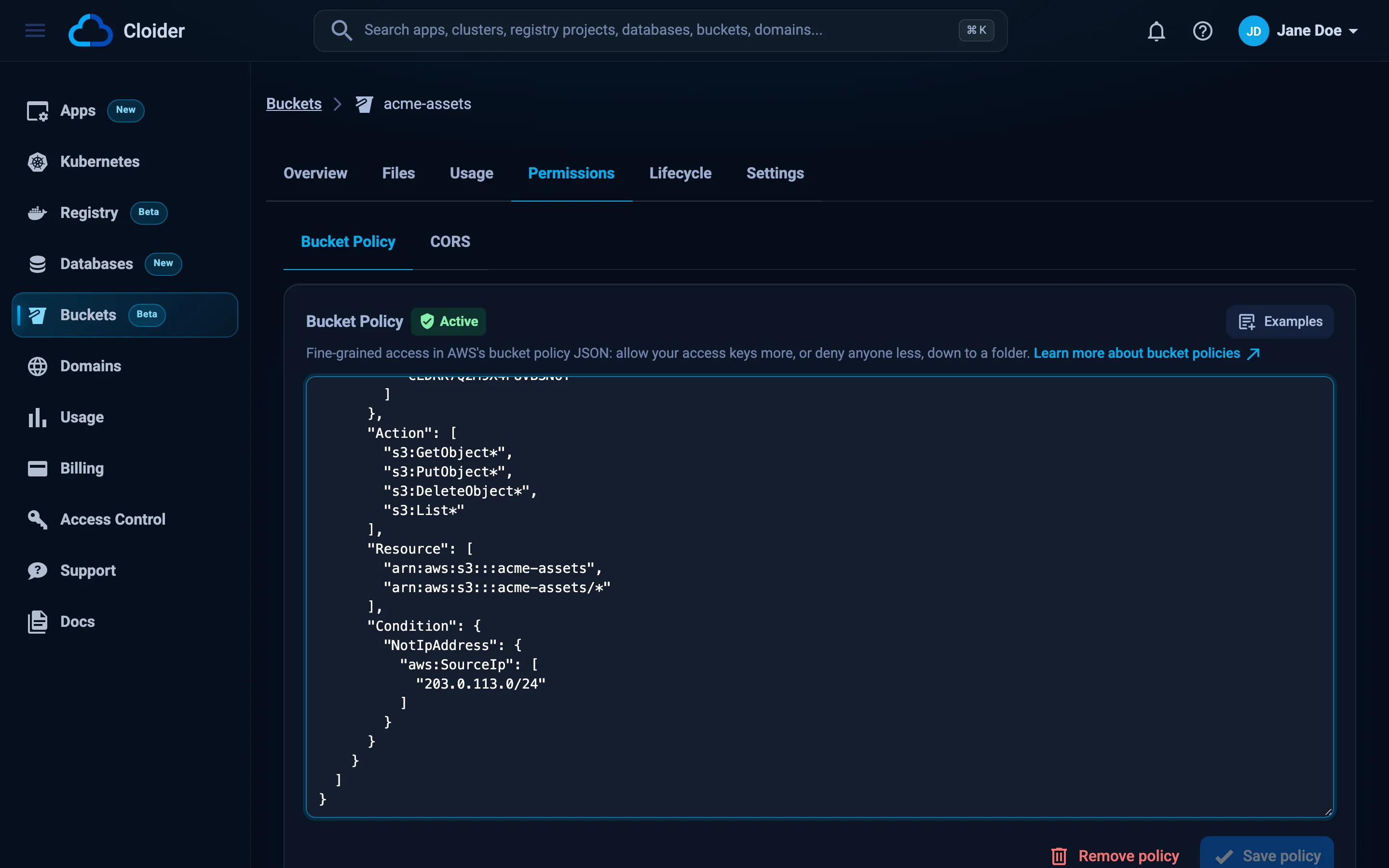
The How Policies Work Here box under the editor lists Your access key IDs; click one to copy it.
Write the policy to a file, then set it:
cloider bucket policy set acme-assets -f policy.json
✓ Set the policy of acme-assets
-f - reads the policy from standard input:
cat policy.json | cloider bucket policy set acme-assets -f -
Print the current policy:
cloider bucket policy get acme-assets
cloider bucket get acme-assets also says whether a policy is set.
The Cloider Terraform provider doesn't manage bucket policies. Set them with the CLI (for example in the same CI job that runs terraform apply) or with the API.
The API takes the policy as a JSON string in the policy field. jq builds the body from a file:
jq -n --rawfile policy policy.json '{policy: $policy}' | \
curl -X PUT https://cloider.com/api/buckets/b7r2xw/policy \
  -H "Authorization: Bearer $CLOIDER_TOKEN" \
  -H "Content-Type: application/json" \
  --data-binary @-
{"policy": "{\n \"Version\": \"2012-10-17\",\n \"Statement\": [ ... ]\n}"}
A rejected policy answers 400 with the reason:
{
  "errors": {"policy": ["Statement 1: Action \"s3:PutBucketAcl\" can't be allowed by a policy, only object actions can"]},
  "data": null
}
The current policy is the policy field of GET /api/buckets/b7r2xw (null without one).
Add a bucket policy to acme-backups that stops the access key CLDR4N7TQ2WB9XK0HJ3E from deleting files.
It calls the set_bucket_policy tool with the policy as a JSON object:
{
  "bucket": "acme-backups",
  "policy": {
    "Version": "2012-10-17",
    "Statement": [{
      "Sid": "KeyNeverDeletes",
      "Effect": "Deny",
      "Principal": {"AWS": ["CLDR4N7TQ2WB9XK0HJ3E"]},
      "Action": ["s3:DeleteObject", "s3:DeleteObjectVersion"],
      "Resource": ["arn:aws:s3:::acme-backups/*"]
    }]
  }
}
The get_bucket tool shows the current policy, and list_bucket_keys the access key ids.
Remove a bucket policy
Removing the policy puts access back to what each access key and the bucket's visibility allow.
- Dashboard
- CLI
- Terraform
- API
- MCP
- Open the bucket's Permissions tab, then Bucket Policy.
- Click Remove policy and confirm with Remove.
cloider bucket policy delete acme-assets
Remove the policy of acme-assets? [y/N] y
✓ Removed the policy of acme-assets
Add --yes in scripts. cloider bucket policy rm is the same command.
Not managed by the Terraform provider. Use the CLI or the API.
curl -X DELETE https://cloider.com/api/buckets/b7r2xw/policy \
  -H "Authorization: Bearer $CLOIDER_TOKEN"
{"policy": null}
{"bucket": "acme-assets"}
Policy reference
Document
{
  "Version": "2012-10-17",
  "Id": "optional-policy-id",
  "Statement": [
    {
      "Sid": "OptionalStatementName",
      "Effect": "Allow",
      "Principal": {"AWS": ["CLDRZ8Q4M2X7KD1PLW0B"]},
      "Action": ["s3:GetObject"],
      "Resource": ["arn:aws:s3:::acme-assets/*"],
      "Condition": {"DateLessThan": {"aws:CurrentTime": "2026-12-31T23:59:59Z"}}
    }
  ]
}
| Field | Required | Rules |
|---|---|---|
Version | Yes | Must be "2012-10-17" |
Id | No | Any string |
Statement | Yes | One statement object or a list of them, at least one |
Sid | No | A name for the statement |
Effect | Yes | "Allow" or "Deny" |
Principal | Yes | "*", {"AWS": "*"}, or {"AWS": ["CLDR..."]} with one or more access key ids |
Action | Yes | One s3: action or a list. See Actions |
Resource | Yes | arn:aws:s3:::<bucket> for the bucket, arn:aws:s3:::<bucket>/<key pattern> for objects. Wildcards * and ? work in key patterns |
Condition | No | See Conditions |
Other fields (NotPrincipal, NotAction, NotResource) and any typo in a field name are refused, so a policy never silently means less than it says. Policy variables such as ${aws:username} aren't supported.
Principals
- Access keys are named by their access key id, the
CLDR...value shown in Access Keys and bycloider bucket key list. The key must exist in this account and be ready. - Everyone is
"*"(or{"AWS": "*"}). It covers requests with and without keys. An Allow to everyone needs the bucket to have public read access.
Actions
Action names are case sensitive in the stored policy, and Cloider rewrites them to their exact spelling when you save, so s3:getobject is saved as s3:GetObject.
What an Allow may grant to access keys (object actions):
| Reading | Writing | Deleting |
|---|---|---|
s3:GetObject | s3:PutObject (covers multipart uploads) | s3:DeleteObject |
s3:GetObjectVersion | s3:CreateMultipartUpload | s3:DeleteObjectVersion |
s3:GetObjectTagging | s3:UploadPart | s3:DeleteObjectTagging |
s3:GetObjectAttributes | s3:CompleteMultipartUpload | |
s3:ListBucket | s3:AbortMultipartUpload | |
s3:ListBucketVersions | s3:PutObjectTagging | |
s3:ListBucketMultipartUploads | ||
s3:ListMultipartUploadParts | ||
s3:GetBucketLocation |
What an Allow may grant to everyone ("*", public buckets only): s3:GetObject, s3:GetObjectVersion, s3:ListBucket, s3:ListBucketVersions, s3:GetBucketLocation.
An Allow can't grant bucket settings, ACLs, retention or the policy itself, and doesn't take wildcards: list each action.
What a Deny may cover: any S3 action, including bucket settings such as s3:PutLifecycleConfiguration or s3:PutBucketVersioning, except s3:PutBucketPolicy and s3:DeleteBucketPolicy. A Deny may use wildcards (s3:Get*, s3:DeleteObject*), as long as the pattern matches at least one action and doesn't cover the two policy actions. That rules out s3:*, s3:Put* and s3:Delete*: list the actions you mean instead, for example ["s3:DeleteObject", "s3:DeleteObjectVersion"].
Conditions
Conditions limit a statement to requests that match. The format is AWS's: an operator, then condition keys with one value or a list.
"Condition": {
  "DateGreaterThan": {"aws:CurrentTime": "2026-12-31T23:59:59Z"}
}
Operators: StringEquals, StringNotEquals, StringLike, StringNotLike, StringEqualsIgnoreCase, StringNotEqualsIgnoreCase, NumericEquals, NumericNotEquals, NumericLessThan, NumericLessThanEquals, NumericGreaterThan, NumericGreaterThanEquals, DateEquals, DateNotEquals, DateLessThan, DateLessThanEquals, DateGreaterThan, DateGreaterThanEquals, Bool, Null, IpAddress, NotIpAddress.
Condition keys:
| Key | Meaning |
|---|---|
aws:CurrentTime | The time of the request, for Date operators |
aws:Referer | The request's Referer header |
aws:UserAgent | The request's User-Agent header |
aws:SourceIp | The IP address the request comes from, for IpAddress and NotIpAddress. See IP addresses |
s3:prefix | The prefix of a list request |
s3:delimiter | The delimiter of a list request |
s3:max-keys | The max-keys of a list request |
s3:authType | How the request was authenticated |
s3:x-amz-<header> | Any x-amz- request header, for example s3:x-amz-acl |
Value rules: values are strings, numbers or booleans. They can't contain spaces (use a StringLike pattern with * or ? instead) or ${...} variables. Numeric operators need numbers, Date operators need dates like 2026-01-31T00:00:00Z, Bool and Null need true or false. IpAddress and NotIpAddress need IPv4 or IPv6 addresses (198.51.100.7) or CIDR ranges (203.0.113.0/24), and take only aws:SourceIp, which takes only them.
Not supported: aws:SecureTransport and s3:ExistingObjectTag/<key>. A policy that uses them is refused when you save it.
IP addresses
aws:SourceIp is the public IPv4 address the request reaches Cloider from (the S3 endpoints have no IPv6 address). Behind a NAT, an office router or a VPN, that is the shared public address, not the machine's own.
| Request | aws:SourceIp |
|---|---|
| S3 tools, SDKs and scripts with an access key | The public IP of the machine running them |
Uploads and downloads in the dashboard and with cloider bucket upload / download | Your public IP: they use presigned URLs, straight from your browser or machine |
Everything else the dashboard's Files tab and the other cloider bucket file commands do (listing, deleting, restoring, new folders), and settings changes such as versioning and lifecycle rules | An address inside Cloider, not yours |
| Apps and Kubernetes clusters running on Cloider | An address inside Cloider that other accounts' workloads share |
| Visitors of the bucket's static website, on its own address or a domain | The visitor's public IP. The website reads the bucket anonymously, so statements for everyone ("Principal": "*") match it |
So name your access keys in a statement with an IP condition, rather than everyone: a Deny for everyone with NotIpAddress also refuses the dashboard's file listing and deleting, whatever your own IP is. And don't allow Cloider's internal addresses in a policy; give workloads on Cloider their own access key instead.
Limits
| Limit | Value |
|---|---|
| Policy size as written | 16 KB |
| Policy size when saved | 20 KB. Each access key a policy names adds to it, so very long key lists can hit this: The policy is too large, shorten it or name fewer access keys |
| Policies per bucket | 1 |
Examples
Replace acme-assets and the access key ids with your own. Every example is a complete policy; to combine several, put their statements in one Statement list.
Let a key read this bucket
Give a key that is scoped to other buckets (or to nothing) read access to this one:
{
  "Version": "2012-10-17",
  "Statement": [
    {
      "Sid": "KeyReads",
      "Effect": "Allow",
      "Principal": {"AWS": ["CLDRZ8Q4M2X7KD1PLW0B"]},
      "Action": ["s3:GetObject", "s3:ListBucket"],
      "Resource": ["arn:aws:s3:::acme-assets", "arn:aws:s3:::acme-assets/*"]
    }
  ]
}
s3:ListBucket applies to the bucket ARN, s3:GetObject to the object ARNs, which is why both resources are listed.
Stop a key from deleting files
The key keeps its upload access but can no longer delete or overwrite history:
{
  "Version": "2012-10-17",
  "Statement": [
    {
      "Sid": "KeyNeverDeletes",
      "Effect": "Deny",
      "Principal": {"AWS": ["CLDRZ8Q4M2X7KD1PLW0B"]},
      "Action": ["s3:DeleteObject", "s3:DeleteObjectVersion"],
      "Resource": ["arn:aws:s3:::acme-backups/*"]
    }
  ]
}
Combined with versioning, this makes a backup key that can add backups but never destroy one: an overwrite only adds a new version.
Make a folder read only for everyone
Nobody, not even the dashboard, can change or delete what is under backups/, and nobody can add a lifecycle rule that would expire it:
{
  "Version": "2012-10-17",
  "Statement": [
    {
      "Sid": "BackupsReadOnly",
      "Effect": "Deny",
      "Principal": "*",
      "Action": ["s3:PutObject", "s3:DeleteObject", "s3:DeleteObjectVersion"],
      "Resource": ["arn:aws:s3:::acme-backups/backups/*"]
    },
    {
      "Sid": "NoExpiry",
      "Effect": "Deny",
      "Principal": "*",
      "Action": ["s3:PutLifecycleConfiguration"],
      "Resource": ["arn:aws:s3:::acme-backups"]
    }
  ]
}
To write to backups/ again, remove or edit the policy first.
A drop box key that can only upload into one folder
Create a key scoped to a different bucket (or read only on another one), then allow it to upload under incoming/ here. It can't list, download or delete anything in this bucket:
{
  "Version": "2012-10-17",
  "Statement": [
    {
      "Sid": "UploadsOnly",
      "Effect": "Allow",
      "Principal": {"AWS": ["CLDR4N7TQ2WB9XK0HJ3E"]},
      "Action": ["s3:PutObject", "s3:AbortMultipartUpload"],
      "Resource": ["arn:aws:s3:::acme-assets/incoming/*"]
    }
  ]
}
Let a key write only until a date
A temporary key for a contractor or a migration: its writes are denied after the end of the year, while reads keep working:
{
  "Version": "2012-10-17",
  "Statement": [
    {
      "Sid": "NoWritesAfter2026",
      "Effect": "Deny",
      "Principal": {"AWS": ["CLDRZ8Q4M2X7KD1PLW0B"]},
      "Action": ["s3:PutObject", "s3:DeleteObject", "s3:DeleteObjectVersion"],
      "Resource": ["arn:aws:s3:::acme-assets/*"],
      "Condition": {"DateGreaterThan": {"aws:CurrentTime": "2026-12-31T23:59:59Z"}}
    }
  ]
}
Deleting the key when the work is done is simpler still: see Access keys.
Let a key work only from your network
The key is refused from every other address, so a leaked copy of it is useless outside your office or CI runners:
{
  "Version": "2012-10-17",
  "Statement": [
    {
      "Sid": "KeyOnlyFromOffice",
      "Effect": "Deny",
      "Principal": {"AWS": ["CLDRZ8Q4M2X7KD1PLW0B"]},
      "Action": ["s3:GetObject*", "s3:PutObject*", "s3:DeleteObject*", "s3:List*"],
      "Resource": ["arn:aws:s3:::acme-assets", "arn:aws:s3:::acme-assets/*"],
      "Condition": {"NotIpAddress": {"aws:SourceIp": ["203.0.113.0/24", "198.51.100.7"]}}
    }
  ]
}
s3:PutObject* also covers multipart uploads, and presigned URLs made with this key only work from these addresses too. The statement names the key, so the dashboard keeps working; see IP addresses before denying everyone.
Let anyone list a public bucket
On a public bucket, add listing to public downloads:
{
  "Version": "2012-10-17",
  "Statement": [
    {
      "Sid": "PublicList",
      "Effect": "Allow",
      "Principal": "*",
      "Action": ["s3:ListBucket"],
      "Resource": ["arn:aws:s3:::acme-assets"]
    }
  ]
}
A bucket with a statement like this can't be made private until the statement is removed.
Let anyone list only one folder
Listing can be limited with the s3:prefix condition, here to downloads/:
{
  "Version": "2012-10-17",
  "Statement": [
    {
      "Sid": "PublicListDownloads",
      "Effect": "Allow",
      "Principal": "*",
      "Action": ["s3:ListBucket"],
      "Resource": ["arn:aws:s3:::acme-assets"],
      "Condition": {"StringLike": {"s3:prefix": ["downloads/*"]}}
    }
  ]
}
Things to know
- The policy can't be read or changed through the S3 API.
aws s3api get-bucket-policyandput-bucket-policyanswerAccessDeniedfor every key. Use the dashboard, the CLI, the API or MCP. - Policies name access keys, so mind key changes. When you delete a key a policy names, its statements stop matching anything. Saving the policy again fails with
no ready access key CLDR... in this accountuntil you remove the deleted key's id. - Deleting a bucket removes its policy first.
- Changes apply within moments. S3 tools don't need to reconnect or reconfigure.
Troubleshooting
| Message | Cause and fix |
|---|---|
The policy is empty / The policy has no statements | Add at least one statement |
Version must be "2012-10-17" | Set "Version": "2012-10-17" |
invalid JSON on line N: ... | Fix the JSON syntax on that line (a missing comma or quote is the usual cause) |
"NotPrincipal" isn't supported | Only the fields in the reference above are accepted |
Principal "..." isn't an access key id, name keys by the id shown under Access Keys (CLDR...) | Use the access key id, not the key's name or Cloider id |
Statement N: no ready access key CLDR... in this account | The key doesn't exist in this account, was deleted, or is still being created |
Action "s3:..." can't be allowed by a policy, only object actions can | Allow only takes the object actions listed above |
Action "s3:..." can't be allowed to everyone ("*"), only s3:GetObject, ... | Everyone may only be allowed read and list actions |
Action "s3:*": Allow takes exact actions, wildcards are only for Deny | List the actions instead of a wildcard |
Action "s3:*" also covers s3:PutBucketPolicy, which the dashboard needs to change this policy, list the actions instead | Use narrower patterns or list the actions |
allowing everyone ("*") needs Public Read Access, turn it on in Settings or name access keys | Make the bucket public, or allow named keys instead |
Resource "..." isn't in this bucket, use "arn:aws:s3:::acme-assets" or "arn:aws:s3:::acme-assets/*" | Resources must be this bucket's ARN or keys inside it |
Condition NotIpAddress aws:SourceIp: "..." isn't an IP address or a range like "203.0.113.0/24" | Use addresses like 198.51.100.7 or CIDR ranges like 203.0.113.0/24 |
Condition StringEquals aws:SourceIp: aws:SourceIp takes IpAddress or NotIpAddress | Compare aws:SourceIp with IpAddress or NotIpAddress |
Condition ... : values can't contain spaces, use a StringLike pattern instead | Replace spaces with ? or * in a StringLike pattern |
The bucket's policy denies this, change the policy first. | A Deny for everyone blocks a dashboard action, such as changing lifecycle rules. Edit the policy |
Storage rejected the policy (MalformedPolicy) | The storage refused the policy after the checks. Simplify it and try again |
The bucket must be ready to change its policy. | Wait until the bucket is Ready |
Next steps
- Scope access keys to buckets and permissions.
- Turn on versioning to keep overwritten and deleted files.
- Protect important data.
Frequently asked questions
Does Cloider support S3 bucket policies?
Yes. Each bucket can have one policy in AWS bucket policy JSON (Version 2012-10-17) with Allow and Deny statements. Principals are your access keys by access key id, or everyone ("*"). Set it in the bucket's Permissions tab, with cloider bucket policy set, or through the REST API.
How do I stop an access key from deleting files?
Add a Deny statement for that key's access key id with the actions s3:DeleteObject and s3:DeleteObjectVersion on the resource arn:aws:s3:::<bucket>/*. The key keeps its other permissions.
Can I set a bucket policy with aws s3api put-bucket-policy?
No. Bucket policies are managed with Cloider's tools only (the dashboard, the cloider CLI, the REST API and the MCP server), so an access key can never change or read its own bucket's policy.
Can a bucket policy restrict access by IP address?
Yes. Use aws:SourceIp with IpAddress or NotIpAddress, for example a Deny for an access key with NotIpAddress and your office range, so the key only works from there. The dashboard's file listing and workloads running on Cloider reach storage from inside Cloider, not from your public IP, so restrict access keys rather than everyone.
Why can't I use s3:* in a Deny?
s3:* also covers s3:PutBucketPolicy and s3:DeleteBucketPolicy, which Cloider needs to be able to change or remove the policy. List the actions you want to deny instead, or use a narrower pattern such as s3:DeleteObject*.
Does a policy affect the dashboard?
A Deny that names everyone ("*") does: it applies to every request on the bucket, including the dashboard's file browser and the cloider bucket file commands. A Deny naming specific access keys only affects those keys.