Delete an S3 bucket on Cloider
Deleting a bucket permanently removes the bucket and everything in it: every file, every earlier version kept by versioning, its policy, its lifecycle rules, and its static website with the targets that serve it. It can't be undone. This page shows how to delete a bucket with every tool, what happens step by step, and what to check first.
You don't need to empty a bucket before deleting it: Cloider deletes the contents for you.
Before you begin
- Copy anything you want to keep. Download it with the CLI or an S3 tool, or copy it to another bucket, for example
rclone copy cloider:acme-old cloider:acme-archive. Versioning doesn't help here: deleting the bucket deletes every version too. - Check what uses the bucket. Apps, Kubernetes workloads, CI jobs, CDN configurations and public links that point at it will start failing with
NoSuchBucket. If the bucket is served as a static website, the website stops and the targets that point domains at it are removed; the domains themselves stay. - Make sure you can delete resources. Members with the read-only role and read only API tokens can't delete buckets.
- Decide whether you need the name. Once deleted, the bucket's name is free for anyone, in any Cloider account, to take.
Delete the bucket
- Dashboard
- CLI
- Terraform
- API
- MCP
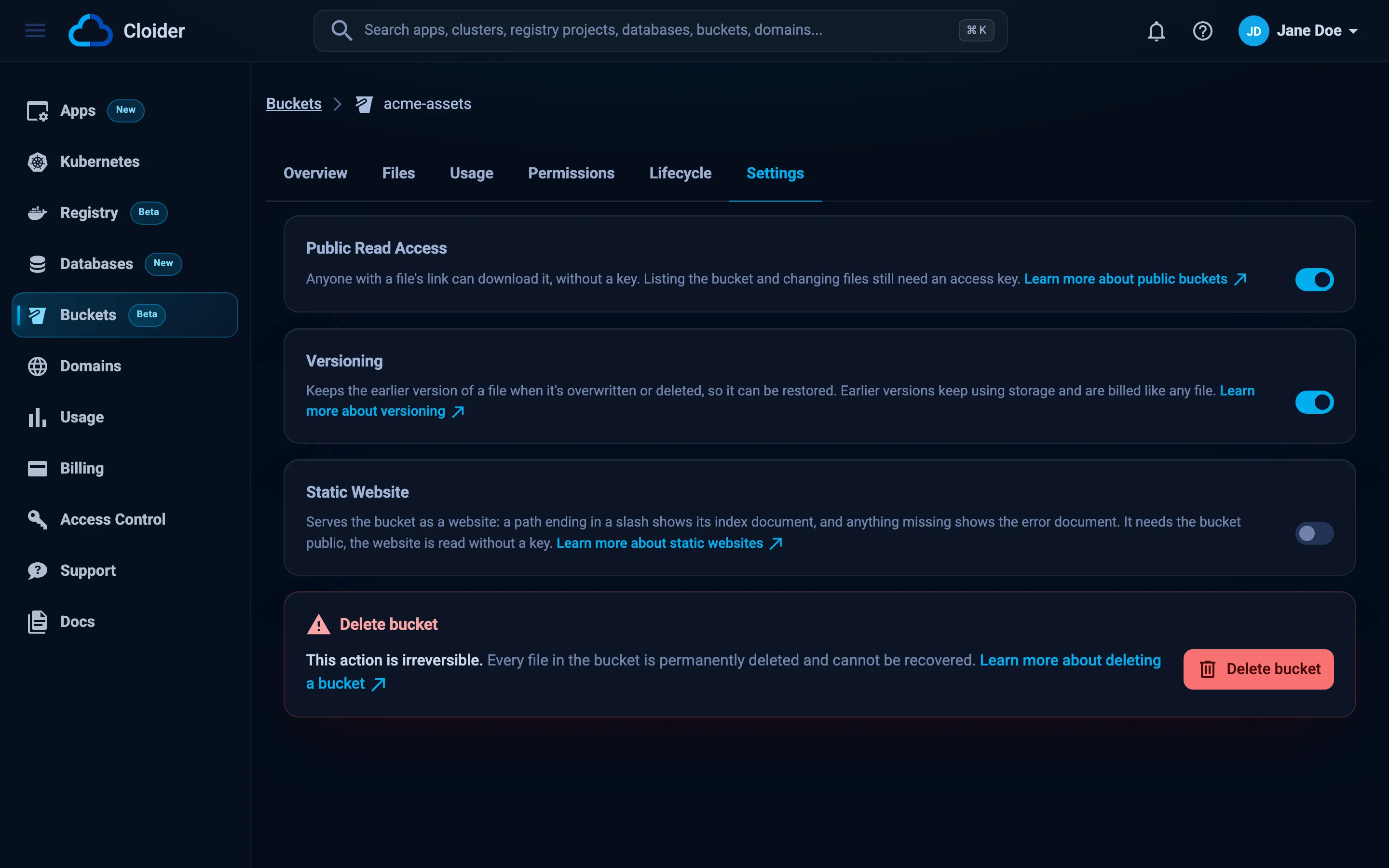
- Open Buckets in the sidebar and click the bucket. (You can also open the actions menu on the bucket's row in the list and choose Delete.)
- Select the Settings tab and click Delete bucket in the danger zone at the bottom.
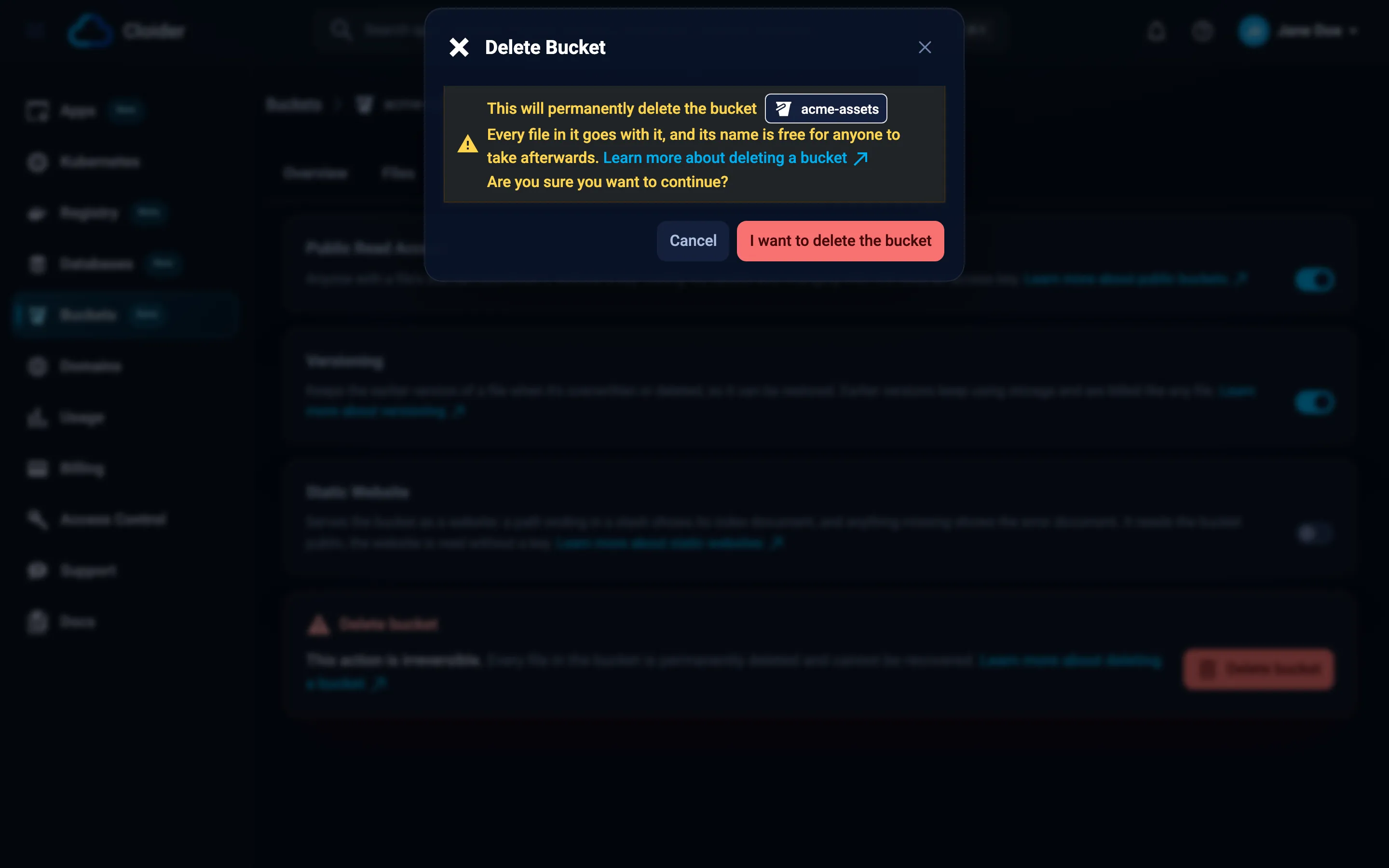
- The Delete Bucket dialog warns that every file goes with the bucket and that its name becomes free for anyone to take. For a website bucket it adds Its website stops, and the targets pointing domains at it are removed. The domains stay. Click I want to delete the bucket.
- Type the bucket's name to confirm, and click Delete bucket.
You are taken back to the Buckets list, where the bucket shows Terminating until it is gone.
cloider bucket delete acme-old --wait
This permanently deletes bucket acme-old.
Type acme-old to confirm: acme-old
✓ Deleting bucket acme-old
✓ Bucket acme-old is deleted
Without --wait the command returns once the deletion has started. In scripts, --yes skips the confirmation:
cloider bucket delete acme-old --yes --wait
Without a terminal and without --yes, the command refuses with deleting bucket acme-old needs --yes when not running in a terminal.
Remove the cloider_bucket resource from the configuration and apply, or destroy it directly:
terraform destroy -target=cloider_bucket.old
Terraform waits until the bucket is deleted, up to the delete timeout (20 minutes by default). For buckets holding many files, raise it:
resource "cloider_bucket" "old" {
  name = "acme-old"

  timeouts {
    delete = "60m"
  }
}
Changing a bucket's name or region in Terraform also deletes it, because it is replaced by a new bucket. Check terraform plan for must be replaced before applying.
curl -X DELETE https://cloider.com/api/buckets/m4t9cs \
  -H "Authorization: Bearer $CLOIDER_TOKEN"
The response is the account's bucket list, with this bucket's status now Terminating. Poll its status until it is gone:
curl https://cloider.com/api/buckets/m4t9cs/status \
  -H "Authorization: Bearer $CLOIDER_TOKEN"
Terminating
Once the bucket is deleted, the status endpoint answers 404.
Delete the bucket acme-old and wait until it is gone.
It calls the delete_bucket tool, which clients that confirm destructive tools ask you to approve first:
{"bucket": "acme-old", "wait": true}
What happens when you delete a bucket?
- The policy is removed first, so nothing in it can interfere with the deletion.
- The website stops. If the bucket is served as a static website, the targets that point domains at it are removed. The domains stay in your account, with their other targets and DNS records.
- The bucket is marked Terminating. It disappears from use in the dashboard: its page can't be opened from the list anymore.
- Access is revoked. Public read access is turned off and every access key loses access to the bucket, before any data is deleted, so nothing can write to it while it is emptied.
- Every file and version is deleted, then the bucket itself. A bucket with many files takes a while; small buckets are gone within seconds.
- The bucket is gone. Its status becomes Terminated and it leaves the Buckets list. Its name is free again.
Access keys aren't deleted with the bucket. A key limited to specific buckets simply drops the deleted one from its list (and shows None left if that was its only bucket). Keys for all buckets keep working with the others.
Storage stops being charged once the data is gone. The bucket's usage up to then stays on the Usage page and on your invoice.
When can't a bucket be deleted?
| Message | Why | What to do |
|---|---|---|
This bucket is still being created! | The bucket is still Creating | Wait a few seconds until it is Ready or Failed |
This bucket is already being deleted! | The deletion is already running | Wait. The bucket leaves the list when done |
Another change to this bucket is in progress, try again in a moment! | A settings or policy change to the bucket is running | Try again in a moment |
Couldn't remove the bucket's policy, try again in a moment! | The policy couldn't be removed, so nothing was deleted | Try again |
You have read-only access to this account, you can not delete buckets! | Your role in this account is read only | Ask a member who can manage resources |
This API token is read only! | The API token has Read access | Use a Read & Write token |
Nothing else blocks a deletion: a bucket with files, versions, a policy, lifecycle rules or public read access is deleted all the same. There is no separate deletion protection setting on buckets, so use roles to control who can delete them, and keep a second copy of data you can't lose (see Data protection).
If the deletion fails
If the bucket can't be emptied or deleted, its status becomes Failed. Its data may still be there, but access keys and public links no longer reach it. Delete it again from its Settings tab, with cloider bucket delete, or with the API. If it keeps failing, contact support with the bucket's name.
Delete only the files
To keep the bucket (and its name) but remove its contents:
- a folder at a time in the dashboard's Files tab, or with
cloider bucket rm <bucket> --prefix <folder>/(up to 10,000 files per folder), - everything at once with an S3 tool, for example
aws s3 rm s3://acme-old --recursive --profile cloiderorrclone delete cloider:acme-old, - automatically with a lifecycle rule that expires files after one day.
On a versioned bucket, these only add delete markers. To free the storage, also delete the versions, for example with a lifecycle rule that sets Remove earlier versions after they've been replaced for 1 day.
Next steps
Frequently asked questions
Do I have to empty a bucket before deleting it?
No. Deleting a bucket on Cloider deletes every file and version in it for you. With S3 tools you would normally have to empty it first, but buckets are deleted with Cloider's own tools, which do it in one step.
Can I recover a deleted bucket?
No. Deleting a bucket permanently deletes all its files and versions, and versioning doesn't protect against it. Keep a copy elsewhere if you might need the data again.
How long does it take to delete a bucket?
A few seconds for small buckets. A bucket holding many files takes longer, because every file is deleted. The bucket shows Terminating until it is gone.
Can someone else take my bucket name after I delete it?
Yes. Bucket names are shared by every Cloider account, and a deleted bucket's name is free for anyone to use. Keep the bucket if the name matters to you, for example because it appears in public links.
Are access keys deleted with the bucket?
No. Access keys stay. A key limited to specific buckets drops the deleted bucket from its list, and keys for all buckets keep working with the remaining buckets.
Can I protect a bucket from being deleted?
There is no deletion protection setting. Members with the read-only role and read only API tokens can't delete buckets, so give delete rights only to members who need them, and keep a second copy of important data.