Object storage usage and billing
Cloider bills object storage on one thing only: how much data your buckets store, per GB per month, charged by the hour. Requests, uploads, downloads and traffic are free. This page explains how the stored amount is measured, what counts toward it, how to see each bucket's usage and forecast, and how to keep the cost down.
At a glance
| Billed on | Stored data, per GB per month, charged by the hour |
| Measured | Every few minutes, averaged over time |
| Free | Requests (PUT, GET, LIST, DELETE), uploads, downloads and traffic |
| Counts toward storage | Every file, every earlier version and delete marker kept by versioning, and parts of unfinished multipart uploads |
| Price | Shown on the Create bucket page, by cloider pricing and at cloider.com/#pricing |
| On the invoice | An Object Storage line per bucket |
| Where to see usage | The bucket's Usage tab, the Usage page, cloider bucket usage, the API and MCP |
How is object storage billed?
Cloider measures how many bytes each bucket stores every few minutes. You are charged for the average amount stored, at the storage price per GB per month, prorated to the hour. In practice:
- A bucket that stores 100 GB for a whole month costs 100 times the monthly price per GB.
- A bucket that stores 100 GB for 3 days, then is emptied, costs about 3 days' worth of 100 GB, about a tenth of the monthly amount.
- A file you upload and delete within the hour costs next to nothing.
There is no minimum size, no minimum storage duration, and no charge for an empty bucket. Requests and data transfer in both directions are free, so serving files from a public bucket doesn't add to the bill however often they are downloaded.
The sizes are measured in binary units: 1 GB in Cloider's usage figures is 1024³ bytes (1 GiB), which is how cloider pricing lists the price, per Gi.
Find the current price
The Create bucket page shows the price per GB per month under the form. From the CLI:
cloider pricing
The bucket row, with the unit storage per Gi, is the price of one GiB stored for a month. Prices change, so check cloider.com/#pricing or the pricing reference rather than copying an amount into your own documentation.
What counts toward a bucket's size?
| Stored data | Counts? |
|---|---|
| Current files | Yes |
| Earlier versions kept by versioning | Yes |
| Delete markers | Yes (they are tiny) |
| Parts of multipart uploads that were never completed or aborted | Yes, until a lifecycle rule or the tool aborts them |
| Empty folder markers created in the dashboard | Yes, zero bytes |
| Files you deleted from a bucket without versioning | No, from the next measurement |
The bucket's size shown in the dashboard and the CLI is the latest measurement, so it can lag a few minutes behind an upload or a delete.
See a bucket's usage
- Dashboard
- CLI
- Terraform
- API
- MCP
- Open Buckets in the sidebar and click the bucket.
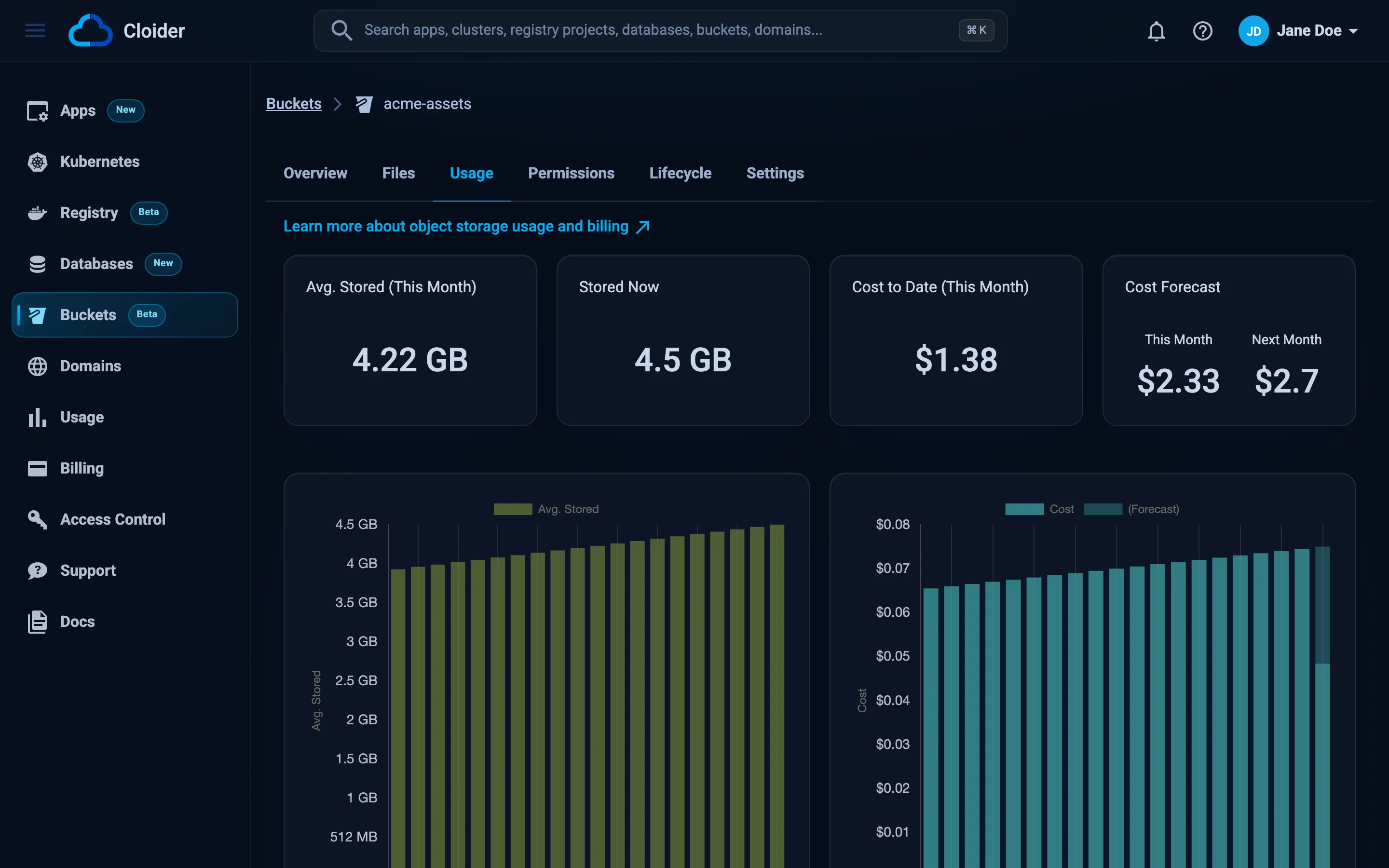
- Select the Usage tab.
It shows:
- Avg. Stored (This Month): the average amount stored since the start of the month,
- Stored Now: the latest measurement,
- Cost to Date (This Month),
- Cost Forecast for This Month and Next Month, if the bucket keeps storing what it stores now,
- daily charts of the average stored amount and the cost, with today's forecast on the last bar.
A new bucket shows What the bucket stores is sampled every few minutes, and shows here once the first samples are in. until the first measurements arrive.
The account wide Usage page in the sidebar lists every bucket next to your other resources. See Usage.
cloider bucket usage acme-backups
Bucket:               acme-backups
Month:                2026-10
Average storage:      41.37 GiB
Cost so far:          $0.53
Forecast this month:  $0.83
Forecast next month:  $0.86

DATE        STORAGE    COST
2026-10-20  48.20 GiB  $0.03
2026-10-19  47.95 GiB  $0.03
2026-10-18  47.10 GiB  $0.03
The figures here are illustrative. -o json prints the API's answer. cloider usage shows the whole account, and cloider bucket list the current size of every bucket.
Usage isn't exposed by the Terraform provider. Use the dashboard, the CLI or the API.
curl https://cloider.com/api/buckets/k9d4mz/usage \
  -H "Authorization: Bearer $CLOIDER_TOKEN"
{
  "hashed_id": "k9d4mz",
  "bucket_name": "acme-backups",
  "region": "eu-central-2",
  "size_bytes": 51754382131,
  "size_sampled_at": "2026-10-20T09:55:00Z",
  "monthly_usage": {
    "avg_storage_usage": 41.3712,
    "storage_total_cost": 0.5291,
    "total_cost": 0.5291,
    "days": 20,
    "forecast_this_month": 0.83,
    "forecast_next_month": 0.86
  },
  "daily_usage": [
    {
      "resource_type": "bucket",
      "date": "2026-10-20T00:00:00Z",
      "total_cost": 0.0266,
      "metrics": {"storage": 48.2, "storage_cost": 0.0266}
    }
  ],
  "date": "2026-10-20",
  "month": "2026-10"
}
avg_storage_usage and metrics.storage are in GiB. daily_usage holds up to the last 31 days. The account wide GET /api/usage lists every bucket under buckets.
How much is the acme-backups bucket costing this month?
It calls the get_usage tool for one bucket:
{"kind": "bucket", "name": "acme-backups"}
Without arguments, get_usage returns the whole account, and get_pricing the current prices.
How to reduce storage costs
- Expire what you don't need. A lifecycle rule can delete temporary files, old logs and old backups automatically.
- Limit version history. Versioning keeps every overwritten and deleted file. Add a lifecycle rule with Remove earlier versions after they've been replaced for N days, so history is kept for as long as you need it and no longer.
- Clean up unfinished uploads. Interrupted multipart uploads leave invisible parts behind. A rule with Clean up unfinished uploads after 7 days removes them.
- Compress before uploading. Database dumps, logs and exports shrink a lot with
gziporzstd. - Delete buckets you don't use. An empty bucket costs nothing, but forgotten data does. The Size column of the Buckets list shows where the data is.
Billing and the Free plan
Buckets are billed like Cloider's other resources: the cost accrues as you go, appears on the Usage page, and is charged on your invoice under Object Storage. See the billing model and Billing.
On the Free plan you can create one bucket. Accounts that are suspended can't create buckets until the account is back in good standing.
Next steps
- Expire files and versions with lifecycle rules.
- See all your usage.
- Understand Cloider's billing model.
Frequently asked questions
How much does Cloider Object Storage cost?
You pay per GB of stored data per month, billed by the hour on the average a bucket stores. Requests, uploads, downloads and traffic are free. The current price per GB is on the Create bucket page, in cloider pricing, and at cloider.com/#pricing.
Does Cloider charge for egress or requests on buckets?
No. Downloads, uploads, traffic and requests of every kind are free. Only stored data is billed.
Do old versions count toward my storage bill?
Yes. Every version and delete marker kept by versioning is stored data and is billed. A lifecycle rule that removes earlier versions after a number of days keeps this in check.
How often is bucket usage measured?
Every few minutes. Cost is based on the average of those measurements over time, so storing data for part of a month is charged for that part only.
Does an empty bucket cost anything?
No. Billing is based only on stored data, so a bucket that stores nothing costs nothing.