S3 lifecycle rules for Cloider buckets
Lifecycle rules delete things from a bucket automatically once they reach an age: files older than a number of days, earlier versions some days after they were replaced, and uploads that were started but never finished. They keep temporary files, logs and old backups from piling up and costing money, without a cron job of your own.
At a glance
| Actions | Delete files after N days, remove earlier versions N days after they were replaced, clean up unfinished uploads after N days |
| Scope | The whole bucket, or the keys starting with a prefix such as tmp/ |
| Days | 1 to 36500 per action. 0 (or empty) turns the action off |
| Rules per bucket | Up to 100 |
| When they run | Every few minutes |
| Managed with | The bucket's Lifecycle tab, cloider bucket lifecycle, the REST API, MCP, and the S3 API |
What each action does
| Action | Dashboard label | JSON field | Effect |
|---|---|---|---|
| Expire files | Delete files after N days | expire_days | Deletes files N days after they were uploaded (last modified). On a versioned bucket this adds a delete marker, so the file disappears but its versions are kept |
| Expire earlier versions | Remove earlier versions after they've been replaced for N days | noncurrent_days | Permanently removes versions N days after they stopped being current, when their file was overwritten or deleted. Only versioned buckets have earlier versions |
| Clean up uploads | Clean up unfinished uploads after N days | abort_multipart_days | Aborts multipart uploads that were started N days ago and never completed, and frees the parts they stored |
On a bucket with versioning, Delete files after only hides files behind a delete marker: their data is kept as earlier versions, and still billed. Add Remove earlier versions to the same rule to free that storage too, for example expire_days: 30 with noncurrent_days: 7 removes the data 37 days after upload.
Unfinished multipart uploads happen when an S3 tool uploading a large file is interrupted. Their parts use storage but aren't visible as files, so a rule that cleans them up after a few days is a good default for every bucket.
Add a lifecycle rule
- Dashboard
- CLI
- Terraform
- API
- MCP
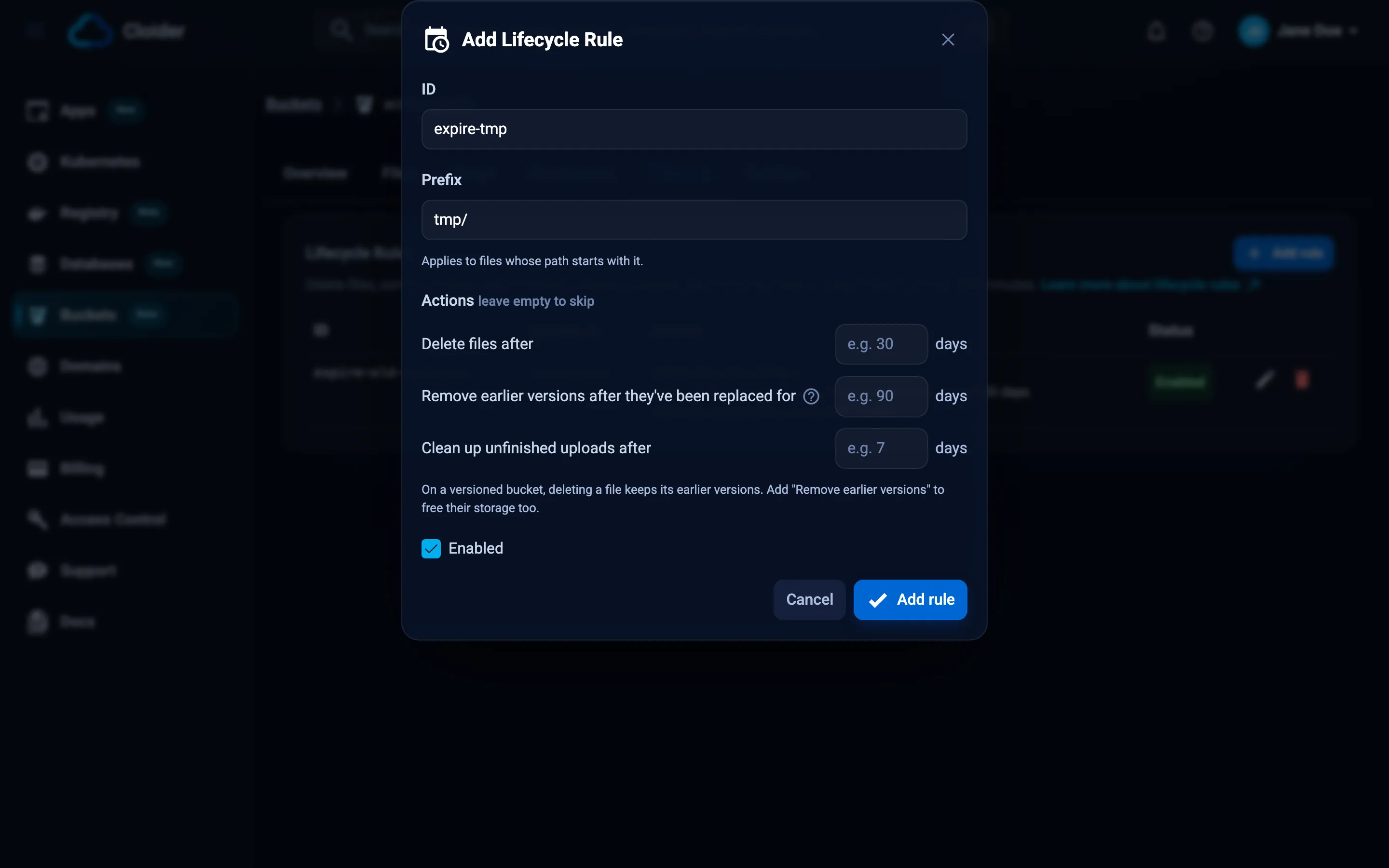
- Open Buckets in the sidebar, click the bucket, and select the Lifecycle tab. (It appears once the bucket is Ready.)
- Click Add rule.
- Enter an ID, a name for the rule such as
expire-tmp. - Enter a Prefix, for example
tmp/, or leave it empty for the whole bucket. - Under Actions, fill in the day counts you want and leave the others empty:
- Delete files after N days,
- Remove earlier versions after they've been replaced for N days,
- Clean up unfinished uploads after N days.
- Keep Enabled checked.
- Click Add rule.
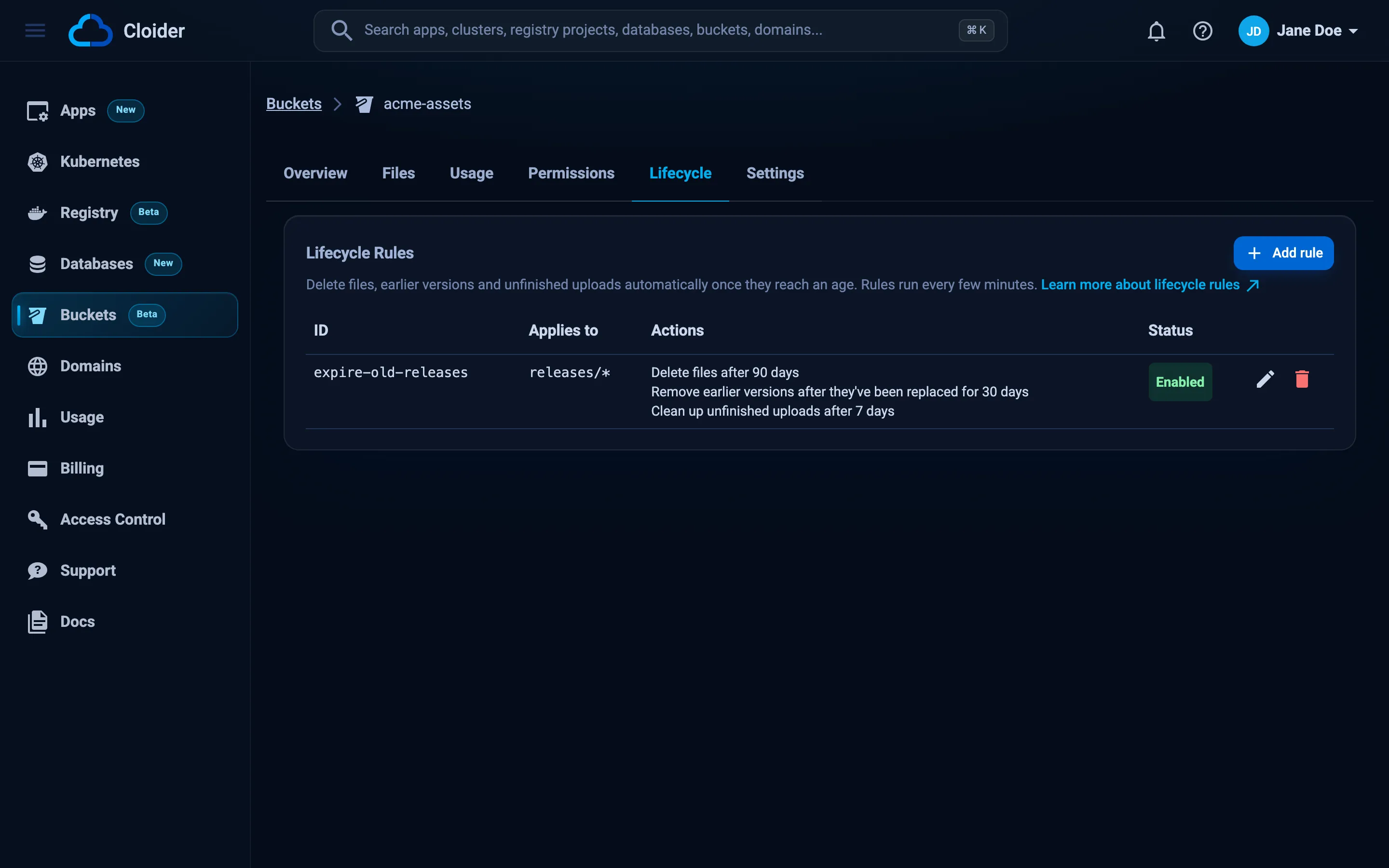
The table shows each rule's ID, what it Applies to (the prefix followed by *, or Whole bucket), its Actions and its Status (Enabled or Disabled). Use the edit and delete buttons to change or remove a rule.
cloider bucket lifecycle set replaces all rules of the bucket with the ones in a JSON file. The file is a list of rules, or an object with a rules list:
[
  {
    "id": "expire-tmp",
    "prefix": "tmp/",
    "enabled": true,
    "expire_days": 7,
    "noncurrent_days": 0,
    "abort_multipart_days": 1
  }
]
cloider bucket lifecycle set acme-assets -f rules.json
✓ acme-assets now has 1 lifecycle rule(s)
-f - reads the rules from standard input:
echo '[{"id": "uploads", "prefix": "", "enabled": true, "abort_multipart_days": 7}]' | \
  cloider bucket lifecycle set acme-assets -f -
List the rules:
cloider bucket lifecycle get acme-assets
PREFIX  ENABLED  EXPIRE  NONCURRENT  ABORT UPLOADS
tmp/    yes      7d      -           1d
-o wide adds each rule's ID, and -o json prints the rules as JSON, ready to edit and set again.
The Cloider Terraform provider doesn't manage lifecycle rules. Set them with cloider bucket lifecycle set or the API, for example in the CI job that runs terraform apply.
PUT replaces every rule of the bucket:
curl -X PUT https://cloider.com/api/buckets/b7r2xw/lifecycle \
  -H "Authorization: Bearer $CLOIDER_TOKEN" \
  -H "Content-Type: application/json" \
  -d '{
    "rules": [
      {"id": "expire-tmp", "prefix": "tmp/", "enabled": true, "expire_days": 7, "noncurrent_days": 0, "abort_multipart_days": 1}
    ]
  }'
{
  "rules": [
    {"id": "expire-tmp", "prefix": "tmp/", "enabled": true, "expire_days": 7, "noncurrent_days": 0, "abort_multipart_days": 1}
  ],
  "unsupported_rules": 0
}
Read the rules with GET /api/buckets/b7r2xw/lifecycle, which answers in the same shape.
In acme-assets, delete everything under tmp/ after 7 days and clean up unfinished uploads after a day.
It reads the current rules with get_bucket_lifecycle, then sets the full list:
{
  "bucket": "acme-assets",
  "rules": [
    {"id": "expire-tmp", "prefix": "tmp/", "enabled": true, "expire_days": 7, "noncurrent_days": 0, "abort_multipart_days": 1}
  ]
}
The CLI, the API and MCP always send the complete list of rules. To add one rule, get the current rules first, add yours to the list, and set the whole list. The dashboard does this for you.
Rule reference
| Field | Type | Rules |
|---|---|---|
id | string | Required. 1 to 255 letters, digits, ., _ or -. Unique within the bucket |
prefix | string | Keys starting with this, for example logs/2026/. Empty for the whole bucket. Up to 1024 characters, no leading /, no control characters |
enabled | boolean | false keeps the rule but doesn't run it |
expire_days | integer | Delete files this many days after they were last modified. 0 for off |
noncurrent_days | integer | Remove versions this many days after they were replaced or deleted. 0 for off |
abort_multipart_days | integer | Abort unfinished uploads this many days after they started. 0 for off |
At least one of the three day counts must be set, each from 1 to 36500. A bucket can have up to 100 rules.
Examples
Delete temporary files after a week
[
  {"id": "expire-tmp", "prefix": "tmp/", "enabled": true, "expire_days": 7, "noncurrent_days": 0, "abort_multipart_days": 0}
]
Keep logs for 90 days
[
  {"id": "logs-90d", "prefix": "logs/", "enabled": true, "expire_days": 90, "noncurrent_days": 1, "abort_multipart_days": 0}
]
noncurrent_days: 1 makes sure expired logs don't linger as versions on a versioned bucket.
Keep 30 days of backup history
Nightly backups overwrite orders/latest.sql.gz on a versioned bucket. Each night's previous backup becomes an earlier version, and is removed 30 days later:
[
  {"id": "backup-history", "prefix": "orders/", "enabled": true, "expire_days": 0, "noncurrent_days": 30, "abort_multipart_days": 7}
]
Clean up unfinished uploads everywhere
A good default for every bucket:
[
  {"id": "abort-uploads", "prefix": "", "enabled": true, "expire_days": 0, "noncurrent_days": 0, "abort_multipart_days": 7}
]
Several rules together
{
  "rules": [
    {"id": "expire-tmp", "prefix": "tmp/", "enabled": true, "expire_days": 7, "noncurrent_days": 1, "abort_multipart_days": 0},
    {"id": "logs-90d", "prefix": "logs/", "enabled": true, "expire_days": 90, "noncurrent_days": 1, "abort_multipart_days": 0},
    {"id": "abort-uploads", "prefix": "", "enabled": true, "expire_days": 0, "noncurrent_days": 0, "abort_multipart_days": 7}
  ]
}
Remove lifecycle rules
- Dashboard
- CLI
- Terraform
- API
- MCP
Click a rule's delete button in the Lifecycle tab and confirm with Delete in Delete Rule. To pause a rule without deleting it, edit it and uncheck Enabled.
Remove every rule:
cloider bucket lifecycle clear acme-assets
Remove every lifecycle rule of acme-assets? [y/N] y
✓ acme-assets now has 0 lifecycle rule(s)
To remove one rule, set the list without it.
Not managed by the Terraform provider.
curl -X PUT https://cloider.com/api/buckets/b7r2xw/lifecycle \
  -H "Authorization: Bearer $CLOIDER_TOKEN" \
  -H "Content-Type: application/json" \
  -d '{"rules": []}'
An empty list removes the bucket's lifecycle configuration.
{"bucket": "acme-assets", "rules": []}
Rules set through the S3 API
A read and write access key can also set lifecycle rules with S3 tools, for example aws s3api put-bucket-lifecycle-configuration. Rules that only use what Cloider's tools show (a prefix filter, expiration in days, noncurrent version expiration in days, and aborting incomplete multipart uploads) appear in the dashboard and the CLI like any other.
Rules that use other S3 lifecycle options, such as tag or size filters, expiration dates, storage class transitions, ExpiredObjectDeleteMarker or NewerNoncurrentVersions, are counted but not shown. The dashboard warns that they were set through the S3 API and that changing the rules there replaces them, and the CLI asks before replacing them. Saving rules from the dashboard, the CLI, the API or MCP always replaces the whole configuration, these rules included.
To stop access keys from changing lifecycle rules, deny s3:PutLifecycleConfiguration in a bucket policy.
Troubleshooting
| Message | Cause and fix |
|---|---|
Rule N: the ID is 1 to 255 letters, digits, '.', '_' or '-' | Use a simple ID without spaces |
Rule N: another rule already has the ID "..." | Give each rule a unique ID |
Rule N: set at least one of the day counts | Set expire_days, noncurrent_days or abort_multipart_days |
Rule N: day counts are 1 to 36500 | Use a positive number of days, or 0 to turn the action off |
Rule N: the prefix starts inside the bucket, without a leading / | Write logs/, not /logs/ |
A bucket can have up to 100 lifecycle rules | Combine rules, or use broader prefixes |
The rules couldn't be read (API) | The body isn't JSON in the shape {"rules": [...]} |
the rules are neither a json array nor {"rules": [...]} (CLI) | Fix the file's JSON |
The bucket's policy denies this, change the policy first. | A bucket policy denies s3:PutLifecycleConfiguration to everyone. Edit the policy |
| Files under a prefix aren't deleted | Check that the rule is Enabled, that the prefix matches the keys exactly (keys are case sensitive), and remember that on a versioned bucket expired files are kept as versions unless noncurrent_days is set |
Next steps
Frequently asked questions
How do I delete files older than 30 days automatically?
Add a lifecycle rule with the prefix of those files (or empty for the whole bucket) and Delete files after 30 days. With the CLI: echo '[{"id": "expire-30d", "prefix": "logs/", "enabled": true, "expire_days": 30}]' | cloider bucket lifecycle set <bucket> -f -. On a versioned bucket, also set Remove earlier versions to free the storage.
How often do lifecycle rules run?
Every few minutes. A file becomes eligible once it reaches the age the rule names, and is removed on one of the following runs.
Why do expired files still use storage on a versioned bucket?
On a versioned bucket, expiring a file only adds a delete marker and keeps its data as an earlier version. Set noncurrent_days (Remove earlier versions after they've been replaced for N days) in the same rule to remove that data too.
Can lifecycle rules move files to a cheaper storage class?
No. Cloider lifecycle rules delete files, earlier versions and unfinished uploads. Storage class transitions aren't available.
How many lifecycle rules can a bucket have?
Up to 100 rules, each with a unique ID.