Create an S3 bucket
A bucket is the container your files live in. This page shows how to create one with every Cloider tool, explains the naming rules and the options you choose at creation (region, public read access and versioning), and shows where to find the endpoint and connection details afterwards.
Creating a bucket takes a few seconds. You can store files in it right away from the dashboard, and from any S3 tool once you have an access key.
Before you begin
- A Cloider account. See Create an account.
- A role that can create resources. Members with the read-only role get
You have read-only access to this account, you can not create buckets!, and read only API tokens getThis API token is read only!. See Accounts and roles. - On the Free plan, no other bucket. A Free plan account can have one bucket at a time. Paid accounts can create more.
- For the CLI, the
cloiderCLI installed and logged in. See Install the CLI. - For Terraform, the API and MCP, an API token with read and write access.
Choose a bucket name
A bucket name is how every S3 client addresses the bucket, and it becomes part of its URL: a bucket named acme-assets is reached at https://acme-assets.s3.eu-central-2.cloider.com. Choose it carefully, because a bucket name can't be changed after the bucket is created.
A valid bucket name:
- is 3 to 63 characters long,
- contains only lowercase letters (
atoz), digits (0to9) and hyphens (-), - starts and ends with a letter or a digit,
- doesn't start with
xn--,sthree-oramzn-s3-demo-, - doesn't end with
-s3alias,--ol-s3,--x-s3or--table-s3, - isn't
filemeta.
Dots are not allowed, unlike on Amazon S3: a dotted name would break HTTPS for the bucket's own address, whose certificate covers a single label.
Bucket names are shared by every Cloider account. Like on Amazon S3, two buckets can't have the same name, even in different accounts. A name somebody else already uses is refused with This bucket name is already taken. Prefix names with your company or project to avoid clashes, for example acme-assets rather than assets.
| Name | Valid? | Why |
|---|---|---|
acme-assets | Yes | |
acme-backups-2026 | Yes | |
ab | No | Shorter than 3 characters |
Acme-Assets | No | Uppercase letters |
acme.assets | No | Dots aren't allowed |
acme_assets | No | Underscores aren't allowed |
-acme | No | Starts with a hyphen |
xn--acme | No | Reserved prefix |
acme-s3alias | No | Reserved suffix |
When you delete a bucket, its name becomes free for anyone to take, including another account. If you rely on a name (for example because it appears in public URLs), keep the bucket.
Choose the options
| Option | Default | What it does | Can it change later? |
|---|---|---|---|
| Region | eu-central-2 | Where the bucket lives and which endpoint serves it | No, it is fixed for the bucket's life |
| Public read access | Off | Anyone with a file's URL can download it without a key. Listing and changing files still need an access key. See Public and private buckets | Yes, in the Settings tab |
| Versioning | Off | Keeps the earlier version of a file when it is overwritten or deleted, so it can be restored. Earlier versions use storage and are billed. See Versioning | Yes, but once on it can only be suspended, not turned fully off |
| Static website | Off | Serves the bucket as a website with index.html as its index document. Needs public read access. See Static websites | Yes, in the Settings tab |
There is one region today:
| Region code | Name | Endpoint |
|---|---|---|
eu-central-2 | Europe | https://s3.eu-central-2.cloider.com |
When versioning is on at creation, Cloider enables it before any access key can write to the bucket, so even the very first upload is versioned.
Create the bucket
- Dashboard
- CLI
- Terraform
- API
- MCP
- Open Buckets in the sidebar.
- Click Create Bucket. When the account has no bucket yet, the button is in the middle of the page.
- Enter a Bucket Name, for example
acme-assets. - Pick the Region.
eu-central-2(Europe) is selected. - Turn on Public read access if anyone should be able to download the files by their link, for example for website images.
- Turn on Versioning if overwritten and deleted files should be kept so you can restore them.
- Turn on Static website to serve the bucket as a website. The switch is disabled until Public read access is on, since the website is read without a key.
- Check the Connection box, which shows the Endpoint, Region and Bucket URL the bucket will have. The line under it shows the storage price per GB per month.
- Click Create bucket.
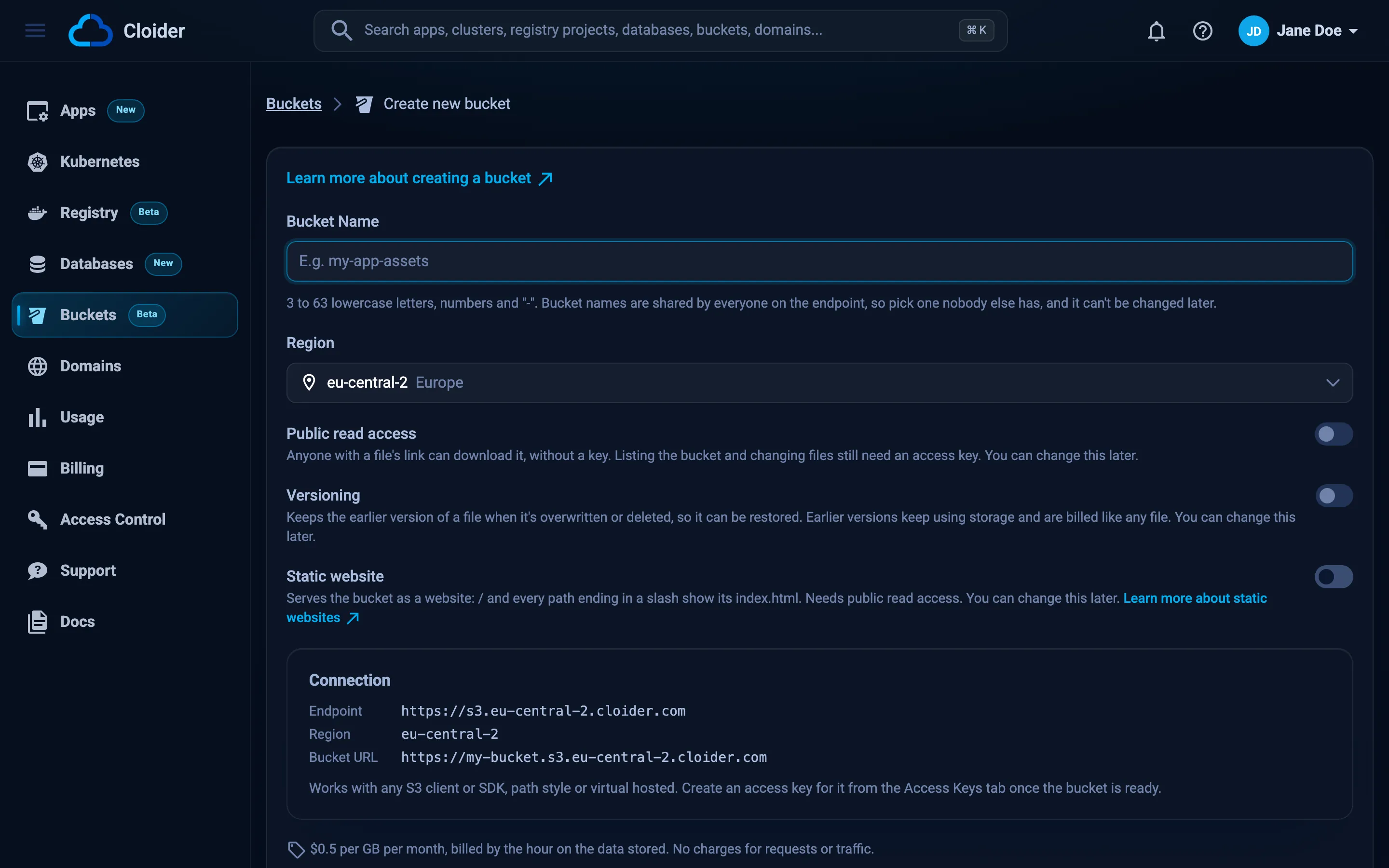
You are taken back to the Buckets list, where the new bucket is highlighted. Its status shows Creating for a few seconds, then Ready.
cloider bucket create acme-assets --wait
✓ Created bucket acme-assets
✓ Bucket acme-assets is ready
The flags:
| Flag | Meaning |
|---|---|
--region <code> | Region code, see cloider bucket regions. Defaults to the first region, eu-central-2 |
--public | Let anyone read its files over HTTPS |
--versioning | Keep previous versions of overwritten and deleted files |
--website | Serve it as a static website, with index.html as its index document. Needs --public |
--wait | Wait until the bucket is ready before returning |
A public, versioned bucket:
cloider bucket create acme-site --public --versioning --wait
With -o json the command prints the new bucket as the API returns it:
cloider bucket create acme-backups --versioning --wait -o json
{
  "hashed_id": "k9d4mz",
  "bucket_name": "acme-backups",
  "region": "eu-central-2",
  "public": false,
  "policy": null,
  "status": "Ready",
  "size_bytes": 0,
  "size_sampled_at": null,
  "endpoint": "https://s3.eu-central-2.cloider.com",
  "url": "https://acme-backups.s3.eu-central-2.cloider.com",
  "created_at": "2026-10-20T09:14:03Z"
}
-q prints only the bucket's name, which is handy in scripts.
terraform {
  required_providers {
    cloider = {
      source = "cloider/cloider"
    }
  }
}

provider "cloider" {}

resource "cloider_bucket" "assets" {
  name   = "acme-assets"
  region = "eu-central-2"
  public = true
}

resource "cloider_bucket" "backups" {
  name       = "acme-backups"
  versioning = true
}

output "assets_endpoint" {
  value = cloider_bucket.assets.endpoint
}

output "assets_url" {
  value = cloider_bucket.assets.url
}
terraform apply
Apply complete! Resources: 2 added, 0 changed, 0 destroyed.

Outputs:

assets_endpoint = "https://s3.eu-central-2.cloider.com"
assets_url = "https://acme-assets.s3.eu-central-2.cloider.com"
name and region can't change in place: changing either replaces the bucket, which deletes the old one and every file in it. public and versioning change in place. See cloider_bucket for every attribute.
curl -X POST https://cloider.com/api/buckets \
  -H "Authorization: Bearer $CLOIDER_TOKEN" \
  -H "Content-Type: application/json" \
  -d '{
    "bucket_name": "acme-assets",
    "region": "eu-central-2",
    "public": false,
    "versioning": true
  }'
{"hashed_id": "b7r2xw"}
The body fields:
| Field | Type | Required | Meaning |
|---|---|---|---|
bucket_name | string | Yes | The bucket's name, following the naming rules above |
region | string | No | Region code. Defaults to eu-central-2 |
public | boolean | No | Public read access. Defaults to false |
versioning | boolean | No | Turn versioning on from the start. Defaults to false |
website | boolean | No | Serve the bucket as a static website. Needs public. Defaults to false |
The bucket is created before the request returns. Read it back with its id:
curl https://cloider.com/api/buckets/b7r2xw \
  -H "Authorization: Bearer $CLOIDER_TOKEN"
{
  "hashed_id": "b7r2xw",
  "bucket_name": "acme-assets",
  "region": "eu-central-2",
  "public": false,
  "policy": null,
  "status": "Ready",
  "size_bytes": 0,
  "size_sampled_at": null,
  "endpoint": "https://s3.eu-central-2.cloider.com",
  "url": "https://acme-assets.s3.eu-central-2.cloider.com",
  "created_at": "2026-10-20T09:12:41Z"
}
A rejected name answers 400 with the reason under the field's name:
{
  "errors": {"bucket_name": ["This bucket name is already taken"]},
  "data": null
}
See Buckets API for every endpoint.
Ask your agent:
Create a private bucket called acme-backups with versioning on, and wait until it is ready.
It calls the create_bucket tool:
{"name": "acme-backups", "versioning": true, "wait": true}
The tool also takes region and public. The list_bucket_regions tool lists the regions with their endpoints.
Verify
A bucket is ready to use when its status is Ready.
- In the dashboard, the Buckets list shows the status, and the bucket's Overview tab shows the Summary (status, size, access, creation date) and the Connection Details.
- With the CLI,
cloider bucket status acme-assetsprintsReady, andcloider bucket get acme-assetsshows the whole bucket:
cloider bucket get acme-assets
Name:      acme-assets
Region:    eu-central-2
Status:    Ready
Access:    private
Size:      0 B
Endpoint:  https://s3.eu-central-2.cloider.com
URL:       https://acme-assets.s3.eu-central-2.cloider.com
Policy:    none
Created:   2026-10-20 11:12
cloider bucket list lists all of them:
cloider bucket list
NAME          REGION        STATUS  ACCESS   SIZE       CREATED
acme-backups  eu-central-2  Ready   private  2.4 GiB    2026-10-20 11:14
acme-assets   eu-central-2  Ready   public   184.2 MiB  2026-10-20 11:12
Add -o wide to see each bucket's id, which Terraform imports and the API use.
Find the endpoint and connection details
Open the bucket and stay on the Overview tab. The Connection Details box lists everything an S3 client needs, and clicking a row copies it:
| Row | Example | Use it for |
|---|---|---|
| Endpoint | https://s3.eu-central-2.cloider.com | The endpoint URL of every S3 client and SDK |
| Region | eu-central-2 | The region setting of the client. Requests are signed for it |
| Bucket | acme-assets | The bucket name in commands and code |
| Bucket URL | https://acme-assets.s3.eu-central-2.cloider.com | Virtual hosted style address. A public bucket's files are at <Bucket URL>/<key> |
| Path style URL | https://s3.eu-central-2.cloider.com/acme-assets | The same bucket for clients set to path style addressing |
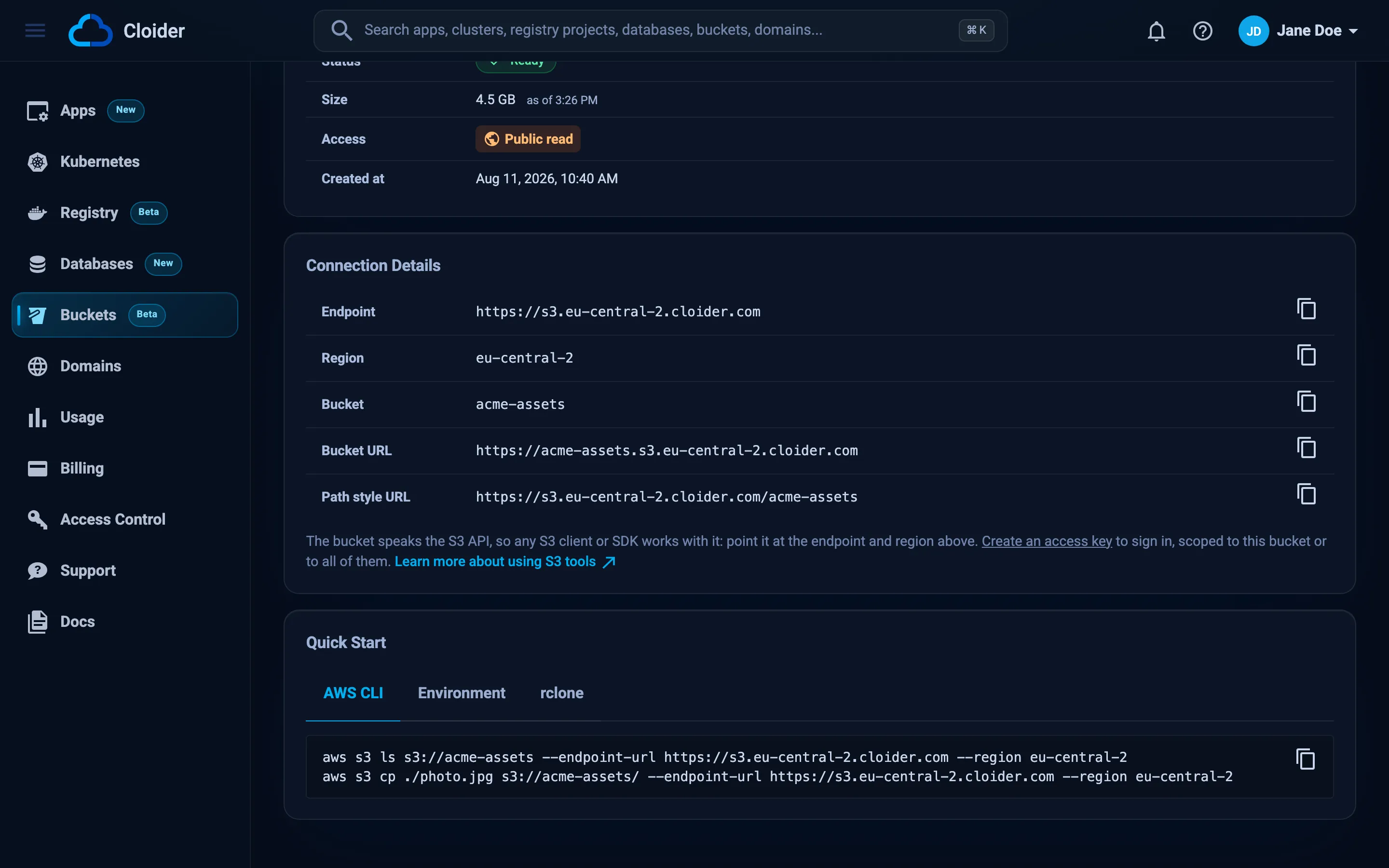
The Quick Start box below has ready made snippets for the bucket, written with placeholder keys because a secret key is only shown once, when the key is created:
AWS_ACCESS_KEY_ID=<access key>
AWS_SECRET_ACCESS_KEY=<secret key>
AWS_REGION=eu-central-2
AWS_ENDPOINT_URL_S3=https://s3.eu-central-2.cloider.com
S3_BUCKET=acme-assets
Replace the placeholders with an access key, then follow S3 tools or SDKs.
What does a new bucket contain?
A new bucket is empty and private (unless you turned on public read access). From the moment it is Ready:
- every access key of the account made with All buckets works with it (keys limited to chosen buckets need to be updated to include it),
- you can browse and upload files in its Files tab without an access key,
- versioning is on, if you asked for it.
Troubleshooting
| Message | Cause and fix |
|---|---|
This bucket name is already taken | Another bucket, in any Cloider account, has this name. Pick another, for example with your company name as a prefix |
Bucket name must be at least 3 characters | Use 3 to 63 characters |
Bucket name must not exceed 63 characters | Shorten the name |
Bucket name can only have lowercase letters, numbers and "-" | Remove uppercase letters, dots, underscores and spaces |
Bucket name must start and end with a letter or a number | Remove the leading or trailing hyphen |
Bucket name is reserved | The name uses a reserved prefix (xn--, sthree-, amzn-s3-demo-), a reserved suffix (-s3alias, --ol-s3, --x-s3, --table-s3) or is filemeta |
Invalid region | The region isn't a region code. Use eu-central-2, or see cloider bucket regions |
Free plan users can not create more than one bucket. UPGRADE NOW! | The Free plan allows one bucket. Upgrade, or delete the existing bucket first |
Your account is suspended. Upgrade to a paid plan to continue using our services. | The account is suspended. See Billing |
You have read-only access to this account, you can not create buckets! | Your role in this account is read only. Ask the Owner or an Admin |
This API token is read only! | The API token has Read access. Use a Read & Write token |
Buckets aren't available at the moment! | Bucket creation is temporarily unavailable. Try again later, or contact support |
Operation failed, Couldn't create the bucket! | Creating the bucket didn't complete. Try again, and contact support if it keeps happening |
| The bucket shows Failed | Setting the bucket up didn't work. Delete it from its Settings tab and create it again |
See Troubleshooting for errors from S3 tools.
Next steps
- Create an access key so S3 tools and apps can reach the bucket.
- Configure the AWS CLI, rclone or s3cmd.
- Upload files from the dashboard or the CLI.
- Serve static assets from a public bucket.
Frequently asked questions
Can I rename a bucket?
No. A bucket's name is fixed when it is created, because it is the name every S3 client addresses it by. To use another name, create a new bucket, copy the files over with an S3 tool such as rclone or aws s3 sync, and delete the old bucket.
Why is my bucket name already taken?
Bucket names are shared by every Cloider account, like on Amazon S3. If another account already has a bucket with that name, you can't use it. Add a prefix such as your company or project name.
Can a bucket name contain dots?
No. Cloider bucket names allow only lowercase letters, digits and hyphens. A dot would break HTTPS for the bucket's own address, https://<bucket>.s3.eu-central-2.cloider.com, because its certificate covers a single label.
Can I move a bucket to another region?
No. A bucket stays in the region it was created in. Today there is one region, eu-central-2 (Europe).
How long does it take to create a bucket?
A few seconds. The bucket is created before the create request returns, and its status becomes Ready.
Can I create a bucket with the AWS CLI or an S3 SDK?
No. Buckets are created with Cloider's tools: the dashboard, the cloider CLI, Terraform, the REST API or the MCP server. Access keys can read and write objects in buckets but can't create or delete buckets.