Manage bucket files in the dashboard and CLI
You can manage the files in a bucket without any S3 tool: the dashboard has a file browser on each bucket's Files tab, and the cloider CLI has ls, upload, download, rm and mkdir commands. Both work with your Cloider login, so you don't need an access key, and both move the file contents straight between your computer and the bucket.
This page covers both, plus the matching REST API endpoints and MCP tools. For large transfers (thousands of files, files over 5 GB, scheduled syncs), use an S3 tool with an access key instead, see S3 tools.
How the file browser and the CLI move files
When you upload a file from the dashboard or the CLI, Cloider's API checks that you may write to the bucket and answers with a presigned URL, a temporary address that is valid for one hour and only accepts that file, with that exact name, size and content type. The browser or the CLI then sends the file directly to the bucket's S3 endpoint. Downloads work the same way in reverse. File contents never pass through the Cloider API, so transfers run at the speed of your connection to the storage.
Each file costs one API request, and the API accepts about 100 requests a minute. The CLI spaces its requests out on its own, which makes it suitable for a handful to a few hundred files. For more, an S3 tool is much faster.
Limits
| Limit | Value |
|---|---|
| Largest file per upload | 5 GB |
| Key length | Up to 1024 characters |
| Keys that are refused | Empty keys, keys starting with /, keys containing // |
| Files and folders listed per page in the dashboard | 200, with Load more for the rest |
| Files and folders deleted in one request | 1000 |
| Files a folder may hold to be deleted from the dashboard or the CLI | 10,000 |
Browse files
- Dashboard
- CLI
- Terraform
- API
- MCP
- Open Buckets in the sidebar and click the bucket's name.
- The Files tab opens. (A bucket that isn't Ready yet has no Files tab.)
- Click a folder to open it. The path above the table (starting with the bucket's name) shows where you are; click any part of it to go back up.
- Click Load more at the bottom when a folder holds more than 200 entries, and the refresh button to reload the list.
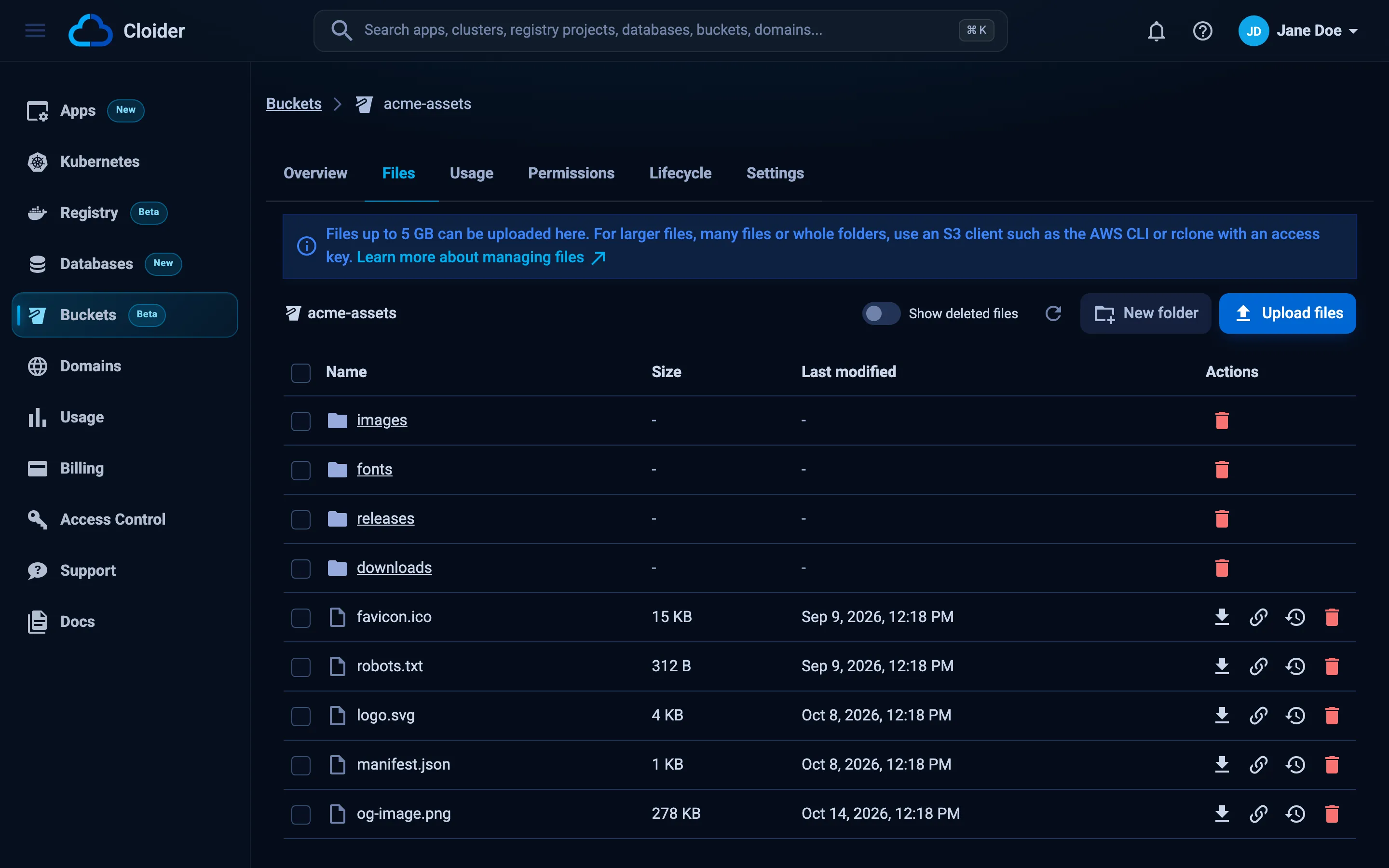
The table shows each entry's Name, Size, Last modified and Actions. Folders come first.
cloider bucket ls acme-assets
KEY          SIZE     MODIFIED
css/         DIR      -
images/      DIR      -
index.html   1.5 KiB  2026-10-20 11:40
robots.txt   431 B    2026-10-20 11:40
List one folder, or everything under it with -r:
cloider bucket ls acme-assets images/
cloider bucket ls acme-assets images/ -r
-o json prints the listing as data:
cloider bucket ls acme-assets images/ -o json
{
  "prefix": "images/",
  "folders": [{"prefix": "images/2026/", "name": "2026"}],
  "objects": [
    {"key": "images/logo.png", "name": "logo.png", "size": 48213, "last_modified": "2026-10-20T09:40:12Z"}
  ]
}
The Cloider provider manages buckets and keys, not the files in them. To list or manage files from Terraform, use the aws provider pointed at Cloider's endpoint, as shown in the Terraform object storage guide.
curl -G https://cloider.com/api/buckets/b7r2xw/objects \
  --data-urlencode "prefix=images/" \
  -H "Authorization: Bearer $CLOIDER_TOKEN"
{
  "prefix": "images/",
  "folders": [{"prefix": "images/2026/", "name": "2026"}],
  "objects": [
    {"key": "images/logo.png", "name": "logo.png", "size": 48213, "last_modified": "2026-10-20T09:40:12Z"}
  ],
  "next_token": ""
}
prefix is empty for the bucket's root, otherwise it ends with /. A page holds up to 200 entries; when next_token isn't empty, pass it as token to get the next page. See Bucket objects API.
What is in the images folder of the acme-assets bucket?
It calls the list_bucket_objects tool:
{"bucket": "acme-assets", "prefix": "images/"}
Add "recursive": true to list everything under the prefix.
Upload files
Uploading to a key that already exists replaces that file. On a bucket with versioning on, the replaced file is kept as an earlier version.
- Dashboard
- CLI
- Terraform
- API
- MCP
- Open the bucket's Files tab and go to the folder you want to upload into.
- Click Upload files and pick one or more files.
- An Uploads panel shows each file's progress. Files are uploaded one after the other.
- When they are done, the folder reloads. Click Clear to empty the Uploads panel.
Files keep their own names and land in the folder you are in. The content type is taken from the browser, or application/octet-stream when it doesn't know one.
Upload a file into a folder:
cloider bucket upload acme-assets logo.png --prefix images/
✓ logo.png → images/logo.png
The flags:
| Flag | Meaning |
|---|---|
--prefix <folder/> | Folder to upload into, for example images/. Each file lands at <prefix><file name> |
--key <key> | Exact key for a single file, for example reports/2026/october.pdf |
-r, --recursive | Upload directories with what is in them, keeping their paths inside the prefix |
Several files at once, and a whole directory:
cloider bucket upload acme-assets a.png b.png c.png --prefix images/
cloider bucket upload acme-assets ./dist -r --prefix site/
✓ dist/index.html → site/index.html
✓ dist/css/app.css → site/css/app.css
✓ dist/js/app.js → site/js/app.js
✓ Uploaded 3 files (184.2 KiB) to acme-assets
Upload under an exact key:
cloider bucket upload acme-assets report.pdf --key reports/2026/october.pdf
The content type is guessed from the file extension. .DS_Store files are skipped when uploading a directory, and files over 5 GB are refused before anything is sent.
Upload files with the aws provider's aws_s3_object resource, configured with an access key and Cloider's endpoint. See the Terraform object storage guide for a complete example that uploads a folder.
Uploading is two requests. First ask for a presigned URL, giving the key, the content type and the exact size in bytes:
curl -X POST https://cloider.com/api/buckets/b7r2xw/objects/upload \
  -H "Authorization: Bearer $CLOIDER_TOKEN" \
  -H "Content-Type: application/json" \
  -d '{"key": "images/logo.png", "content_type": "image/png", "size": 48213}'
{"url": "https://s3.eu-central-2.cloider.com/acme-assets/images/logo.png?X-Amz-Algorithm=AWS4-HMAC-SHA256&..."}
Then PUT the file to that URL with the same Content-Type. No Cloider token is needed for this request:
curl -X PUT "$UPLOAD_URL" \
  -H "Content-Type: image/png" \
  --upload-file logo.png
The URL is valid for one hour and accepts exactly that size and content type. Without content_type, the API uses application/octet-stream.
Upload ./dist/robots.txt to the root of acme-assets.
It calls the upload_bucket_objects tool:
{"bucket": "acme-assets", "paths": ["./dist/robots.txt"]}
The tool also takes prefix, key and recursive, and can upload text the agent writes itself with content and key:
{"bucket": "acme-assets", "key": "robots.txt", "content": "User-agent: *\nDisallow:\n"}
Download files
- Dashboard
- CLI
- Terraform
- API
- MCP
Click the download button in a file's Actions. The browser downloads it under its own name.
On a public bucket, the Copy public link button copies the file's permanent public URL, such as https://acme-assets.s3.eu-central-2.cloider.com/images/logo.png.
cloider bucket download acme-assets images/logo.png
✓ images/logo.png → logo.png
One file is written to the current directory under its name, or where --dest (-d) says:
cloider bucket download acme-assets reports/2026/october.pdf --dest ./october.pdf
cloider bucket download acme-assets reports/2026/october.pdf --dest ~/Downloads/
--dest - writes one file to standard output, for pipes:
cloider bucket download acme-backups orders/2026-10-20.sql.gz --dest - | gunzip | psql "$DATABASE_URL"
Download a whole folder, keeping the paths below it:
cloider bucket download acme-assets site/ -r --dest ./site
--version-id downloads an earlier version of one file, see Versioning. Downloads are written to a temporary file first, so an interrupted download never leaves half a file behind.
The Cloider provider doesn't read files. The aws provider's aws_s3_object data source can read a small object's content when configured with Cloider's endpoint and an access key.
Ask for a presigned download URL, then fetch it:
curl -G https://cloider.com/api/buckets/b7r2xw/objects/download \
  --data-urlencode "key=images/logo.png" \
  -H "Authorization: Bearer $CLOIDER_TOKEN"
{"url": "https://s3.eu-central-2.cloider.com/acme-assets/images/logo.png?X-Amz-Algorithm=AWS4-HMAC-SHA256&..."}
curl -o logo.png "$DOWNLOAD_URL"
The URL is valid for one hour and makes browsers save the file under its name. Add version_id to download an earlier version.
Show me the content of robots.txt in acme-assets.
It calls the download_bucket_objects tool. Without dest, one text file of up to 1 MiB comes back as the tool's answer:
{"bucket": "acme-assets", "keys": ["robots.txt"]}
With dest, files are written to that path on your machine, and recursive downloads whole folders.
Create a folder
S3 has no real folders, only keys that share a prefix. A folder appears as soon as a file is uploaded under it (images/2026/logo.png creates images/ and 2026/ in every listing). To create an empty folder before any file is in it, Cloider stores a zero byte object named like the folder, for example images/2026/.
- Dashboard
- CLI
- Terraform
- API
- MCP
- Go to the folder that should contain the new one.
- Click New folder.
- Enter the Folder name, for example
images. The dialog shows where it will be created. - Click Create folder.
cloider bucket mkdir acme-assets images/2026/
✓ Created images/2026/ in acme-assets
Folders don't need to be created ahead of time: uploading a file under a prefix creates it. With the aws provider, an aws_s3_object whose key ends with / and has empty content creates an empty folder marker.
curl -X POST https://cloider.com/api/buckets/b7r2xw/folders \
  -H "Authorization: Bearer $CLOIDER_TOKEN" \
  -H "Content-Type: application/json" \
  -d '{"prefix": "images/2026/"}'
{"success": true}
The prefix must end with /.
Create a folder images/2026/ in acme-assets.
{"bucket": "acme-assets", "folder": "images/2026/"}
Delete files and folders
Deleting a folder deletes every file under it. On a bucket with versioning Enabled, deleted files keep their earlier versions and can be restored. Without versioning, a delete is permanent.
- Dashboard
- CLI
- Terraform
- API
- MCP
- Open the bucket's Files tab.
- Click the delete button in a file's or a folder's Actions, or tick several entries and click Delete (n).
- Confirm in the Delete Files dialog. On a versioned bucket it says the files can be restored from Show deleted files; otherwise it asks whether to delete permanently.
If some files couldn't be deleted, a message lists them.
Delete files by key:
cloider bucket rm acme-assets images/old.png images/older.png
✓ Deleted 2 files from acme-assets
Delete everything under a folder with --prefix (repeatable). The CLI asks for confirmation first, and --yes skips it in scripts:
cloider bucket rm acme-assets --prefix tmp/ --yes
✓ Deleted 1 folder from acme-assets
Deleting single files doesn't ask for confirmation. An empty --prefix is refused, because it would be the whole bucket: delete the bucket instead.
Removing an aws_s3_object resource from a configuration that uses the aws provider deletes that file. The Cloider provider doesn't manage files.
curl -X POST https://cloider.com/api/buckets/b7r2xw/objects/delete \
  -H "Authorization: Bearer $CLOIDER_TOKEN" \
  -H "Content-Type: application/json" \
  -d '{"keys": ["images/old.png"], "prefixes": ["tmp/"]}'
{"failed": []}
keys are files, prefixes are folders ending with / whose whole content is deleted. Up to 1000 entries per request. failed lists the keys that couldn't be deleted.
Delete everything under tmp/ in acme-assets.
{"bucket": "acme-assets", "prefixes": ["tmp/"]}
Files are given as keys. Clients that confirm destructive tools will ask you first.
The dashboard, the CLI and the API delete a folder by listing it first, and refuse folders holding more than 10,000 files with The folder "logs/" holds over 10000 files, delete it with an S3 client!. Use aws s3 rm s3://acme-assets/logs/ --recursive or rclone purge cloider:acme-assets/logs for those, or let a lifecycle rule expire them.
Restore earlier versions and deleted files
On a versioned bucket, the Files tab has a Versions button on each file and a Show deleted files switch. Both are explained in Versioning, along with the cloider bucket versions, restore, deleted and rm-versions commands.
Who can manage files?
Every member of the account can browse and download files. Members with the read-only role, and read only API tokens, can't upload, create folders, delete or restore: the dashboard hides those buttons, and the API answers You have read-only access to this account, you can not change files! (or This API token is read only! for a read only token). See Accounts and roles.
A bucket policy applies to access keys, not to the dashboard and the CLI.
Troubleshooting
| Message | Cause and fix |
|---|---|
Files over 5 GB can't be uploaded from the dashboard, use an S3 client! | Upload large files with the AWS CLI or rclone, which use multipart uploads. See S3 tools |
Invalid file name! or Invalid file! | The key is empty, starts with /, contains //, is longer than 1024 characters, or (for uploads) ends with / |
Invalid folder! or Invalid folder name | A folder must end with / and follow the same rules as keys |
Too many files at once, select fewer! | Delete at most 1000 files and folders per request |
The folder "..." holds over 10000 files, delete it with an S3 client! | Use an S3 tool or a lifecycle rule for very large folders |
The bucket isn't ready! | The bucket is still being created, failed, or is being deleted |
The upload was interrupted, please try again. | The browser lost the connection while sending the file. Upload it again |
Next steps
- Turn on versioning to restore overwritten and deleted files.
- Make files public.
- Clean up old files automatically with lifecycle rules.
- Use the AWS CLI or rclone for large transfers.
Frequently asked questions
Do I need an access key to upload files from the dashboard?
No. The dashboard's file browser and the cloider CLI use your Cloider login and get a short lived presigned URL for each file. Access keys are only needed for S3 tools and SDKs.
What is the largest file I can upload from the dashboard?
5 GB per file. Larger files are uploaded with an S3 tool such as the AWS CLI or rclone, which split them into a multipart upload automatically.
How do I upload a whole folder with the cloider CLI?
Run cloider bucket upload <bucket> ./folder -r --prefix <folder>/. Every file inside keeps its path below the prefix. Each file is one API request, so for thousands of files an S3 tool such as aws s3 sync or rclone is faster.
Can I recover a file I deleted?
Only on a bucket with versioning enabled. Then the delete keeps the file's earlier versions, and you can restore it from Show deleted files in the Files tab or with cloider bucket restore. Without versioning, deletes are permanent.
Why does an empty folder disappear?
S3 has no real folders. A folder exists while a file's key starts with it, or while its zero byte folder marker exists. A folder created with New folder or cloider bucket mkdir stays until you delete it.