Public and private S3 buckets
Every Cloider bucket is either private, so every request needs an access key or a presigned URL, or public, so anyone can download a file if they know its URL. New buckets are private. This page explains exactly what public read access allows and what it doesn't, how to switch a bucket between the two, and how to share single files from a private bucket.
At a glance
| Private bucket | Public bucket | |
|---|---|---|
| Download a file by its URL without a key | No | Yes |
| List the bucket's files without a key | No | No |
| Upload, overwrite or delete without a key | No | No |
| Download with an access key or a presigned URL | Yes | Yes |
| Shown in the dashboard as | Private | Public (list), Public read (Overview) |
| Can be served as a static website | No | Yes |
| Typical use | User uploads, backups, internal data | Website images, CSS and JavaScript, public downloads, static websites |
What does public read access mean?
Public read access means that anyone on the internet can fetch an object with a plain HTTPS GET request, if they know the object's key. Nothing else becomes public:
- Listing stays private. Nobody can ask the bucket "which files do you have?" without a key. A visitor has to know (or guess) the exact key.
- Writing stays private. Uploading, overwriting and deleting still need a read and write access key.
- Settings stay private. Visibility and policies are only changed with Cloider's tools. Versioning and lifecycle rules need Cloider's tools or a read and write access key.
A public file's URL is the bucket URL followed by the key:
https://acme-assets.s3.eu-central-2.cloider.com/images/logo.png
The path style form works too:
https://s3.eu-central-2.cloider.com/acme-assets/images/logo.png
You can use these URLs directly in HTML, CSS, emails and apps:
<img src="https://acme-assets.s3.eu-central-2.cloider.com/images/logo.png" alt="Acme logo">
<link rel="stylesheet" href="https://acme-assets.s3.eu-central-2.cloider.com/css/styles.css">
Every file in a public bucket can be downloaded by anyone who has its URL, including files you upload later. Keys are often guessable (backup.sql, invoices/2026/0001.pdf), and URLs leak through logs, browser history and shared links. Keep anything sensitive in a separate private bucket.
Make a bucket public or private
You can choose public read access when you create a bucket, and change it at any time once the bucket is Ready. The change applies within moments.
- Dashboard
- CLI
- Terraform
- API
- MCP
- Open Buckets in the sidebar and click the bucket.
- Select the Settings tab.
- Click the Public Read Access switch.
- Confirm in the dialog: Make public in Make Bucket Public, or Make private in Make Bucket Private.
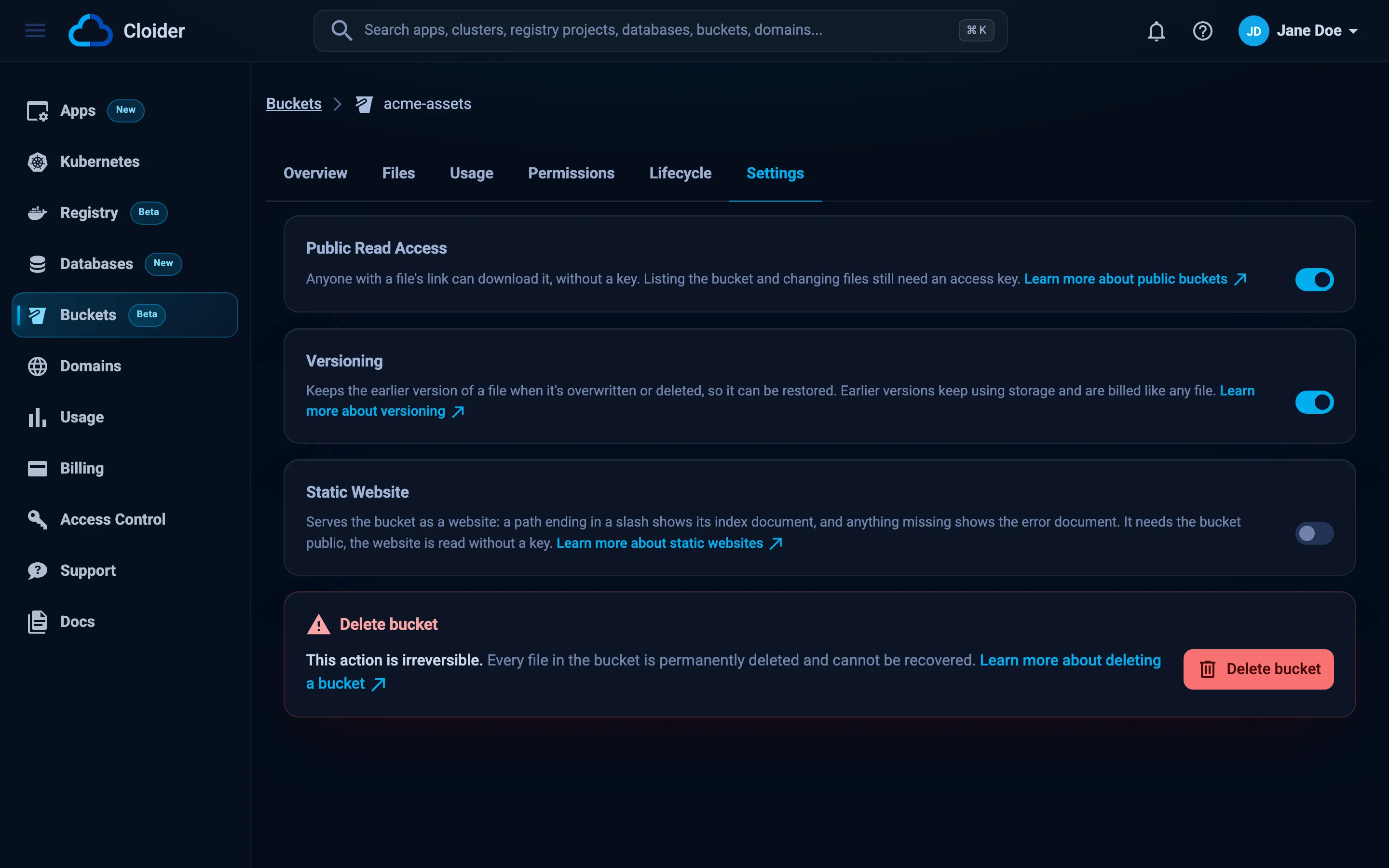
The bucket's Overview tab and the Buckets list show the new access.
Show the current visibility:
cloider bucket visibility acme-assets
private
Make it public. The CLI asks for confirmation, --yes skips it in scripts:
cloider bucket visibility acme-assets public
Anyone will be able to read every file in acme-assets. Continue? [y/N] y
✓ Bucket acme-assets is now public
Make it private again:
cloider bucket visibility acme-assets private
✓ Bucket acme-assets is now private
resource "cloider_bucket" "assets" {
  name   = "acme-assets"
  public = true
}

# A file is read at <url>/<key>
output "assets_url" {
  value = cloider_bucket.assets.url
}
Set public = false (or remove it) and apply to make the bucket private. The change happens in place.
curl -X PUT https://cloider.com/api/buckets/b7r2xw/visibility \
  -H "Authorization: Bearer $CLOIDER_TOKEN" \
  -H "Content-Type: application/json" \
  -d '{"public": true}'
{"success": true}
Send {"public": false} to make it private. The bucket's public field in GET /api/buckets/b7r2xw shows the current value.
Make the acme-assets bucket public.
It calls the set_bucket_visibility tool:
{"bucket": "acme-assets", "public": true}
Verify that a file is public
Request a file without any credentials. A public bucket answers 200, a private one 403:
curl -I https://acme-assets.s3.eu-central-2.cloider.com/images/logo.png
HTTP/2 200
content-type: image/png
content-length: 48213
HTTP/2 403
Listing the bucket without a key is refused even when it is public. The answer is an S3 error document:
curl https://acme-assets.s3.eu-central-2.cloider.com/
<?xml version="1.0" encoding="UTF-8"?>
<Error><Code>AccessDenied</Code><Message>Access Denied</Message>...</Error>
In the dashboard, files in a public bucket have a Copy public link button in the Files tab.
What happens when a bucket becomes private?
All public URLs stop working at once: requests without a key get 403 Access Denied. Links you already shared, <img> tags on websites and URLs cached in apps break. Presigned URLs and access keys keep working.
A bucket whose policy allows everyone ("Principal": "*") can't be made private until those statements are removed: the API refuses with The bucket's policy allows everyone ("*"), remove those statements first. Edit or remove the policy first, then change the visibility.
A bucket served as a static website can't be made private while the website is on: the API refuses with The bucket's website needs it public, turn the website off first. Turn the website off first, which in turn needs any targets that point domains at it removed.
Make a public bucket listable
Public read access deliberately doesn't allow listing. If you want anyone to be able to list a public bucket's files (for example a public dataset or a downloads page generated by a tool), add a bucket policy that allows s3:ListBucket to everyone:
{
  "Version": "2012-10-17",
  "Statement": [
    {
      "Sid": "PublicList",
      "Effect": "Allow",
      "Principal": "*",
      "Action": "s3:ListBucket",
      "Resource": "arn:aws:s3:::acme-assets"
    }
  ]
}
cloider bucket policy set acme-assets -f public-list.json
Statements that allow everyone are only accepted on a public bucket, and only for read actions. See Bucket policies.
Share files from a private bucket
To share one file from a private bucket for a limited time, create a presigned URL. It works like a public link for that single file, and expires.
- In code, with any SDK. See Create a presigned URL.
- With the AWS CLI:
aws s3 presign s3://acme-backups/reports/october.pdf --expires-in 3600 --profile cloider. - With rclone:
rclone link cloider:acme-backups/reports/october.pdf --expire 1h. - From the dashboard, the download button in the Files tab uses a presigned URL valid for one hour. It is meant for your own download rather than for sharing.
Serve a website's assets from a public bucket
A public bucket is a simple way to host images, stylesheets, scripts and downloads for a website or an app:
- Create a public bucket, for example
acme-assets. - Upload the files with the right
Content-Typeand aCache-Controlheader, for example withaws s3 sync ./public s3://acme-assets --cache-control "public, max-age=86400" --profile cloider. - Reference them by their URLs.
On the bucket URL, / doesn't return index.html and a folder path doesn't return its index. To serve a whole static site, with index and error documents and on your own domain, turn on the bucket's static website. For a site that needs server-side code, deploy it as an app. The guide Static assets on object storage walks through a complete assets setup.
Troubleshooting
| Problem | Cause and fix |
|---|---|
403 / Access Denied on a file URL | The bucket is private, or the key in the URL is wrong (keys are case sensitive, and spaces must be URL encoded as %20) |
403 on the bucket URL itself (/) | Listing is never public. Add a policy allowing s3:ListBucket to "*" if you need it |
The bucket's policy allows everyone ("*"), remove those statements first. | Remove the policy statements with "Principal": "*", then make the bucket private |
The bucket's website needs it public, turn the website off first. | The bucket is served as a static website. Turn the website off, then make the bucket private |
The bucket must be ready to change its visibility. | The bucket is still being created or is being deleted |
Another change to this bucket is in progress, try again in a moment! | Another settings, policy or delete change to this bucket is running. Wait a moment and try again |
Couldn't change the bucket's visibility, try again in a moment! | The change couldn't be applied, and the bucket kept its previous visibility. Try again |
| Browser shows the file as text or downloads an image | The file was uploaded with the wrong Content-Type. Upload it again with the right one |
making a bucket public needs confirming, pass --yes when not running in a terminal (CLI) | Add --yes in scripts |
Next steps
- Write a bucket policy for finer access control.
- Serve static assets from a bucket.
- Host a static website in a bucket.
- Create presigned URLs in your code.
Frequently asked questions
Can anyone list the files of a public Cloider bucket?
No. Public read access only lets anyone download a file whose exact URL they know. Listing the bucket, uploading, overwriting and deleting still need an access key. To make listing public too, add a bucket policy that allows s3:ListBucket to everyone.
What is the URL of a file in a public bucket?
The bucket URL followed by the file's key, for example https://acme-assets.s3.eu-central-2.cloider.com/images/logo.png. The path style form https://s3.eu-central-2.cloider.com/acme-assets/images/logo.png works too.
Are buckets public or private by default?
Private. A new bucket needs an access key or a presigned URL for every request, unless you turn on Public read access when creating it or later in its Settings tab.
What happens to shared links when I make a bucket private?
Public links stop working immediately and return 403 Access Denied. Presigned URLs that haven't expired and access keys keep working.
Can I make only one folder of a bucket public?
Public read access applies to the whole bucket. To share only some files, keep the bucket private and use presigned URLs, or put the public files in a separate public bucket.
Can I put a custom domain in front of a bucket?
Yes, through the bucket's static website. Turn the website on in the bucket's Settings tab, then add a Bucket target that points the domain at it. The target takes the whole domain, and the bucket's S3 address under s3.eu-central-2.cloider.com keeps working too.