Deploy an app from GitHub, GitLab or Bitbucket
A Cloider app can deploy straight from a GitHub, GitLab or Bitbucket repository: you connect your git account once, pick a repository and a branch, and Cloider builds the latest commit. With auto deploy on, every push to that branch builds and deploys the next version, with no CI pipeline to write. This page covers connecting each provider, creating the app, auto deploy, manual deploys, changing the branch, and what to do when something goes wrong.
How git deploys work
A git app remembers its repository, its branch and the connection it reads them through. Each deploy, whether a push or a click, does the same thing:
- Cloider asks the provider for the newest commit on the app's branch.
- It downloads the repository as an archive at exactly that commit, so a push that lands in the meantime can't change what is built.
- It builds and deploys that archive like any other upload. The build records the commit SHA and the first line of its message, so the Builds tab says which commit each version is.
| GitHub | GitLab | Bitbucket | |
|---|---|---|---|
| Where | github.com | gitlab.com | bitbucket.org |
| How you connect | Install the Cloider GitHub App on your user or organization and choose its repositories | Authorize the Cloider application on GitLab | Authorize the Cloider consumer on Bitbucket |
| What you can import | The repositories the installation can see | Projects you are at least a Reporter on | Repositories you can read in your workspaces |
| How pushes arrive | The GitHub App's webhook, nothing to set up | A project webhook Cloider adds when the app is created | A repository webhook Cloider adds when the app is created |
| Needed for auto deploy | Nothing more | The Maintainer role on the project | Admin access to the repository |
| Repository is matched by | Repository id | Project id | Repository uuid |
Self-managed GitLab and Bitbucket Data Center aren't supported.
Before you begin
- A Cloider account with a role that can create resources. See Accounts and roles.
- Your code in a GitHub, GitLab or Bitbucket repository, with at least one commit on the branch you want to deploy.
- A project Cloider can build: a
Dockerfileat the repository root, a project file a buildpack recognizes, or a static site. See Build configuration. - For the CLI, install it and log in.
Step 1: Connect your git provider
Connecting happens in the browser, logged in to the dashboard, because the provider sends you back to the dashboard when you are done. You only do it once per git account.
- Dashboard
- CLI
- Terraform
- API
- MCP
- Open Apps in the sidebar and click Create App.
- Under Import a Git repository, click GitHub, GitLab or Bitbucket. A provider you haven't connected yet sends you to its authorization page.
- Approve the request:
- GitHub: authorize the app. If none of your accounts has it installed yet, GitHub then asks where to install it and which repositories it may see. Pick All repositories or only the ones Cloider should deploy.
- GitLab and Bitbucket: approve Cloider's access request.
- You land back on Create App with the import dialog open.
To add another GitHub organization or GitLab or Bitbucket user later, open the import dialog and click Add account.
cloider git connect github
Opening the browser to connect GitHub. If it doesn't open, visit:
  https://cloider.com/api/git/github/connect?return=%2Fdashboard%2Fapps%2Fnew-app
Once connected, `cloider git repos github` lists what apps can deploy from.
Finish in the browser, then check the connection:
cloider git installations github
ACCOUNT   TYPE           STATUS   CONNECTED
acme      Organization   Active   2026-10-20 09:02
Use gitlab or bitbucket in place of github for the other providers.
The Terraform provider can't connect git accounts or create apps. Connect the provider in the dashboard or with
cloider git connect.
Connecting needs a browser session, so an API token can't start it: open
https://cloider.com/api/git/github/connect (or gitlab, bitbucket) in a browser where you are logged in to the
dashboard. Once connected, list the connections with a token:
curl https://cloider.com/api/git/github/installations \
  -H "Authorization: Bearer $CLOIDER_TOKEN"
{
  "configured": true,
  "installations": [
    {
      "hashed_id": "g8x2kd",
      "provider": "GitHub",
      "account_login": "acme",
      "account_type": "Organization",
      "avatar_url": "https://avatars.githubusercontent.com/u/1234567",
      "suspended_at": null,
      "created_at": "2026-10-20T09:02:11Z"
    }
  ]
}
Ask your agent:
Connect my GitHub account to Cloider.
It calls the connect_git_provider tool, which opens the browser on your machine for you to finish:
{"provider": "github"}
When you install the GitHub App on an organization where you aren't an owner, GitHub sends an approval request to the owners instead. The dashboard shows Waiting for approval. Once an owner approves it, open Create App again and the organization is there.
Step 2: Create the app from a repository
- Dashboard
- CLI
- Terraform
- API
- MCP
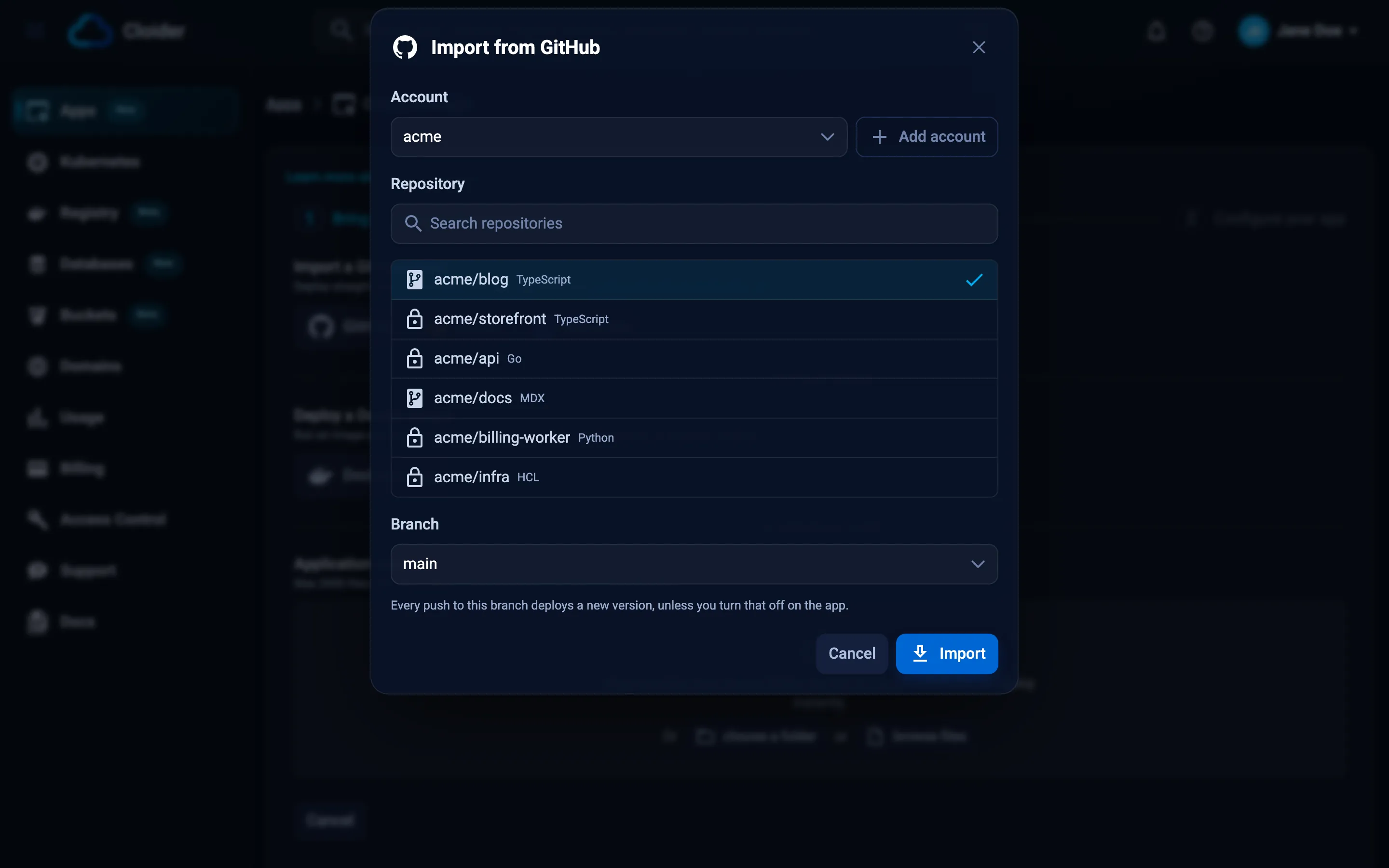
- On Create App, click your provider under Import a Git repository.
- In the dialog, pick the Account (the GitHub user or organization, or the GitLab or Bitbucket user), then the Repository. Type in Search repositories to filter a long list.
- Pick the Branch. It defaults to the repository's default branch, and you can type a branch that isn't listed.
- Click Import. Cloider fetches the repository (Fetching your repository...) and reads it (Analyzing your code...).
- On Configure your app, check the Deploying from box (repository, branch and commit) and what was detected, then fill in App Name, Port, the optional Start Command and the Subdomain. Add environment variables, build variables or build arguments if the app needs them on its first build.
- Click Create App.
cloider app create --git github --repo acme/api
Detected Go
✓ Created app api on port 8080
Downloading source for app k3m9tw...
No Dockerfile in the source, looking for a buildpack...
[buildpack output]
App k3m9tw built and pushed as registry.cloider.com/acme-apps/api-k3m9tw:1
Deploying the image...
Waiting for the app to start...
The app is up, watching it for 15s...
The app is running.
✓ Deployed version 1 of api
https://api-q2v8.cloider.app/
Useful flags: --branch (default: the repository's default branch), --installation when several accounts of the
provider are connected, --name, --port, --start-command, --subdomain or --no-subdomain, --env and
--secret-env, --build-arg and --secret-build-arg, --build-env and --secret-build-env, and --detach to return
once the build starts.
cloider app create --git gitlab --repo acme/web --branch main --name web --port 3000
To see what you can import first:
cloider git repos github
cloider git branches github acme/api
The Terraform provider has no app resource. Create the app with the dashboard, the CLI or the API, then route a
domain to it with cloider_target and its app_id.
Creating a git app is three calls. First, stage the repository. GitHub and Bitbucket take repo_full_name, GitLab takes
the numeric project_id from the repository list:
curl -X POST https://cloider.com/api/apps/source/github \
  -H "Authorization: Bearer $CLOIDER_TOKEN" \
  -H "Content-Type: application/json" \
  -d '{"installation_hashed_id": "g8x2kd", "repo_full_name": "acme/api", "branch": "main"}'
{"token": "Wq3...staging-token"}
Then poll the staged source until status is Done, Failed or Unavailable. It moves through Fetching and
Detecting first:
curl https://cloider.com/api/apps/source/$TOKEN \
  -H "Authorization: Bearer $CLOIDER_TOKEN"
{
  "status": "Done",
  "app_name": "api",
  "language": "Go",
  "framework": "",
  "port": 8080,
  "message": "",
  "build_args": [],
  "git": {
    "provider": "GitHub",
    "repo_full_name": "acme/api",
    "repo_url": "https://github.com/acme/api",
    "branch": "main",
    "commit_sha": "9f2c1e7b4a0d8c6e5f3a2b1c0d9e8f7a6b5c4d3e",
    "commit_message": "Add health endpoint"
  }
}
Finally, create the app on the staged source:
curl -X POST https://cloider.com/api/apps \
  -H "Authorization: Bearer $CLOIDER_TOKEN" \
  -H "Content-Type: application/json" \
  -d '{
    "app_name": "api",
    "port": 8080,
    "source_token": "'"$TOKEN"'",
    "subdomain": "api-q2v8.cloider.app",
    "env_vars": [{"key": "LOG_LEVEL", "value": "info", "secret": false}]
  }'
{"hashed_id": "k3m9tw", "build_hashed_id": "b7n4xp", "version": "1"}
The Git API reference lists the repository and branch endpoints.
Ask your agent:
Create a Cloider app from the GitHub repository acme/api on the main branch and tell me when it is live.
It calls the create_app_from_git tool, which follows the first build until the app is up:
{"provider": "github", "repo": "acme/api", "branch": "main"}
A git app is created with auto deploy on. The first build starts immediately on the commit that was fetched.
What is imported from the repository?
Cloider downloads the whole repository at one commit, without its git history, and removes .git, __MACOSX and
.DS_Store entries. The archive must be 100 MB or smaller, and 500 MB or smaller once extracted. The build runs at the
repository root: a Dockerfile must be at the root to be used, and buildpacks look for project files such as
package.json or go.mod at the root. See Monorepos and subfolders.
Auto deploy on push
With auto deploy on, a push to the app's branch starts a build of the newest commit on that branch. You see it appear on the Builds tab with the commit SHA and message as its source.
Cloider ignores a push when:
- It is to another branch, or it pushes a tag.
- It deletes the branch.
- The app is paused or being deleted. Resume the app and click Deploy latest commit to catch up.
- A build of the app is already running. The push is skipped, not queued: push again, or click Deploy latest commit once the running build finishes.
- The account is suspended.
- The same delivery arrives twice. Providers retry deliveries, and each one builds at most once.
If two of your apps deploy from the same repository and branch, a push builds both.
Auto deploy on GitLab and Bitbucket
GitHub delivers pushes through the Cloider GitHub App itself. GitLab and Bitbucket don't have that, so Cloider adds a webhook to the project or repository when the app is created, and removes it when the app is deleted or the connection is removed.
Creating that webhook needs the Maintainer role on a GitLab project, or admin access to a Bitbucket repository. If
the user who connected the provider doesn't have it, the webhook can't be created and Cloider turns auto deploy off
for that app. The app still works: deploy with Deploy latest commit or cloider deploy --git, or ask someone with
the right role to connect their account and turn auto deploy back on, which tries to create the webhook again.
Deploy the latest commit manually
You can build the newest commit of the branch at any time, for example after a skipped push or with auto deploy off.
- Dashboard
- CLI
- Terraform
- API
- MCP
- Open the app and go to the Builds tab.
- Click Deploy latest commit.
A git app has no Deploy new version upload button: an upload would be a version the repository knows nothing about, and the next push would replace it.
cloider deploy --git --app api
✓ Building version 4 of api from acme/api@main
...
✓ Deployed version 4 of api
https://api-q2v8.cloider.app/
In a directory linked to the app (see .cloider/app.json),
cloider deploy --git is enough.
The Terraform provider can't deploy apps. Use the dashboard, the CLI or the API.
curl -X POST https://cloider.com/api/apps/k3m9tw/builds/git \
  -H "Authorization: Bearer $CLOIDER_TOKEN"
{
  "hashed_id": "c5r8ws",
  "version": "4",
  "attempt": 1,
  "status": "Pending",
  "source_filename": "api.zip",
  "source_size": 0,
  "uploaded": false,
  "commit_sha": "",
  "commit_message": "",
  "image_ref": "",
  "message": "",
  "started_at": null,
  "finished_at": null,
  "created_at": "2026-10-20T10:31:02Z"
}
The build answers at once and fills in the commit as it fetches it. Poll GET /api/apps/k3m9tw/builds to follow it.
Ask your agent:
Deploy the latest commit of the api app.
{"app": "api", "git": true}
Change the branch or turn auto deploy off
The branch and auto deploy are on the app's Settings tab. Changing them doesn't build anything by itself: the next push or the next Deploy latest commit uses them. A branch that doesn't exist isn't checked when you save, it shows up as a failed build on the next deploy.
- Dashboard
- CLI
- Terraform
- API
- MCP
- Open the app and go to the Settings tab.
- Under Repository, change Branch, or switch Auto deploy on push on or off.
- Click Save changes.
cloider app git api --branch release --auto-deploy=false
✓ Saved, api deploys from release (auto deploy no)
The Terraform provider can't change apps. Use the dashboard, the CLI or the API.
Send both fields, the branch is required:
curl -X PUT https://cloider.com/api/apps/k3m9tw/git \
  -H "Authorization: Bearer $CLOIDER_TOKEN" \
  -H "Content-Type: application/json" \
  -d '{"branch": "release", "auto_deploy": false}'
The response is an empty 200.
Ask your agent:
Make the api app deploy from the release branch and stop deploying on every push.
{"app": "api", "branch": "release", "auto_deploy": false}
Manage your git connections
What happens when I disconnect a git account?
Disconnecting removes the connection on Cloider's side and turns auto deploy off for every app that deploys through it. The apps keep running and remember their repository and branch; their page shows the repository as disconnected and they can't deploy from git until you connect the account again. For GitLab, Cloider also revokes its access token and removes the webhooks it created. For Bitbucket, it removes its webhooks; revoke the grant itself in your Bitbucket account settings. For GitHub, uninstall the Cloider app on GitHub to remove its access.
cloider git disconnect github acme
Connecting the same git account again creates a new connection. Apps that deployed through the removed one keep
showing it as disconnected and can't deploy from git any more, so create a new app from the repository, or deploy
the old one from your computer with cloider deploy --app. To pause deploys without losing the connection, turn
Auto deploy on push off instead.
Changes you make on the provider
| You do this on the provider | Cloider does this |
|---|---|
| Rename or transfer the repository | Keeps deploying it. Repositories are matched by their id, and the new name is picked up from the next push |
| Remove the repository from the GitHub App's access | Turns auto deploy off for apps deploying from it |
| Suspend the GitHub App installation | Turns auto deploy off for its apps and marks the connection suspended |
| Unsuspend it | Clears the suspension. Auto deploy stays off until you turn it on |
| Uninstall the GitHub App | Removes the connection, as if you disconnected it |
| Revoke Cloider's access on GitLab or Bitbucket | Removes the connection the next time Cloider tries to use it |
| Delete the branch | The next deploy fails with a message naming the branch |
Can I deploy a subfolder of a monorepo?
Not directly: Cloider always builds the repository root, and there is no setting for a subdirectory. Two ways around it:
-
Put a
Dockerfileat the repository root that copies and builds the subfolder you want:DockerfileFROM node:22-alpineWORKDIR /appCOPY services/web/package*.json ./RUN npm ciCOPY services/web/ ./RUN npm run buildCMD ["npm", "start"] -
Or deploy the subfolder from your computer or CI with
cloider deploy services/web. See Deploy from your computer.
Verify
- The Builds tab lists a build whose Source is the commit you pushed, and it reaches Ready.
- The Overview tab shows the repository, branch and commit under Deployed source.
cloider app builds apilists the build with the short SHA and commit message.
Troubleshooting
| Message | Cause and fix |
|---|---|
| No repositories to show. | GitHub: the installation can only see the repositories you granted it; change them on GitHub. GitLab: you need at least the Reporter role on the project. Bitbucket: you need read access in the workspace |
| Only the first repositories are listed. | The installation sees more than the list can load. Narrow the installation down on GitHub, or use cloider app create --repo with the exact name |
| This installation is suspended on GitHub. Re-enable it there before importing from it. | Unsuspend the Cloider app in the GitHub account or organization settings |
We could not read acme/api at main. The branch may be gone, or the repository may have no commits yet. | Push a commit to the branch, or pick an existing branch |
acme/api is over the 100MB limit. | The repository archive is too big. Remove large files from the repository, or deploy a smaller folder with cloider deploy |
GitHub no longer gives us acme/api at main (on a build) | The branch was deleted or renamed, or the repository was removed from the installation. Change the branch on Settings, or grant access again |
The GitLab connection was revoked, reconnect GitLab | Cloider's access was revoked on GitLab, so the connection was removed. See What happens when I disconnect a git account? |
| This app's GitHub connection is gone. Reconnect GitHub and try again. | The connection is suspended or was removed. Unsuspend a suspended GitHub installation on GitHub. A removed connection can't be restored for an existing app, see What happens when I disconnect a git account? |
| This app is already building, wait for that build to finish! | Only one build runs per app. Wait, then deploy again |
| This app is paused. Resume it before deploying a new version! | Resume the app first, see Pause, resume and delete |
| Pushes don't deploy a GitLab or Bitbucket app | Auto deploy switched itself off because the webhook couldn't be created. Check Auto deploy on push on Settings; see Auto deploy on GitLab and Bitbucket |
| GitHub importing is not set up on this environment yet. | The provider isn't available. Deploy from your computer instead |
For build failures after the source is fetched, see Troubleshooting apps.
Next steps
- Build configuration: how Cloider decides how to build your repository.
- Environment variables: configure the app and its build.
- Builds and deployments: follow, read and retry builds.
- CI/CD with GitHub Actions: deploy from your own pipeline instead.
Frequently asked questions
Does Cloider deploy automatically when I push to GitHub?
Yes. An app created from a GitHub, GitLab or Bitbucket repository has auto deploy on: every push to its branch builds and deploys the newest commit. Pushes to other branches and tag pushes are ignored, and you can turn auto deploy off on the app's Settings tab.
Can I deploy from a private repository?
Yes. Cloider reads private repositories through the connection you authorize: the repositories the Cloider GitHub App can see, GitLab projects you are at least a Reporter on, or Bitbucket repositories you can read.
What happens if I push while a build is running?
The push is skipped, not queued, because an app builds one version at a time. Push again or click Deploy latest commit once the running build finishes.
Why did auto deploy turn itself off on my GitLab app?
Auto deploy on GitLab needs a project webhook, and creating one needs the Maintainer role. If the connected GitLab user lacks it, Cloider turns auto deploy off. Deploy manually, or have a Maintainer connect GitLab and turn auto deploy back on.
Can I deploy a branch other than main?
Yes. Pick any branch when you import the repository, and change it later on the Settings tab or with cloider app git <app> --branch <branch>.
Does Cloider support self-hosted GitLab?
No. Cloider connects to gitlab.com, github.com and bitbucket.org. For a self-hosted git server, deploy from your CI pipeline with cloider deploy.
Can I roll back to an earlier commit?
There is no rollback button. Revert the commit in git and push, or set the app's branch to one that points at the commit you want and click Deploy latest commit.