Deploy a Docker image as an app
A Cloider app can run a Docker image you already built, instead of building one from your source. You give it an image and a tag, plus a login when the image is private, and Cloider runs it with a free subdomain, environment variables, logs and everything else an app has. A new version is a push to the tag followed by a deploy, from the dashboard, the CLI, the API, or a deploy hook URL that your CI calls.
How image deploys work
An image app never builds anything. Each deploy does the same three things:
- Cloider asks the image's registry which image the tag points at right now, logged in when the app has a login.
- It records that exact image, by its digest (
sha256:...), as the new version in the Builds tab. - It runs that image, pulling it again on every start, and waits until it is listening on the app's port.
Because every version is pinned to a digest, pushing a new image to the same tag (for example latest) and deploying
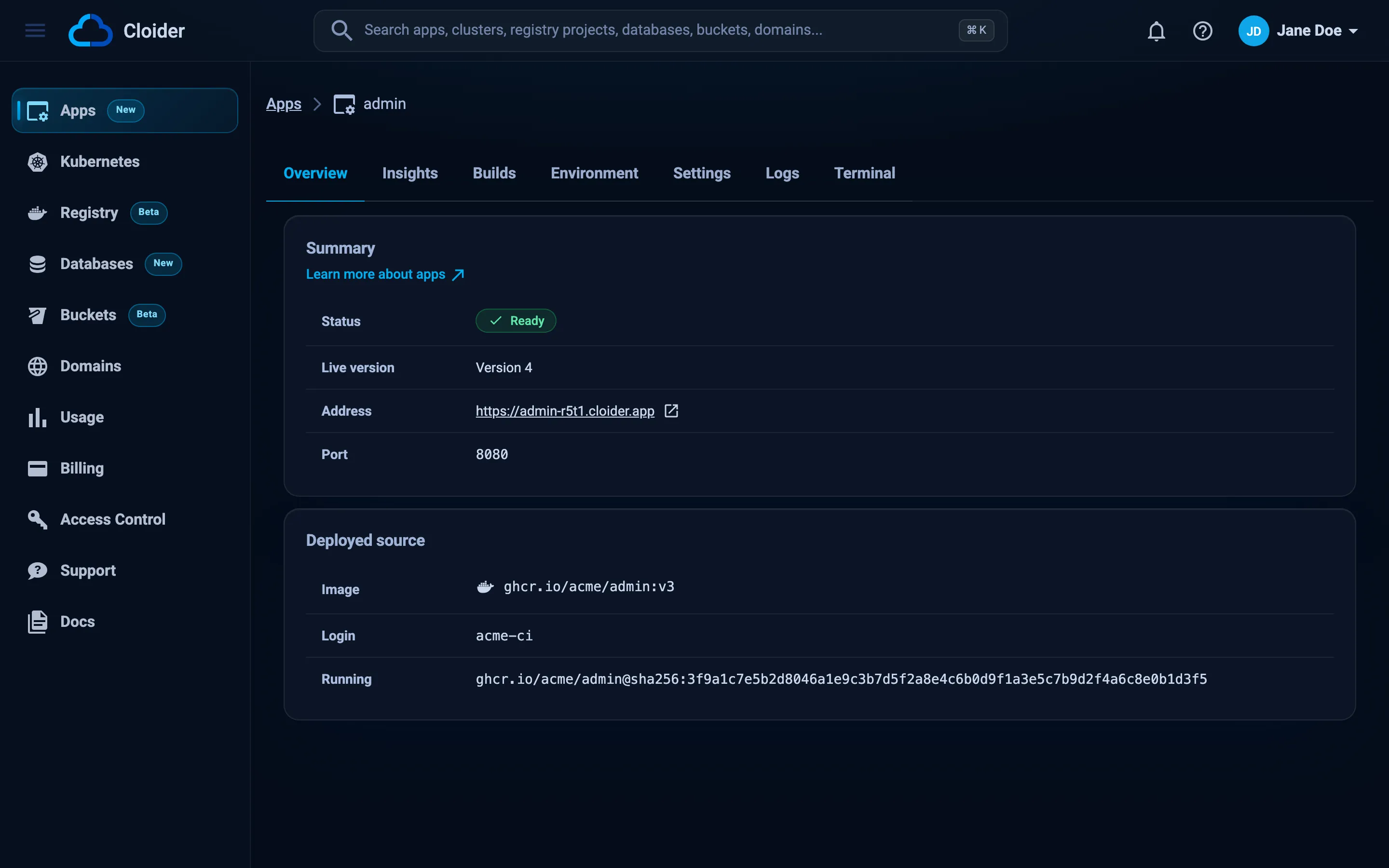
is enough to ship it, and every row of the Builds tab says exactly which image it ran. The app's Overview tab
shows the image and tag it follows, the login it is pulled with, and the exact image running.
| Image app | App built from source | |
|---|---|---|
| What you give Cloider | An image and a tag | A folder, a zip or a git repository |
| Who builds the image | You, anywhere | Cloider, with your Dockerfile or a buildpack |
| A new version | Push to the tag, then deploy | Upload again, or push to the branch |
| Start command | Optional, runs with sh -c in place of the image's ENTRYPOINT and CMD | Available |
| Build variables, build arguments | Not used, nothing is built | Available |
| Deploy hook URL | Yes | No (git apps deploy on push) |
Before you begin
- A Cloider account. An app's compute is billed like any other app, see pricing.
- An image on a registry Cloider can reach over the internet: Docker Hub, GitHub Container Registry (
ghcr.io), GitLab (registry.gitlab.com), your Cloider registry (registry.cloider.com) or any other public registry address. - The image has a
linux/amd64build. Apps run onlinux/amd64, so an image built only for Apple Silicon (arm64) is refused. Build for both withdocker buildx build --platform linux/amd64,linux/arm64, or for amd64 alone with--platform linux/amd64. - The image listens on one port for HTTP. Cloider fills the port in from the image's
EXPOSEwhen it exposes exactly one, and also passes it to the container as thePORTvariable.
Deploy a public image
- Dashboard
- CLI
- Terraform
- API
- MCP
- Open Apps in the sidebar and click Create App.
- Under Deploy a Docker image, click Docker image.
- Enter the Image, for example
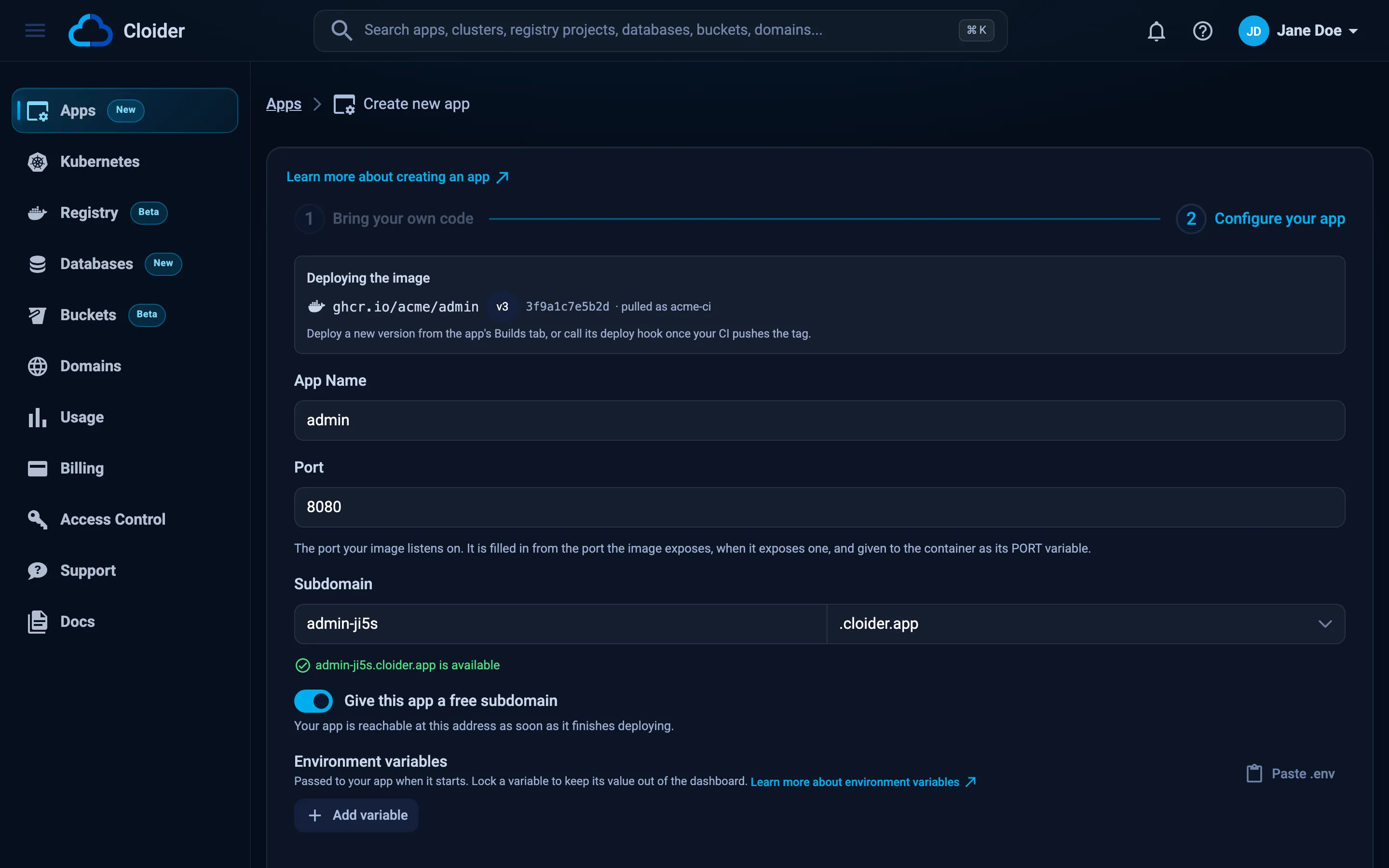
nginx, and the Tag, for example1.27. Pastingnginx:1.27into Image moves the tag into its own field. An empty tag meanslatest. - Click Continue. Cloider looks the image up and opens the next step with the app name and port filled in.
- Check the Port, pick a subdomain, add environment variables if the image needs any, and click Create App.
A Start Command is optional: it runs with
sh -cin place of the image'sENTRYPOINTandCMD. There are no build variables or arguments: the image runs as it was built.
cloider app create --image nginx:1.27 --port 80
The tag is the one written into --image. An image without one takes --tag, and latest when that isn't given
either, so these two are the same, and the third deploys nginx:latest:
cloider app create --image nginx:1.27 --port 80
cloider app create --image nginx --tag 1.27 --port 80
cloider app create --image nginx --port 80
Giving a tag both ways (--image nginx:1.27 --tag 1.28) is an error.
The CLI looks the image up, creates the app with a free subdomain, follows the first deploy and prints the app's URL.
--name, --subdomain, --no-subdomain, --env, --secret-env and --detach work as they do for
cloider deploy.
The Terraform provider doesn't manage apps. Create the app with the dashboard, the CLI or the API.
Stage the image, then create the app on the returned token:
curl -X POST https://cloider.com/api/apps/source/image \
  -H "Authorization: Bearer $CLOIDER_TOKEN" \
  -H "Content-Type: application/json" \
  -d '{"image": "nginx", "tag": "1.27"}'
{
  "token": "4b8e1d0c7a2f9e6b3d5c8a1f0e7d2b9c",
  "status": "Done",
  "app_name": "nginx",
  "port": 80,
  "image": {"image": "nginx", "tag": "1.27", "digest": "sha256:6784fb0834aa...", "username": ""}
}
curl -X POST https://cloider.com/api/apps \
  -H "Authorization: Bearer $CLOIDER_TOKEN" \
  -H "Content-Type: application/json" \
  -d '{"app_name": "web", "port": 80, "subdomain": "web-7k2p.cloider.app", "source_token": "4b8e1d0c7a2f9e6b3d5c8a1f0e7d2b9c"}'
Ask your agent:
Deploy the nginx:1.27 image as an app called web on port 80.
It calls the create_app_from_image tool:
{"image": "nginx", "tag": "1.27", "name": "web", "port": 80}
Deploy a private image
A private image needs a username and a token (or password) that can pull it. Use a token that can only pull, so the app's login can't push or delete anything:
| Registry | Image looks like | Username | Token |
|---|---|---|---|
| Docker Hub | acme/api | Your Docker Hub username | A personal access token with Read-only access |
| GitHub Container Registry | ghcr.io/acme/api | Your GitHub username | A personal access token (classic) with read:packages |
| GitLab | registry.gitlab.com/acme/api | The deploy token's username | A deploy token with read_registry |
| Cloider registry | registry.cloider.com/acme/api | Your registry username | A registry token with pull access |
- Dashboard
- CLI
- Terraform
- API
- MCP
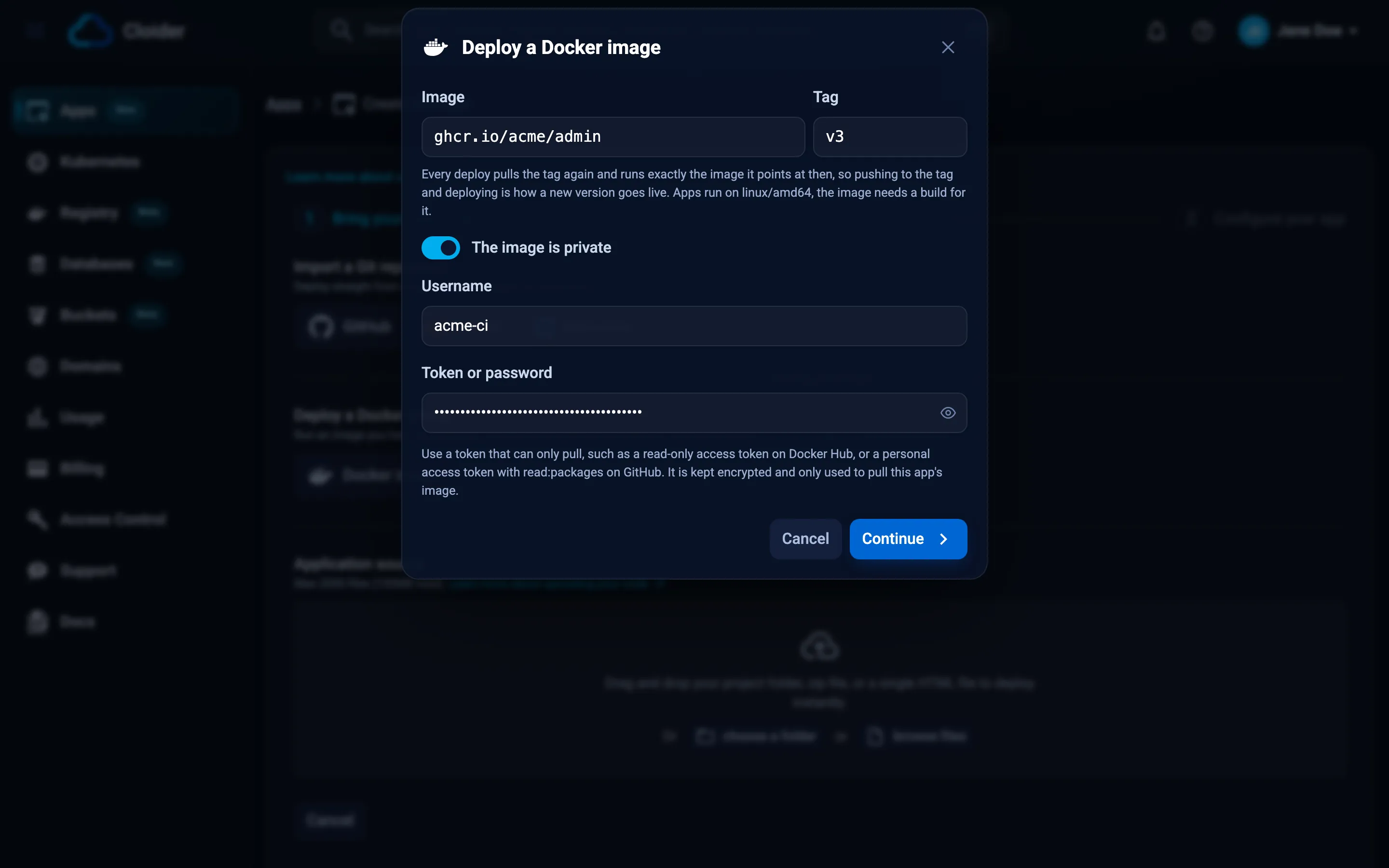
In the Deploy a Docker image dialog, turn on The image is private and fill in Username and Token or password before clicking Continue. A login the registry refuses is reported right there.
The token is read from stdin with --registry-password-stdin, or asked for when you run the command in a terminal:
echo "$GHCR_TOKEN" | cloider app create --image ghcr.io/acme/admin:v3 \
  --registry-username acme-ci --registry-password-stdin
The Terraform provider doesn't manage apps. Create the app with the dashboard, the CLI or the API.
curl -X POST https://cloider.com/api/apps/source/image \
  -H "Authorization: Bearer $CLOIDER_TOKEN" \
  -H "Content-Type: application/json" \
  -d '{"image": "ghcr.io/acme/admin", "tag": "v3", "username": "acme-ci", "password": "'"$GHCR_TOKEN"'"}'
{"image": "ghcr.io/acme/admin", "tag": "v3", "name": "admin", "registry_username": "acme-ci", "registry_password": "ghp_xxxxxxxxxxxxxxxx"}
The token is only used to pull this app's image. You can change or remove the login later in Settings.
Deploy a new version
Push the new image to the app's tag, then deploy. A deploy pulls the tag again and runs the image it points at now. To switch to another tag, give it when you deploy: the app follows that tag from then on.
- Dashboard
- CLI
- Terraform
- API
- MCP
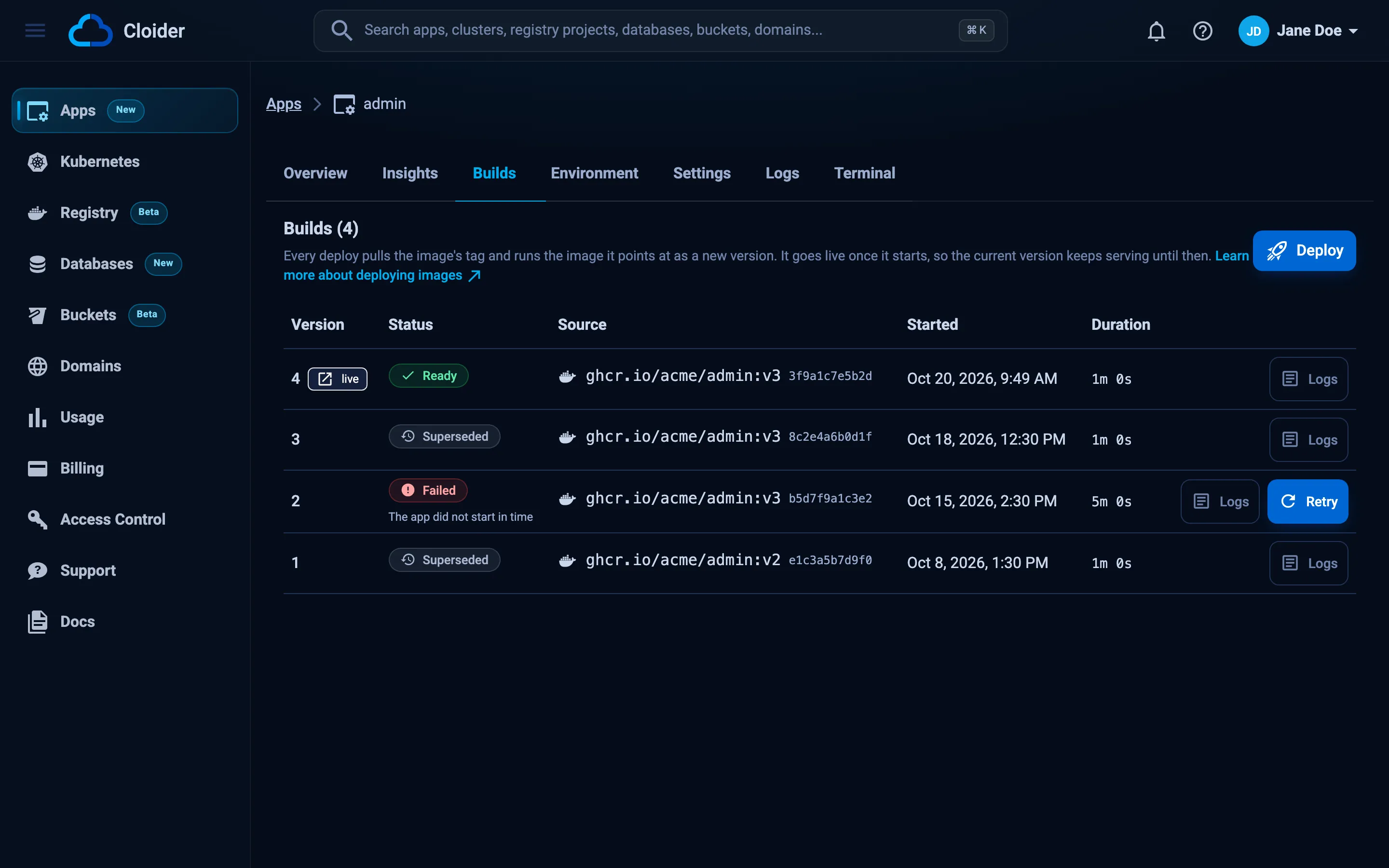
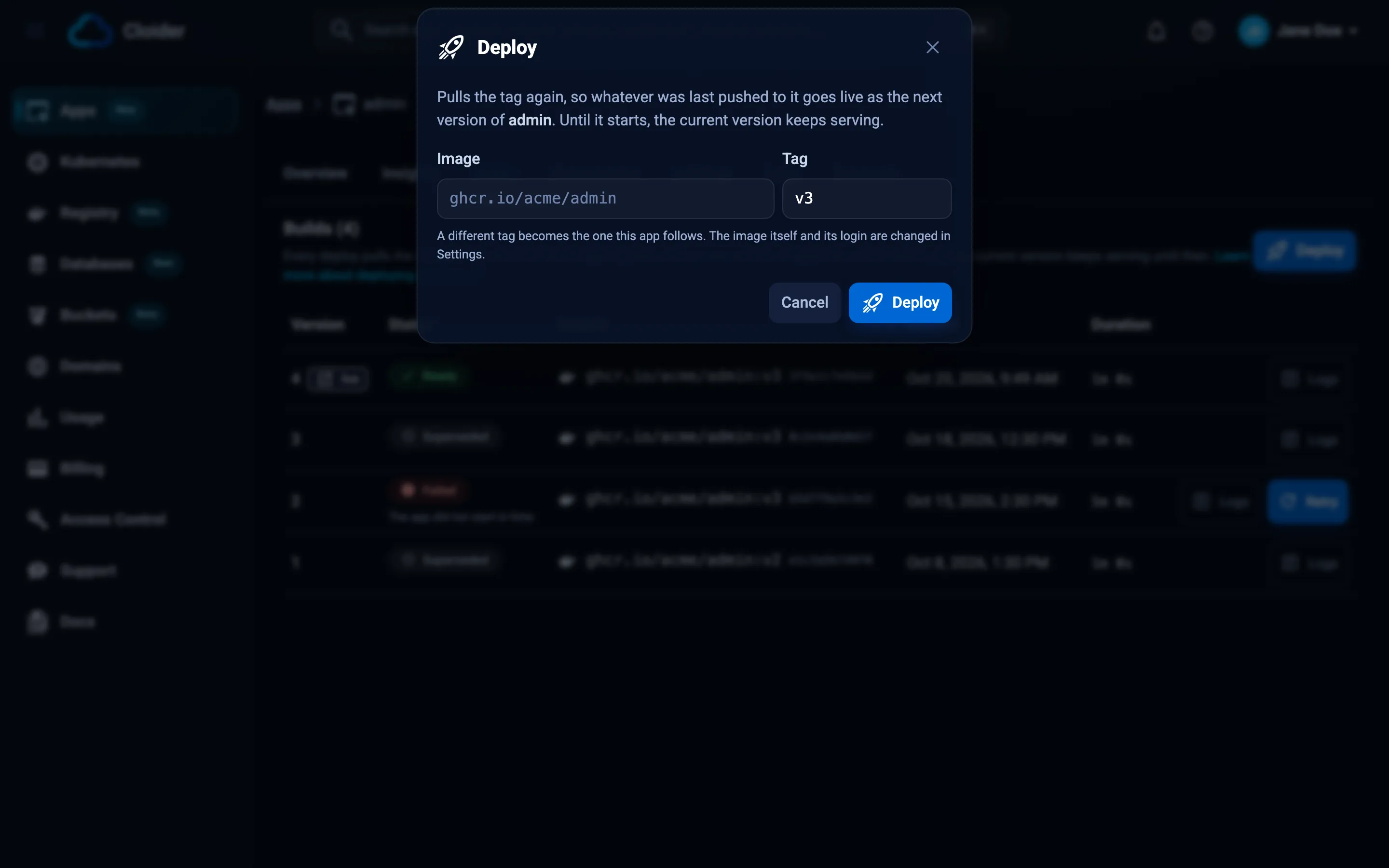
Open the app, go to Builds and click Deploy. The dialog has the app's tag filled in: click Deploy to pull it again, or type another tag first.
cloider deploy --app admin             # pull the app's tag again
cloider deploy --app admin --tag v2    # deploy another tag, which the app then follows
The Terraform provider doesn't manage apps. Deploy with the dashboard, the CLI, the API or the deploy hook.
curl -X POST https://cloider.com/api/apps/d6h3t/builds/image \
  -H "Authorization: Bearer $CLOIDER_TOKEN" \
  -H "Content-Type: application/json" \
  -d '{"tag": "v2"}'
Leave tag empty to pull the app's own tag again. See
Deploy a tag of an image app.
{"app": "admin", "tag": "v2"}
When the tag still points at the image the app is running, nothing is deployed and you see The app is already running the image ghcr.io/acme/admin:v2 points at. Push a new image to the tag, or deploy another tag.
Deploy from CI with a deploy hook
A deploy hook is a URL that deploys the app when it receives a POST. It needs no API token, so it is the simplest
way for a CI pipeline, or a registry's own push webhook, to ship a new version once the image is pushed.
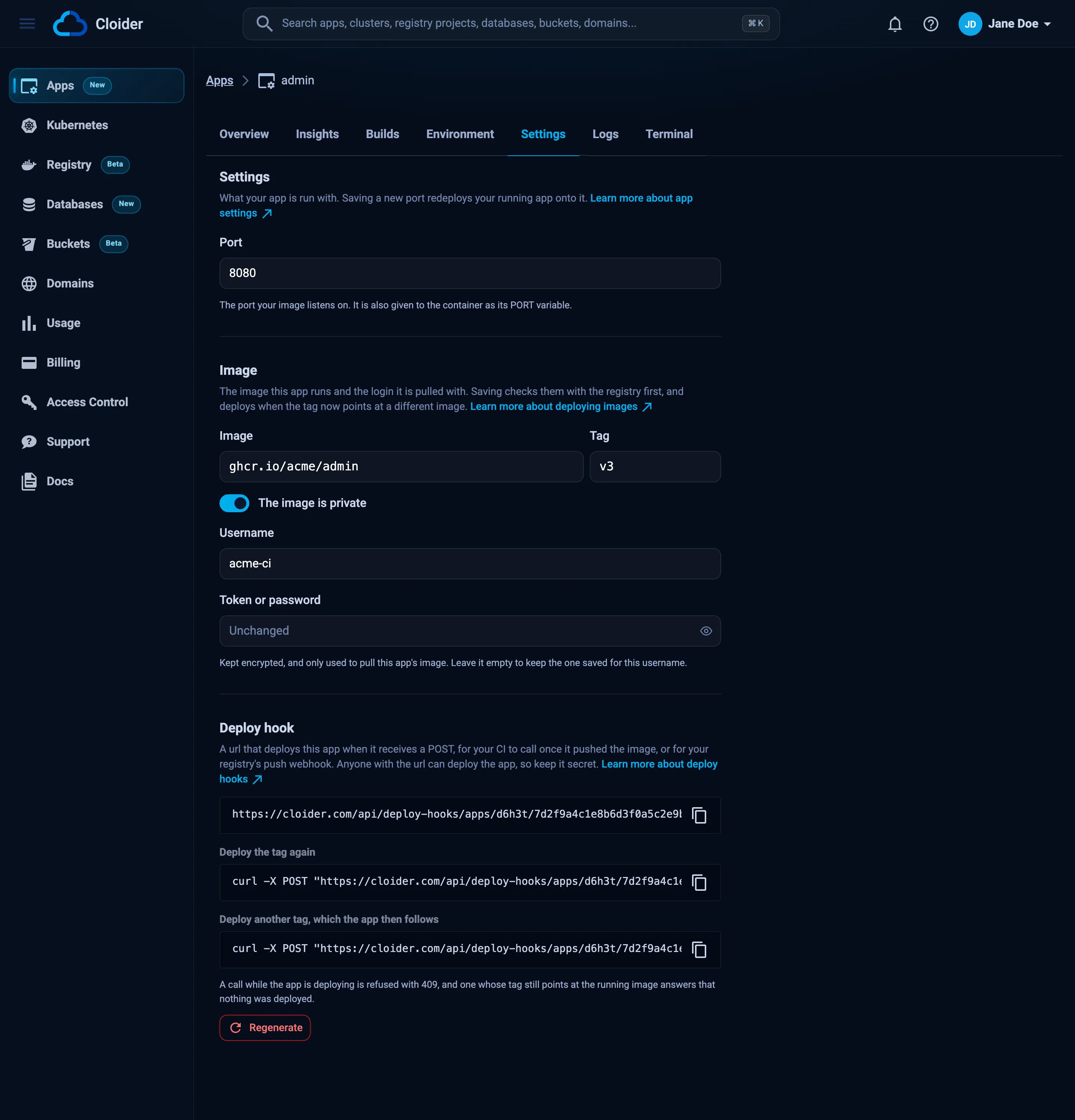
- Open the app, go to Settings and click Show deploy hook under Deploy hook. With the CLI, run
cloider app deploy-hook admin. - Store the URL as a secret in your CI, for example
CLOIDER_DEPLOY_HOOK. - Call it after the push:
curl -X POST "$CLOIDER_DEPLOY_HOOK"            # pull the app's tag again
curl -X POST "$CLOIDER_DEPLOY_HOOK?tag=v2"     # deploy another tag, which the app then follows
The tag can also be sent as a JSON body, {"tag": "v2"}. A body without a tag, such as a registry webhook's payload,
deploys the app's own tag.
name: Deploy
on:
  push:
    branches: [main]
jobs:
  deploy:
    runs-on: ubuntu-latest
    permissions:
      contents: read
      packages: write
    steps:
      - uses: actions/checkout@v4
      - uses: docker/login-action@v3
        with:
          registry: ghcr.io
          username: ${{ github.actor }}
          password: ${{ secrets.GITHUB_TOKEN }}
      - uses: docker/build-push-action@v6
        with:
          push: true
          platforms: linux/amd64
          tags: ghcr.io/acme/admin:${{ github.sha }}
      - run: curl --fail -X POST "${{ secrets.CLOIDER_DEPLOY_HOOK }}?tag=${{ github.sha }}"
| Response | Meaning |
|---|---|
202 with {"deployed": true, "build_hashed_id": ..., "version": ..., "image_ref": ...} | A new version is deploying |
200 with {"deployed": false} | The tag still points at the running image, nothing to deploy |
404 | The URL is wrong, or it was regenerated |
409 | The app is already deploying, is paused, or the account is suspended. Call again later |
422 | The image or tag can't be read, for example ghcr.io/acme/admin has no tag v4. |
Anyone with the URL can deploy the app, so keep it secret. Click Regenerate (or run
cloider app deploy-hook admin --rotate) to replace it: the old URL stops working at once.
Change the image or its login
Settings of an image app has an Image section with the image, the tag and the login. Saving checks them with the registry first, then deploys when the tag now points at a different image. Leave Token or password empty to keep the saved one for the same username, and turn off The image is private to pull without a login.
cloider app image admin --tag v4
cloider app image admin --image ghcr.io/acme/admin-next   # no tag given: latest
echo "$NEW_TOKEN" | cloider app image admin --registry-username acme-ci --registry-password-stdin
cloider app image admin --no-login
A new --image follows the same rule as cloider app create: the tag written into it, else --tag, else latest.
The Port is changed in the same tab, and saving it redeploys the running image on the new port.
What an image app doesn't have
- Build variables and build arguments: nothing is built. The API refuses them for an image app. A start command does apply, see Change the start command.
- Upload a new version: an image app is deployed by tag.
- Terminal and exec need a shell in the image (
/bin/sh). A distroless orscratchimage has none, so the terminal can't open in it.
Troubleshooting
| Message | What to do |
|---|---|
nginx does not exist or is private. If it is private, add a login for its registry. | Check the name, or turn on The image is private and add a login |
The registry refused this login, check the username and the token, and that it can pull ghcr.io/acme/admin. | The token is wrong, expired, or lacks pull access to that image |
ghcr.io/acme/admin has no tag v4. | Push the tag first, or pick one that exists |
This image has no linux/amd64 build, which is what apps run on. Build it with --platform linux/amd64. | Rebuild with docker buildx build --platform linux/amd64 |
This registry is not on a public address, apps can only pull from public registries. | The registry's name resolves to a private address. Use a registry reachable over the internet |
The registry is limiting how often its images can be read, try again in a few minutes. | Docker Hub limits anonymous pulls. Add a Docker Hub login, even for a public image |
The build ends with The app image could not be pulled | The login stopped working after the deploy was queued, or the image was deleted. Fix the login in Settings and click Retry |
The build ends with The app did not start in time | Nothing listened on the app's port. Check the port against what the image listens on, and the app's Logs |
Frequently asked questions
Can I deploy an image from my Cloider registry?
Yes. Use the image's full name, such as registry.cloider.com/acme/api:1.0, your registry username, and a registry token that can pull from the project.
Does pushing to the tag deploy the app on its own?
No. Deploy after the push, from the Builds tab, with cloider deploy --app <app>, or by calling the app's deploy hook from your CI or your registry's push webhook.
Can I deploy by digest instead of a tag?
Not directly. Give the tag: every deploy records the digest the tag points at, and the Builds tab shows it. To roll back, deploy a tag that still points at the older image.
Can I turn an app built from source into an image app?
No, an app keeps the kind of source it was created with. Create a new app from the image and point your domain at it with a target.
Which architectures are supported?
linux/amd64 only. A multi-platform image works as long as it includes linux/amd64.
Next steps
- Environment variables for the image's configuration.
- Domains to serve the app on your own domain.
- Builds and deployments for versions, retries and rollbacks.
- Container registry to host your images on Cloider.