App insights, requests, CPU, memory and cost per day
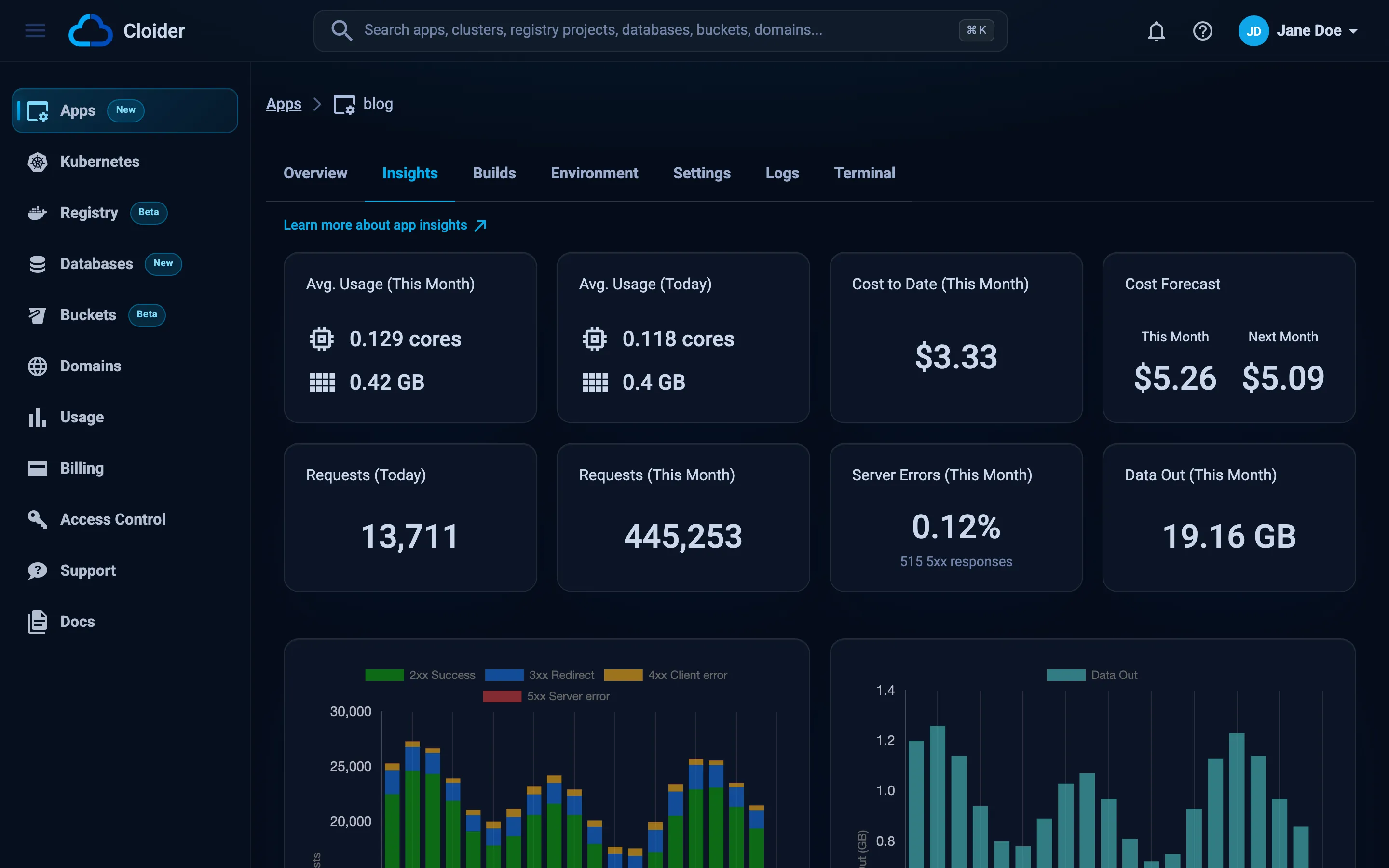
The Insights tab shows how much traffic an app serves and what it uses and costs: requests per day split by status
class, the data sent back, average CPU and memory for this month and today, the cost so far this month, a forecast for
this month and next, and daily charts for the last 31 days. The same numbers come from cloider app usage and the REST
API. CPU and memory are the figures an app is billed on, so this page also explains how they are measured. Requests and
data out are shown only and never billed.
At a glance
| Card or chart | Shows |
|---|---|
| Requests (Today) | Requests to the app's domains so far today |
| Requests (This Month) | Requests since the first of the month |
| Server Errors (This Month) | The share of this month's requests answered with a 5xx status, and how many |
| Data Out (This Month) | Bytes sent back to clients since the first of the month |
| Requests | Requests per day, stacked by 2xx, 3xx, 4xx and 5xx, last 31 days |
| Data Out | Bytes sent back per day, last 31 days |
| Avg. Usage (This Month) | Average CPU in cores and memory in GB over the days of this month |
| Avg. Usage (Today) | Average CPU and memory so far today |
| Cost to Date (This Month) | What the app has cost since the first of the month |
| Cost Forecast | The expected cost for This Month and Next Month at the current usage |
| CPU Usage | Average cores per day, last 31 days |
| Memory Usage | Average GB per day, last 31 days |
| Cost | Cost per day, last 31 days |
Usage is sampled every minute while the app runs. A new app shows Usage is sampled every minute while the app runs, and shows here once the first samples are in. until its first samples arrive.
How are requests counted?
Requests are counted where they enter Cloider, at the ingress in front of every app domain: the subdomain the app was
created with and any custom domain or target pointing at it. Every request is counted, including
the ones the app never sees, such as the 503 a client gets while the app is down or restarting.
- Requests is the total. The chart splits it by status class: 2xx success, 3xx redirect, 4xx client error
and 5xx server error. WebSocket upgrades (
101) are in the total only. - Data Out is the size of the responses sent back, headers included, in binary units (1 KB = 1024 bytes).
- Counts are added every minute to the current day, in UTC.
- Days from before requests were counted show no bar.
How is usage measured?
Each sample reads the CPU and memory of the app's container. The terminal that the dashboard's Terminal tab opens isn't counted, only your app.
- CPU is in cores:
0.25 coresis a quarter of one CPU core on average. - Memory is in GB.
- Samples are averaged over time, so a short spike barely moves a daily average.
- A paused app has no container, so its samples are zero and it costs nothing for compute.
Cost is calculated from the same averages: the larger of the CPU cores used and the memory used converted to cores at a fixed ratio, times the compute rate, times the time the app ran. The rate is on the pricing page, and the billing model explains how daily costs become an invoice.
Read an app's usage
- Dashboard
- CLI
- Terraform
- API
- MCP
- Open the app.
- Go to the Insights tab.
For every resource of the account at once, open Usage in the sidebar.
cloider app usage blog
Month:                2026-10
So far:               $1.84
Forecast this month:  $2.91
Forecast next month:  $2.88
Daily usage is in -o json.
The daily figures, CPU in millicores and memory in MiB, are in the JSON:
cloider app usage blog -o json
The Terraform provider doesn't read usage. Use the dashboard, the CLI or the API.
curl https://cloider.com/api/apps/a7c2mq/usage \
  -H "Authorization: Bearer $CLOIDER_TOKEN"
The response is the app with its usage. A trimmed example:
{
  "hashed_id": "a7c2mq",
  "app_label": "blog",
  "status": "Ready",
  "daily_usage": [
    {
      "resource_type": "app",
      "date": "2026-10-19T00:00:00Z",
      "total_cost": 0.0947,
      "total_time_seconds": 86400,
      "metrics": {
        "cpu": 38.5,
        "memory": 212.4,
        "compute_cost": 0.0947,
        "requests": 18342,
        "requests_by": {"2xx": 17610, "3xx": 402, "4xx": 318, "5xx": 12},
        "bytes_out": 96468992
      }
    }
  ],
  "monthly_usage": {
    "avg_cpu_usage": 41,
    "avg_memory_usage": 208,
    "compute_total_cost": "1.84",
    "total_cost": 1.84,
    "days": 20,
    "forecast_this_month": 2.91,
    "forecast_next_month": 2.88
  },
  "forecast_rest_of_day": 0.0312,
  "date": "2026-10-20",
  "month": "2026-10"
}
metrics.cpu and monthly_usage.avg_cpu_usage are in millicores (1000 = one core), metrics.memory and
avg_memory_usage in MiB. metrics.requests is the day's request count and metrics.requests_by its split by status
class, metrics.bytes_out the bytes sent back. Days from before requests were counted have none of the three.
daily_usage holds up to the last 31 days.
Ask your agent:
How much has the blog app cost this month, and what is the forecast?
It calls the get_usage tool for one app:
{"kind": "app", "name": "blog"}
Use insights to size and save
- 5xx share goes up: the app is failing requests. Check the logs around the days it rose.
- Memory climbs day after day: the app probably leaks memory. Check the logs and restart it by saving the Environment tab, then fix the leak.
- High CPU at idle: look for busy loops, aggressive polling or a development server running in production (for
example
npm run devinstead ofnpm start). - An app nobody uses: pause it. A paused app costs nothing for compute and keeps its configuration.
For live numbers rather than daily averages, look inside the container, if its image has ps:
cloider app exec blog -- ps aux
Next steps
- Logs: what the app is doing right now.
- Pause, resume and delete: stop paying for idle apps.
- Usage: every resource's usage in one place.
- Pricing: current rates.
Frequently asked questions
How many requests does my app get per day?
The app's Insights tab shows requests per day for the last 31 days, split into 2xx, 3xx, 4xx and 5xx, with today's and this month's totals and the data sent back. They are counted at the ingress for every domain of the app, and are not billed.
Where can I see how much CPU and memory my app uses?
On the app's Insights tab in the dashboard: average CPU in cores and memory in GB for this month and today, and daily charts for the last 31 days. cloider app usage <app> -o json returns the same figures.
How often is app usage measured?
Usage is sampled every minute while the app runs, and averaged per day. A paused app has no running container, so it records zero usage.
Does the web terminal count towards my app's usage?
No. Only the app's own container is measured and billed. The terminal that the dashboard opens runs separately and isn't counted.
How is the cost forecast calculated?
The forecast projects the app's current usage over the rest of this month and over next month, at the current rates. It changes as the app's usage changes.