View and stream Cloider app logs
An app's logs are everything its running container prints to standard output and standard error: requests your
framework logs, console.log and print calls, warnings and stack traces. Cloider streams them live from the app's
container to the dashboard's Logs tab, to cloider app logs, to the REST API and to AI agents. This page shows each
way to read them and explains what the stream keeps and what it doesn't. A cron job's logs are its
runs' instead, on the Runs tab.
At a glance
| What | The stdout and stderr of the app's running container |
| History | The last 100, 200 (default), 500 or 1000 lines the current container printed |
| Live | New lines arrive as the app prints them, for up to 60 minutes per stream |
| Kept | Not stored by Cloider: logs live in the container, so a restart or a new deploy starts a fresh log |
| Build output | Separate, on the Builds tab. See Builds and deployments |
| Not available | While the app is paused, or before its first version deploys |
Read the logs
- Dashboard
- CLI
- Terraform
- API
- MCP
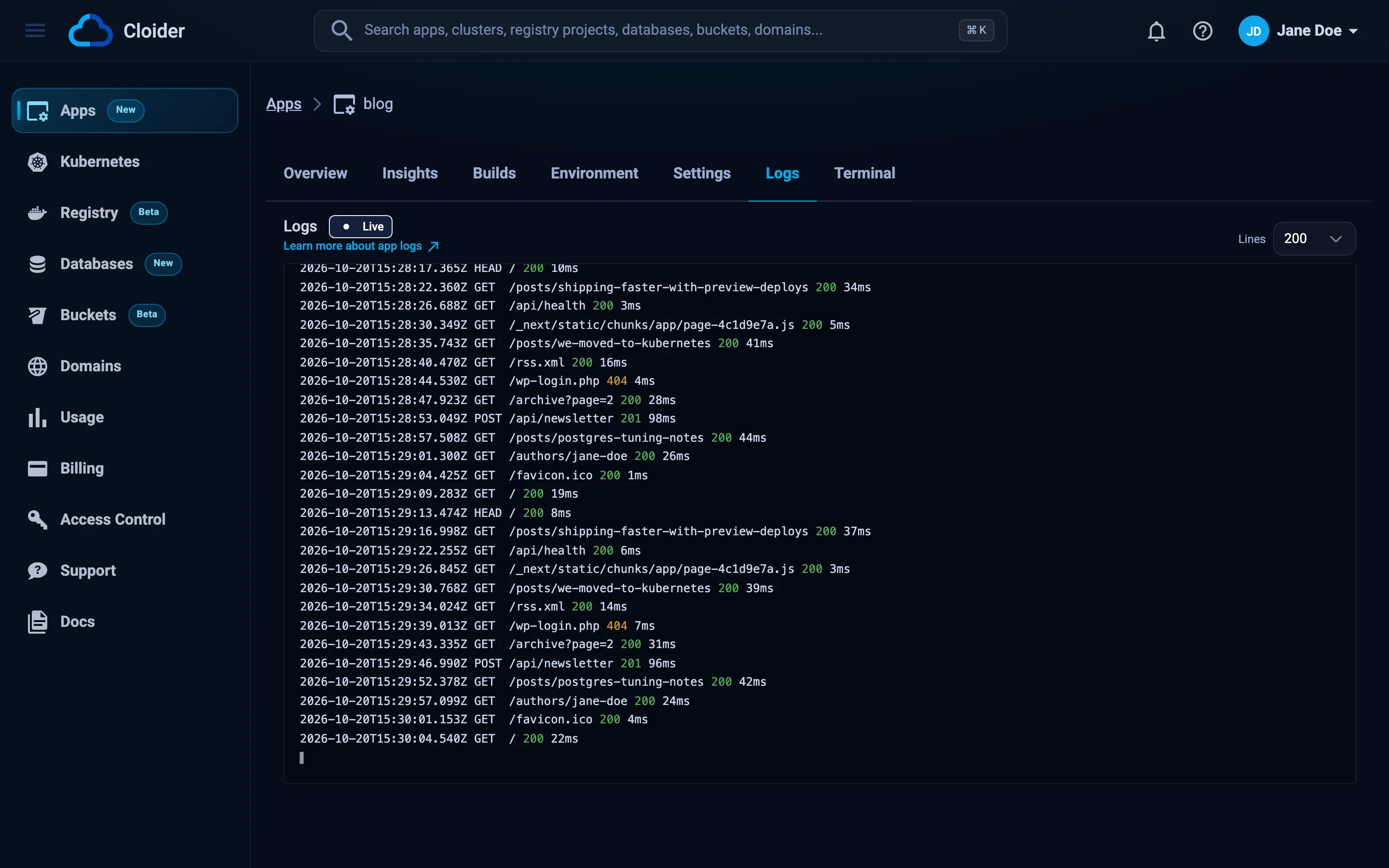
- Open the app and go to the Logs tab.
- The tab shows Connecting to the app..., then the latest lines, and keeps following with a Live badge.
- Pick how much history to load with Lines (100, 200, 500 or 1000). Changing it opens a new stream.
- Scroll up to read without being pulled back down; scroll to the bottom to follow again.
When the stream ends (after 60 minutes, or if the connection can't be restored), the tab says This stream has ended. Reconnect to keep following the app. Click Reconnect.
The stream is open only while the Logs tab is on screen. Colored output (ANSI escape codes) is shown in color.
Print the last 200 lines and exit:
cloider app logs blog
> blog@1.0.0 start
> node server.js

Listening on 3000
GET / 200 4.112 ms - 18
GET /health 200 0.731 ms - 2
Follow new lines as they come, like tail -f, with more history:
cloider app logs blog -f -n 1000
-n, --lines takes 100, 200, 500 or 1000. Logs go to stdout, so you can pipe them:
cloider app logs blog -n 1000 | grep -i error
cloider app logs blog -f | tee blog.log
If a followed stream reconnects, the CLI prints --- reconnected, the last lines may repeat --- on stderr, since a
reconnect starts from a fresh tail.
The Terraform provider can't read app logs. Use the dashboard, the CLI or the API.
The logs are a server-sent events stream. lines is 100, 200, 500 or 1000 (anything else means 200), and
follow=false sends the tail and ends instead of following:
curl -N "https://cloider.com/api/apps/a7c2mq/logs/stream?lines=200&follow=false" \
  -H "Authorization: Bearer $CLOIDER_TOKEN"
: open

event: reset
data: 1

data: Listening on 3000
data:

data: GET / 200 4.112 ms - 18
data: GET /health 200 0.731 ms - 2
data:

event: end
data: 1
- Each chunk of output arrives as one event whose lines are
data:fields; join them with newlines to get the output exactly as printed. resetopens every stream. When you reconnect, discard what you had: the new stream starts from a fresh tail.endmeans nothing more is coming on this stream.- Comment lines (
: ping) are keep-alives sent while the app is quiet.
Ask your agent:
Show me the last 500 lines of the blog app's logs and tell me if there are errors.
It calls the get_app_logs tool, which returns the latest lines and doesn't follow:
{"app": "blog", "lines": 500}
What do the logs contain?
- Everything the app's process writes to stdout and stderr, in order. Write your logs there rather than to files inside the container: files aren't streamed and are lost with the container.
- Only the app's current container. During a rollout the stream moves to the new version's container once it is running.
- Lines your app prints while starting, including crash output. If the container restarts, the stream picks up the new
one, and prints
--- waiting for a pod ---while there is no container to read.
They don't contain the build output (see the Builds tab), nor requests that never reached your app.
How long are app logs kept?
Cloider doesn't store app logs. The stream reads them from the running container, so:
- A restart (saving environment variables, a crash) or a new deploy starts with an empty log.
- History is limited to what the container still holds, up to the 1000 lines you can ask for.
To keep logs, send them from your app to a logging service of your choice, or write them to an object storage bucket.
Why does the Logs tab say nothing was printed?
| What you see | Meaning |
|---|---|
| Nothing printed yet. | The stream is open and the app hasn't printed anything since its container started |
| Nothing was printed. | The stream ended without output |
This app has not deployed a version yet. | No version is running yet. Check the Builds tab |
The logs could not be read, try again! | The stream couldn't be opened. Reconnect in a moment |
| No Logs tab | The app is paused. Resume it to see logs |
Some runtimes buffer output when it isn't a terminal. If lines arrive late or in bursts, turn buffering off: for Python
set the environment variable PYTHONUNBUFFERED=1; in other languages flush after writing, or log to stderr.
Next steps
- Insights: CPU and memory over time.
- Terminal and exec: run commands inside the container.
- Troubleshooting: crash loops and start failures.
Frequently asked questions
How do I see my Cloider app's logs?
Open the app's Logs tab in the dashboard, or run cloider app logs <app> for the last 200 lines and cloider app logs <app> -f to follow new lines. The logs are the app container's stdout and stderr.
Does Cloider keep app logs?
No. Logs are streamed from the running container and are not stored, so a restart or a new deploy starts an empty log. Send logs to an external service if you need to keep them.
How many log lines can I see?
100, 200, 500 or 1000 lines of history, chosen with the Lines picker or cloider app logs -n. Following then shows new lines as they arrive, for up to 60 minutes per stream.
Where is the build output?
On the Builds tab: click Logs on a build, or run cloider app build logs <app>. The Logs tab only shows the running app.
Why are my Python logs delayed?
Python buffers stdout when it isn't a terminal. Set the environment variable PYTHONUNBUFFERED=1 on the app, or flush after printing, and lines appear as they are written.