Health checks for a Cloider app
A health check is a path of your app, such as /healthz, that Cloider requests on every replica to know whether it
can serve. With one set, a new version only goes live once it passes, a replica that starts failing stops receiving
requests, and one that keeps failing is restarted. This page explains what the check does, its settings, how to write
a good health endpoint, and what you see when it fails. A cron job has no health check: each run is
judged by its exit code.
At a glance
| Without a path (the default) | With a path | |
|---|---|---|
| Checks | That something accepts connections on the app's port | A GET on the path, passing on a 2xx or 3xx answer |
| A new version goes live | Once every replica accepts connections | Once every replica passes |
| A failing replica | Isn't restarted while its port stays open | Stops receiving requests after 2 failures in a row, and is restarted after the Failure threshold |
| Settings | None | Interval, Timeout, Failure threshold, Grace period |
| Managed with | Dashboard, cloider app update, REST API, the update_app_settings MCP tool |
The health check is in the Advanced settings section of the Create new app form and of the app's Settings tab. It costs nothing.
How does a health check work?
Every Interval seconds, Cloider sends each replica a GET request on the
Health check path, over plain HTTP on the app's port. An answer from 200 to 399 within the Timeout passes;
anything else, no answer, or a refused connection fails.
- While a replica starts, it has the Grace period to pass its first check, and failures within it are expected. A replica that hasn't passed by the end of it is restarted.
- Once it passes, it receives requests.
- After 2 failures in a row (or 1, with a Failure threshold of 1), it stops receiving requests. The other replicas keep serving. It gets requests again as soon as it passes once more.
- After Failure threshold failures in a row, it is restarted, and starts again with a new grace period.
A new version replaces the old one only once every new replica passes and stays up for 15 seconds. If it doesn't within 5 minutes, the deploy fails and the previous version keeps serving. See Builds and deployments.
Health check settings
| Setting | Range | Default | What it does |
|---|---|---|---|
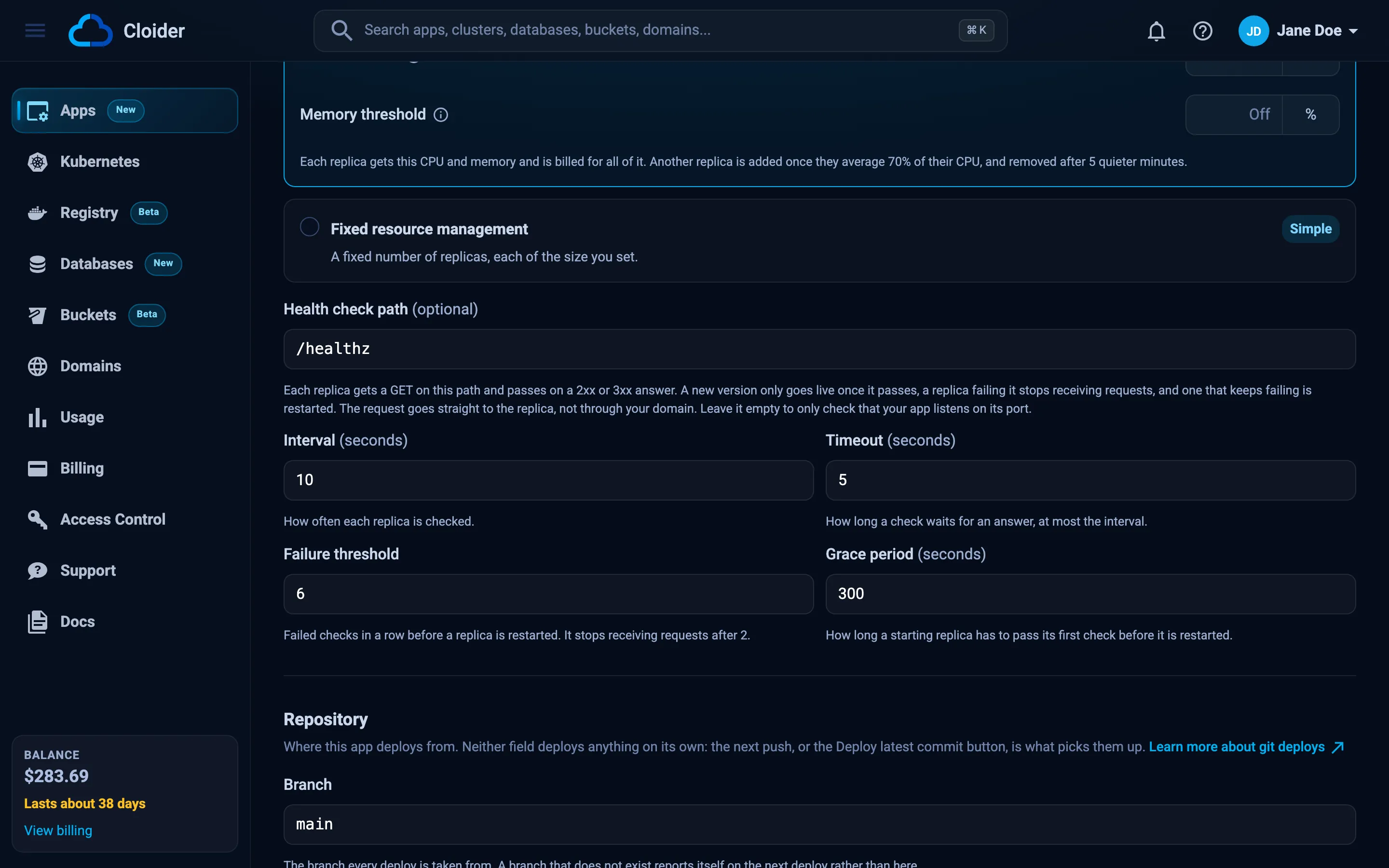
| Health check path | Up to 200 characters, starting with / | Empty | The path checked. A query string is allowed (/healthz?full=1), spaces aren't. Empty checks only the port |
| Interval | 1 to 300 seconds | 10 | How often each replica is checked |
| Timeout | 1 to 60 seconds, at most the interval | 5 | How long a check waits for an answer |
| Failure threshold | 1 to 30 | 6 | Failed checks in a row before a replica is restarted |
| Grace period | 0 to 300 seconds | 300 | How long a starting replica has to pass its first check. 0 counts failures from the start |
With the defaults, a replica that stops answering is out of traffic after about 20 seconds and restarted after about a minute. The timings only apply with a path, so the dashboard shows them once you type one.
Set a health check
Saving a health check redeploys the version the app is running, without a rebuild. The new replicas must pass the new check to go live, so a path your app doesn't answer fails the redeploy and leaves the old replicas serving.
- Dashboard
- CLI
- Terraform
- API
- MCP
- Open the app and go to the Settings tab.
- Open Advanced settings, below the start command, and scroll to Health check path.
- Type the path, for example
/healthz. Interval, Timeout, Failure threshold and Grace period appear with their defaults; change them if you need to. - Click Save changes. The toast says Your app is redeploying with its new settings.
The Summary on the Overview tab shows it on its Health check row, for example /healthz, every 10s, restarted after 6 failures in a row, or Listening on port 3000 without a path.
To remove the health check, clear the path and save.
cloider app update blog --health-check-path /healthz --wait
✓ Saved, redeploying blog
Change the timings, in seconds:
cloider app update blog --health-check-interval 30 --health-check-timeout 10
cloider app update blog --health-check-failure-threshold 3 --health-check-grace-period 120
Remove it with an empty path:
cloider app update blog --health-check-path ""
cloider app get shows it on its Health check line:
Health check: GET /healthz every 10s, 5s timeout, restarted after 6 failures, 300s grace period
The Terraform provider can't change app settings. Use the dashboard, the CLI or the API.
Send the health check fields with the app's port. A field you leave out keeps its value, and an empty
health_check_path removes the check:
curl -X PUT https://cloider.com/api/apps/b7x2k/settings \
  -H "Authorization: Bearer $CLOIDER_TOKEN" \
  -H "Content-Type: application/json" \
  -d '{
    "port": 3000,
    "health_check_path": "/healthz",
    "health_check_interval": 10,
    "health_check_timeout": 5,
    "health_check_failure_threshold": 6,
    "health_check_grace_period": 300
  }'
{"applied": "redeploy"}
Ask your agent:
Give the blog app a health check on /healthz and wait until it is back up.
It calls the update_app_settings tool:
{"app": "blog", "health_check_path": "/healthz", "wait": true}
Write a good health endpoint
The check's request goes straight to each replica, not through your domain, so it measures that replica alone. A good health endpoint:
- Answers fast and cheaply, well within the Timeout, without logging in or rendering a page.
- Answers
200once the app can serve, and an error while it can't, for example before it has loaded its configuration or while it is shutting down. - Thinks twice before checking other services. A check that also queries the database takes every replica out of traffic when the database is unreachable, and restarts them all, which doesn't bring the database back. Check only what a restart can fix, or give such a check its own path that you monitor yourself.
app.get("/healthz", (req, res) => res.status(200).send("ok"));
@app.get("/healthz")
def healthz():
    return "ok", 200
Apps that only answer known hosts
The check's Host header is the replica's own address, not your domain. A framework that refuses unknown hosts answers
it with an error, and the check fails:
- Django answers
400(DisallowedHost) when the host isn't inALLOWED_HOSTS. Answer the health check path in a middleware placed beforedjango.middleware.common.CommonMiddleware, so the host is never checked for it. - Rails answers
403(blocked host) whenconfig.hostsis set. Exclude the path from host authorization:config.host_authorization = { exclude: ->(request) { request.path == "/up" } }, with/upas the health check path.
Health check requests reach your app like any other request, so a framework that logs every request logs them too. Skip logging for the health check path to keep your logs readable.
What happens when the health check fails?
During a deploy, the new version doesn't go live and the previous one keeps serving. The build fails with a message
saying why, which the Builds tab and cloider app builds show:
| Message | Meaning |
|---|---|
The health check at /healthz failed: it answered with HTTP 500. | The app answered, with an error status |
The health check at /healthz failed: nothing was listening on the port. | Nothing accepts connections on the app's port. Check the port on the Settings tab |
The health check at /healthz failed: it did not answer in time. | No answer within the Timeout |
The health check at /healthz failed: it closed the connection without answering. | The connection was closed before an answer |
The health check at /healthz did not pass within the grace period, so the app was restarted: ... | The app took longer than the Grace period to start passing. Raise it, or make the app start faster |
The health check at /healthz kept failing, so the app was restarted: ... | It passed, then failed Failure threshold times in a row |
The build's logs end with the app's own output, which usually says why. See Troubleshooting.
While the app runs, a failing replica is taken out of traffic and, if it keeps failing, restarted, while the other
replicas serve. The Replica picker on the Logs tab and cloider app replicas show it as not ready, with
Failing its health check, it answered with HTTP 503 and the like, or Restarted for failing its health check
after a restart. See See an app's replicas.
If every replica fails at once, the app has nothing to serve: requests to it fail until one passes again. Running at least 2 replicas protects against one replica failing, not against a bug or an outage they all share.
Troubleshooting
| Message | Cause and fix |
|---|---|
Health check path must start with / and be a URL path, without spaces | Start the path with / and leave out spaces; encode them as %20 |
Health check path must be at most 200 characters | Use a shorter path |
Timeout must not be longer than the interval | Lower the timeout or raise the interval |
Interval must be between 1 and 300 seconds | And the matching ranges for Timeout (1 to 60), Failure threshold (1 to 30) and Grace period (0 to 300) |
The deploy fails with it answered with HTTP 404 | The app doesn't serve that path. Add the route, or fix the path |
The deploy fails with it answered with HTTP 400 or 403 | The app refuses the check's host. See Apps that only answer known hosts |
The deploy fails with it answered with HTTP 401 | The path needs a login. Serve the health check without one |
| Replicas restart every few minutes | The endpoint is too slow or depends on a service that fails. Make it cheaper, raise the Timeout or the Failure threshold |
a cron job has no health check, each run is checked by its exit code (CLI) | Cron jobs have no health check |
Next steps
- Scaling and compute: run several replicas, so one failing replica isn't an outage.
- Builds and deployments: how a new version goes live.
- Troubleshooting: apps that fail to start.
Frequently asked questions
How do I add a health check to a Cloider app?
Type a path such as /healthz in Health check path, in the Advanced settings section of the app's Settings tab, and save. From the CLI, run cloider app update <app> --health-check-path /healthz. The app is redeployed with the check.
What counts as a passing health check?
An HTTP answer from 200 to 399 to a GET on the path, within the timeout (5 seconds by default). Any other status, a refused connection or no answer fails.
What happens when my app fails its health check?
During a deploy, the new version does not go live and the previous one keeps serving. While the app runs, a replica that fails 2 checks in a row stops receiving requests, and one that fails the failure threshold (6 by default) in a row is restarted.
What does Cloider check without a health check path?
Only that something accepts connections on the app's port. A new version goes live once it does, but a replica that stops answering requests while its port stays open is not restarted. Set a path to have it checked over HTTP.
Why does my Django app fail its health check with 400?
The check's Host header is the replica's own address, which is not in ALLOWED_HOSTS, so Django answers 400. Answer the health check path in a middleware placed before CommonMiddleware.
Does the health check go through my domain?
No. It goes straight to each replica on the app's port over plain HTTP, so it checks every replica separately and does not count as traffic to your domain.