Scale a Cloider app with replicas and autoscaling
An app's compute configuration decides how many copies of it run, called replicas, and how much CPU and memory each one gets. Cloider spreads the app's requests across its replicas, adds replicas when they get busy, and removes them when traffic drops. This page explains the three ways to configure it, how each is billed, and how to change it from every tool. A cron job has no compute configuration: each run is a container of its own.
At a glance
| Option in the dashboard | You set | Each replica | Billed for | Replicas |
|---|---|---|---|---|
| Automatic resource management (Experimental) | Minimum and maximum replicas | Uses what it needs, up to 0.25 vCPU and 500 MB of memory | What it uses | Added on CPU or memory, between the minimum and the maximum |
| Horizontal autoscaling (Recommended) | CPU and memory per replica, minimum and maximum replicas, CPU and memory thresholds | Gets exactly the CPU and memory you set | All of its CPU and memory | Added on CPU, memory or both, between the minimum and the maximum |
| Fixed resource management (Simple) | Replicas, CPU and memory per replica | Gets exactly the CPU and memory you set | All of its CPU and memory | Always the number you set |
- Replicas: 1 to 20 per app. A new app starts on automatic resource management with 2 to 5 replicas.
- CPU per replica: up to 2 vCPU. Memory per replica: up to 4096 MB.
- Where: in the Advanced settings section of the app's Settings tab, and of the form that creates the app.
- Managed with: dashboard,
cloider app update, REST API and theupdate_app_settingsMCP tool. The Terraform provider can't change app settings.
What is a replica?
A replica is one running copy of your app: the same image, environment variables and port, in a container of its own. Every replica runs the same version, and Cloider sends each request to one of them. Running two or more replicas means:
- No downtime when one stops. A replica that crashes, is restarted for failing its health check or runs on a server that goes away is replaced while the others keep serving. Cloider places an app's replicas on different servers where it can.
- More capacity. Busy replicas share the load with the replicas added next to them.
Because any replica can answer any request, keep what they share outside of them: sessions, uploads and caches belong in a database or a bucket, not in the app's memory or on its disk. A user whose session lives in one replica's memory is logged out the moment their next request reaches another one.
With only 1 replica, the dashboard warns: Your application may experience downtime if its instance or node becomes unavailable. For better availability and fault tolerance, we recommend at least 2 replicas.
Automatic resource management
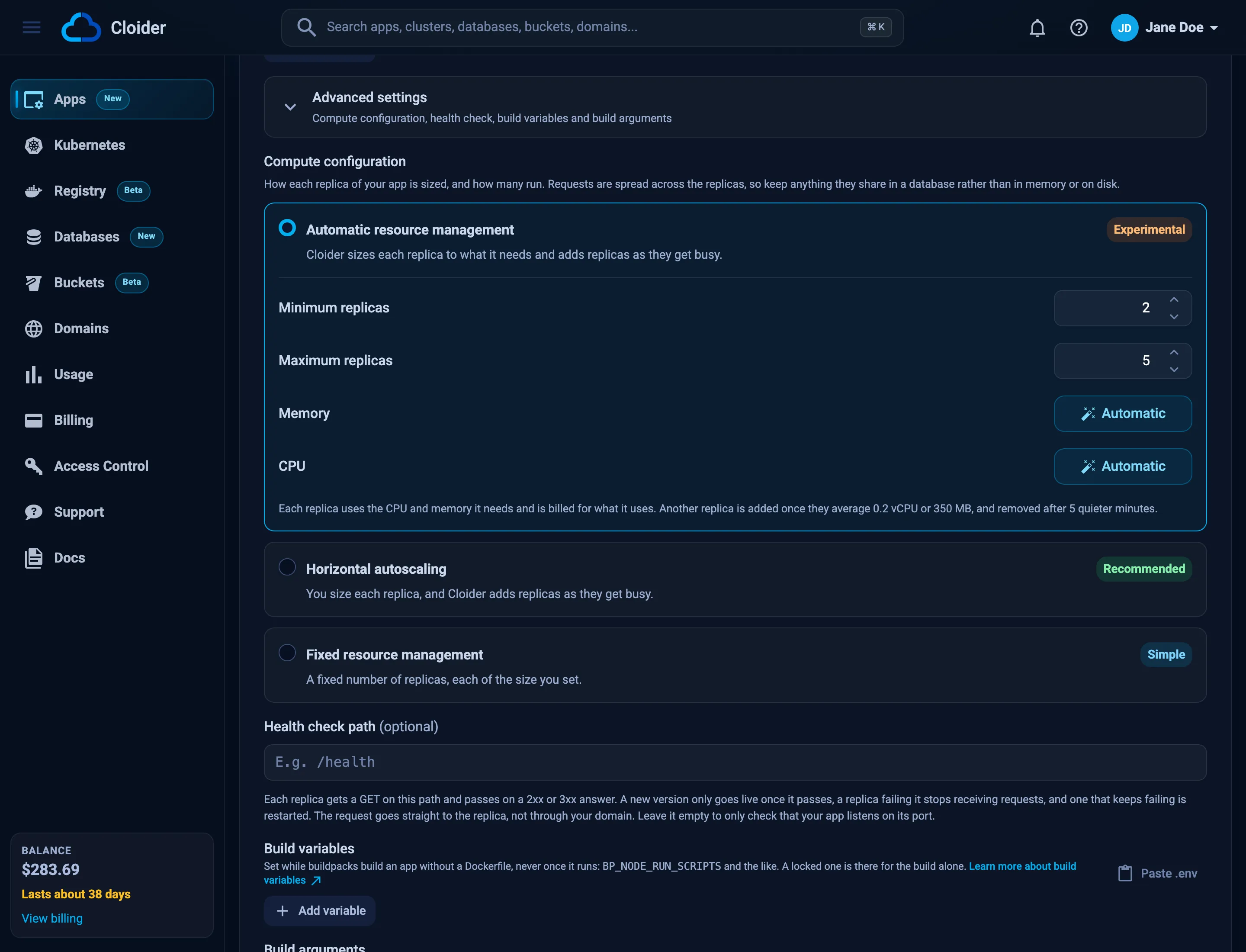
With Automatic resource management, you only choose how many replicas may run. Cloider scales the app both ways:
- Vertically: each replica uses the CPU and memory it needs, up to 0.25 vCPU and 500 MB per replica, and is billed for what it uses, with the app minimum as the least the app pays.
- Horizontally: another replica is added once the replicas average 80% of their CPU (0.2 vCPU) or 70% of their memory (350 MB) per replica, up to Maximum replicas (5 by default).
- Down: a replica is removed after 5 quieter minutes, never below Minimum replicas (2 by default).
Hover Automatic next to Memory or CPU in the dashboard to see the same limits for the app.
A replica that needs more than 500 MB of memory runs out of memory and is restarted. If your app needs more, or more than 0.25 vCPU, configure the size yourself with one of the other two options.
This option is marked Experimental: it suits apps whose usage you don't know yet. Once you know what a replica needs, sizing it yourself gives steadier performance.
Horizontal autoscaling
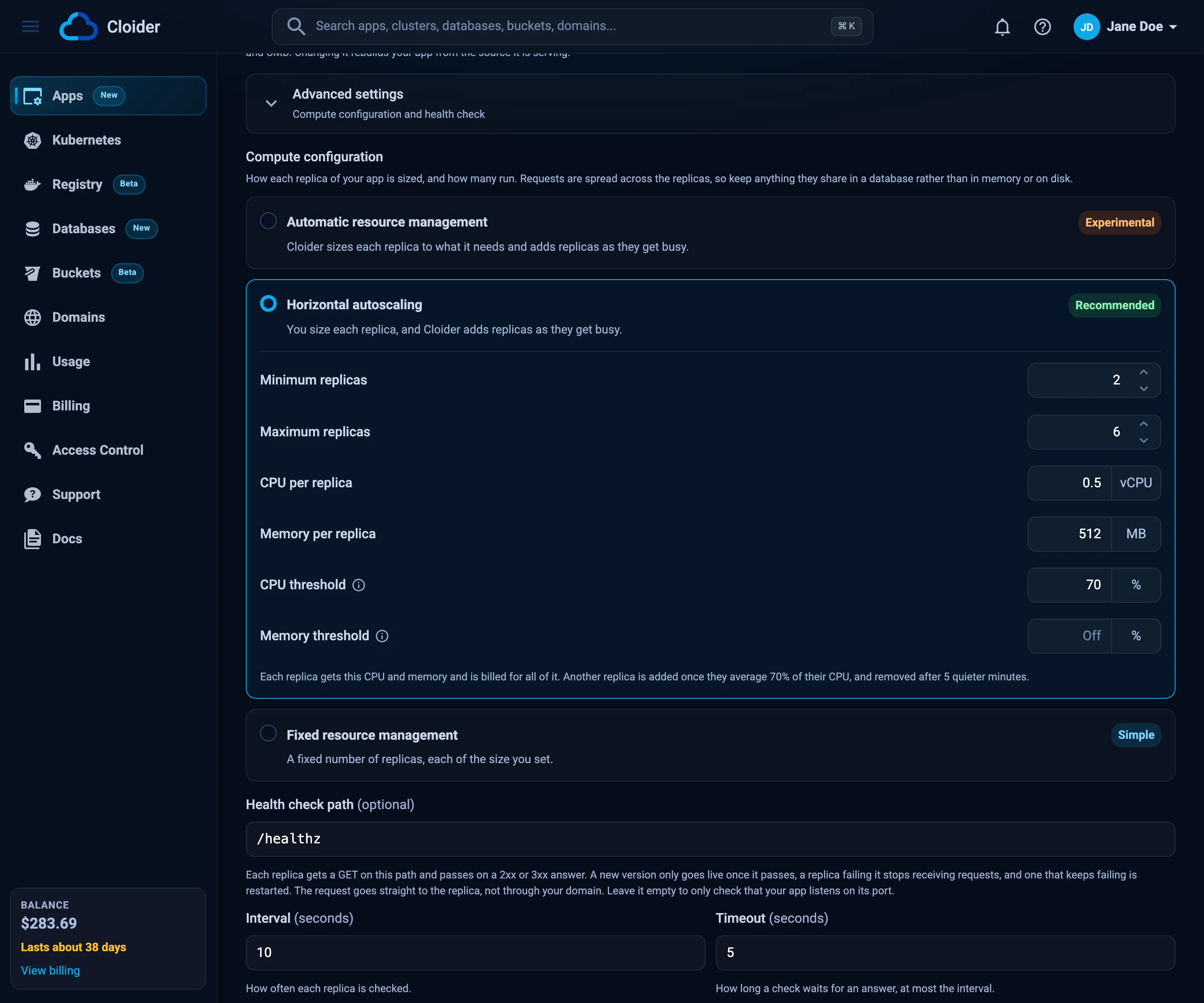
With Horizontal autoscaling, you size each replica and Cloider adds replicas as they get busy. This is the recommended option for production apps.
| Field | Range | Default | What it does |
|---|---|---|---|
| Minimum replicas | 1 to 20 | 2 | How many always run |
| Maximum replicas | The minimum to 20 | 10 | The most Cloider adds |
| CPU per replica | Up to 2 vCPU | 0.1 | The CPU each replica gets. A replica can't use more: past it, the app slows down |
| Memory per replica | Up to 4096 MB | 250 | The memory each replica gets. A replica that needs more runs out of memory and is restarted |
| CPU threshold | 10% to 90%, or off | 80% | Add a replica once the replicas average this share of their CPU |
| Memory threshold | 10% to 90%, or off | 70% | Add a replica once the replicas average this share of their memory |
- Leave a threshold empty to turn it off, so the app scales on the other one alone. At least one must be set: the form says Set a CPU threshold, a memory threshold or both, for when to add a replica.
- With both set, a replica is added when either is reached.
- A replica is removed after 5 quieter minutes.
- Each replica is billed for all of its CPU and memory, whether it uses them or not.
Most runtimes keep the memory they took, even after the work that needed it is done. On a memory threshold, such an app can stay at its maximum replicas. Use the memory threshold for apps whose memory follows their load, and keep the CPU threshold on.
For example, blog set to 0.5 vCPU, 512 MB, 2 to 6 replicas and a 70% CPU threshold runs 2 replicas when it is quiet.
When they average 0.35 vCPU each, Cloider adds a third, and so on up to 6. It is billed for 1 vCPU and 1 GB while 2 run,
and 3 vCPU and 3 GB at 6.
Fixed resource management
With Fixed resource management, a fixed number of Replicas run, each with the CPU per replica and Memory per replica you set (same ranges as autoscaling). Nothing is added or removed with the traffic, and each replica is billed for all of its CPU and memory. Use it when the load is steady, or when the app must never run more copies than you chose.
With the same minimum and maximum, Automatic resource management and Horizontal autoscaling never add or remove a replica either, so the dashboard suggests Fixed resource management instead. Its link switches to it with that number of replicas, and coming from Horizontal autoscaling, the same CPU and memory per replica.
Change the compute configuration
Saving a new compute configuration redeploys the version the app is running, without a rebuild: the app goes
Deploying, then Starting, then Ready. It keeps serving throughout, since replicas of a new size only replace the
old ones once they are up. A redeploy or a new version keeps the number of replicas the app has scaled to, within the
new minimum and maximum.
- Dashboard
- CLI
- Terraform
- API
- MCP
- Open the app and go to the Settings tab.
- Open Advanced settings, below the start command.
- Under Compute configuration, pick an option and fill in its fields. Picking another option starts its fields on their defaults; picking the app's current option again brings back its saved values.
- Click Save changes. The toast says Your app is redeploying with its new settings.
The Summary on the Overview tab shows the result on its Compute row, for example Autoscaling, 2 to 6 replicas of 0.5 vCPU and 512 MB, at 70% CPU.
Size the replicas and autoscale between 2 and 6 of them:
cloider app update blog --compute autoscaling --cpu 0.5 --memory 512 --replicas 2 --max-replicas 6 --wait
✓ Saved, redeploying blog
Change only what you pass; every other value is kept:
cloider app update blog --max-replicas 10
cloider app update blog --cpu-threshold 60 --memory-threshold 80
cloider app update blog --memory-threshold 0
cloider app update admin --compute fixed --replicas 3 --cpu 1 --memory 1024
cloider app update api --compute automatic --replicas 2 --max-replicas 8
| Flag | Values |
|---|---|
--compute | automatic, autoscaling or fixed |
--replicas | 1 to 20. The count with fixed, the minimum otherwise |
--max-replicas | Up to 20, for automatic and autoscaling |
--cpu | vCPU per replica, up to 2, for autoscaling and fixed |
--memory | MiB per replica, up to 4096, for autoscaling and fixed |
--cpu-threshold, --memory-threshold | 10 to 90, or 0 for off, for autoscaling |
cloider app get shows the result on its Compute line:
Compute: autoscaling, 2 to 6 replicas of 0.5 vCPU and 512 MiB, at 70% CPU
The Terraform provider can't change app settings. Use the dashboard, the CLI or the API.
Send the compute fields with the app's port. A field you leave out keeps its value. cpu is in millicores (1000 is
1 vCPU) and memory in MiB:
curl -X PUT https://cloider.com/api/apps/b7x2k/settings \
  -H "Authorization: Bearer $CLOIDER_TOKEN" \
  -H "Content-Type: application/json" \
  -d '{
    "port": 3000,
    "compute_mode": "autoscaling",
    "replicas": 2,
    "max_replicas": 6,
    "cpu": 500,
    "memory": 512,
    "cpu_threshold": 70,
    "memory_threshold": 0
  }'
{"applied": "redeploy"}
See Change the port, compute, health check, schedule or start command for every field and error.
Ask your agent:
Run the blog app on 2 to 6 replicas of half a vCPU and 512 MB each, scaling at 70% CPU, and wait until it is back up.
It calls the update_app_settings tool:
{"app": "blog", "compute": "autoscaling", "cpu": "0.5", "memory": 512, "replicas": 2, "max_replicas": 6, "cpu_threshold": 70, "wait": true}
Choose the compute when you create an app
The form that creates an app has the same Compute configuration in its Advanced settings section, below the environment variables. It starts on Automatic resource management with 2 to 5 replicas. Change it there, or create the app first and change it in Settings later.
cloider deploy, cloider app create and the MCP tools create the app with that default, and the
create endpoint takes the compute fields too. An app created before
compute configuration was available keeps its single replica on automatic resource management until you raise its
Minimum replicas.
See an app's replicas
The replicas serving an app are listed, oldest first, with their status, whether they pass their checks, how often they restarted and the version they run.
- Dashboard
- CLI
- Terraform
- API
- MCP
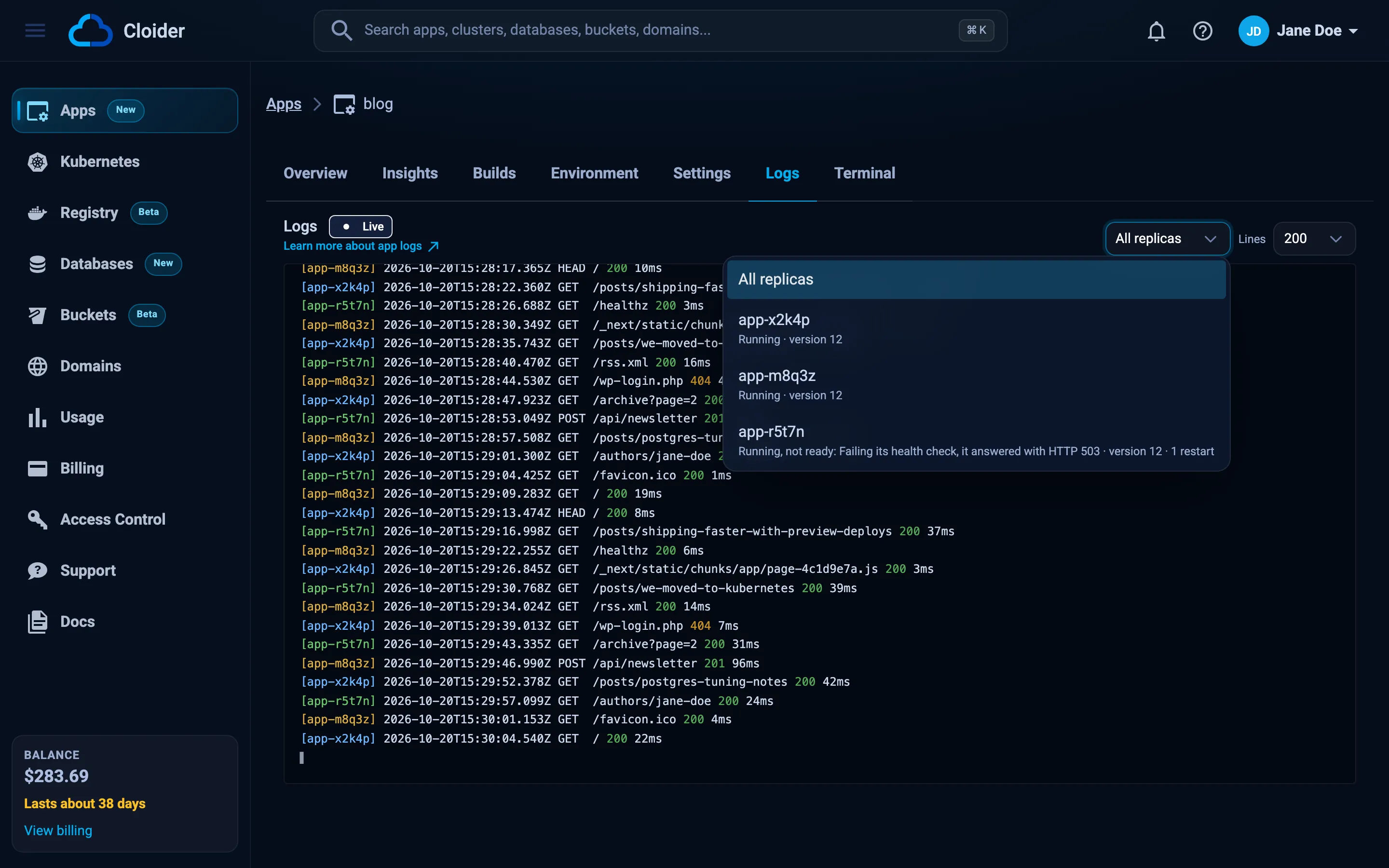
On the Logs and Terminal tabs of an app that can run more than one replica, the Replica picker lists them. Each one shows its status, its version and its restarts, and why it isn't simply up, such as Failing its health check, it answered with HTTP 503.
cloider app replicas blog
NAME         STATUS    READY   RESTARTS   VERSION   CREATED   MESSAGE
blog-x2k4p   Running   yes     0          12        2d ago    -
blog-m8q3z   Running   yes     0          12        2d ago    -
blog-r5t7n   Running   no      1          12        38m ago   Failing its health check, it answered with HTTP 503
READY is yes when the replica passes its checks and receives requests.
The Terraform provider can't list app replicas. Use the dashboard, the CLI or the API.
curl https://cloider.com/api/apps/b7x2k/replicas \
  -H "Authorization: Bearer $CLOIDER_TOKEN"
[
  {"name": "blog-x2k4p", "version": "12", "status": "Running", "ready": true, "restarts": 0, "message": "", "created_at": "2026-10-18T11:12:40Z"},
  {"name": "blog-r5t7n", "version": "12", "status": "Running", "ready": false, "restarts": 1, "message": "Failing its health check, it answered with HTTP 503", "created_at": "2026-10-20T14:52:03Z"}
]
Is every replica of the blog app healthy?
{"app": "blog"}
A replica's status is one of:
| Status | Meaning |
|---|---|
Starting | Its container is starting, or it is still within its health check's grace period |
Running | Its container is up. It receives requests once it is ready |
Crashing | Its container stopped and is being restarted: it exited, ran out of memory or kept failing its health check |
Stopping | It is being removed, after a scale down, a restart or a new version |
Read one replica's output with the Logs tab or cloider app logs --replica, and
open a shell in it with the Terminal tab or cloider app shell --replica.
How is a scaled app billed?
An app is billed in compute units for the CPU and memory of all its running replicas together, prorated to the second. Each replica counts the larger of what it is given and what it uses:
| Option | Each running replica counts |
|---|---|
| Horizontal autoscaling | The CPU and memory you set |
| Fixed resource management | The CPU and memory you set |
| Automatic resource management | What it uses, at least 0.001 vCPU and 1 MB |
Whatever the option, a running app pays at least the app minimum, $2.99 per 30 days, charged by the second as it runs. Each day the app costs its compute or the minimum for the time it ran, whichever is more, so a small app pays about $0.10 a day and $1.495 by day 15. Time counts while any replica runs, so a paused app and an app whose first build hasn't finished pay nothing, and a cron job is billed for its runs alone. On the invoice, the days billed on compute appear as Compute-Hour lines and the days billed the minimum as Minimum lines in running hours.
So an autoscaled app's bill follows its replica count: more replicas during busy hours, fewer at night. A paused app runs no replicas and costs nothing. See the pricing reference for current rates, and the Insights tab for what the app used.
What happens when a replica runs out of memory?
A replica that needs more memory than it can use is stopped and restarted, and shows Crashing with Ran out of
memory while it comes back. If this happens while a new version starts, the deploy fails with a message naming the
limit, for example The app ran out of memory, past the 512 MiB each replica can use., and the previous version keeps
serving.
Raise Memory per replica, or move to a sized option if the app needs more than the 500 MB of automatic resource management. CPU works differently: a replica that reaches its CPU is slowed down, never restarted.
Troubleshooting
| Message | Cause and fix |
|---|---|
Minimum replicas must be between 1 and 20 / Replicas must be between 1 and 20 | Pick a count from 1 to 20 |
Maximum replicas must be between the minimum and 20 | Set the maximum at or above the minimum |
CPU must be between 0.001 and 2 | Enter a CPU per replica of up to 2 vCPU |
Memory must be between 64 and 4096 MB | Enter a memory per replica of up to 4096 MB |
CPU threshold must be between 10% and 90%, or off | Use 10 to 90, or leave it empty (0 in the CLI and API) |
Set a CPU threshold, a memory threshold or both, for when to add a replica | Turn at least one threshold on |
The app ran out of memory, past the 512 MiB each replica can use. | Raise Memory per replica, see above |
| The app stays at its maximum replicas | On a memory threshold, or on automatic resource management, the runtime keeps its memory. Turn the memory threshold off and scale on CPU, moving to Horizontal autoscaling if the app is on automatic |
| Users are logged out, or uploads go missing, at random | The app keeps sessions or files in one replica. Move them to a database or a bucket |
a cron job has no replicas to size or scale, each run is a container of its own (CLI) | Cron jobs have no compute configuration |
Next steps
- Health checks: tell Cloider when a replica is really able to serve.
- Logs: read every replica's output at once, or one replica's.
- Insights: the CPU and memory the app used.
- Settings: everything else the Settings tab changes.
Frequently asked questions
Can a Cloider app run more than one instance?
Yes. An app runs 1 to 20 replicas, identical copies that share its requests. Set a fixed count, or let Cloider add and remove replicas between a minimum and a maximum as the app gets busy. New apps start with 2 to 5 replicas.
How does autoscaling work on Cloider?
With Horizontal autoscaling, a replica is added once the replicas average your CPU threshold (80% by default), your memory threshold (70% by default), or either. With Automatic resource management, a replica is added once they average 0.2 vCPU or 350 MB each. Replicas are removed after 5 quieter minutes, never below the minimum.
What is the difference between Horizontal autoscaling and Automatic resource management?
Horizontal autoscaling gives each replica the CPU and memory you set, bills all of it, and lets you pick the CPU and memory thresholds. Automatic resource management lets each replica use what it needs, up to 0.25 vCPU and 500 MB, and bills what it uses. Either way, a running app pays at least $2.99 per 30 days.
How many replicas should my app run?
At least 2 for anything users depend on, so one replica can restart or move while the other keeps serving. With 1 replica the app is down whenever that replica is.
Does changing the compute configuration rebuild my app?
No. Saving it redeploys the version that is running, and the old replicas keep serving until the new ones are up.
Can I scale an app to zero?
No. At least 1 replica runs while the app is up. To stop an app and its billing completely, pause it.