Run WordPress on Kubernetes with managed MySQL
In this guide you run WordPress on a Cloider Kubernetes cluster the production friendly way: the WordPress container runs as a Kubernetes Deployment, its data lives in a managed MySQL database (backed up by Cloider, restorable to any second of the last 14 days), its uploads, plugins and themes live on a PersistentVolumeClaim, and visitors reach it over HTTPS through a domain target, with no load balancer to pay for. You get complete manifests you can apply as they are.
At a glance
| You will build | WordPress at https://acme-blog.cloider.app (and optionally https://blog.example.com), on the cluster production, with the MySQL database shop-db |
| Products | Kubernetes, Databases, Domains and DNS |
| Tools | The cloider CLI and kubectl |
| Difficulty | Intermediate. You should know what a Deployment, a Service and a Secret are, or read Deploy a workload first |
| Time | About 40 minutes |
| Cost | Cluster compute, one volume and one database plan, prorated by the second. See What it costs |
What you'll build
- WordPress runs from the official
wordpressimage, which configures itself from environment variables. One pod is enough for most sites, and aReadWriteOncevolume can only be mounted by one pod at a time. - wp-content (uploads, plugins, themes) is on a 10 GiB PersistentVolumeClaim, so it survives restarts and new versions. WordPress core comes from the image, so upgrading WordPress is changing the image tag.
- MySQL is a Cloider managed database. Only the cluster may connect to it, over its private host and TLS.
- A target routes the free subdomain
acme-blog.cloider.appto thewordpressService, with HTTPS handled by Cloider. KubernetesIngressobjects aren't served on Cloider; targets replace them. See Expose services.
Before you begin
- A Cloider account and the CLI, logged in with Read & Write access. See Install the CLI.
kubectlon your computer. Without it, everykubectlcommand below can run throughcloider cluster exec production -- kubectl ...instead.opensslandjq, to generate WordPress's secret keys and read JSON from the CLI.- Optional, for the last part: a domain on Cloider's nameservers, here
example.com. See Add a custom domain.
Part 1: Create the cluster and connect kubectl
Create a cluster called production, wait until it is ready, and add it to your kubeconfig as the current context:
cloider cluster create production --wait
cloider cluster kubeconfig production --merge --use
✓ Creating cluster production (Kubernetes 1.34)
✓ Cluster production is ready. Get its kubeconfig with `cloider cluster kubeconfig production --merge`.
✓ Added context cloider-production to /Users/you/.kube/config
A Cloider cluster is serverless: there are no nodes to size, and you pay for the CPU and memory your pods request or use. See Create a cluster and Connect with kubectl.
Verify
kubectl get nodes
kubectl get storageclass
The first command lists the cluster's nodes. The second lists the storage classes, one of them marked (default),
which the volume in part 4 uses.
Part 2: Create the MySQL database
Create a MySQL database called shop-db that only the production cluster may connect to:
cloider db create shop-db --engine mysql --trusted-source cluster:production --wait
✓ Creating MySQL 9 database shop-db (plan Hobby)
✓ Database shop-db is ready. Connect with `cloider db connect shop-db`.
--trusted-source cluster:productionallows connections from the cluster to the database's private host, and nothing else. See Trusted sources.- The Hobby plan allows 20 connections, enough for a small site with one WordPress pod. For a busy site, choose a
larger plan with
--plan, see MySQL and Resize. - SSL is on by default. MySQL 9 authenticates with
caching_sha2_password, which works without extra settings over TLS.
Read the connection details you need for WordPress:
DB_JSON=$(cloider db get shop-db -o json)
DB_HOST=$(echo "$DB_JSON" | jq -r .private_host)
DB_PORT=$(echo "$DB_JSON" | jq -r .database_port)
DB_USER=$(echo "$DB_JSON" | jq -r .database_user)
DB_NAME=$(echo "$DB_JSON" | jq -r .database_name)
echo "$DB_HOST:$DB_PORT $DB_USER $DB_NAME"
shop-db-k7x2wd.db.cloider.internal:22861 shop_db_user shop-db
Verify
cloider db exec shop-db "SELECT @@character_set_server, @@max_connections"
@@character_set_server	@@max_connections
utf8mb4	20
cloider db exec runs mysql next to the database, so it works even though your own IP isn't a trusted source.
Part 3: Store the database password and WordPress keys in a Secret
WordPress needs the database login and eight random secret keys, which sign its login cookies. Keep them in a Kubernetes Secret, never in the manifest file.
kubectl create namespace wordpress

kubectl create secret generic wordpress -n wordpress \
  --from-literal=WORDPRESS_DB_HOST="$DB_HOST:$DB_PORT" \
  --from-literal=WORDPRESS_DB_USER="$DB_USER" \
  --from-literal=WORDPRESS_DB_PASSWORD="$(cloider db password shop-db)" \
  --from-literal=WORDPRESS_DB_NAME="$DB_NAME" \
  --from-literal=WORDPRESS_AUTH_KEY="$(openssl rand -base64 48)" \
  --from-literal=WORDPRESS_SECURE_AUTH_KEY="$(openssl rand -base64 48)" \
  --from-literal=WORDPRESS_LOGGED_IN_KEY="$(openssl rand -base64 48)" \
  --from-literal=WORDPRESS_NONCE_KEY="$(openssl rand -base64 48)" \
  --from-literal=WORDPRESS_AUTH_SALT="$(openssl rand -base64 48)" \
  --from-literal=WORDPRESS_SECURE_AUTH_SALT="$(openssl rand -base64 48)" \
  --from-literal=WORDPRESS_LOGGED_IN_SALT="$(openssl rand -base64 48)" \
  --from-literal=WORDPRESS_NONCE_SALT="$(openssl rand -base64 48)"
namespace/wordpress created
secret/wordpress created
WORDPRESS_DB_HOSTtakes the port after a colon. The port is your database's own, not MySQL's usual 3306.- The keys must stay the same across restarts. Without them, the image generates new random keys each time the pod starts, and everyone is logged out.
Verify
kubectl get secret wordpress -n wordpress -o jsonpath='{.data}' | jq 'keys'
The output lists the twelve keys, from WORDPRESS_AUTH_KEY to WORDPRESS_SECURE_AUTH_SALT.
Part 4: Deploy WordPress
Save this file. It holds the volume claim, the Deployment and the Service:
# Uploads, plugins and themes, kept across restarts
apiVersion: v1
kind: PersistentVolumeClaim
metadata:
  name: wp-content
  namespace: wordpress
spec:
  accessModes:
    - ReadWriteOnce
  resources:
    requests:
      storage: 10Gi
---
apiVersion: apps/v1
kind: Deployment
metadata:
  name: wordpress
  namespace: wordpress
  labels:
    app: wordpress
spec:
  replicas: 1
  # A ReadWriteOnce volume is mounted by one pod at a time: stop the old pod first
  strategy:
    type: Recreate
  selector:
    matchLabels:
      app: wordpress
  template:
    metadata:
      labels:
        app: wordpress
    spec:
      securityContext:
        # www-data, the user Apache runs as, can write to the volume
        fsGroup: 33
      containers:
        - name: wordpress
          image: wordpress:6.8-apache
          ports:
            - name: http
              containerPort: 80
          envFrom:
            - secretRef:
                name: wordpress
          env:
            - name: WP_HOME
              value: https://acme-blog.cloider.app
            - name: WORDPRESS_CONFIG_EXTRA
              value: |
                define('MYSQL_CLIENT_FLAGS', MYSQLI_CLIENT_SSL);
                define('WP_HOME', getenv('WP_HOME'));
                define('WP_SITEURL', getenv('WP_HOME'));
          volumeMounts:
            - name: wp-content
              mountPath: /var/www/html/wp-content
          resources:
            requests:
              cpu: 100m
              memory: 256Mi
            limits:
              memory: 512Mi
          readinessProbe:
            httpGet:
              path: /wp-login.php
              port: http
            initialDelaySeconds: 10
            periodSeconds: 10
          livenessProbe:
            tcpSocket:
              port: http
            initialDelaySeconds: 30
            periodSeconds: 20
      volumes:
        - name: wp-content
          persistentVolumeClaim:
            claimName: wp-content
---
apiVersion: v1
kind: Service
metadata:
  name: wordpress
  namespace: wordpress
spec:
  type: ClusterIP
  selector:
    app: wordpress
  ports:
    - name: http
      port: 80
      targetPort: http
What the important settings do:
| Setting | Why |
|---|---|
mountPath: /var/www/html/wp-content | Only wp-content is on the volume. WordPress core is copied from the image at every start, so a new image tag upgrades it |
strategy: Recreate | The old pod releases the ReadWriteOnce volume before the new pod mounts it |
MYSQL_CLIENT_FLAGS with MYSQLI_CLIENT_SSL | WordPress connects to MySQL over TLS, which the database requires with SSL on |
WP_HOME and WP_SITEURL | The address WordPress builds its links with, read from the WP_HOME variable so you can change it without editing the database |
fsGroup: 33 | Gives the volume to the www-data group, so WordPress can write uploads and install plugins |
resources.requests | What the pod is billed for at least. Cloider bills the larger of a container's request and its actual use |
readinessProbe | The Service only sends traffic once WordPress answers |
The image also sets HTTPS on when a request arrives with X-Forwarded-Proto: https, which is how Cloider forwards
requests through a target, so WordPress generates https:// links and the admin works without redirect loops.
Apply it:
kubectl apply -f wordpress.yaml
persistentvolumeclaim/wp-content created
deployment.apps/wordpress created
service/wordpress created
Verify
kubectl rollout status deployment/wordpress -n wordpress --timeout=5m
kubectl get pods,svc -n wordpress
kubectl get pvc -n wordpress -o custom-columns=NAME:.metadata.name,STATUS:.status.phase,CAPACITY:.status.capacity.storage
deployment "wordpress" successfully rolled out
NAME                             READY   STATUS    RESTARTS   AGE
pod/wordpress-6d9c7f8b5c-x2k4m   1/1     Running   0          58s

NAME                TYPE        CLUSTER-IP     EXTERNAL-IP   PORT(S)   AGE
service/wordpress   ClusterIP   10.43.118.27   <none>        80/TCP    58s
NAME         STATUS   CAPACITY
wp-content   Bound    10Gi
If the pod stays Pending or the claim isn't Bound, see Troubleshooting.
Part 5: Serve WordPress over HTTPS with a target
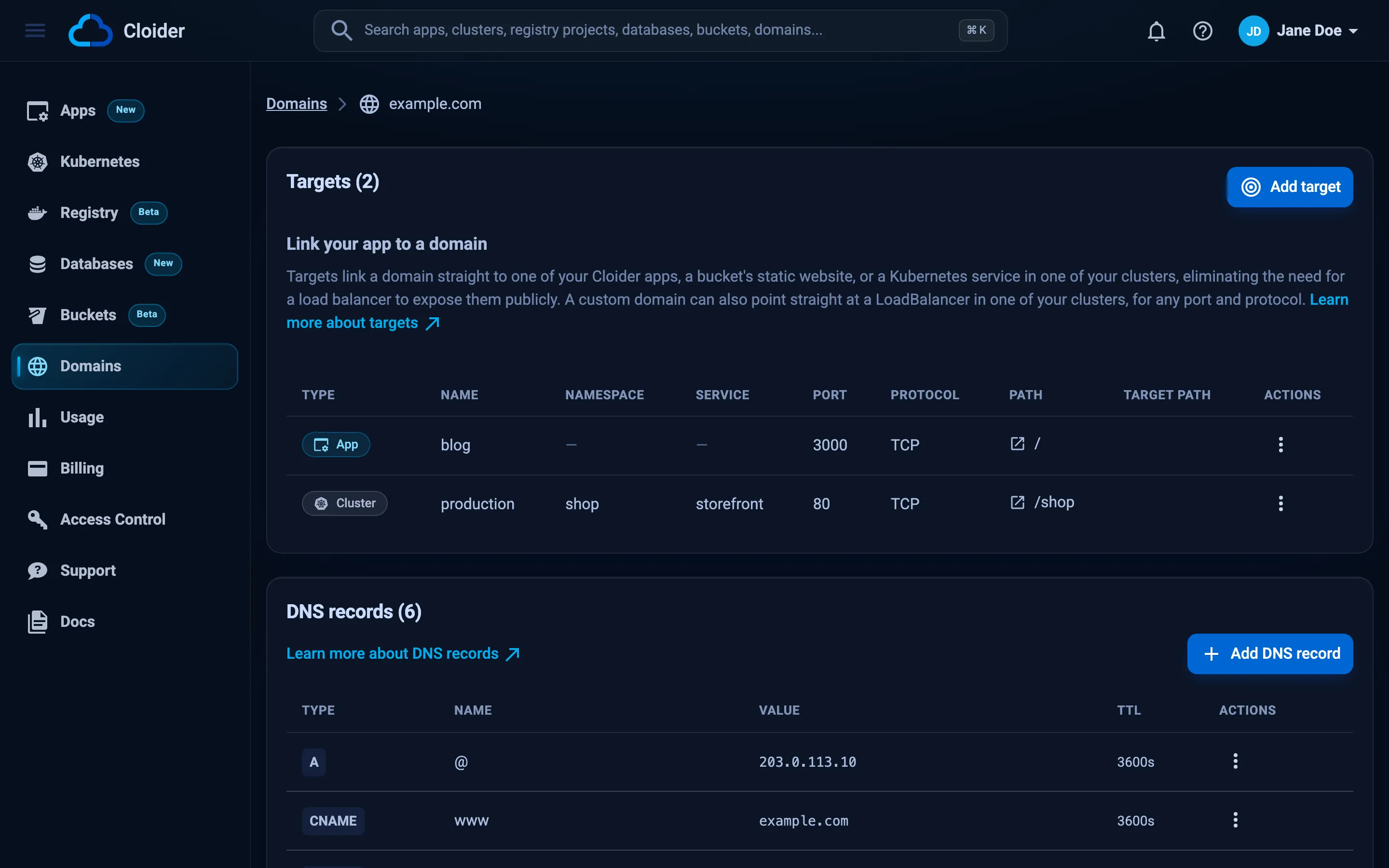
Claim a free subdomain and route it to the wordpress Service. A target is the right tool for a website: Cloider
terminates HTTPS with a certificate it manages, forwards plain HTTP to the Service, and there is no load balancer
charge.
cloider domain create acme-blog.cloider.app
cloider target create acme-blog.cloider.app --cluster production --service wordpress/wordpress
✓ Claimed acme-blog.cloider.app
Route it with `cloider target create acme-blog.cloider.app --app <app>`.
✓ Routed acme-blog.cloider.app/ to production/wordpress/wordpress:80
--service is <namespace>/<service>, and the Service's only port (80) is used. cloider cluster services production
lists what a target can route to. The same steps in the dashboard are under Domains, your domain, Add target,
Target type Cluster. See Expose services.
Alternative: a LoadBalancer Service with a public IP
A Service of type LoadBalancer gets its own public IP address and passes any TCP port through. For a website it has
two drawbacks: TLS is passed through untouched, so WordPress would be served on plain http:// unless you terminate
TLS in the pod yourself, and each load balancer is billed per month. Use it only when you need a raw port.
apiVersion: v1
kind: Service
metadata:
  name: wordpress-public
  namespace: wordpress
spec:
  type: LoadBalancer
  selector:
    app: wordpress
  ports:
    - name: http
      port: 80
      targetPort: http
kubectl apply -f wordpress-lb.yaml
kubectl get svc wordpress-public -n wordpress
Set WP_HOME to http://<EXTERNAL-IP> to match. See Load balancers.
Verify
curl -sI https://acme-blog.cloider.app/
HTTP/2 302
location: https://acme-blog.cloider.app/wp-admin/install.php
The redirect to install.php means WordPress reached the database and found it empty, which is what you expect
before the installation.
Part 6: Install WordPress and test uploads
- Open
https://acme-blog.cloider.app/wp-admin/install.php. - Pick a language, then fill in Site Title, Username, a strong Password and Your Email.
- Click Install WordPress, then Log In.
- In the admin, open Media, Add New Media File, and upload a small image.
Verify
The tables are in the managed database:
cloider db exec shop-db "SHOW TABLES"
Tables_in_shop-db
wp_commentmeta
wp_comments
wp_links
wp_options
wp_postmeta
wp_posts
wp_term_relationships
wp_term_taxonomy
wp_termmeta
wp_terms
wp_usermeta
wp_users
The image is on the volume, and stays there when the pod is replaced:
kubectl exec -n wordpress deploy/wordpress -- find wp-content/uploads -type f
kubectl rollout restart deployment/wordpress -n wordpress
kubectl rollout status deployment/wordpress -n wordpress
kubectl exec -n wordpress deploy/wordpress -- find wp-content/uploads -type f
Both find commands list the same file, for example wp-content/uploads/2026/10/logo.png, and you are still logged in
to the admin after the restart, because the keys come from the Secret.
Part 7: Use your own domain (optional)
To serve the site on https://blog.example.com, the domain example.com must be on Cloider's nameservers. Then add a
DNS record for blog, add blog.example.com as a domain of its own, and route it to the same Service:
cloider dns create example.com --type CNAME --name blog --value acme-blog.cloider.app. --ttl 3600
cloider domain create blog.example.com
cloider target create blog.example.com --cluster production --service wordpress/wordpress
A target doesn't add a DNS record, which is why the CNAME comes first. See
Add a custom domain for adding example.com and pointing its nameservers.
Then tell WordPress its new address. The pod restarts with the new value:
kubectl set env deployment/wordpress -n wordpress WP_HOME=https://blog.example.com
WP_HOME changes the address WordPress builds links with. Links already saved inside posts still point at the old
address: update them with a search and replace plugin, or with WP-CLI if you add it to your image.
Verify
dig blog.example.com +short
curl -sI https://blog.example.com/ | head -n 1
acme-blog.cloider.app.
203.0.113.80
HTTP/2 200
The certificate for blog.example.com is issued once the name resolves to Cloider, usually within a minute or two.
See HTTPS certificates.
Run it in production
- Upgrade WordPress by changing the image tag (for example to a newer
wordpress:6.x-apache) and runningkubectl apply -f wordpress.yaml. Back up first. Plugins and themes on the volume are updated from the admin as usual. - Backups: Cloider takes a full backup of
shop-dbevery 14 days and records every change in between, so any second of the last 14 days can be restored, see Backups and restore. The volume isn't backed up for you. Copywp-contentto a bucket on a schedule, as in Back up a database to a bucket, or keep media in object storage with an offload plugin. - Connections: every PHP worker can hold a database connection. Keep an eye on the Insights tab, and resize the database before it reaches the plan's limit.
- One replica: a
ReadWriteOncevolume can't be shared by several pods. To run several WordPress pods, move uploads to object storage first. - Pause the cluster to stop paying for compute while the site isn't needed, see Pause and resume. A paused cluster's targets answer with errors until you resume it.
What it costs
Each resource is billed while it exists, by the second, at the monthly rates on the pricing page:
| Resource | How it is billed |
|---|---|
Cluster production | Compute units for its running containers, including its Kubernetes control plane. Each container counts the larger of its request and its use, so the 100m CPU and 256Mi memory requests set a floor for WordPress |
Volume wp-content | Per GiB of provisioned size per month: 10 GiB is billed as 10 GiB however full it is. Also billed while the cluster is paused |
Database shop-db | The flat monthly price of its plan, prorated while it is Ready |
| Domains, DNS records, targets, certificates | Free. A target has no load balancer charge |
| LoadBalancer Service (alternative only) | Per load balancer per month, while it has an external IP |
See the billing model and watch the cost on the Usage page.
Clean up
Deleting is permanent. Export anything you want to keep first.
# The routes and the free subdomain (and blog.example.com if you added it)
cloider domain delete acme-blog.cloider.app --yes
cloider domain delete blog.example.com --yes

# WordPress, its Secret, and the volume with your uploads
kubectl delete namespace wordpress

# The database, its data and its backups
cloider db delete shop-db --yes --wait

# The cluster and everything still in it
cloider cluster delete production --yes --wait
Remove the blog record from example.com with cloider dns list example.com and cloider dns delete <record-id>
if you added it. Deleting the cluster alone also removes the namespace and its volume.
Troubleshooting
| Symptom | Cause and fix |
|---|---|
| Error establishing a database connection | The cluster isn't a trusted source (cloider db trusted-sources shop-db must list production), WORDPRESS_DB_HOST uses the public host or lacks the port, or the password is wrong. Check the Secret with kubectl get secret wordpress -n wordpress -o jsonpath='{.data.WORDPRESS_DB_HOST}' | base64 -d |
The pod logs Authentication requires secure connection | MYSQL_CLIENT_FLAGS is missing from WORDPRESS_CONFIG_EXTRA, so WordPress connects without TLS. Keep the define('MYSQL_CLIENT_FLAGS', MYSQLI_CLIENT_SSL); line |
The pod stays Pending | The claim isn't bound. kubectl describe pvc wp-content -n wordpress says why. See Persistent volumes |
Multi-Attach error when the pod is replaced | Two pods want the same ReadWriteOnce volume. Keep strategy: Recreate and replicas: 1 |
502 Bad Gateway or 503 on the site | The pod isn't ready or the target points at the wrong port. Check kubectl get endpoints wordpress -n wordpress and cloider target list acme-blog.cloider.app |
Redirect loop, or the admin redirects to http:// | WP_HOME doesn't start with https://. Set it with kubectl set env |
| Uploads fail with Unable to create directory | WordPress can't write to the volume. Keep fsGroup: 33 in the pod's securityContext |
Uploads of large files fail with 413 Request Entity Too Large | The upload was refused before it reached WordPress: requests through a target currently accept bodies up to 1 MB. Resize images before uploading them, or serve the site through a LoadBalancer Service |
| Everyone is logged out after each restart | The eight WORDPRESS_*_KEY and WORDPRESS_*_SALT values are missing from the Secret |
Too many connections | The plan's connection limit is reached. Resize the database |
More in Kubernetes troubleshooting and Database troubleshooting.
Next steps
- Back up a database to a bucket: keep your own MySQL dumps on a schedule.
- Helm: install other applications from charts.
- Pull private images: run a custom WordPress image with your own plugins baked in.
- CI/CD with GitHub Actions: build and roll out that image automatically.
Frequently asked questions
Can I run WordPress on Cloider Kubernetes with a managed MySQL database?
Yes. Run the official wordpress image as a Deployment, give it the database's private host and port, user, password and name through a Secret, set MYSQL_CLIENT_FLAGS to MYSQLI_CLIENT_SSL so it connects over TLS, and add the cluster to the database's trusted sources.
How do I keep WordPress uploads when the pod restarts?
Mount a PersistentVolumeClaim at /var/www/html/wp-content. Uploads, plugins and themes are written there and survive restarts and new versions, while WordPress core comes from the image.
Do I need an Ingress controller for WordPress on Cloider?
No. Ingress objects aren't served on Cloider clusters. Route a domain to the WordPress Service with a target, and Cloider terminates HTTPS with a certificate it manages, without a load balancer charge.
Can I run more than one WordPress pod?
Not with a ReadWriteOnce volume, which only one pod can mount at a time. To scale out, move uploads to object storage with an offload plugin so the pods share nothing on disk.
Why does WordPress log everyone out after a restart?
The official image generates random secret keys when they aren't set. Store the eight WORDPRESS_*_KEY and WORDPRESS_*_SALT values in a Secret so they stay the same.
Is my WordPress database backed up?
Yes. Cloider takes a full backup of every managed MySQL database every 14 days and records every change in between, so you can restore any second of the last 14 days into a new database. The wp-content volume isn't backed up automatically.