Deploy a Node.js app with PostgreSQL on Cloider
In this guide you build a small but complete web application, an order board for Acme Inc, and run it on Cloider the
way you would run a real product: a Node.js (Express) app with a managed PostgreSQL database, the database connection
string stored as a secret, the schema created with a migration you run with cloider db exec, a new version deployed
automatically on every git push to GitHub, and the whole thing served on your own domain over HTTPS.
At a glance
| You will build | An Express app called web that lists and creates orders, backed by the PostgreSQL database orders-db, on https://example.com |
| Products | Apps, Databases, Domains and DNS |
| Tools | The cloider CLI, git and GitHub, Node.js 22 on your computer. The dashboard can do every Cloider step too |
| Difficulty | Beginner. You should be able to run commands in a terminal and use git |
| Time | About 45 minutes, plus the time your registrar takes to switch nameservers for the custom domain |
| Cost | One app (compute) and one database (plan price), prorated by the second. See What it costs |
What you'll build
- The app runs your Express server in one container. Cloider builds it from your GitHub repository with a
buildpack (no Dockerfile needed) and gives it a free
cloider.appaddress. - The database is a managed PostgreSQL server. The app reaches it on its private host, inside Cloider's network, with TLS. Only the app (and your own IP address while you develop) may connect.
- Migrations are plain SQL files in the repository, run with
cloider db exec, which runspsqlnext to the database: nothing to install, and no firewall to open. - Auto deploy builds and deploys every push to the
mainbranch. - Your custom domain points at Cloider's nameservers, and Cloider issues the HTTPS certificate.
Before you begin
-
A Cloider account and the CLI, logged in with Read & Write access. If you don't have them yet, follow the quick start and Install the CLI, then check:
cloider whoami -
A GitHub account and an empty repository, here
acme/web. GitLab and Bitbucket work the same way, see Deploy from git. -
Node.js 22 and npm on your computer, to create the lockfile and run the app locally. Check with
node --version. -
jq, used below to read JSON from the CLI (
brew install jq,sudo apt install jq). You can also copy the values from the dashboard instead. -
For part 8, a domain you own, here
example.com, and access to its registrar to change its nameservers. You can skip part 8 and keep the freecloider.appaddress.
A connection string (or DSN, or database URL) puts the host, port, user, password and database name of a database in one value. A migration is a script that changes the database's schema, such as creating a table. A secret is an environment variable whose value Cloider never shows again after you save it. The glossary has the rest.
Part 1: Create the PostgreSQL database
Create a PostgreSQL database called orders-db and wait until it is ready. The default plan, Hobby, is enough for
this guide; production apps usually start on Standard (see Resize to change it later).
- CLI
- Dashboard
cloider db create orders-db --engine postgresql --wait
✓ Creating PostgreSQL 18 database orders-db (plan Hobby)
✓ Database orders-db is ready. Connect with `cloider db connect orders-db`.
- Open Databases in the sidebar and click Create Database.
- Choose PostgreSQL, keep the newest version and the Hobby plan, and name it
orders-db. - Leave the trusted sources on Allow Everything for now (part 6 narrows them) and create the database.
- Wait until its status is Ready.
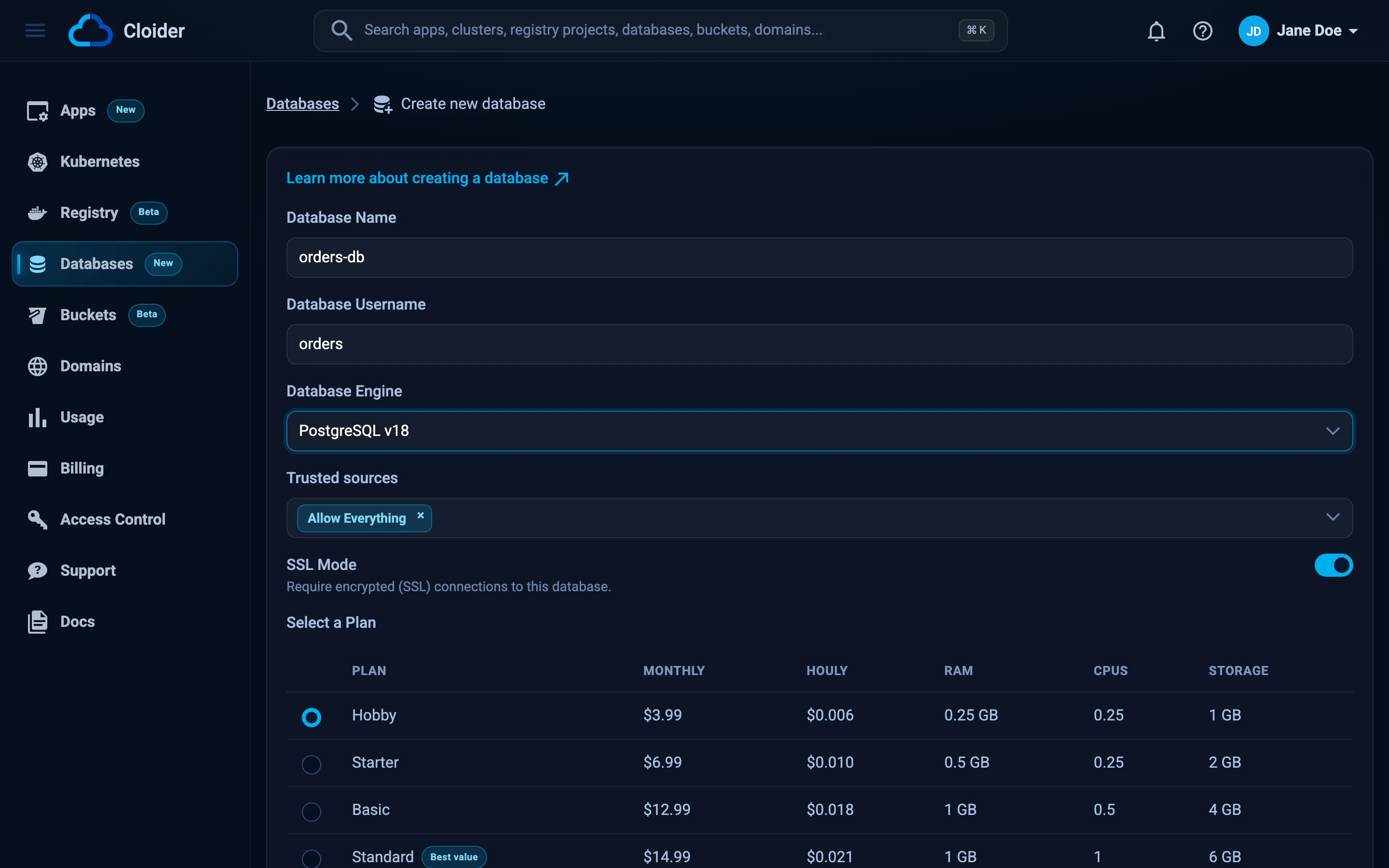
The database starts out trusting connections from anywhere (*), protected by its random 32 character password. You
narrow that to your app in part 6, once the app exists.
Build the connection string
Your app runs on Cloider, so it connects to the database's private host (...db.cloider.internal), which stays
inside Cloider's network. Your computer can't reach the private host, so for local development you use the public
host (...db.cloider.com). Both use the same port, user and password.
Read the details from the CLI and build both connection strings:
DB_JSON=$(cloider db get orders-db -o json)
DB_USER=$(echo "$DB_JSON" | jq -r .database_user)
DB_NAME=$(echo "$DB_JSON" | jq -r .database_name)
DB_PORT=$(echo "$DB_JSON" | jq -r .database_port)
DB_PUBLIC_HOST=$(echo "$DB_JSON" | jq -r .host)
DB_PRIVATE_HOST=$(echo "$DB_JSON" | jq -r .private_host)
DB_PASSWORD=$(cloider db password orders-db)

# For the app on Cloider
PRIVATE_DATABASE_URL="postgresql://$DB_USER:$DB_PASSWORD@$DB_PRIVATE_HOST:$DB_PORT/$DB_NAME"
# For your computer
PUBLIC_DATABASE_URL="postgresql://$DB_USER:$DB_PASSWORD@$DB_PUBLIC_HOST:$DB_PORT/$DB_NAME"

echo "$PRIVATE_DATABASE_URL" | sed "s/$DB_PASSWORD/PASSWORD/"
postgresql://orders_db_user:PASSWORD@orders-db-p0q9zm.db.cloider.internal:20417/orders-db
The database name is orders-db, with a hyphen, and the port is the one assigned to your database, not PostgreSQL's
usual 5432. The password only uses letters, digits, _, - and ., so it needs no escaping
in a URL. See Connect for where each value comes from.
In the dashboard, the same strings are in the database's Overview tab, under Quick Connect, DSN, on the Private and Public tabs.
Download the CA certificate
SSL is on by default, so the server encrypts every connection with a certificate signed by Cloider's own certificate authority (CA). Download that CA certificate so the app can verify it is really talking to your database:
cloider db cert orders-db -f ca.crt
✓ Wrote the CA certificate of orders-db to ca.crt
The DSN the dashboard shows ends in ?sslmode=require. The connection strings above leave it out on purpose: the
pg driver for Node.js lets settings in the URL replace the ssl option you pass in code, and recent versions treat
sslmode=require as "verify against the system's certificate authorities", which don't include Cloider's CA. The
result is self-signed certificate in certificate chain. Pass the CA in code, as db.js does below, and keep sslmode
out of the URL. See PostgreSQL and SSL/TLS.
Verify
cloider db status orders-db
cloider db exec orders-db "SELECT version()"
Ready
                                                       version
-------------------------------------------------------------------------------------------------------------------
 PostgreSQL 18.0 on x86_64-pc-linux-gnu, compiled by gcc (GCC) 14.2.0, 64-bit
(1 row)
Part 2: Create the tables with a migration
Keep the schema in your repository as numbered SQL files, so every change is reviewed and repeatable. Create the project folder and the first migration:
mkdir web && cd web
mkdir migrations public
-- Orders shown on the board. Safe to run more than once.
CREATE TABLE IF NOT EXISTS orders (
  id         BIGSERIAL PRIMARY KEY,
  customer   TEXT        NOT NULL,
  item       TEXT        NOT NULL,
  quantity   INTEGER     NOT NULL DEFAULT 1 CHECK (quantity > 0),
  status     TEXT        NOT NULL DEFAULT 'new' CHECK (status IN ('new', 'packed', 'shipped')),
  created_at TIMESTAMPTZ NOT NULL DEFAULT now()
);

CREATE INDEX IF NOT EXISTS orders_created_at_idx ON orders (created_at DESC);
Run it with cloider db exec. The -i flag sends the file on stdin to psql, which runs next to the database and is
already logged in, so you don't need psql installed and the database's trusted sources don't apply:
cloider db exec -i orders-db < migrations/001_create_orders.sql
CREATE TABLE
CREATE INDEX
A PostgreSQL script run this way stops at its first error, and cloider db exec exits with psql's exit code, so a
failed migration fails your shell script or CI job. Scripts can be up to 2 MiB. See
Terminal and exec.
This guide keeps migrations simple: each file can be run again safely, and you run new files in order. For larger
projects use a migration tool that records what it applied, such as node-pg-migrate, Prisma Migrate or Knex, and
run it in the app's container with cloider app exec web -- npx node-pg-migrate up. See
Terminal and exec.
Verify
cloider db exec orders-db "\d orders"
                                       Table "public.orders"
   Column   |           Type           | Collation | Nullable |              Default
------------+--------------------------+-----------+----------+------------------------------------
 id         | bigint                   |           | not null | nextval('orders_id_seq'::regclass)
 customer   | text                     |           | not null |
 item       | text                     |           | not null |
 quantity   | integer                  |           | not null | 1
 status     | text                     |           | not null | 'new'::text
 created_at | timestamp with time zone |           | not null | now()
Indexes:
    "orders_pkey" PRIMARY KEY, btree (id)
    "orders_created_at_idx" btree (created_at DESC)
Part 3: Write the app
The app is an Express server with a small JSON API (/api/orders), a health check (/healthz) that also checks the
database, and a single HTML page that uses the API. It follows the rules every Cloider app follows: it listens on
$PORT on all interfaces, starts with npm start, and reads its configuration from environment variables. See
Supported languages.
The finished project looks like this:
web/
  .gitignore
  package.json
  package-lock.json      created by npm install
  db.js
  server.js
  public/
    index.html
  migrations/
    001_create_orders.sql
package.json
{
  "name": "web",
  "version": "1.0.0",
  "private": true,
  "description": "Acme order board, running on Cloider",
  "main": "server.js",
  "scripts": {
    "start": "node server.js",
    "dev": "node --env-file=.env --watch server.js"
  },
  "engines": {
    "node": "22.x"
  },
  "dependencies": {
    "express": "^4.21.2",
    "pg": "^8.13.1"
  }
}
The Node.js buildpack installs the dependencies from your lockfile, picks Node.js 22 from engines.node, and starts
the app with the start script.
db.js
const { Pool } = require("pg");

// DATABASE_URL has no sslmode parameter: TLS is configured here, with Cloider's CA,
// so the server's certificate is verified.
const ca = process.env.DATABASE_CA_CERT;

const pool = new Pool({
  connectionString: process.env.DATABASE_URL,
  ssl: ca ? { ca } : undefined,
  // Small plans accept few connections; one app container needs only a handful.
  max: 5,
  idleTimeoutMillis: 30000,
});

pool.on("error", (err) => {
  console.error("idle database connection failed:", err.message);
});

module.exports = pool;
server.js
const path = require("node:path");
const express = require("express");
const pool = require("./db");

const app = express();
const port = Number(process.env.PORT) || 3000;
const STATUSES = ["new", "packed", "shipped"];
const COLUMNS = "id, customer, item, quantity, status, created_at";

// Cloider terminates HTTPS and forwards plain HTTP with X-Forwarded-Proto: https.
app.set("trust proxy", true);

// Optional: send www.example.com to example.com. Cloider serves both names, it doesn't redirect.
const canonicalHost = process.env.CANONICAL_HOST;
if (canonicalHost) {
  app.use((req, res, next) => {
    if (req.hostname === `www.${canonicalHost}`) {
      return res.redirect(301, `https://${canonicalHost}${req.originalUrl}`);
    }
    next();
  });
}

app.use(express.json());
app.use(express.static(path.join(__dirname, "public")));

// Health check: answers 200 only when the database answers too.
app.get("/healthz", async (req, res) => {
  try {
    await pool.query("SELECT 1");
    res.json({ status: "ok", database: "ok" });
  } catch (err) {
    console.error("health check failed:", err.message);
    res.status(503).json({ status: "error", database: err.message });
  }
});

app.get("/api/orders", async (req, res, next) => {
  try {
    const { rows } = await pool.query(
      `SELECT ${COLUMNS} FROM orders ORDER BY created_at DESC LIMIT 100`
    );
    res.json(rows);
  } catch (err) {
    next(err);
  }
});

app.post("/api/orders", async (req, res, next) => {
  const customer = String(req.body?.customer ?? "").trim();
  const item = String(req.body?.item ?? "").trim();
  const quantity = Number(req.body?.quantity ?? 1);
  if (!customer || !item || !Number.isInteger(quantity) || quantity < 1) {
    return res.status(400).json({ error: "customer, item and a positive whole quantity are required" });
  }
  try {
    const { rows } = await pool.query(
      `INSERT INTO orders (customer, item, quantity) VALUES ($1, $2, $3) RETURNING ${COLUMNS}`,
      [customer, item, quantity]
    );
    res.status(201).json(rows[0]);
  } catch (err) {
    next(err);
  }
});

app.patch("/api/orders/:id", async (req, res, next) => {
  const { id } = req.params;
  const status = req.body?.status;
  if (!/^\d+$/.test(id)) return res.status(404).json({ error: "order not found" });
  if (!STATUSES.includes(status)) {
    return res.status(400).json({ error: `status must be one of: ${STATUSES.join(", ")}` });
  }
  try {
    const { rows } = await pool.query(
      `UPDATE orders SET status = $1 WHERE id = $2 RETURNING ${COLUMNS}`,
      [status, id]
    );
    if (rows.length === 0) return res.status(404).json({ error: "order not found" });
    res.json(rows[0]);
  } catch (err) {
    next(err);
  }
});

app.delete("/api/orders/:id", async (req, res, next) => {
  const { id } = req.params;
  if (!/^\d+$/.test(id)) return res.status(404).json({ error: "order not found" });
  try {
    const { rowCount } = await pool.query("DELETE FROM orders WHERE id = $1", [id]);
    if (rowCount === 0) return res.status(404).json({ error: "order not found" });
    res.status(204).end();
  } catch (err) {
    next(err);
  }
});

// Log the real error, answer with a generic one.
app.use((err, req, res, next) => {
  console.error(err);
  res.status(500).json({ error: "internal error" });
});

const server = app.listen(port, "0.0.0.0", () => {
  console.log(`web listening on port ${port}`);
});

// Release database connections when Cloider stops the container (a new version, a pause).
process.on("SIGTERM", () => {
  server.close(() => pool.end().finally(() => process.exit(0)));
});
public/index.html
<!doctype html>
<html lang="en">
<head>
  <meta charset="utf-8">
  <meta name="viewport" content="width=device-width, initial-scale=1">
  <title>Acme order board</title>
  <style>
    body { font-family: system-ui, sans-serif; max-width: 720px; margin: 2rem auto; padding: 0 1rem; }
    form { display: flex; gap: .5rem; flex-wrap: wrap; margin-bottom: 1.5rem; }
    input, select, button { font: inherit; padding: .4rem .6rem; }
    table { width: 100%; border-collapse: collapse; }
    th, td { text-align: left; padding: .4rem; border-bottom: 1px solid #ddd; }
  </style>
</head>
<body>
  <h1>Acme order board</h1>

  <form id="new-order">
    <input name="customer" placeholder="Customer" required>
    <input name="item" placeholder="Item" required>
    <input name="quantity" type="number" min="1" value="1" required>
    <button type="submit">Add order</button>
  </form>

  <table>
    <thead><tr><th>#</th><th>Customer</th><th>Item</th><th>Qty</th><th>Status</th><th></th></tr></thead>
    <tbody id="orders"></tbody>
  </table>

  <script>
    const statuses = ["new", "packed", "shipped"];
    const tbody = document.getElementById("orders");

    async function api(path, options = {}) {
      const res = await fetch(path, { headers: { "Content-Type": "application/json" }, ...options });
      if (!res.ok && res.status !== 204) throw new Error((await res.json()).error || res.statusText);
      return res.status === 204 ? null : res.json();
    }

    async function load() {
      const orders = await api("/api/orders");
      tbody.innerHTML = "";
      for (const order of orders) {
        const row = tbody.insertRow();
        for (const value of [order.id, order.customer, order.item, order.quantity]) {
          row.insertCell().textContent = value;
        }
        const select = document.createElement("select");
        for (const status of statuses) select.add(new Option(status, status, false, status === order.status));
        select.onchange = () => api(`/api/orders/${order.id}`, { method: "PATCH", body: JSON.stringify({ status: select.value }) }).catch(alert);
        row.insertCell().append(select);
        const remove = document.createElement("button");
        remove.textContent = "Delete";
        remove.onclick = () => api(`/api/orders/${order.id}`, { method: "DELETE" }).then(load).catch(alert);
        row.insertCell().append(remove);
      }
    }

    document.getElementById("new-order").onsubmit = async (event) => {
      event.preventDefault();
      const form = event.target;
      const body = Object.fromEntries(new FormData(form));
      body.quantity = Number(body.quantity);
      await api("/api/orders", { method: "POST", body: JSON.stringify(body) }).catch(alert);
      form.reset();
      load();
    };

    load().catch((err) => alert(err.message));
  </script>
</body>
</html>
.gitignore
node_modules/
.env
ca.crt
.cloider/
.env and ca.crt stay on your computer. Cloider gets the connection string and the CA certificate as environment
variables, never from the repository.
Run it locally (optional)
Install the dependencies, which also creates package-lock.json, and run the app against the Cloider database over
its public host:
npm install

cat > .env <<EOF
DATABASE_URL=$PUBLIC_DATABASE_URL
DATABASE_CA_CERT="$(cat ca.crt)"
EOF

npm run dev
web listening on port 3000
Node.js reads .env with --env-file (Node.js 20.6 or later) and accepts the multi-line certificate in double
quotes.
Verify
In a second terminal:
curl -s localhost:3000/healthz
curl -s -X POST localhost:3000/api/orders -H 'Content-Type: application/json' \
  -d '{"customer": "Globex", "item": "Anvil", "quantity": 2}'
curl -s localhost:3000/api/orders
{"status":"ok","database":"ok"}
{"id":"1","customer":"Globex","item":"Anvil","quantity":2,"status":"new","created_at":"2026-10-20T09:41:07.312Z"}
[{"id":"1","customer":"Globex","item":"Anvil","quantity":2,"status":"new","created_at":"2026-10-20T09:41:07.312Z"}]
Open http://localhost:3000 to see the board. The id is a string because PostgreSQL's bigint doesn't fit in a
JavaScript number, which pg handles by returning text.
Part 4: Push the code to GitHub
git init -b main
git add .
git commit -m "Order board"
git remote add origin git@github.com:acme/web.git
git push -u origin main
Verify
git status says the branch is up to date with origin/main, and the repository on GitHub shows package.json,
package-lock.json and the other files, but not .env or ca.crt.
Part 5: Create the app from GitHub
Connect your GitHub account to Cloider once, then create the app from the repository. The app gets its environment variables when it is created, so its very first version can reach the database.
Connect GitHub
cloider git connect github
The browser opens on GitHub. Install the Cloider GitHub App on your user or organization and give it access to the
acme/web repository (or all repositories). Then check the connection:
cloider git installations github
ACCOUNT   TYPE           STATUS   CONNECTED
acme      Organization   Active   2026-10-20 09:52
Create the app
- CLI
- Dashboard
cloider app create --git github --repo acme/web --branch main \
  --name web --port 3000 --subdomain acme-web \
  --env NODE_ENV=production \
  --env DATABASE_CA_CERT="$(cat ca.crt)" \
  --secret-env DATABASE_URL="$PRIVATE_DATABASE_URL"
Detected JavaScript Express
✓ Created app web on port 3000
Downloading source for app k3m9tw...
No Dockerfile in the source, looking for a buildpack...
[buildpack output]
App k3m9tw built and pushed as registry.cloider.com/acme-apps/web-k3m9tw:1
Deploying the image...
Waiting for the app to start...
The app is up, watching it for 15s...
The app is running.
✓ Deployed version 1 of web
https://acme-web.cloider.app/
What each flag does:
| Flag | Why |
|---|---|
--git github --repo acme/web --branch main | Deploy from this repository and branch. Auto deploy on push is on for git apps |
--name web | The app's name in Cloider, used by every later command |
--port 3000 | The port Cloider sends traffic to and passes to the app as PORT |
--subdomain acme-web | The free address acme-web.cloider.app. Without it, Cloider picks web- and 4 random characters |
--env DATABASE_CA_CERT=... | The CA certificate. It isn't a secret, so it stays a plain variable you can read back |
--secret-env DATABASE_URL=... | The connection string with the password, stored as a secret: never listed again, only read on request |
- Open Apps in the sidebar and click Create App.
- Under Import a Git repository, click GitHub, pick the Account
acme, the Repositoryacme/weband the Branchmain, and click Import. - On Configure your app, check that JavaScript and Express were detected. Set App Name to
web, Port to3000and Subdomain toacme-web. - Under Environment variables, add
NODE_ENV=productionandDATABASE_CA_CERTwith the whole content ofca.crt(from-----BEGIN CERTIFICATE-----to-----END CERTIFICATE-----). - Add
DATABASE_URLwith the Private DSN from the database's Quick Connect box, without?sslmode=requireat the end, and click its lock icon to store it as a secret. - Click Create App and watch the build on the Builds tab.
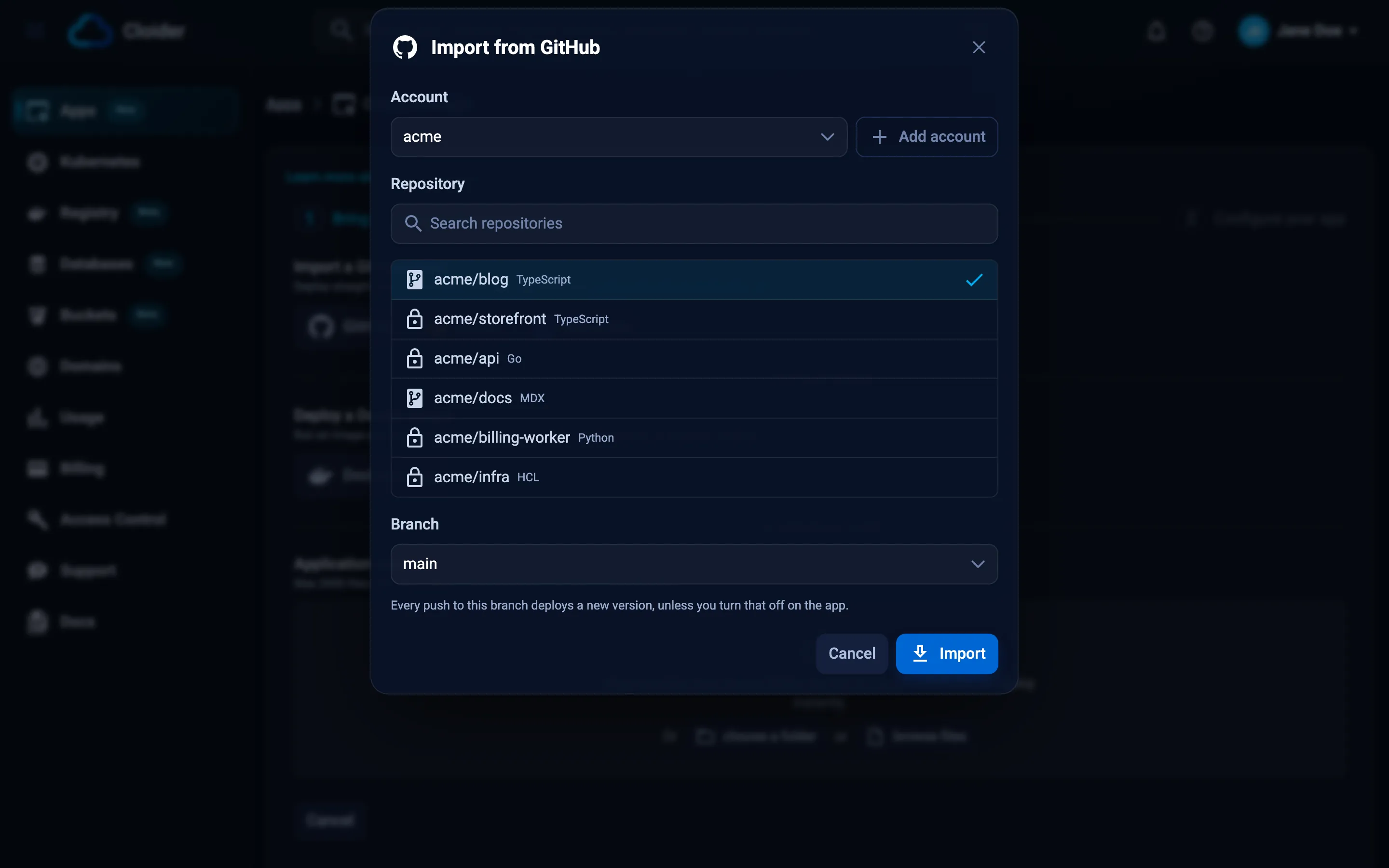
The secret is now stored with the app. Check what the app has, without revealing the secret:
cloider app env list web
KEY                VALUE
NODE_ENV           production
DATABASE_CA_CERT   -----BEGIN CERTIFICATE-----...
DATABASE_URL       (secret)
See Environment variables for how secrets work.
Verify
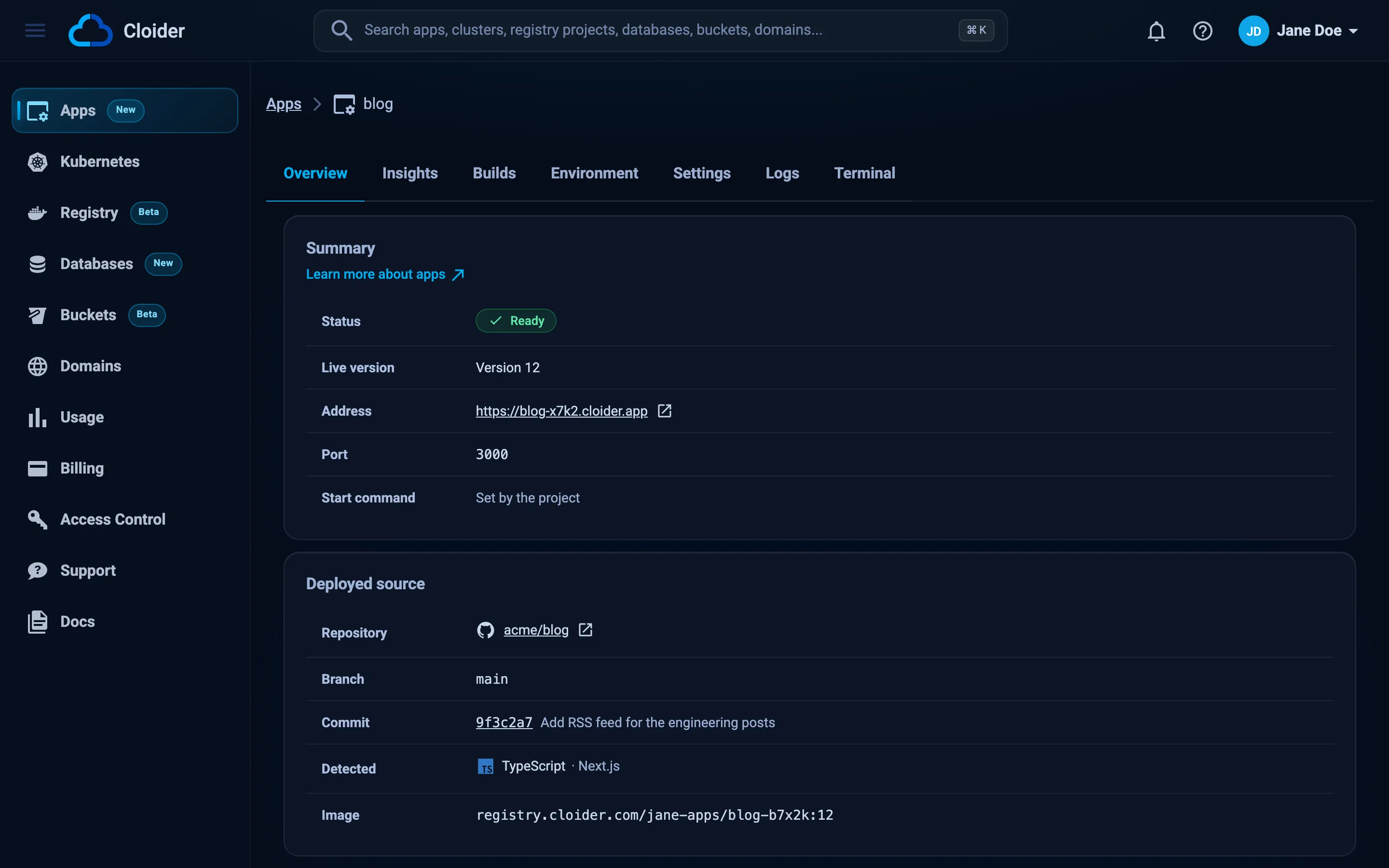
cloider app get web
curl -s https://acme-web.cloider.app/healthz
Name:           web
Status:         Ready
URL:            https://acme-web.cloider.app/
Version:        1
Detected:       JavaScript Express
Port:           3000
Start command:  -
Domains:        acme-web.cloider.app
Source:         acme/web@main (GitHub)
Auto deploy:    yes
Created:        2026-10-20 09:55
{"status":"ok","database":"ok"}
Open https://acme-web.cloider.app in your browser and add an order. If /healthz answers 503, the app runs but
can't reach the database: see Troubleshooting.
Part 6: Allow only your app to reach the database
Until now the database accepts connections from anywhere that knows the password. Now that the app exists, replace that with two trusted sources: the app itself, and the public IP address of the computer you develop on.
cloider db trusted-sources orders-db --set app:web --add-my-ip
✓ Updated who may connect to orders-db
SOURCE              TYPE   NAME
k3m9tw              App    web
198.51.100.23/32    MyIP   My IP (198.51.100.23/32)
app:webmatches connections from the app to the private host, which is the one in itsDATABASE_URL.- Your IP lets
npm run devkeep working over the public host. Run--add-my-ipagain when your IP changes, or remove it with--remove 198.51.100.23when you are done developing. cloider db execandcloider db shellrun next to the database and ignore trusted sources, so migrations keep working from anywhere.
See Trusted sources for every kind of source.
Verify
curl -s https://acme-web.cloider.app/healthz
{"status":"ok","database":"ok"}
Part 7: Ship a change with auto deploy
A real app changes, and so does its schema. Add an optional note to each order: first the migration, then the code that uses it.
1. Write and run the migration first. Adding a nullable column doesn't break the version that is running, so you can apply it before the new code is deployed:
ALTER TABLE orders ADD COLUMN IF NOT EXISTS notes TEXT;
cloider db exec -i orders-db < migrations/002_add_order_notes.sql
ALTER TABLE
2. Use the column in the code. In server.js, add notes to the selected columns and to the insert:
const COLUMNS = "id, customer, item, quantity, status, notes, created_at";

// in app.post("/api/orders", ...)
  const notes = req.body?.notes ? String(req.body.notes).slice(0, 500) : null;
// ...
    const { rows } = await pool.query(
      `INSERT INTO orders (customer, item, quantity, notes) VALUES ($1, $2, $3, $4) RETURNING ${COLUMNS}`,
      [customer, item, quantity, notes]
    );
3. Push. Auto deploy builds the new commit:
git add .
git commit -m "Add notes to orders"
git push
Follow the build while it runs:
cloider app build logs web
Verify
cloider app builds web
curl -s -X POST https://acme-web.cloider.app/api/orders -H 'Content-Type: application/json' \
  -d '{"customer": "Initech", "item": "Stapler", "notes": "Red, please"}'
VERSION  STATUS  SOURCE                       CREATED           MESSAGE
2        Ready   4f2a9c1 Add notes to orders  2026-10-20 10:21  -
1        Ready   9e1b7d3 Order board          2026-10-20 09:55  -
{"id":"2","customer":"Initech","item":"Stapler","quantity":1,"status":"new","notes":"Red, please","created_at":"2026-10-20T10:23:44.018Z"}
Run a migration that adds something (a column, a table, an index) before you push the code that needs it. Run a migration that removes something only after the code that no longer uses it is deployed. That way the running version never meets a schema it doesn't understand.
If a build fails, the previous version keeps serving. Read the build's output with cloider app build logs web, fix
the code and push again. See Builds and deployments.
Part 8: Serve the app on your own domain with HTTPS
Your app is live on https://acme-web.cloider.app. To serve it on https://example.com and https://www.example.com,
you hand the domain's DNS to Cloider, add records that point both names at Cloider, and route both names to the app
with targets.
When the nameservers switch, Cloider answers every DNS query for example.com. Records you have today at your current
DNS host (email MX records, verification TXT records, other subdomains) must be recreated on Cloider first, or they
stop working. See Add a custom domain.
1. Add the domain to Cloider:
cloider domain create example.com
✓ Added example.com
Point it at these nameservers at your registrar:
  ns1.cloider.com
  ns2.cloider.com
  ns3.cloider.com
  ns4.cloider.com
Then add records with `cloider dns create example.com ...` and routes with `cloider target create example.com ...`.
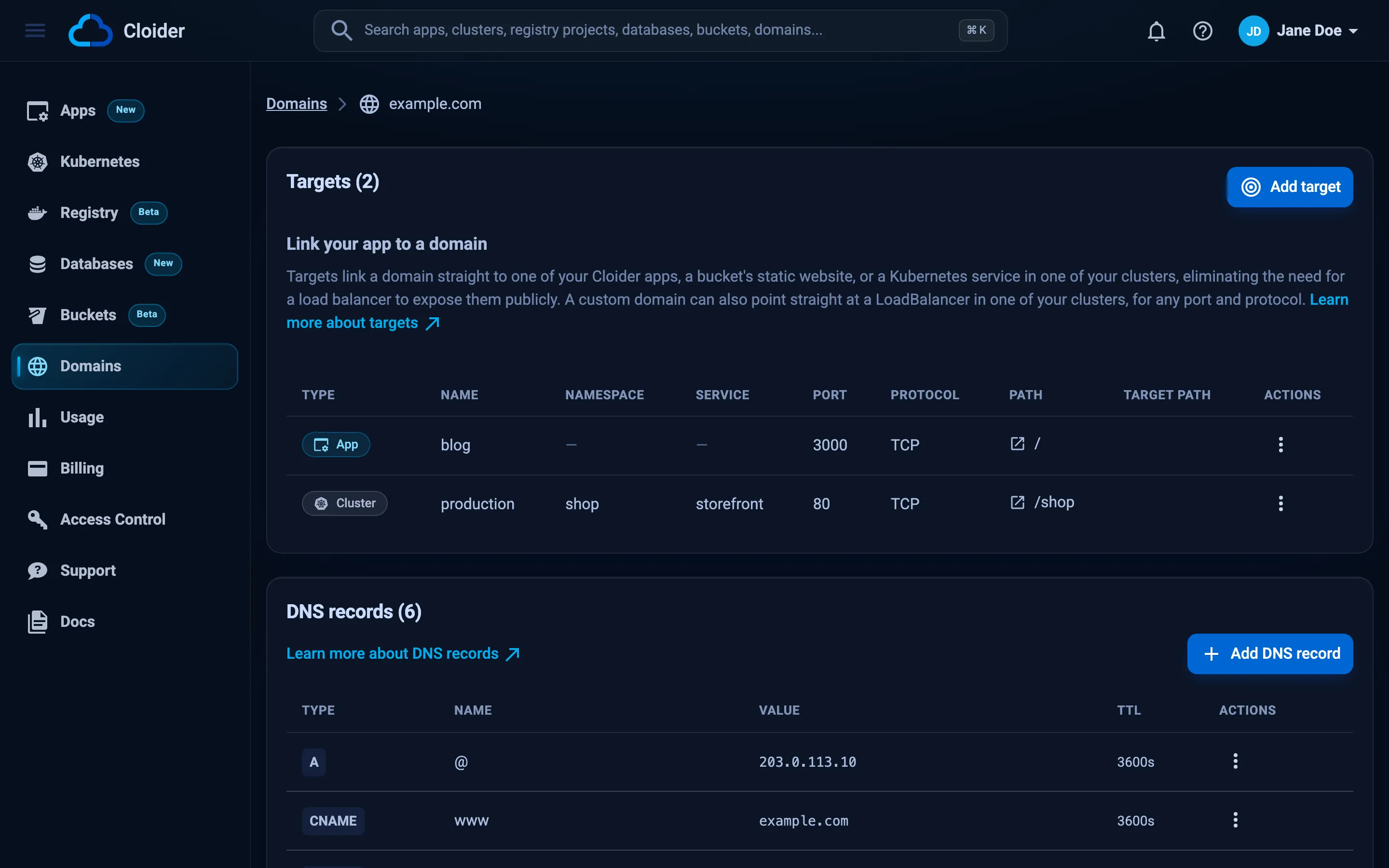
2. Point both names at Cloider. example.com itself already has an ALIAS record that points at Cloider, added
with the domain. A target doesn't create DNS records, so add a CNAME for www to the app's free subdomain yourself:
cloider dns create example.com --type CNAME --name www --value acme-web.cloider.app. --ttl 3600
✓ Added CNAME record www -> acme-web.cloider.app.
3. Route both names to the app. A target routes the host name of the domain it belongs to, so www.example.com is
added as a domain of its own. Its DNS record stays on example.com:
cloider target create example.com --app web
cloider domain create www.example.com
cloider target create www.example.com --app web
✓ Routed example.com/ to the app
✓ Added www.example.com
...
✓ Routed www.example.com/ to the app
The CLI prints the nameservers again for www.example.com. You don't need to do anything with them: www.example.com
is answered by the nameservers of example.com.
4. Change the nameservers at your registrar to ns1.cloider.com through ns4.cloider.com. Registrars call this
"custom nameservers" or "external DNS". The change can take from minutes to a day or two to reach everyone. See
Nameservers for the exact steps at common registrars.
5. Make www redirect to the apex (optional). Cloider serves both names, but doesn't redirect one to the other.
The app already does it when CANONICAL_HOST is set:
cloider app env set web CANONICAL_HOST=example.com
✓ Saved, web restarts with 4 variable(s)
Once the domain resolves to Cloider, Cloider requests a certificate for each name, which usually takes a minute or two. Until then, browsers show a certificate warning for the new names. See HTTPS certificates.
Verify
dig example.com NS +short
dig example.com A +short
dig www.example.com +short
curl -sSI https://example.com/healthz
curl -sSI https://www.example.com/ | grep -i location
ns1.cloider.com.
ns2.cloider.com.
ns3.cloider.com.
ns4.cloider.com.
203.0.113.80
acme-web.cloider.app.
203.0.113.80
HTTP/2 200
location: https://example.com/
cloider domain list now shows example.com and www.example.com as Active. cloider app get web lists all three
domains.
What it costs
Cloider is pay as you go: each resource is billed while it exists, by the second, at the monthly rates on the pricing page. In this guide:
| Resource | How it is billed |
|---|---|
App web | Compute units: the larger of the CPU and the memory its one container requests or uses, while it runs. Builds, requests and traffic aren't billed. A paused app costs nothing |
| App images | The two most recently deployed images are kept in the account's apps registry project, billed by the GiB stored |
Database orders-db | The flat monthly price of its plan (Hobby here), prorated while it is Ready. While paused, only its storage |
| Domains, DNS records, targets, HTTPS certificates | Free |
See an estimate as you go with cloider app usage web and on the Usage page. On the free trial, the
credit pays for it. See the billing model.
Clean up
Delete everything this guide created. Each delete is permanent: the database's data and its backups go with it.
# The app, and its free subdomain acme-web.cloider.app
cloider app delete web --yes

# The custom domains, with their DNS records and targets
cloider domain delete www.example.com --yes
cloider domain delete example.com --yes

# The database, its data and its backups
cloider db delete orders-db --yes --wait

# Optional: disconnect GitHub (apps deploying through it stop deploying on push)
cloider git disconnect github acme --yes
If example.com still points at Cloider's nameservers, set the nameservers at your registrar back to your previous DNS
host before you delete the domain, or the domain stops resolving. To remove the Cloider GitHub App's access completely,
uninstall it in your GitHub settings.
Check that nothing is left:
cloider app list
cloider db list
cloider domain list
Troubleshooting
| Symptom | Cause and fix |
|---|---|
The build fails at npm ci | package-lock.json is missing or out of date. Run npm install, commit the lockfile and push |
/healthz answers 503 with self-signed certificate in certificate chain | DATABASE_URL still ends in ?sslmode=require, or DATABASE_CA_CERT is missing. Set the URL without sslmode and check cloider app env get web DATABASE_CA_CERT |
/healthz answers 503 with a timeout or ECONNREFUSED | The app isn't a trusted source of the database, or DATABASE_URL uses the public host. Run cloider db trusted-sources orders-db and make sure app:web is listed and the URL uses .db.cloider.internal |
password authentication failed for user "orders_db_user" | The password in DATABASE_URL is wrong. Rebuild the URL with cloider db password orders-db and set it again with cloider app env set web --secret DATABASE_URL=... |
database "orders_db" does not exist | The database name has a hyphen: orders-db |
relation "orders" does not exist | The migration hasn't run on this database. Run cloider db exec -i orders-db < migrations/001_create_orders.sql |
column "notes" does not exist after a push | The code was deployed before its migration. Run migrations/002_add_order_notes.sql |
| A push doesn't start a build | Another build of the app was running (pushes are skipped, not queued), or auto deploy is off. Run cloider deploy --git --app web, and check Auto deploy in cloider app get web |
The app's status is Failed | The first build failed, so nothing is running. Read cloider app build logs web, fix the code and push |
502 Bad Gateway on the app's address | Nothing listens on the app's port. The server must listen on process.env.PORT and 0.0.0.0, and the app's port must be 3000 |
npm run dev times out locally | Your IP changed and isn't trusted any more. Run cloider db trusted-sources orders-db --add-my-ip |
Certificate warning on example.com | DNS doesn't point to Cloider yet. Check dig example.com NS and the A and CNAME records, then wait a few minutes |
www.example.com shows a 404 or a default page | www.example.com has no target of its own. Add it with cloider domain create www.example.com and cloider target create www.example.com --app web |
Redirect loop on https:// | Something redirects HTTP to HTTPS without trusting X-Forwarded-Proto. Keep app.set("trust proxy", true) |
More in Troubleshooting apps, Database troubleshooting and Domains troubleshooting.
Next steps
- CI/CD with GitHub Actions: run tests and migrations in a pipeline before
cloider deploy. - Static assets on object storage: store user uploads in a bucket with presigned URLs.
- Back up a database to a bucket: keep your own dumps next to Cloider's backups.
- Logs and Insights: watch the app in production.
Frequently asked questions
How do I connect a Cloider app to a Cloider PostgreSQL database?
Build a connection string with the database's private host (name-id.db.cloider.internal), port, user, password and database name, store it on the app as a secret environment variable such as DATABASE_URL, and add the app to the database's trusted sources with cloider db trusted-sources <database> --add app:<app>.
Why does node-postgres fail with self-signed certificate in certificate chain?
The database's certificate is signed by Cloider's own CA, which your system doesn't trust. Download it with cloider db cert <database> -f ca.crt, pass it as ssl: { ca } to the Pool, and remove sslmode=require from the connection string, because settings in the URL replace the ssl option.
How do I run database migrations on Cloider?
Keep migrations as SQL files and run each with cloider db exec -i <database> < file.sql. It runs psql next to the database, needs nothing installed, ignores trusted sources and exits with psql's exit code, so it also works in CI. A migration tool can run in the app instead with cloider app exec <app> -- <command>.
Does Cloider deploy my app automatically when I push to GitHub?
Yes. An app created from a GitHub, GitLab or Bitbucket repository has auto deploy on, and every push to its branch builds and deploys the newest commit. A push that arrives while a build is running is skipped.
Do I need a Dockerfile to deploy an Express app on Cloider?
No. A project with a package.json at its root is built with the Node.js buildpack, which installs dependencies from the lockfile and starts the app with npm start. Add a Dockerfile only when you need full control over the image.
How do I serve both example.com and www.example.com?
Add example.com to Cloider, point it at Cloider's nameservers, add a CNAME for www to the app's cloider.app subdomain (the apex already has an ALIAS record that points at Cloider), then add www.example.com as its own domain and create a target to the app on both names. Cloider serves both with HTTPS but doesn't redirect one to the other.